Why AI Training Shouldn't Be a Black Box
Every time you update a product page, change a return policy, add a help center article, or upload a new PDF, your AI needs to learn those changes. That process is called training, and it's the foundation of accurate AI. And for most AI knowledge management tools, it happens behind the scenes with zero visibility.
You hit "train," wait, and hope it works. If something takes too long, you don't know why. If something breaks, you don't know where. And if you need to stop a run mid-process, you're usually stuck choosing between canceling everything or letting it finish on its own terms.
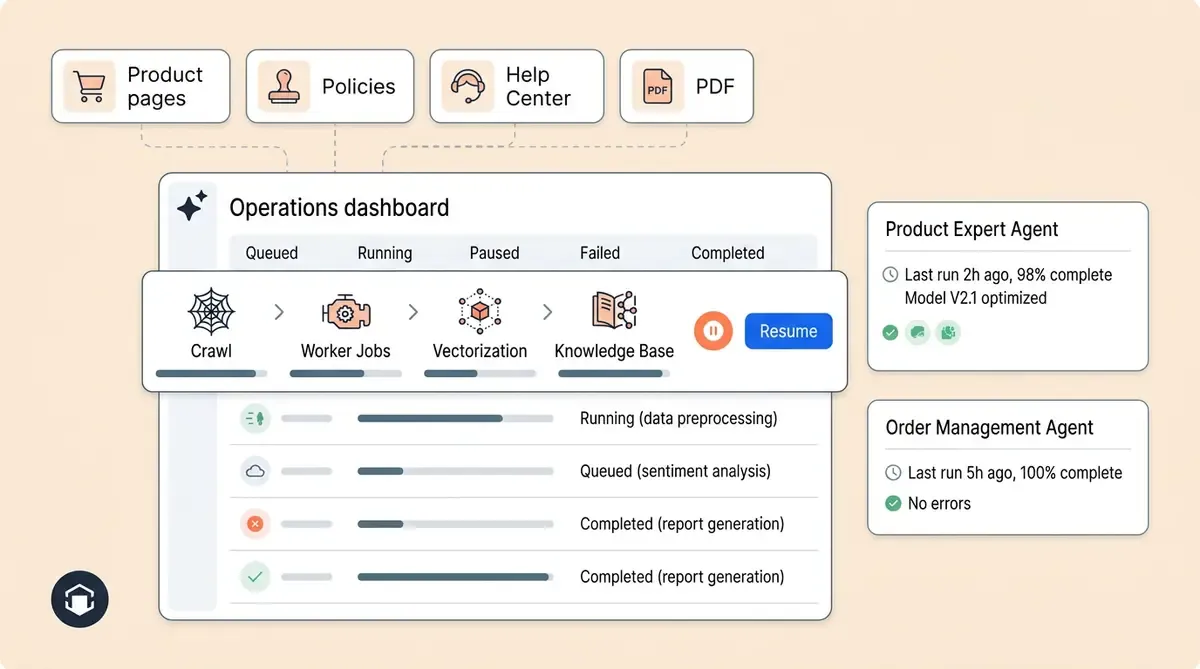
That's why we built Training Monitor, the operational control center for AI training runs in Alhena. It gives you real visibility in real-time into what your AI is learning, when it's learning it, and exactly where any run stands in the pipeline. You can pause, resume, investigate, and audit every training run from a single dashboard.
This post walks you through what Training Monitor does, how it works under the hood, and why it changes the way teams manage knowledge for their AI shopping assistant and support concierge knowledge.
What Training Monitor Is (and Who It's For)
Training Monitor is the dashboard where operators see every active, paused, failed, and completed training run across their Alhena deployment. It turns artificial intelligence knowledge management from a guessing game into a structured, automated workflow.
The primary users are enterprise internal operators, enterprise support team leads, and admins who need to manage enterprise knowledge updates safely. If your brand uses Alhena's Product Expert Agent or Order Management Agent, Training Monitor gives you the controls to make sure those agents always have accurate, up-to-date information.
Here's what you can see at a glance for any training run:
- Which companies have active training runs
- What stage each run is in (crawling, vectorizing, finalizing, or done)
- Whether jobs are running, stuck, or failed
- When training started and when it was last updated
- Whether a run should be paused, resumed, canceled, or investigated
Think of it as your AI knowledge management system's operations console. Instead of filing a support ticket to ask "Is my AI trained yet?", you open the self-service dashboard and see the answer in seconds.
How AI Training Works in Alhena
Before we dig into Training Monitor's features, it helps to understand what happens during a training run. When you connect a data source, update content, or trigger a retrain in Alhena, the system moves through an automated multi-phase pipeline:
- INIT prepares the training request and sets up the processing queue
- CRAWLING pulls content from websites, documents, product catalogs, help center articles, PDFs, spreadsheets, or other connected sources
- VECTORIZING converts crawled content into searchable AI knowledge using vector embedding models
- FINALIZING_AGENT_KB updates the knowledge base. For details on connecting Zendesk or Freshdesk, read our Zendesk and Freshdesk knowledge base training guide.
- FINALIZING_KNOWLEDGE_SUMMARY refreshes each AI profile's knowledge summary
- FINALIZING_METADATA_TRAINING runs product metadata training when applicable
- FINALIZING_COMPLETION_EMAIL handles notifications
- DONE marks the training as complete
Each phase involves dozens or hundreds of individual jobs. A large ecommerce catalog with thousands of product pages, policy documents, governance policies, and FAQ articles might generate hundreds of crawl jobs, worker jobs, and vectorization jobs. Training Monitor shows you exactly which jobs are in progress, which have finished, and which have gotten stuck.
This granularity matters. When a support team lead calls in asking why the AI doesn't know about the new holiday return policy, you can open Training Monitor, check the latest run, and answer with speed in thirty seconds: "The crawl finished, but vectorization failed on three documents. Let me resume it."
Active Trainings: Your Real-Time Operations View
The Active Trainings view is the first screen you see. It shows all current training runs that are queued, running, or paused across every company in your Alhena deployment.
For each run, the dashboard displays:
- Company key to quickly identify which brand or store is being trained
- Training request ID for tracking and cross-referencing
- Status showing whether the run is active, paused, or queued
- Current phase so you know if the run is crawling, vectorizing, or finalizing
- Job counts broken down by crawler, worker, and vectorization jobs
- Stuck-job indicators flagging jobs that haven't progressed
- Oldest in-progress job age highlighting potential bottlenecks
- Start time and action buttons for pause, resume, details, or cancel
When you manage multiple brands (like enterprise agencies running ecommerce solutions for several clients), Active Trainings lets you triage quickly. You can spot a stuck run for one client while confirming another client's training completed successfully, all without switching between dashboards or automation tools.
Training Details: Diagnosing Issues Fast
Click into any training run, and you get the detail page, a deep view into one specific training request.
The detail page shows:
- Request metadata,, including the training source and configuration
- Phase timeline showing how long each phase took or is taking
- Job breakdown with counts of total, finished, in-progress, failed, and stuck jobs
- Worker jobs covering crawl, vectorize, and finalization tasks
- Crawler jobs for URL-level or source-level work
- Vectorize jobs for file-level processing
- Retry counts and error messages for any failed jobs
This level of detail answers the question every operator dreads: "Where exactly is this training run stuck?" Instead of saying "training is slow" and filing a ticket, you can see that 247 of 250 crawl jobs finished, but three URLs timed out, or that vectorization completed, but the agent knowledge base finalization hit a configuration error.
For teams using Alhena's Agent Assist copilot alongside the autonomous agents, Training Details also confirms that the human support knowledge layer was updated correctly. This means your support reps get the same fresh data the AI does, keeping the conversation debugger and agent workflows in sync.
Training History: The Audit Trail You Need
Training History provides a complete audit log of past training runs. Operators can filter by company and status, then review:
- Request ID and company key
- Status (completed, failed, paused, canceled)
- Final phase reached
- Start time, last updated time, and total duration
Why does this matter? Three reasons.
First, accountability. When a customer reports outdated information in the AI, you can check Training History to confirm when the last successful training run was completed. If the run finished yesterday at 3 PM but the content was updated at 5 PM, you know the AI hasn't picked up the change yet.
Second, pattern recognition. If a particular company's training runs regularly fail or take three times longer than average, Training History surfaces that pattern. You can investigate whether the issue is a large catalog, broken URLs, or oversized documents before it becomes a recurring support ticket.
Third, compliance and governance. For brands in regulated industries, such as beauty, skincare, or supplements, Training History supports compliance evidence by recording when the AI's knowledge base was last verified. This kind of auditability supports faster decision-making and is rare in AI knowledge management tools.
Pause and Resume: Control Without Starting Over
Pause and Resume might be Training Monitor's most practical features. They solve a problem every team that manages AI knowledge has faced: what do you do when a training run needs to stop, but you don't want to lose progress?
How Pause Works
When you hit Pause on an active training run, Alhena does several things:
- The training request is marked PAUSED
- Active crawler jobs are reset so they can be picked up later
- Active worker jobs are stopped and reset for later processing
- The current training phase is preserved
- Completed work and checkpoints are kept where supported
- The run stops advancing until you resume
Pause is the right move when you need speed control or when training started at the wrong time (like during a flash sale when you need every bit of server capacity), when a data source needs correction before the AI ingests it, or when a run is consuming processing capacity during a busy period.
How Resume Works
Resume picks up where Pause left off. Alhena finds the latest paused training request, moves it back into progress, and uses the preserved phase to determine where to continue. Reset jobs get picked up again, and finished checkpointed work can be skipped instead of being fully repeated.
This is especially valuable for large training runs. A brand with 5,000 product pages and 200 help center articles might have a training run that takes hours. Without Resume, any interruption means starting from scratch. With Resume, the system continues from saved progress.
Pause vs. Cancel
The difference is simple. Pause means "stop for now, continue later." Cancel means "abandon this run entirely." Use Pause when you expect to continue. Use Cancel when the run should not continue, and a fresh training should start from the beginning.
This distinction saves hours of reprocessing for enterprise operators managing knowledge freshness across multiple brands.
How Training Monitor Fits Into Alhena's AI Knowledge Management System
Training Monitor doesn't exist in isolation. It's one piece of Alhena's broader AI knowledge management system that ensures your AI-enhanced agents always know what they should know, and never make things up.
Here's how it connects to the rest of the platform:
- Data source connections feed content into the training pipeline. Whether you've connected your Shopify store, Zendesk help center, or uploaded PDFs, Training Monitor shows you when that content was last ingested.
- Hybrid retrieval (vectors + graphs) powers the AI's ability to find and use trained knowledge. Training Monitor's vectorization phase is where this retrieval layer and foundation are built.
- FAQ conflict detection runs during finalization to catch contradictions in the knowledge base before they reach customers.
- Conversation debugger lets you trace any AI response back to its source data, enabling knowledge sharing and closing the loop between "what did the AI say?" and "what was it trained on?"
- Catalog-first data quality ensures product data accuracy before training even begins, reducing errors in the pipeline.
Together, these tools form an ai powered knowledge management platform where every step from data ingestion to response delivery is observable, controllable, and auditable, designed to power knowledge accuracy at scale. That's what makes Alhena's approach to AI customer service different from other AI technology services that treat training as a one-click, hope-for-the-best process.
Why Observability Matters for Ecommerce AI
A 2024 Harvard Business School research study found that AI can boost worker performance by up to 40% compared to non-users. But that number assumes the AI is actually working correctly, trained on accurate data, and delivering reliable answers and responses.
In ecommerce, the cost of stale or broken artificial intelligence knowledge is direct and measurable. If your AI shopping assistant recommends a product that's out of stock because training failed halfway through a catalog update, you lose the sale and the customer's trust. If your support concierge quotes an old return policy because the training run got stuck on vectorization, you create a customer service escalation that costs time and money.
Brands using Alhena have seen real results when their AI knowledge stays current: Tatcha saw a 3x conversion rate and 38% AOV uplift, while Puffy achieved 90% CSAT with 63% automated inquiry resolution. Those numbers depend on the AI having accurate, up-to-date knowledge.
Training Monitor is what keeps that knowledge pipeline reliable. It gives operators the visibility to catch problems early, the controls to manage training safely and improve customer service, and the audit trail to prove that the AI's knowledge is current.
Getting Started
Training Monitor is available to all Alhena enterprise operators. If you're already using Alhena, you can access it from the admin dashboard under the training section.
If you're evaluating Alhena for your ecommerce AI needs, Training Monitor ships as part of the platform. You don't need to set up separate monitoring tools or build custom dashboards. It's built in because we believe training your AI agent should be as transparent and controllable as every other part of your self-service operations.
Ready to see how Alhena handles AI knowledge management for your store? Book a demo to see Training Monitor in action, or start for free with 25 conversations to experience how Alhena keeps your AI sharp.
For teams that store SOPs and product guides in the cloud, you can also train your AI directly from Google Drive using Docs, Sheets, and Slides as knowledge sources.
Teams that keep product knowledge in Atlassian wikis can also train their AI chatbot directly from Confluence using Alhena's integration.
Alhena also sends training lifecycle notifications (pre-training, start, and completion) so your team knows when knowledge updates land. See how the full notification system works.
Alhena AI
Frequently Asked Questions
What is Training Monitor in Alhena AI?
Training Monitor is the operational dashboard inside Alhena that gives operators visibility into every AI powered training run. It shows status, phase, and job-level detail so you always know whether the system is crawling content, building the knowledge base, or finalizing indexes. It ships with every Alhena deployment at no extra cost.
How does AI knowledge management work in Alhena?
Alhena ingests content from connected data sources, including websites, help centers, product catalogs, and unstructured data like PDFs. The pipeline uses natural language processing (NLP) to break content into segments, then converts them into vector embeddings for semantic search and retrieval. Machine learning models power the contextual matching that lets the AI retrieve the right answer for each customer query.
Can I pause an AI training run without losing progress?
Yes. The Pause capability stops an active run while preserving all completed checkpoints in the knowledge base. When you resume, the AI powered system picks up where it left off, so finished work doesn't repeat. This is especially valuable for large runs with thousands of pages where restarting from scratch would waste hours.
What is the difference between pausing and canceling a training run?
Pause means stop temporarily and continue later. The AI system keeps completed work and you can resume from the saved checkpoint. Cancel means abandon the run completely, and a new request must start fresh. Operators use Pause when they need to correct a data source or free up capacity during busy periods.
How do I know if a training run is stuck?
Training Monitor shows stuck-job indicators and the oldest in-progress job age for every active run. The details page breaks down counts by status with error messages, helping you identify knowledge gaps in the pipeline and make faster decisions about whether to retry, pause, or escalate.
Does Alhena keep a history of past training runs?
Yes. Training History is a full audit log that supports governance and organizational accountability. It shows each run's request ID, status, final phase, and duration. Teams use it to confirm when a knowledge base was last updated and share detailed records across departments for collaboration and troubleshooting.
What types of content can Alhena train on?
Alhena trains on structured content and raw files from websites, help centers, product catalogs, PDFs, spreadsheets, and support tickets. It connects to integration platforms like Shopify, Zendesk, and Freshdesk. Semantic search lets the AI surface relevant information from all sources regardless of format, and Training Monitor tracks ingestion status across every source.
How long does a knowledge management training run take?
Duration depends on content volume. A small catalog might finish in minutes, while a large enterprise with 5,000+ pages could take several hours. Training History lets you benchmark run times to set expectations and streamline your workflow over time.
How does AI powered knowledge management differ from manual approaches?
Manual knowledge management relies on people to organize and update content by hand, which creates gaps as information grows. An AI powered KM system like Alhena uses generative AI to automate ingestion and intelligent search across your entire data layer. This keeps the knowledge current without manual intervention, improves self-service accuracy, and speeds up onboarding for new team members who use AI to find answers instantly.
Can Training Monitor help teams close content gaps?
Yes. It surfaces missing coverage by showing which sources failed to process, which jobs got stuck, and where coverage is incomplete. Operators can use this this information for better decision-making about which content needs attention, improving knowledge sharing and interaction quality between support and content teams. The workflow is straightforward: check the dashboard, identify the gap, fix the source, trigger creation of new training jobs, and resume.