Your AI shopping assistant does not know your products. It retrieves them, title by title, variant by variant, at the moment a shopper asks. The model paraphrases what it finds. Everything it gets right or wrong was decided upstream, in your catalog.
The catalog is the model
Accuracy is bounded by two things: how well retrieval finds the right rows, and how complete those rows actually are. Whether a shopper is browsing for recommendations or hunting a specific item, the agent works with what your data provides and nothing else.
Merchants who ask "how clean does my data need to be?" before deploying are asking exactly the right question. What follows is the pipeline your catalog data travels, where it breaks, and what the failures look like when they happen quietly. For specs and compatibility tables kept in spreadsheets, Alhena's Sheet Search adds table-aware retrieval that preserves row and column structure.
How a query becomes an answer
Five steps. Every one of them reads your catalog.
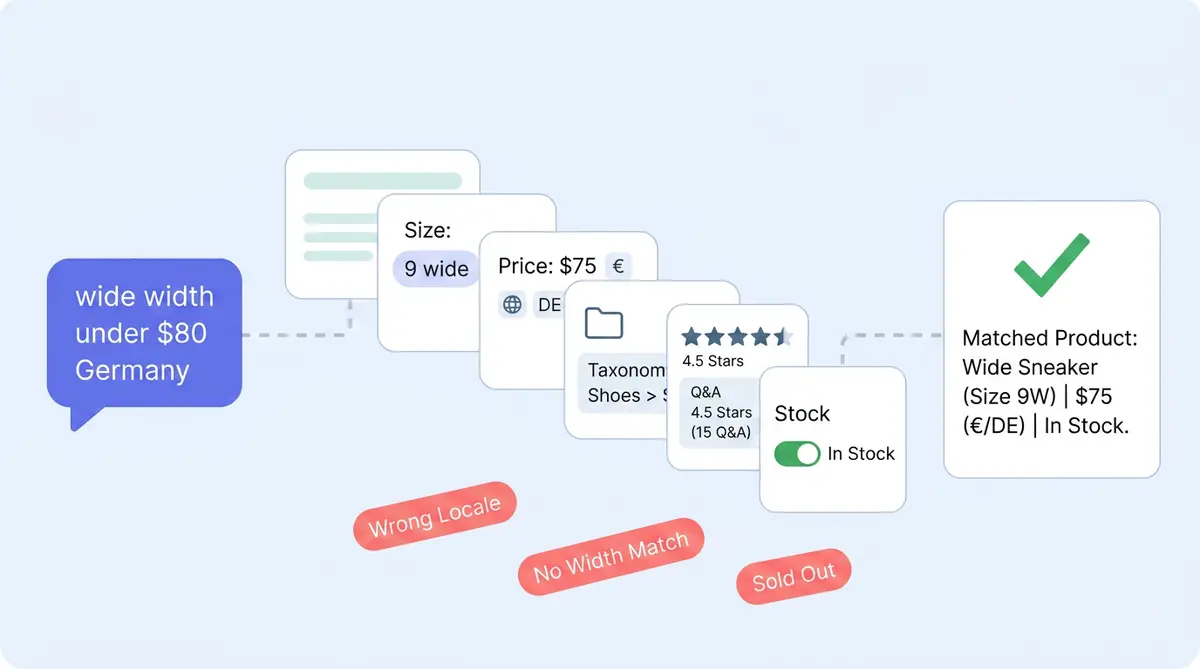
When a customer asks "do you have this in a wide width under $80 that ships to Germany?", the Alhena shopping assistant runs a planner that identifies intent and picks a retriever, then hybrid search combining dense embeddings and BM25 pulls candidate products, then variants get filtered by availability, structured attributes, and price, then the answer is composed grounded in the retrieved rows. If nothing supports an answer, the agent defers rather than guessing.
For a deeper look at the retrieval architecture underneath, see the Agentic RAG post.
Where gaps create silent failures
Bad catalog data rarely produces an obviously wrong answer.
Silent disqualification
A variant missing a width attribute is not returned for "wide." The shopper sees fewer matches, not an error, and you lose the sale without knowing why.
Right product, wrong variant
Our engineering team found the assistant returning sample sizes on Paula's Choice routines because variant attributes did not disambiguate full-size from sample. The fix was in the catalog, not the AI.
Refusal that looks like ignorance
With no source data, Alhena defers by design. To the customer that reads as "the bot doesn't know." In reality the catalog does not say, and escalations rise.
Confidently bland answers
Generic descriptions produce generic embeddings, and the assistant writes generic copy back. Accuracy is fine. Relevance is poor.
You can trace any of these with the Conversation Debugger, which shows exactly which sources fed each response. For which specific fields matter and why, the companion post on product data fields for AI recommendations covers the full list.
What Alhena does, and does not do
Native connectors pull your catalog in without manual mapping, across Shopify, WooCommerce, Magento, and Salesforce Commerce Cloud. From that raw data an LLM-based extractor builds structured fields against a schema. When a field cannot be determined it writes "N/A," not a guess. Alhena also builds a per-merchant taxonomy and aggregates reviews and Q&A into summaries the assistant can cite. On inventory specifically, see how variant-level stock data stays fresh in real time.
What it will not do is backfill missing attributes from imagination. If your feed does not say "machine washable," the assistant will not say it either. There is no cross-retailer truth-checking, and Alhena does not replace your PIM. If you want more accurate answers, the fix is upstream. For keeping that data accurate over time, see AI Knowledge Base Ops.
Start with your catalog, not your prompt
Most merchants spend their first week after deployment tuning prompts and tone. That work matters, but it will not fix answers that fail because the source data is thin. Run a few test conversations, trace each answer back to its source, and where you find gaps, fix the catalog. The agent delivers better matches the same day.
See how your catalog actually performs
Run your real product data through an AI assistant and watch where it defers, guesses, or comes back thin.
Frequently asked questions
Assistants retrieve answers directly from your catalog. They do not generate product knowledge independently. If attributes like size, price, or description are missing or thin, the assistant returns wrong results, fewer results, or refuses. Data quality sets the accuracy ceiling, and even the best assistant can only match what your catalog provides.
Four gaps cause most of the damage, and each fails differently. Thin titles and descriptions weaken the search embedding, so retrieval returns the wrong products rather than none. Missing structured variant attributes break filtering, which is how a shopper asking for a full size gets shown a sample. Absent price, currency, or locale data stops a product card rendering at all. Stale stock status produces the worst outcome of the four, a confident recommendation for something you cannot ship. None of these announce themselves.
It extracts structured attributes from your raw catalog using an LLM, but it does not invent missing information. If your feed does not include a field like "machine washable," the assistant will not claim it. Fields that cannot be determined are marked N/A rather than guessed.
Use the Conversation Debugger, which shows which data sources fed each response. When shoppers see refusals, wrong variants, or generic results, trace them back to the source rows. In most cases the fix is in the catalog, not the prompt.
Dedicated catalog connectors for Shopify, WooCommerce, Magento, and Salesforce Commerce Cloud. Each ingests product data, variants, pricing, reviews, and Q&A specific to that platform's data model.
It defers or escalates to a human rather than guessing. To the shopper it may look like the bot does not know, but it is the catalog that does not say. Filling those gaps improves resolution rates directly.