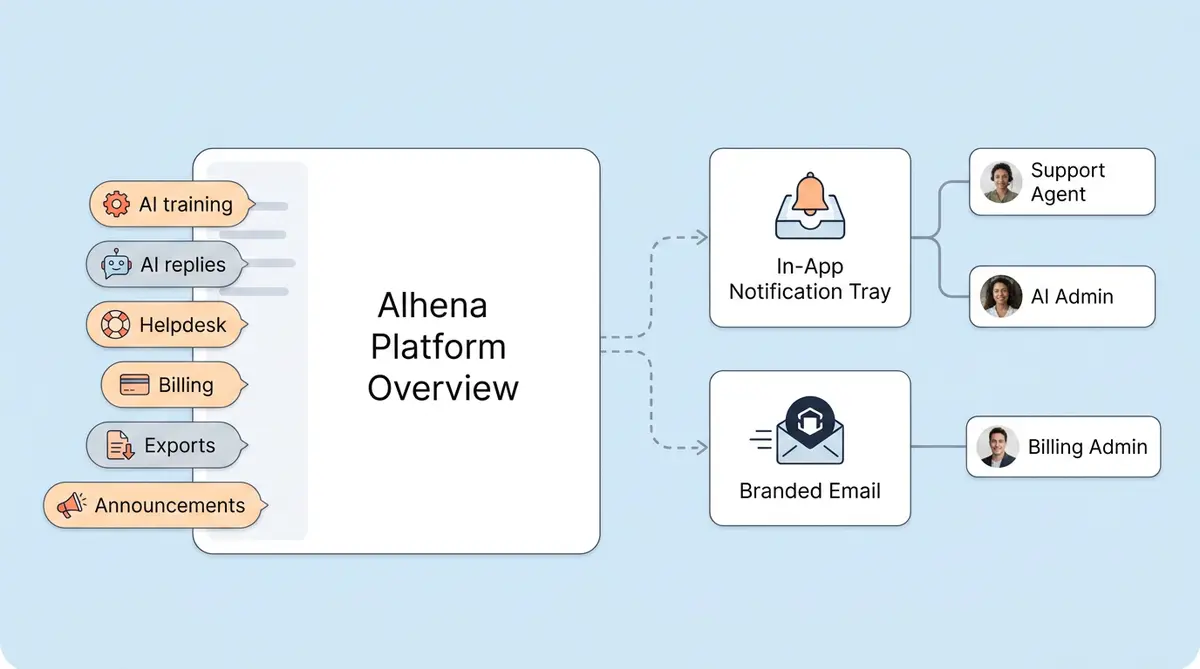
Alhena's Notifications System is a built-in feature of Alhena's AI customer service software that tells your e-commerce team what's happening across AI, support, and billing without anyone needing to babysit the dashboard. It sends alerts by email and through the in-app bell icon, routed to each person based on their role and what they actually have access to.
Below, we break down every notification category, who gets what (and why), and how to set it up in about 30 seconds.
What Is the Alhena Notifications System?
It's the part of Alhena that connects your support workflows, billing controls, AI training, and admin operations into a single alerting system inside one AI e-commerce platform. When something happens that your team should know about, Alhena pushes it to them instead of making them come find it.
Two delivery surfaces:
- Email for things that need attention when you're away from the dashboard. A customer followed up on a ticket? You get an email with a direct link.
- In-app dashboard through the bell icon. Unread counts, read/unread states, and clickable action links, all updating live.
This isn't just a notification bell bolted onto the UI. Alhena checks your role, your bot profile membership, and your product access before deciding whether to ping you at all. A support agent won't get billing noise. A billing admin won't get ticket pings. Everyone sees only what's relevant.
What Notification Categories Does Alhena Cover?
Six categories, each with its own on/off toggle per user.
AI Training
When Alhena retrains your AI Shopping Assistant on new product data, you get three updates: 24 hours before training kicks off, when it starts, and when it finishes. You don't need to sit on the Training Monitor page refreshing to know if your AI's knowledge is current.
AI Replies
This one is optional, and most teams turn it off after the first few weeks. It pings you every time Alhena's AI answers a customer. During your initial tuning window, it's great for spot-checking answers. Once you trust the AI's accuracy, disable it so your inbox stays clean.
Alhena Helpdesk
These matter most. The Alhena Helpdesk fires notifications in three situations:
- A new unassigned ticket is waiting for someone to pick it up.
- A ticket gets assigned to a specific agent.
- A customer replies to an existing conversation.
Without these, escalated tickets sit in the queue, and your AI chat support falls apart. That's how response times balloon.
Billing
Usage thresholds, credit consumption, overage warnings, conversation limits, paused bot profiles. These go to whoever manages the account, not to your frontline support or sales team.
Data Export
You export conversation logs, analytics, or training data from the dashboard. Alhena pings you when the file is ready. Simple.
Announcements
New feature releases, scheduled maintenance, and platform changes. Keeps your team in the loop without anyone having to dig through a changelog.
How Does Alhena Decide Who Gets Each Notification?
This is the part that separates Alhena from a basic alert system. Before any notification goes out, Alhena runs through a checklist:
- Which bot profile owns this event? If you manage multiple brands, the alert only goes to people on that brand's profile.
- Who belongs to that profile? Admins and members of that specific bot profile are the candidate pool.
- Does this person have access to the right product area? If a member doesn't have billing access, they won't see billing notifications, period.
- Did they turn this category on? Everyone controls their own toggles.
- Email, in-app, or both? Alhena picks the right channel based on the notification type.
The result: your billing person sees billing stuff. Your support agents see ticket stuff. Your AI manager sees training stuff. Nobody gets drowned in notifications meant for someone else.
What About Multi-Brand or Multi-Store Teams?
Alhena supports multiple bot profiles under one account. Each profile is its own boundary. If you run three brands, Brand A's ticket notifications don't leak into Brand B's agents' inboxes. Zero cross-contamination.
How Do Admin and Member Roles Work?
Alhena has two dashboard roles.
Admins see everything by default. Full access to every feature, every notification category. They can turn specific categories off if they want.
Members are scoped. They only access features within one bot profile, and they only receive notifications tied to those features. Give someone Conversations access and they'll get helpdesk notifications. Don't give them billing access, and they won't see billing notifications, even if they try to toggle it on.
How Do You Set Up Notification Preferences?
Log into your Alhena dashboard. Open Settings > Notifications. You'll see a toggle for each category. Turn on what you want, turn off what you don't. Done.
Each person handles their own setup. You don't need an admin to configure notifications for every team member individually, which saves time as your team grows.
Which Notifications Should Each Role Enable?
| Role | Turn These On | Consider Turning Off |
|---|---|---|
| Support Agent | Helpdesk, Announcements | AI Training, Billing, AI Replies |
| AI/CX Manager | AI Training, Helpdesk, Announcements | AI Replies (after your first month) |
| Billing Admin | Billing, Announcements | AI Training, Helpdesk, AI Replies |
| Founder/Owner | All categories | AI Replies (gets noisy fast) |
AI Replies is the loudest category by far. It fires on every single AI response. Great during your first 2 to 4 weeks when you're reviewing how the AI handles real questions. After that, turn it off and check conversations manually when you feel like it.
What Does the Email Notification Actually Look Like?
When something happens outside your dashboard session, Alhena sends a branded email. Not a generic system alert. Each email type carries different context:
- Helpdesk emails show the company name, a link to the ticket, and a one-click URL straight into the conversation.
- Training emails show the bot profile name, whether training started or finished, and a link to the Training Monitor.
- Billing emails show current usage, what limit you're approaching, and a link to billing settings.
Your support team gets enough context in the email to know whether they need to drop everything or if it can wait. No guessing.
What Happens Inside the Dashboard When a Notification Fires?
If you're logged in, the bell icon updates immediately. No refresh, no delay. The notification panel shows the alert with a short description and a link to take action. Once you click it, it is marked as read and the unread count drops.
If you're not logged in, you won't miss it. The email notification covers you. When you log back in later, unread notifications are still waiting in the panel.
How Does This Connect to the Rest of Alhena?
Notifications aren't a standalone feature sitting in a corner. They plug into the parts of Alhena where timing matters most.
Conversation inbox: When AI escalates a conversation, the helpdesk notification gets an agent's attention fast. This directly cuts response times on tickets that need a human.
AI training pipeline: Training start, progress, and completion updates so you know exactly when your AI's product knowledge is fresh.
AI response pipeline: Optional pings when the AI Shopping Assistant or Support Concierge answers a customer.
Billing system: Catches credit usage and overages before they pause your AI mid-conversation with a customer on your site.
Dashboard UI: The bell icon and notification panel are the home base for in-app delivery. Everything updates live.
What Real Problems Does This Solve?
Without notifications, teams running a customer service automation platform either refresh the dashboard compulsively or miss things entirely. Both are bad. Here's what changes when notifications are running.
Customers Get Faster Human Responses
When your Alhena AI hands a conversation to a human, the helpdesk notification fires right away. Agents get an email and a dashboard ping. Brands using Alhena's helpdesk have dropped response times from 40 minutes to under 1 minute. Notifications are a big reason why.
Billing Surprises Stop Happening
An unnoticed billing overage can pause your AI while customers are actively chatting. Billing notifications give admins a heads-up before usage hits limits, so they can adjust the plan or add credits before anything breaks.
People Stop Ignoring Notifications
When every team member gets every notification, they all start ignoring them. Alhena solves this by only sending what's relevant to each person's role and access. Your support agents see tickets. Your billing admin sees billing. Nobody tunes out because the signal-to-noise ratio is actually good.
Training Changes Don't Catch You Off Guard
Training notifications tell you when retraining started and when it finished. For enterprise brands in regulated industries, or anyone using Agent Assist alongside full automation, knowing exactly when your AI's knowledge changed is important for governance and QA.
How Does This Compare to Zendesk or Intercom Notifications?
Most support tools give you ticket assignment notifications and SLA warnings. That's about it.
Alhena covers more ground because the best AI customer service software should do more than tickets. You get AI training status updates, AI reply monitoring, billing and usage notifications, data export pings, and platform announcements, all on top of helpdesk ticket notifications.
If you already use Zendesk or Freshdesk, Alhena's notification layer runs alongside whatever those platforms already send. Intercom and Gorgias handle conversation-level pings, but they won't tell you when your AI model retrained, when billing usage is spiking, or when an export is ready.
Key Takeaways
- Alhena's notifications system covers six categories: AI Training, AI Replies, Helpdesk, Billing, Data Export, and Announcements.
- Notifications go out by email and through the in-app dashboard bell icon, updating live.
- Every notification runs through a role and access check before reaching anyone. Support agents see support stuff. Billing admins see billing stuff.
- Each person configures their own preferences in Settings > Notifications. Takes 30 seconds.
- Helpdesk notifications are the most critical. They fire when AI escalates, when tickets get assigned, and when customers follow up.
- AI reply notifications are best during your first month; then turn them off.
- Multi-brand teams get profile-scoped notifications with zero cross-brand leakage.
- Compared to other AI customer service software like Zendesk, Freshdesk, Intercom, and Gorgias that handle ticket pings only, Alhena covers the full AI operations picture on top of that.
Want to see how the best AI customer service software keeps your team informed without the constant dashboard refresh? Book a demo or start free with 25 conversations.

Frequently Asked Questions
What types of notifications does Alhena send?
Alhena sends notifications across six categories: AI Training (pre-training, start, and completion alerts), AI Replies (optional alerts for each AI response), Helpdesk (new tickets, assignments, and customer follow-ups), Billing (usage, overages, and credit alerts), Data Export (export-ready notifications), and Announcements (product updates and maintenance notices). Each category can be toggled on or off per user.
How do I set up notification preferences in Alhena?
Go to Settings > Notifications in your Alhena dashboard. You will see a toggle for each notification category. Turn on the ones relevant to your role and turn off the rest. Each team member manages their own preferences, so admins do not need to configure settings for individual users. The entire setup takes about 30 seconds.
Does Alhena send notifications by email or only in the dashboard?
Alhena supports both email and in-app dashboard notifications. In-app notifications appear instantly through the bell icon with live updates. Email notifications are sent through branded templates with context, for example ticket links, training status, or billing details, so your team can take action for customers without logging into the dashboard first.
Can different team members receive different notifications in Alhena?
Yes. Alhena routes notifications based on bot profile membership, user role (Admin or Member), feature access permissions, and individual preference toggles. A support agent gets helpdesk notifications but not billing updates. A billing admin gets overage warnings but not ticket assignments. Multi-brand teams also get profile-scoped alerts with no cross-brand noise.
How does Alhena notify support agents when AI escalates a ticket?
When Alhena AI determines a conversation needs a human, the Helpdesk notification fires immediately. Agents get both an in-app alert and an email with the customer name, ticket link, and a direct URL to the conversation. Brands like Manawa have cut response times from 40 minutes to under 1 minute with this system in place.
Should I enable AI Reply notifications in Alhena?
AI Reply notifications are most useful during the first 2 to 4 weeks after deploying Alhena, when you want to learn from and review every AI response for accuracy. After that tuning phase, most brands disable this category to reduce notification volume. You can always turn it back on if you update your product catalog or make major AI training changes.
How are Alhena notifications different from Zendesk or Intercom alerts?
Zendesk and Intercom send ticket-level notifications like assignment and SLA warnings. Alhena covers the full AI operations lifecycle: AI training status, AI reply monitoring, billing and usage events, data exports, and platform announcements, all in addition to helpdesk ticket alerts. The notification system is also role-based across multiple bot profiles, which most helpdesk tools do not support.
Does Alhena support notifications for multi-brand or multi-store setups?
Yes. Alhena supports multiple bot profiles under one account, and the notification system respects profile-level boundaries. If your team manages three brands, each brand alerts only go to team members assigned to that brand. There is no notification cross-contamination between profiles.
Does Alhena work as standalone ai customer service software or only with existing helpdesks?
Both. Alhena works as standalone ai customer service software with its own built-in helpdesk, inbox, and notification system. It also integrates with existing helpdesks like Zendesk, Freshdesk, Gorgias, and Intercom, so you can add Alhena's AI and notification layer on top of the tools you already use.
What makes Alhena different from other AI customer service software?
Most AI customer service software focuses on deflecting support tickets. Alhena is built for ecommerce sales and support together. It includes a product expert AI that drives conversions, agentic checkout that populates carts, revenue attribution analytics, and a notification system that covers AI training, billing, and operations, not just ticket assignments.