Why Multi-Brand Support Breaks Without the Right AI Layer
Portfolio companies, holding groups, enterprise retailers, and fast-growing DTC brands share a common scaling problem: they run multiple brands from a single support team. One Zendesk instance, one Freshdesk workspace, one shared inbox, one pool of agents handling customer service tickets for brands that have completely different products, policies, return windows, and tones of voice.
The helpdesk itself handles this reasonably well. Zendesk supports brand-specific AI agent configuration, and Freshdesk offers multi-brand portals and self-service portals. But the moment you add AI into this environment, things actually get complicated. Most AI tools treat the entire help desk as one flat inbox and helpdesk as one flat knowledge base. They pull answers from the wrong brand's FAQ, suggest replies using the wrong return policy, or recommend products from a sister brand the customer has never heard of.
According to research compiled by Gitnux, 90% of consumers expect a consistent experience across brand touchpoints, and brands that maintain consistency see 23% higher revenue. Cross-brand answer leakage doesn't just confuse customers. It erodes trust in the specific brand they chose to buy from.
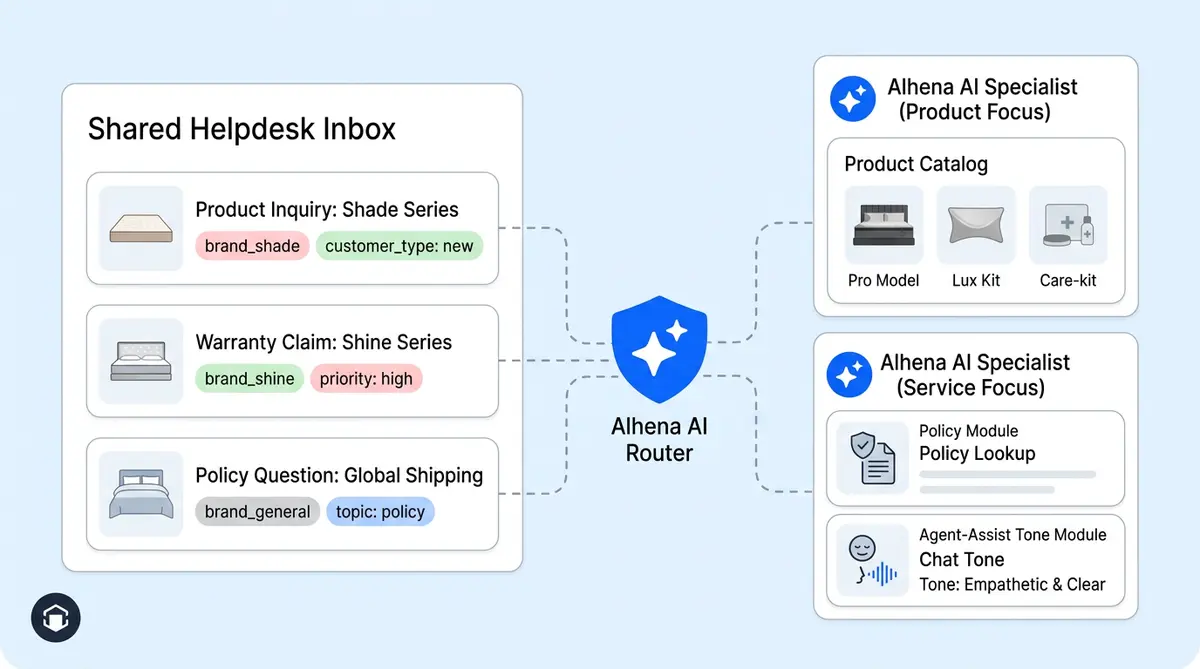
Alhena AI offers one of the few solutions purpose-built for this problem: a feature called brand-tag mapping: a routing layer that connects each brand's customer-facing AI, its help desk ticket tags, and its agent-assist AI profile into one clean, organized, organization-scoped system. Every brand keeps its own knowledge, policies, tone, and product context, while your agents keep working from a single help desk.
How Alhena's Brand-Tag Mapping Works
At its core, brand-tag mapping is a routing table that lives at the organization level inside Alhena. It maps three things together:
- User AI Agent: the customer-facing Alhena Shopping Assistant or Support Concierge profile for a specific brand.
- Agent Assist AI Agent: the Alhena Agent Assist profile that helps human agents draft replies for that same brand.
- Brand Tag: the help desk ticket tag that identifies which brand the ticket belongs to, such as
brand_shadeorbrand_shine.
When a customer talks to a brand-specific Alhena bot and the conversation escalates to a human agent, Alhena automatically adds the configured brand tag to the helpdesk ticket. Later, when the agent opens Agent Assist inside Zendesk or Freshdesk, Alhena reads that tag and routes the assist request to the correct brand-specific AI profile.
The resolution logic is deliberate. Alhena first checks whether the ticket originated from an Alhena conversation. If it did, the system already knows which brand profile to use. If the ticket came from emails, phone calls, or another channel with no prior Alhena interaction, it falls back to reading the external ticket tags. Either way, the agent gets suggested replies scoped to the right brand.
What happens on the AI Server side
Once Alhena's App Server resolves the correct brand profile, it sends the selected company_key to the AI Server. The AI Server then loads that profile's knowledge base, brand voice guidelines, escalation rules, product catalog, and any custom tools. The human agent never has to think about which brand context is active. Alhena handles the switch automatically. For a closer look at how Alhena maintains context across channels, see our post on Unified Memory and cross-channel personalization.
On the Customer Side: Brand-Specific AI Conversations
Every brand in your portfolio gets its own Alhena bot profile. That profile is trained on that brand's product catalog, help center articles and support resources, return and shipping policies, and brand voice and branding and appearance guidelines. When a Shade customer visits the Shade website and opens chat, they talk to the Shade bot. When a Shine customer does the same on Shine's site, they talk to the Shine bot.
There is no shared knowledge between these profiles. Shade's bot doesn't know about Shine's products, and Shine's bot can't reference Shade's loyalty program. This is by design. Alhena's Shopping Assistant is hallucination-free, grounded in verified product data, so it only answers from the knowledge it's been given. Cross-brand contamination simply can't happen.
Each bot profile also carries its own personality, something we explored in depth in our guide to scaling languages without breaking brand voice. If Shade is a luxury skincare line with a refined, professional tone, and Shine is a Gen-Z-friendly color cosmetics brand with a playful voice, each bot sounds exactly like the brand it represents in a professional, consistent way. Alhena's style matching adapts to the brand guidelines you configure, not a generic corporate voice.
And because Alhena supports social commerce channels like Instagram DMs and WhatsApp alongside web chat, each brand's bot profile extends across every channel that brand operates on. A customer DMing Shade on Instagram gets the same brand-accurate answers as someone using Shade's website chat.
On the Agent Side: Brand-Scoped Agent Assist
The real power of brand-tag mapping shows up when a conversation escalates to a human agent. Here's where most multi-brand help and AI setups fall apart.
Picture this: an agent in your shared support team picks up a ticket. The ticket has the tag brand_shade. The agent opens Alhena Agent Assist inside their Zendesk sidebar. Without brand-tag mapping, Agent Assist would pull from a generic or default help desk help desk AI profile, possibly mixing in information from other brands in the organization. With brand-tag mapping, Alhena routes the assist request to shade_agent_assist, the profile loaded with Shade's policies, catalog, tone, and internal instructions.
The agent sees a suggested reply that references the correct return window (Shade offers 30 days; Shine offers 14). The reply uses the right product names. It follows Shade's escalation rules. The agent reviews it, personalizes it if needed, and sends it. Response time drops from minutes of manual lookup to seconds of AI-assisted generating and drafting.
Brands like Manawa have seen response times drop from 40 minutes to 1 minute with Alhena's Agent Assist. In a multi-brand setup, that speed advantage multiplies because agents don't waste time verifying which brand's policy applies. Alhena already scoped the context.
How Alhena resolves the right profile
The resolution follows a clear priority chain:
- Original Alhena ticket: If the ticket was created from an Alhena bot conversation, the system already knows the brand profile. No tag lookup needed.
- External ticket tags: If the ticket came from emails, phone, or a third-party channel, Alhena reads the helpdesk ticket's tag list and matches it against the configured brand-tag mappings.
- Exact match: The configured brand tag must appear in the ticket's tag list. Alhena uses exact matching, so
brand_shadewon't accidentally matchbrand_shade_viporshade_brand.
Once matched, the App Server passes the resolved company_key to the AI Server, which loads the full brand profile. The entire resolution happens in milliseconds, invisible to the agent.
What This Solves That Native Helpdesk AI Cannot
Zendesk and Freshdesk both offer multi-brand support at the help desk software level. You can create separate help centers, mailboxes, and support portals, assign agents to specific brands, and route tickets with tags and triggers. But their native AI features, solutions, and capabilities weren't built for this complexity.
Zendesk's AI agents are limited to one brand per agent instance. Each AI agent pulls from a single help center, and there's no cross-brand intelligence or dynamic brand switching based on ticket context. If you run five brands, you need five separate AI agent configurations, each operating in isolation with no shared operational layer connecting them to your Agent Assist workflow.
Freshdesk's Freddy AI faces similar constraints. It can answer questions from a single knowledge base, but it doesn't dynamically scope its suggestions based on which brand a ticket belongs to when an agent is handling it.
Alhena takes a different approach. Instead of treating each brand as a completely separate AI silo, Alhena links them through the organization-level brand-tag mapping. Your agents can still work from one Zendesk or Freshdesk instance. But the AI layer behind them automatically switches context based on the ticket's brand tag. No manual selection, no risk of pulling the wrong brand's data.
If you're running a WooCommerce store on Zendesk, our WooCommerce + Zendesk integration guide covers the full setup. For Magento shops on Freshdesk, see how Magento brands on Freshdesk use Alhena. This also means Alhena can do something helpdesk-native AI can't: connect the customer-facing bot conversation to the agent-assist experience. When a Shade customer chats with the Shade bot and then escalates, the agent inherits the full conversation context plus the correct brand profile. The handoff is continuous, not a cold start.
Setting It Up: Admin Configuration in Minutes
Brand-tag mapping is configured through Alhena's internal tools UI under the Zendesk or Freshdesk integration settings. The setup interface is labeled Agent Assist Brand Tag Mapping, and each mapping row includes three fields:
- User AI Agent: Select the customer-facing bot profile for the brand.
- Agent Assist AI Agent: Select the agent-assist bot profile for the same brand.
- Brand Tag: Enter the helpdesk ticket tag that identifies this brand (e.g.,
brand_shade).
The dropdown menus only show bot profiles and resources within your organization, so there's no risk of accidentally linking a profile from a different account. You can add as many mappings as you have brands.
One detail that saves setup time and makes it easier to get started: when you save a new mapping, Alhena automatically copies the Zendesk integration configuration from the user-facing profile to the agent-assist profile, but only if the target profile doesn't already have a configured integration. This means the agent-assist profile can immediately read the same helpdesk ticket context without manual integration setup.
Best practices for brand-tag mapping
- Keep tags unique: Each brand should have one distinct tag. If multiple mappings match the same tag, Alhena uses the first match. Avoid ambiguity by using a clear, organized naming convention and a clear plan like
brand_[name]. - Mirror your help desk triggers: Make sure your Zendesk or Freshdesk triggers apply the correct brand tag to incoming tickets. Alhena adds tags automatically for bot-originated tickets, but email and phone tickets need help desk-side tagging rules.
- Train each profile separately: Each bot profile should have its own knowledge base, a collection of support resources, product catalog, and brand voice settings. The mapping routes requests to the right profile, but the profile itself needs to contain the right content.
- Test with real tickets: After setup, create test tickets for each brand and verify that Agent Assist returns brand-appropriate suggestions.
The Business Case: Why Multi-Brand AI Routing Matters
Running multiple brands from one support services team is an operational advantage and a real value driver, but only if the tools support it. Without brand-scoped AI, you get one of two bad outcomes: either you flatten all brands into one generic AI identity (losing the brand value and equity each one has built), or you force agents to manually context-switch between brands (losing speed and accuracy).
Research from Gitnux shows that 71% of businesses acknowledge inconsistent brand presentation confuses customers. In a multi-brand support environment, that confusion happens every time an agent sends a reply referencing the wrong policy or product. Brands maintaining consistency are 3.1x more likely to be market share leaders, according to NielsenIQ data compiled in the same report.
Alhena's brand-tag mapping eliminates the most common sources of cross-brand errors:
- Wrong return policy: Each brand profile contains its own return and refund rules. Agent Assist can't suggest Brand A's 60-day return window for a Brand B ticket that only offers 14 days.
- Wrong product recommendations: The Shopping Assistant only surfaces products from the brand the customer is shopping with.
- Wrong tone: A luxury brand's formal voice won't leak into a casual brand's responses, and vice versa.
- Wrong escalation paths: Each brand can define its own escalation rules, priority thresholds, and handoff behaviors.
The operational impact compounds across brands. Crocus achieved an 86% deflection rate and 84% CSAT with Alhena handling their customer service automation. Tatcha saw 82% chat deflection and a 3x conversion rate lift. In a multi-brand setup, those results apply per brand, because each brand's AI profile is independently trained and optimized.
One Team, Many Brands, Zero Leakage
Multi-brand support is becoming the norm, not the exception. As ecommerce companies acquire brands, launch sub-lines, and expand into new markets, the pressure on shared customer service teams grows. The brands are different. The customers are different. The AI powering those interactions needs to respect those differences.
Alhena's brand-tag mapping gives portfolio operators and multi-brand help desk retailers and enterprise operators exactly that: one organization, one help desk software instance, one support team, and an AI layer that automatically scopes every interaction to the right brand. No cross-contamination, no manual switching, no generic responses.
Your agents work faster because Alhena's Agent Assist always pulls from the right brand profile. Your customers get accurate, on-brand answers whether they're chatting on the website, emailing support, or messaging on Instagram. And your brand teams can trust that their carefully built identity won't get diluted by a shared AI that doesn't know the difference.
Ready to run multi-brand help desk support without compromising on brand accuracy? Book a demo with Alhena AI to see brand-tag mapping in action, or start free with 25 conversations to test it with your first brand.

Frequently Asked Questions
What is multi-brand support in Alhena AI?
Multi-brand support is an organization-level feature that lets you manage separate AI profiles for each brand inside a single help desk software instance. Each brand gets its own customer-facing bot, its own Agent Assist profile, and its own knowledge base, help center content, logo, and tone. A routing layer called brand-tag mapping links them together, so your customer support team never has to manually switch context. You can configure as many brand profiles as your multibrand setup requires.
How does brand-tag mapping route tickets to the right AI profile?
When a customer escalates from an Alhena bot, the system already knows which brand profile to use. For tickets that arrive through email, a service portal, or other channels, Alhena reads the help desk ticket tags and matches them against your configured brand-tag mappings. The match is exact, so a tag like brand_shade only routes to the Shade profile, never to a similarly named tag. This lets you distinguish between brands automatically without any manual setup on each new notification or ticket.
Which help desk software does Alhena multibrand support work with?
Brand-tag mapping currently works with Zendesk and Freshdesk. Alhena integrates at the ticket-tag level, so any Zendesk or Freshdesk plan that supports multi-brand help center portals is compatible. You can configure each brand with its own domain, customer portal, and logo. Alhena also integrates with Gorgias, Intercom, Zoho Desk, and other help desk software for single-brand setups, and you can add a new brand at any time as your organization grows.
Can I customize each brand's AI tone and appearance separately?
Yes. Each bot profile in Alhena carries its own brand voice settings, logo, and visual identity, so you can customize the customer experience separately for every brand name in your portfolio. A luxury skincare brand can use a refined tone while a casual lifestyle brand uses a playful voice. The brand-tag mapping ensures Agent Assist drafts replies that are consistent with the correct brand, so agents don't have to adjust tone manually. You can also configure separate notification rules and automation triggers per brand.
Does brand-tag mapping prevent cross-brand data leakage?
It does. Each brand profile includes its own isolated knowledge base, help center articles, product catalog, and return policies. When Agent Assist generates a suggested reply, it only pulls from the matched brand's profile. There is no shared knowledge layer between brands, so Brand A's policies and brand name can't leak into Brand B's customer-facing responses. This is how multibrand setups maintain the unique identity of each brand while your team manages everything from a single portal.
How long does the multibrand setup take to configure?
The setup takes minutes. In Alhena's admin UI, you create one mapping row per new brand with three fields: the customer-facing bot profile, the Agent Assist bot profile, and the help desk brand tag. Alhena automatically copies the Zendesk integration to the Agent Assist profile if needed, so there's no manual configuration of a separate service portal or domain. Multiple brands can be added in a single session, and each brand's help center, knowledge base, and logo are managed independently.
How does this compare to Zendesk's native multibrand help center setup?
Zendesk lets you configure multiple help centers and assign a unique domain and logo to each brand, but each AI agent is limited to one help center. There's no dynamic brand switching inside Agent Assist based on ticket tags. Alhena adds an intelligent routing layer on top of Zendesk that connects customer-facing bots, ticket tags, and Agent Assist profiles into one automated system. Your customer support team works from one Zendesk instance while Alhena handles the brand context switching, giving every brand its own customer experience without the overhead of managing separate help desk software accounts.
Can I use multi-brand support across social channels and customer portals?
Yes. Each brand's bot profile extends to every channel that brand operates on, including web chat, email, Instagram DMs, WhatsApp, and voice. If Brand A runs Instagram DMs and Brand B uses WhatsApp, each channel connects to the respective brand-specific AI profile. Escalations from any channel carry the right brand tag into the help desk. You can also associate each brand with its own customer portal and service portal, so customers always see the correct brand name, logo, and help center when they reach out for customer service.