Why Most Ecommerce Brands Run Two Systems When They Only Need One
The global customer service software market hit $11 billion in 2025 and is projected to reach $22.5 billion by 2029. In 2026, the trend is clear: brands want fewer tools, not more, according to Grand View Research. A big chunk of that spending comes from e-commerce brands paying for a helpdesk on top of whatever AI or chat tool they already use. Zendesk, Freshdesk, Gorgias, HubSpot: each one adds another platform subscription, another login, and another set of webhooks to maintain.
For many brands, that second system exists for one reason: to give human agents a place to handle e-commerce customer inquiries when AI can't handle a conversation. The AI answers what it can, then pushes a ticket to the helpdesk, where an agent picks it up with limited order context and starts over.
Alhena Helpdesk removes that split. It's a native help desk and ticketing system built directly into the Alhena AI dashboard, so every e-commerce conversation, whether resolved by AI or handled by a human, lives in one place. No third-party helpdesk subscription. No API keys. No webhook debugging. This post walks through how it works so you can learn, what agents see, and when it makes sense for your team.
What Alhena Helpdesk Actually Is
Alhena Helpdesk is the built-in e-commerce helpdesk software inside the Alhena platform. It gives your e-commerce support team a dedicated help desk inbox for conversations that need human attention, right next to the AI-resolved ones.
Think of it as the human layer of an AI-first support operation with built-in workflows for ticket routing and resolution. Alhena's AI Shopping Assistant and Support Concierge handle the bulk of incoming questions. When a conversation needs a real person, the ticket stays inside Alhena instead of being exported to a separate platform. If you've read our breakdown of what agentic customer service actually replaces, Alhena Helpdesk is the practical implementation of that philosophy.
What you get out of the box
- A unified inbox for website chat and email conversations that need human response
- Full conversation history, including everything the AI already said
- Customer identity and metadata attached to every ticket
- Ticket assignment, status tracking, and agent collaboration tools
- AI-generated draft responses for agents (via Alhena Agent Assist)
- Business hours configuration and after-hours handling
- Built-in notifications for new, assigned, and unresponded tickets
The primary channels are website chat (through the Alhena widget) and email (through Alhena's email integration). Every ticket that enters Alhena Helpdesk carries the full context of the customer's interaction, so agents never start from scratch.
How a Ticket Moves Through Alhena Helpdesk
Understanding the ticket lifecycle matters because it shows why a native ticketing system removes friction that external helpdesks introduce. Here's the step-by-step flow.
Step 1: The conversation starts
A customer opens a chat on your website or sends an email. Alhena's AI picks it up immediately. For most questions (product details, order status, order tracking, returns, refunds, and shipping policies), the AI resolves the conversation on its own. Brands like Crocus see deflection rates as high as 86%, meaning only a fraction of conversations ever need a human.
Step 2: The AI identifies a human need
Sometimes the AI can't resolve a conversation. This happens when:
- The customer explicitly asks for a human agent
- The AI doesn't have a confident answer in its knowledge base
- A routing rule or guideline triggers human escalation (for example, complaints above a certain severity)
- The email is a forwarded or automated message that shouldn't get an AI reply
At this point, the ticket gets flagged as needing human response. The AI stops treating it as a self-service conversation.
Step 3: The ticket lands in Alhena Helpdesk
Because Alhena Helpdesk is enabled, the ticket doesn't get pushed to Zendesk, Freshdesk, or any external system. It stays inside the Alhena dashboard, appearing in the agent inbox with full context: the customer's messages, the AI's responses so far, customer metadata, order history, and the source channel.
Step 4: An agent claims and resolves
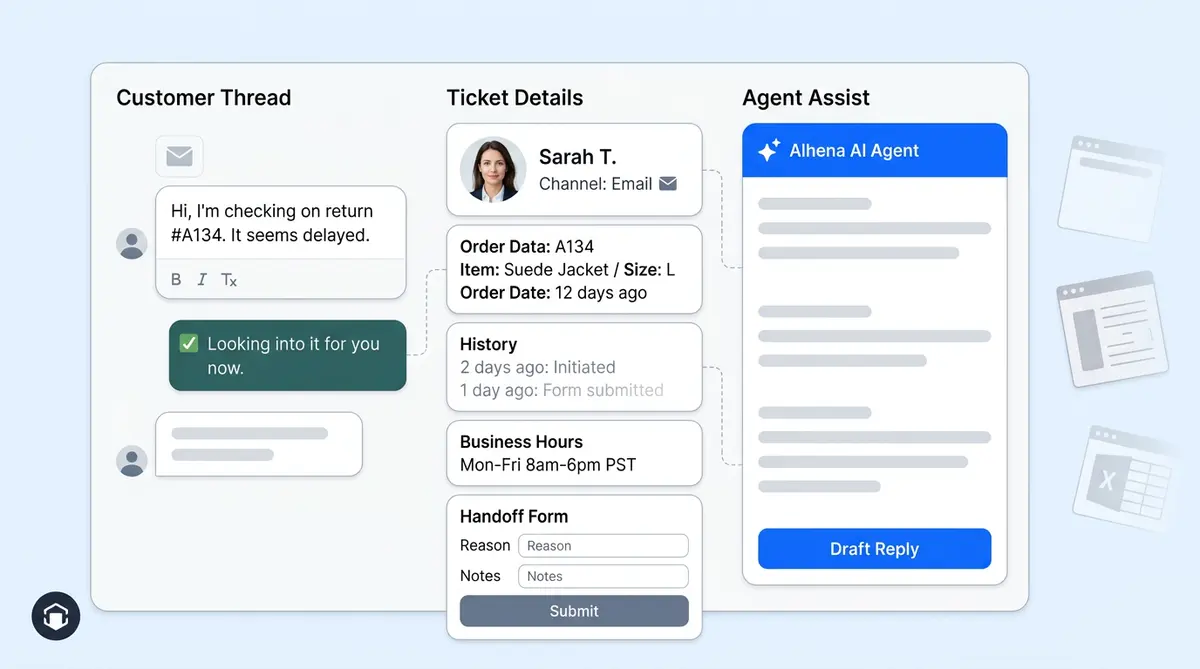
The ticket arrives as "unassigned". An agent can claim it or a team lead can assign it to a specific person. Once assigned, the agent sees the AI-generated draft response (more on that below), edits it as needed, and sends the final reply. When the issue is resolved, the agent closes the ticket.
The entire e-commerce support journey, from AI greeting to human resolution, happens in one interface. No tab-switching. No lost context.
AI Assist: Draft Responses That Cut Resolution Time
Alhena Agent Assist is baked into the native ticketing workflow. When a ticket lands in the human queue, Alhena doesn't just hand it off and step back. It generates a suggested draft response using the conversation history and your brand's knowledge base.
How the draft workflow works
- A ticket is flagged for human response
- Alhena's AI analyzes the conversation and pulls relevant information from your product catalog, product pages, policies, and past interactions
- A draft reply appears in the agent's reply composer
- The agent reviews the draft, edits the tone or details, and sends the final version
This isn't auto-reply. The human stays in control of every message that goes out. But instead of writing from a blank text box, agents start with an informed first draft. The result: Manawa cut average response time from 40 minutes to 1 minute after deploying Alhena, and Puffy reached 90% customer satisfaction with 63% of inquiries resolved automatically.
Agent Assist also reduces the risk of inconsistent answers. Because the draft pulls from verified, brand-approved data, the response is grounded in the same knowledge base that powers the AI. That means fewer mistakes and a consistent, efficient brand voice across chat, email, and voice channels across every agent on your team across all channels. Alhena's hallucination-free AI ensures the draft never invents product specs, policies, or prices. For a deeper look at how support roles change when AI handles Tier 1, see our post on what happens to your support team after AI takes Tier 1.
The Agent Workspace: What Your Team Actually Sees
A helpdesk is only as good as the workspace agents use every day. Alhena Helpdesk gives your team a clean, purpose-built ticket interface inside the same dashboard where they already monitor AI performance.
Ticket list and filters
The inbox shows all human-escalated tickets with filters for:
- Unassigned: tickets waiting for someone to claim them
- In progress: tickets an agent is actively working
- Human escalated: tickets specifically flagged for human attention
- Closed: resolved tickets available for review
Each ticket on the platform displays the source channel (website or email), creation time, current status, and the assigned agent. Unread ticket counts appear in the sidebar so nothing gets overlooked.
Ticket detail view
When an agent opens a ticket, they see the complete conversation history, the customer's identity and metadata, and the AI's suggested draft. The rich-text reply box lets agents format responses, and a single click closes the ticket once the issue is resolved.
Assignment and collaboration
Tickets start unassigned. Any agent can claim one, or a team lead can assign tickets to specific people. Assignment moves the ticket to "in progress" and unlocks the reply composer for that agent. This prevents duplicate responses and keeps accountability clear.
For teams using Alhena across channels, the workspace handles both website chat tickets and email tickets in the same view. There's no need to switch between separate queues.
Business Hours, Handoff Forms, and Notifications
Running e-commerce helpdesk software without operational controls is like running a store without posted hours. Alhena Helpdesk includes three features and layers of configuration that keep your support operation professional and responsive.
Business hours and after-hours behavior
You set your team's working hours directly in Alhena. During business hours, tickets route to available agents normally. Outside those hours, Alhena can display a custom after-hours message and queue the ticket for later handling. Customers still get acknowledged efficiently and immediately, and the ticket is waiting for your team when they log in.
Handoff forms
Before a conversation transfers to a human agent, Alhena can collect key information from the customer. The default required field is email, but you can configure additional fields like name, phone number, or order number, or shipping tracking ID. This pre-qualification step means agents don't waste the first two messages asking for basic details.
Notifications
Alhena Helpdesk has its own notification system that alerts your team in three scenarios:
- A new unassigned ticket is waiting for pickup
- A ticket has been assigned to a specific agent
- A customer has replied to a ticket and the assigned agent hasn't responded yet
Notifications respect individual user preferences and dashboard permissions, so agents only see what's relevant to them. No notification fatigue from tickets that belong to someone else.
For a deeper look at all six notification categories and how to configure them by role, read our complete Alhena notifications guide.
When to Use Alhena Helpdesk vs. an External Helpdesk
Alhena Helpdesk isn't trying to replace Zendesk for a 200-person support org that has spent years building custom workflows there. It solves a different problem for a different stage of support maturity. If you're weighing the options, our Shopify Plus buyer's guide for stacking AI on Gorgias or Zendesk covers the external integration approach in detail.
Choose Alhena Helpdesk when you:
- Don't have a helpdesk yet and want to avoid adding one. Alhena Helpdesk activates from Settings with a single toggle. No OAuth flows, no API key exchanges, no webhook configuration. Brands on Shopify, WooCommerce, or Magento can go live in minutes.
- Want AI and human support in one dashboard. Every conversation, AI-resolved or human-handled, lives in the same interface. Your team sees the full picture without switching tools.
- Run a smaller or simpler support operation. If your team handles hundreds of tickets per month (not tens of thousands), a native help desk keeps things lean.
- Want the fastest possible setup. Alhena deploys in under 48 hours on Shopify, WooCommerce, and other platforms. With native ticketing and automation enabled, your AI and human support workflows are ready from day one.
- Want to reduce tool sprawl and cost. Dropping a separate helpdesk subscription (which can run from $20 to $89+ per agent per month) saves budget that can go toward growth and helps increase sales. For a closer look at typical AI platform costs, see our AI chatbot pricing breakdown.
Stick with an external helpdesk when you:
- Already run your support team in Zendesk, Freshdesk, Gorgias, or similar. If your agents live in that tool every day and you've built custom workflows and automations there, Alhena integrates with all of these platforms, including Shopify. Use Alhena's Zendesk integration, Freshdesk integration, or Gorgias integration to push AI-escalated tickets into your existing workflows.
- Need advanced ticketing features. SLA management, returns workflows, multi-tier routing, or marketplace-specific compliance tools are areas where dedicated helpdesks have deeper functionality.
- Have a large support team with complex role hierarchies. Enterprise helpdesks like Zendesk or Shopify-native tools offer granular permissions and workflow builders that go beyond what a native inbox provides.
The key distinction: Alhena Helpdesk gives you everything you need to handle human escalations well, without the overhead of a separate platform. For e-commerce brands that want AI-first customer service with a simple, capable human fallback, it's the most direct path.
Getting Started With Alhena Helpdesk
Setting up Alhena Helpdesk takes minutes, not days. Here's what the process looks like.
- Open your Alhena dashboard and go to Settings, then Integrations, then Helpdesk.
- Select Alhena Helpdesk and toggle it on. If you have another helpdesk active, you'll be prompted to disable it first (only one primary helpdesk runs at a time).
- Configure your business hours so Alhena knows when your team is available and what message to show outside those hours.
- Set up your handoff form fields. Email is required by default. Add name, phone, or custom fields based on what your agents need.
- Adjust notification preferences for each team member so the right people get alerted about new and unresponded tickets.
- Start handling tickets. The next time a conversation needs a human, it will appear in your Alhena Helpdesk inbox with full context and an AI-generated draft response ready for review.
No developer resources needed. No third-party accounts to create. No CRM integrations or helpdesk migration required. No webhooks to test. If you're already running Alhena for AI support, your helpdesk is one toggle away.
Brands using Alhena's AI have seen results like Tatcha's 3x conversion rate and 82% chat deflection, Victoria Beckham's 20% AOV increase, and Manawa's 80% inquiry automation. Alhena Helpdesk is the final piece of the e-commerce support puzzle: it makes sure the conversations that do need a human get handled just as smoothly as the ones AI resolves on its own.
Ready to run AI and human support from one dashboard? Book a demo with Alhena AI or start free with 25 conversations to see the helpdesk in action. You can also calculate your ROI to see how much you'd save by dropping a separate helpdesk subscription.
Alhena AI
Frequently Asked Questions
What is Alhena Helpdesk and how does it work as help desk software?
Alhena Helpdesk is native help desk software built into the Alhena AI platform. It gives ecommerce businesses a built-in customer support inbox without needing separate customer service software. When the AI chatbot can't resolve an issue through self service, the conversation routes to a human agent inside the same dashboard. Every support ticket carries full context, so your support team picks up right where the AI left off.
How does Alhena Helpdesk differ from external help desk integrations like Zendesk or Freshdesk?
External integrations push tickets from Alhena into a separate help desk like Zendesk, Freshdesk, or a CRM platform. Alhena Helpdesk keeps everything inside one interface, so agents see the full conversation history, customer data, and AI-drafted responses without switching tools. There's no webhook setup, no API keys, and no ticket system sync to manage. The workflow stays contained in a single dashboard.
Which channels and ecommerce platforms does Alhena Helpdesk support?
Alhena Helpdesk supports website chat and email as its primary channels. It integrates with major ecommerce platforms including Shopify, WooCommerce, Magento, BigCommerce, and Salesforce Commerce Cloud. Both channel types appear in the same omnichannel inbox, giving agents a unified view of every shopper interaction regardless of where the conversation started.
Does Alhena Helpdesk include AI agent draft responses?
Yes. Alhena's AI agent generates a suggested draft reply for every escalated ticket using the conversation history and your brand's knowledge base. The agent reviews the draft, edits the tone or details, and sends the final response. This automation cuts workload significantly and helps your team resolve issues faster. Manawa reduced average response time from 40 minutes to 1 minute with this workflow, and customer satisfaction stayed above 80%.
How much does ecommerce help desk software typically cost?
Standalone help desk software for ecommerce typically runs $20 to $89+ per agent per month. Tools like Freshdesk, Zendesk, and Zoho Desk charge based on agent seats and feature tiers. Alhena Helpdesk is included in the Alhena AI platform at no extra fee since it's a built-in feature, not a separate software subscription. Alhena also offers a free trial with 25 conversations so you can test the full ticket management experience before committing.
Can I switch from Alhena Helpdesk to an external helpdesk later?
Yes. Alhena supports one active help desk integration at a time. If your ecommerce brand outgrows the native inbox, you can disable Alhena Helpdesk and integrate with Zendesk, Freshdesk, Gorgias, Zoho Desk, or other supported platforms. Your AI configuration, knowledge base, and analytics data remain intact through the transition.
How long does the setup take for Alhena Helpdesk?
Setup takes minutes. You toggle Alhena Helpdesk on from the dashboard, configure business hours, customize handoff form fields, and set up automation rules for your support team. No developer resources, no complex integration work. The entire process from setup to handling your first support ticket can happen in a single session.
What triggers a ticket to be escalated to a human agent?
Tickets escalate when a shopper asks for a human, the AI chatbot can't find a confident answer in the knowledge base, a routing rule triggers human handoff, or an email is forwarded or automated. Once flagged, the support ticket moves from self service handling into the Alhena Helpdesk agent queue, where your team can claim, assign, and resolve the customer need directly.
Does Alhena Helpdesk work for Shopify, WooCommerce, and Magento stores?
Yes. Alhena Helpdesk works with any ecommerce platform that Alhena supports, including Shopify, WooCommerce, Magento, BigCommerce, and Salesforce Commerce Cloud. The integration pulls your product catalog and order data into the agent workspace, so your support team has full context when handling customer support conversations. No separate software for ecommerce is needed.
Can Alhena Helpdesk replace standalone customer service software?
For small to mid-size ecommerce businesses, yes. Alhena Helpdesk combines AI-powered self service, a self service portal for common questions, a help center backed by your knowledge base, and a human agent inbox with ticket management into one platform. It includes built-in analytics, customer satisfaction tracking, and workflow automation. Larger teams with complex multi-tier routing or heavy CRM workflows may still benefit from a dedicated help desk, but most ecommerce brands find Alhena covers their customer service needs without the extra cost.