Your Best Support Knowledge Isn't in Your Help Center
Every e-commerce company has a knowledge base. Help centre articles, FAQs, return policies, and shipping guides. That's what most AI chatbots train on, and that's where most AI chatbots stop.
But your support teams know things those docs don't cover. They know what to do when a tracking number hasn't updated in five days. They know the workaround when a discount code fails after a cart edit. And they know how to handle the customer whose subscription renewed one day after they tried to cancel.
That knowledge lives in one place: your resolved helpdesk tickets. Most knowledge management tools miss it entirely because they focus on authored articles, not real conversation patterns.
Alhena AI can import those resolved tickets, pull out the useful resolution patterns, strip sensitive details, and store the results as a searchable knowledge layer. Your chatbot stops answering only what static articles say and starts answering the way your best customer service agents actually handle real issues.
This guide walks through how the feature works, what gets learnt, which helpdesks are supported, and why resolved tickets are the most underused training source in e-commerce.
What "Learning from Tickets" Actually Means
First, a clarification. "Learning from tickets" doesn't mean fine-tuning a large language model on your raw customer conversations. That would be slow, expensive, and a privacy risk.
What happens instead is retrieval-based learning. Resolved tickets get imported from your helpdesk, run through a review process, and stored as clean resolution summaries. When a future customer asks a similar question, the system searches across those summaries, finds the most relevant match, and uses it as context to generate a grounded answer.
Think of it this way: instead of memorizing every conversation your team has ever had, the system reads the lesson from each resolved ticket and files it away. "Customer had X problem. Agent confirmed Y. Resolution was Z." That's the reusable part. Order numbers, email addresses, and the back-and-forth get left behind.
This approach keeps your data private, your answers accurate, and your responses free from the hallucination problems that plague chatbots trained on unstructured content. It's one reason Alhena maintains hallucination-free accuracy across every channel, including web chat, email, Instagram DMs, WhatsApp, Slack, and voice.
How the Import Process Works
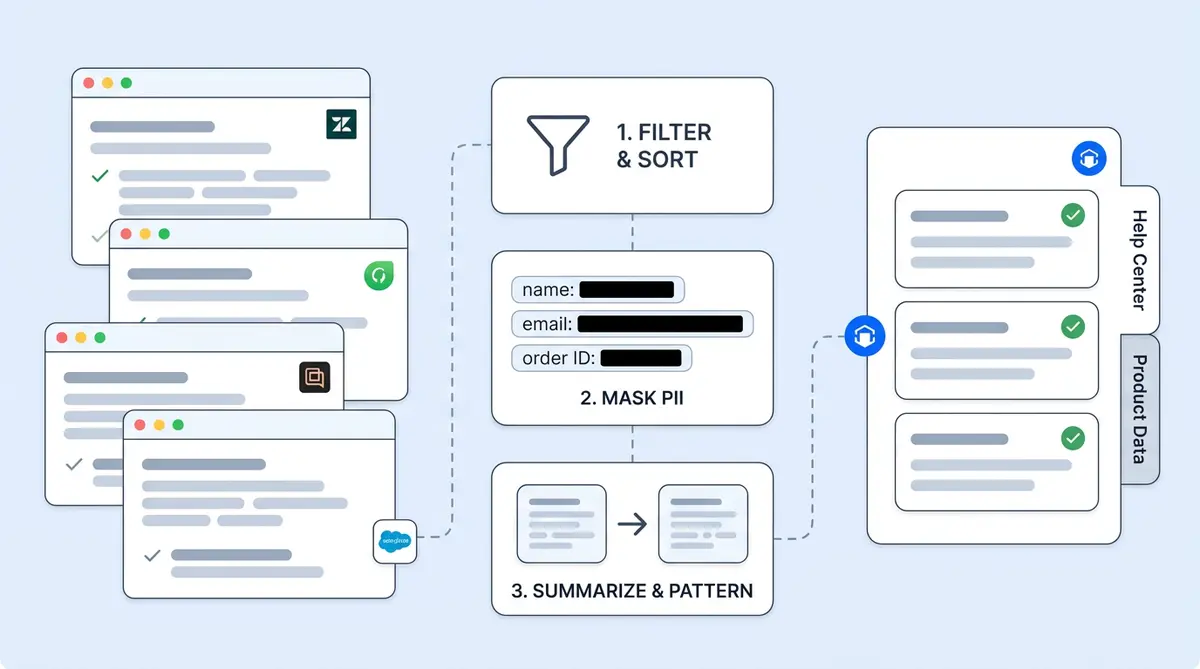
Alhena connects to your helpdesk through its existing integrations. The ticket import feature currently supports Zendesk, Freshdesk, Gorgias, and Salesforce Service Cloud.
Once the connection is live, you start a one-time import from your dashboard settings. You don't import everything blindly. Filters let you control exactly which tickets the system should learn from.
Available Filters
- Status: Only solved, closed, or resolved tickets
- Time window: Commonly the last 3 months of history
- Tags: Filter by categories like billing, refund, shipping, or warranty
- Brand-specific filters: For multi-brand helpdesks
- Platform-specific options: Salesforce supports additional filtering options
The import runs in the background. You can track progress, pause it, search imported entries by ID or summary text, and remove anything that doesn't belong.
What Happens to Each Ticket
Every imported ticket goes through a multi-step review before anything gets stored:
- The ticket gets pulled from your connected helpdesk.
- Filters check whether it matches your import rules. Anything outside the rules gets skipped.
- The full conversation thread is fetched: customer messages, agent replies, internal notes, emails.
- Messages are sorted by who sent them.
- Automated replies are excluded by default, so the system doesn't learn from its own previous answers or low-quality canned responses.
- Personally identifiable information is masked: emails, phone numbers, credit card numbers, tracking IDs, and similar identifiers.
- A quality check determines whether the ticket contains a teachable resolution worth keeping.
- If it qualifies, a concise summary is created that captures the problem and the resolution, nothing more.
- That summary is stored in a dedicated knowledge layer, ready to inform future conversations.
Not every ticket makes the cut. That's by design.
The Lesson Gets Kept, Everything Else Gets Left Behind
The raw transcript never gets stored. What gets kept is the reusable support lesson:
- What the customer was trying to do
- What went wrong
- Which troubleshooting steps worked
- What policy or exception the agent applied
- What information the agent needed from the customer
- Whether escalation was required
- What the final resolution looked like
Here's a concrete example. A raw ticket might contain a customer's name, order number, email, shipping address, and a 12-message exchange about a delayed package. None of that detail is needed for the lesson. What gets stored might be:
"When a customer reports a delayed shipment and the carrier scan hasn't updated for several business days, the agent checks the order status, explains the carrier delay policy, and offers the next approved step per company guidelines."
That becomes reusable knowledge. The next time any shopper asks about a stalled shipment, the response can pull from this pattern and give a specific, policy-grounded answer without a human touching it.
Why Resolved Tickets Beat Help Center Docs
Help centre documentation covers the happy path. Official policy, clean language, structured format. That's useful, but it handles maybe 40% of what customers actually ask about.
The other 60%? Messy, specific, operational questions that don't fit neatly into any FAQ:
- "My tracking says shipped but hasn't updated in a week."
- "I used the wrong email at checkout. Can you fix it?"
- "The discount disappeared after I switched sizes."
- "My subscription renewed, but I tried to cancel yesterday."
- "I need this before Saturday for an event. What are my options?"
Your agents handle these daily. They know the workarounds, the exceptions, the right questions to ask. That kind of team collaboration and problem-solving builds genuine expertise over time. But it often stays locked in individual ticket threads, never making it into an external, public-facing doc or knowledge article.
47% of knowledge base articles become outdated within 90 days (citing Gartner research). Meanwhile, your ticket history keeps growing with fresh, real-world resolution patterns every single day.
Alhena's ticket import bridges that gap. It captures the operational knowledge your agents have built through thousands of real customer interactions, the stuff that never gets documented but makes the difference between a resolved inquiry and an escalation.
Quality and Safety Controls
Not every ticket is worth learning from. A one-line "thanks" reply doesn't teach anything. A ticket full of sensitive financial details shouldn't be indexed. The pipeline is intentionally selective about what it keeps.
What Gets Filtered Out
- Open or unresolved tickets (no confirmed resolution to learn from)
- Spam or trivial exchanges
- Tickets without a clear problem-and-resolution structure
- Conversations too short to contain a useful lesson
- Automated responses (excluded by default to avoid circular learning)
How Personal Data Gets Handled
Before any summary is stored, personally identifiable information is masked: names, email addresses, phone numbers, credit card numbers, order numbers, tracking numbers, and similar unique identifiers. Summaries focus on the problem pattern and resolution steps, not on any individual customer.
You keep full control over what's indexed. Every imported summary can be viewed, searched, and deleted. If something doesn't look right, one click removes it.
This matters especially for brands in regulated categories like beauty and skincare or home furnishing, where product safety questions and warranty claims need careful handling.
How This Shows Up in Customer Conversations
When a customer asks a question, Alhena searches across all connected knowledge sources: product catalog, help centre content, internal FAQs, uploaded documents, and imported ticket summaries. If a relevant past resolution matches the question, it gets used as grounding context.
The response is still generated in real time, in your brand's voice. But it's informed by how your team has actually handled similar situations before.
For the Support Concierge, this means fewer escalations. Questions that used to need a human ("I cancelled but got charged anyway") can now get handled automatically because the system has seen how agents resolved that exact scenario dozens of times.
For Agent Assist, ticket knowledge surfaces as suggested responses. When an agent picks up a complex case, they see recommendations grounded in past resolutions instead of generic templates. It's like having the institutional memory of your entire team available in every conversation.
Every AI response can be traced back to its source, including the original helpdesk ticket URL. If you want to audit why a certain answer was given, you can follow the trail from the response to the specific resolution that informed it.
The Practical Impact on Your Support Operation
Better answer accuracy. Real resolutions become reference points, not just formal documentation. When a customer asks about a scenario your help center doesn't cover, past agent solutions fill the gap.
Wider coverage without writing more FAQs. Edge cases that would normally need manual article creation get covered automatically through the import. No one has to anticipate every possible question upfront.
More consistent handling. New hires get the same resolution quality as 5-year veterans because both draw from the same knowledge layer.
Fewer escalations. Brands already see strong deflection rates with Alhena. Crocus hit 86% deflection with 84% CSAT, and Puffy reached 63% automated resolution at 90% CSAT. Adding ticket-based knowledge on top of standard sources pushes those numbers higher by filling gaps that help centre content misses.
Faster onboarding. New team members get AI-powered suggestions backed by thousands of past resolutions from day one. Tribal knowledge that normally takes months to absorb becomes available instantly through Agent Assist.
Where Tickets Fit in the Bigger Knowledge Picture
Unlike traditional knowledge base software that only indexes articles, Alhena supports over a dozen source types. Your chatbot doesn't pick just one. It pulls from all of them together:
- Product catalogs from Shopify, WooCommerce, Magento, or Salesforce Commerce Cloud
- Help center content from Zendesk or Freshdesk
- Internal docs from Notion, Google Drive, Confluence pages, Slack channels, or GitHub
- Uploaded files like PDFs, spreadsheets, or policy documents
- Resolved helpdesk tickets from Zendesk, Freshdesk, Gorgias, or Salesforce Service Cloud
- Manual FAQs and custom entries
Each layer fills a different gap. Your product catalog tells the chatbot what you sell. Your help centre explains official policies. Past support resolutions show how your team actually applies those policies when real customers show up with real problems.
If you've already connected your help centre (covered in our Zendesk and Freshdesk knowledge base training guide), or set up Notion or Google Drive as sources, adding ticket import gives you one more layer of real-world context.
Getting Started
Setting up ticket import takes minutes, not days:
- Connect your helpdesk if you haven't already. Alhena works with Zendesk, Freshdesk, Gorgias, and Salesforce Service Cloud.
- Open dashboard settings and go to knowledge sources. You'll see the option to import helpdesk tickets.
- Set your filters. Choose resolved tickets only, pick a time window (the last 3 months is a good start), and add any tag filters that make sense.
- Start the import. It runs in the background. Monitor progress and pause or stop at any time.
- Review the results. Search summaries, spot-check a few, and remove anything that shouldn't be there.
Most brands go live with Alhena in under 48 hours with no developer resources needed. Ticket import is just one more source you can turn on in the configuration.
Key Takeaways
- Resolved helpdesk tickets contain operational knowledge that help centre articles don't capture.
- Alhena imports tickets from Zendesk, Freshdesk, Gorgias, and Salesforce Service Cloud, then extracts clean resolution summaries.
- The process is retrieval-based, not fine-tuning. Your data stays private, and responses stay grounded.
- Personal data is masked automatically. Every imported summary can be reviewed, searched, and deleted.
- Ticket-based knowledge improves deflection rates, answer accuracy, agent onboarding, and response consistency.
- It works alongside your other sources (product catalog, help centre, Notion, and Google Drive) as one layer in Alhena's knowledge system.

Alhena AI
Frequently Asked Questions
How does Alhena learn from helpdesk tickets without exposing customer data?
Alhena uses retrieval-based learning. It doesn't fine-tune an AI model on your raw conversations. Instead, it imports resolved support tickets, masks personal information (emails, phone numbers, credit cards, order numbers), and stores only a sanitized summary of the problem and resolution in an ai powered knowledge layer. The raw transcript never enters the knowledge base. Admins can review, search, and delete any imported summary at any time.
Which help desk software platforms support ticket import?
Alhena's ticket import currently works with Zendesk, Freshdesk, Gorgias, and Salesforce Service Cloud. If your ticket system runs on a different help desk like Zoho Desk, Help Scout, or HubSpot Service Hub, Alhena can still connect through its CRM and helpdesk integrations for live support, though ticket import availability depends on the platform. Check with the team for the latest connector list.
What types of support tickets does Alhena import?
Only resolved, closed, or solved tickets. You can filter by time window (e.g., last 3 months), tags (billing, shipping, refund), and brand. Open tickets, spam, and conversations too short to contain a useful resolution are automatically excluded. Think of it as ticket management for your AI: you handle the triage and categorization of which history the system should learn from.
Does Alhena import the full ticket conversation?
No. Alhena fetches the full thread for processing, but what it stores is a short, neutral summary of the customer's intent, written in plain natural language (no raw NLP output), and the resolution the agent provided. Personal details, order numbers, and the back-and-forth are stripped out. The AI keeps only the reusable lesson, not the raw conversation.
How is this different from training on help center articles or self service content?
Help center documentation and self service portal content explain official policy. Resolved tickets show how your agents actually apply that policy to messy, real-world situations. According to Gartner research cited by Fini Labs, 47% of knowledge base articles go stale within 90 days. Ticket history captures use cases, edge-case workarounds, and contextual decision-making that formal documentation and static knowledge graph structures miss.
Will Alhena learn from automated replies or AI agent responses in my ticket history?
No. By default, Alhena skips tickets that contain automated or AI agent replies. This prevents the system from learning from its own previous answers or from low-quality canned responses. Only human-agent resolutions get used, which keeps the imported knowledge grounded in real workflow decisions.
How long does it take to set up ticket import?
If your help desk is already connected, enabling ticket import takes a few minutes. You set your filters, start the import, and it runs in the background. Most brands go live with Alhena in under 48 hours total. No custom ai training scripts, no developer resources, and no complicated SLA management setup required.
Can I see which resolved ticket informed a specific AI answer?
Yes. Alhena provides source attribution for every response. You can trace an answer back to the specific ticket summary and original helpdesk URL that informed it. This kind of analytics transparency is useful for auditing, improving CSAT, and building trust across your customer support team.
Does ticket import work for omnichannel support teams?
Yes. Alhena imports resolved tickets regardless of the original channel. Whether a customer reached out via live chat, email, social media, or phone, the resolution pattern gets captured into a unified knowledge layer the same way. For omnichannel teams handling multilingual conversations, ticket import works across languages since the summaries focus on the resolution steps, not the original phrasing.
Can ticket-based learning help improve response times and reduce workload?
Directly, yes. When your AI can answer questions using patterns from previously resolved issues, fewer tickets need human handling. That improves response time for customers and reduces repetitive workload for agents. Brands using Alhena have seen measurable ROI here: Crocus hit 86% deflection, and Manawa cut response time from 40 minutes to 1 minute. Ticket import adds another layer of knowledge that helps resolve issues faster without writing new documentation from scratch.