Train Your AI from Zendesk Help Center or Freshdesk Knowledge Base
If your team already maintains a Zendesk Help Center or Freshdesk knowledge base, you may already have everything needed to train an AI customer support assistant.
Most e-commerce brands spend years building help centre content that covers return policies, shipping information, warranty claims, troubleshooting guides, billing FAQs, product care instructions, and customer service workflows. The challenge is that many AI chatbot platforms require teams to manually rebuild that knowledge in a separate system.
Alhena eliminates that extra work.
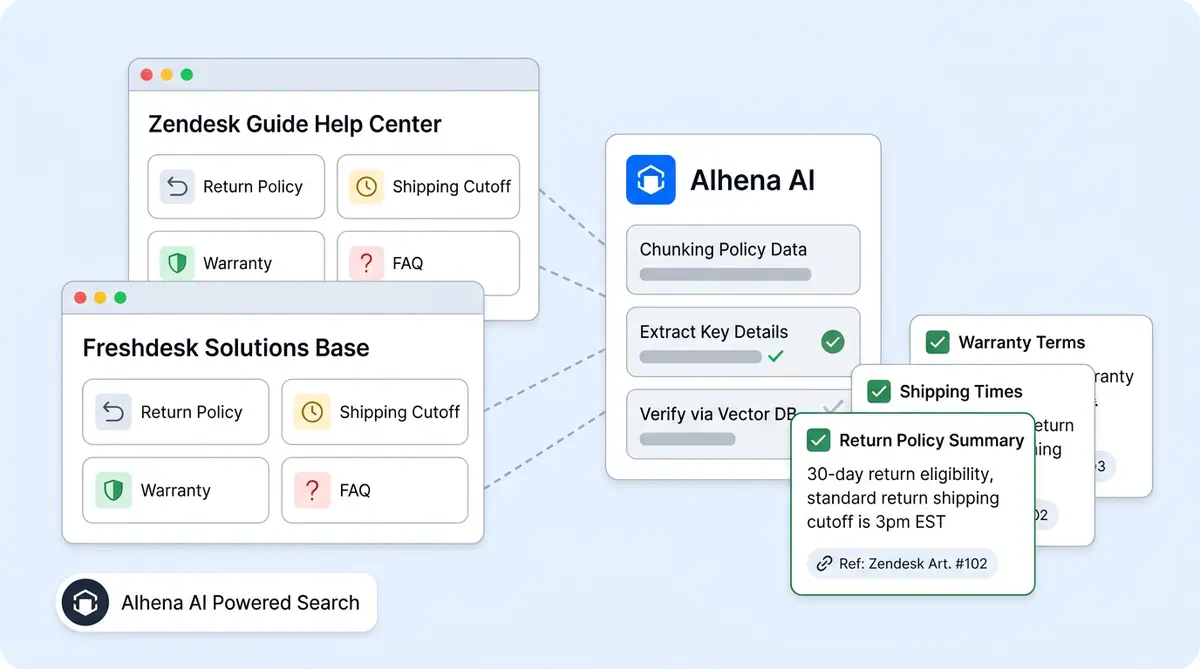
Instead of copying articles into another AI knowledge base, you can connect your Zendesk Help Center or Freshdesk Solutions portal directly to Alhena. The platform automatically reads published help center articles, transforms them into searchable AI training data, and uses that information to answer customer questions across chat, email, Slack, Instagram, WhatsApp, and voice.
In this guide, you'll learn how Zendesk AI knowledge base training works, how Freshdesk knowledge base integration works, what content Alhena indexes, and how e-commerce brands use their existing customer support documentation to power AI-driven sales and support experiences.
Quick Summary
- Connect your Zendesk Help Center or Freshdesk knowledge base directly to Alhena.
- Turn existing support articles into AI training data.
- Eliminate manual knowledge base duplication.
- Keep AI responses aligned with published support documentation.
- Combine help centre knowledge with e-commerce product data.
- Deploy AI-powered support across web chat, email, WhatsApp, Instagram, Slack, and voice.
Why Your Zendesk or Freshdesk Knowledge Base Is Already AI Training Data
Most e-commerce customer service teams don't realize they already have a training dataset.
If your agents use Zendesk Guide or the Freshdesk Solutions portal, you've likely spent years building a structured collection of customer knowledge that an AI assistant can learn from.
Think about what's already inside your help centre:
- Return and exchange policies
- Shipping timelines and delivery information
- Warranty claim procedures
- Product troubleshooting guides
- Billing and subscription FAQs
- Product care instructions
- Account setup walkthroughs
This content is already accurate, reviewed, and maintained by the people who know your customers best.
The challenge isn't creating content. The challenge is that many AI chatbot platforms force teams to manually copy articles into a separate knowledge base, reformat them, organize them, and continuously update them whenever changes occur.
That approach doesn't scale.
It creates inconsistencies between your help centre and your AI chatbot. Over time, the chatbot starts giving answers that don't match your official documentation.
Alhena removes that problem by treating your existing help centre as the source of truth.
How to Train AI Using Your Zendesk Help Center
Connecting your Zendesk Help Center to Alhena takes a few minutes. In the AI Knowledge section of your dashboard, you add an external source and select "Zendesk Articles". Then you provide your Zendesk subdomain (or full domain) and choose the locale you want to pull from.
If you've already connected the Zendesk integration for ticket sync, Alhena can reuse that same connection to access internal Help Center articles too. That means both public-facing and internal-only content becomes available as training material, if you choose to enable it. The connection is read-only, so your security posture doesn't change.
What Happens When Alhena Trains on Zendesk Articles
Once the source is saved, Alhena includes it in your next training run (manual or scheduled). Here's what happens behind the scenes:
- Alhena connects to your Zendesk Help Center and pulls all published articles for your chosen locale.
- Draft and outdated articles are automatically skipped.
- Each article's title, body, section headers, tables, and links are extracted.
- The content is processed and indexed so the AI can search it during live conversations.
When a customer asks a question, the AI Shopping Assistant or Support Concierge searches your articles and pulls the most relevant passages to form its answer. The AI doesn't guess or generalize. It responds with the same information your help center publishes.
What Content Does Alhena Extract from Zendesk Articles?
Alhena reads everything that matters from a Zendesk article: the title, full body, section headers, tables, inline links, and any labels or tags attached. Images are noted for context, but the text is what powers the AI's responses.
If your Help Center has 50 articles, Alhena processes all 50. If it has 2,000, it handles every one. There's no practical limit on article count.
How to Train AI Using Your Freshdesk Knowledge Base
The Freshdesk setup follows a similar path but works through a different connection. Freshdesk organizes its knowledge base into categories, folders, and articles through its built-in knowledge base portal.
In the AI Knowledge section, you add a source, select "Freshdesk Articles", and provide your Freshdesk subdomain and login details. That's all Alhena needs to start reading your KB.
How Alhena Processes Freshdesk Articles
When a training run starts, Alhena works through Freshdesk KB structure systematically:
- All solution categories in your portal are identified.
- Within each category, every folder is listed.
- Every article in every folder is read and its content extracted.
- The content is processed and indexed, just like Zendesk articles.
The result is the same: your Freshdesk KB becomes the source of truth for AI responses across every channel your customers use.
Zendesk Ticket Sync vs Knowledge Base Training
A common question: "Doesn't Alhena already connect to Zendesk and Freshdesk?" Yes, but for a different purpose. For a deeper look at this capability, see our guide on <a href="https://alhena.ai/blog/train-ai-from-helpdesk-tickets/">train your AI from resolved helpdesk tickets</a>.
Ticket sync connects to your live support workflows. It lets the AI create tickets, update fields, route conversations to human agents, and pull order data into replies. That's operational.
KB training connects to your support documentation. It turns your help center articles into the AI's knowledge layer. Your published docs become the source of truth for answers.
Most brands use both at the same time. Ticket sync handles workflows, KB training handles knowledge. They solve different problems and complement each other well.
For a closer look at how all training sources are managed together, the Training Monitor guide covers the full knowledge management workflow.
What Zendesk AI and Freshdesk Freddy Can't Do With Your KB
Zendesk's native AI and Freshdesk's Freddy both use your knowledge base. So why bring Alhena into the picture?
It comes down to what they do with the content and where they can deploy it.
Zendesk AI uses Help Center articles to power its bot within Zendesk messaging. It's good at deflecting tickets by surfacing article links. But it doesn't use that knowledge to recommend products, build carts, or drive sales. And it only works inside Zendesk's own channels. When a user reaches out on Instagram or WhatsApp, Zendesk's bot isn't there.
Freshdesk Freddy pulls from your Solutions portal to answer questions inside Freshdesk. Same story: it deflects tickets but can't connect KB content to product catalogs, pricing, or checkout flows. It doesn't work on social channels or voice.
Alhena uses the same KB content but deploys it everywhere. Your help centre articles ground the AI across web chat, email, Slack, Instagram DMs, WhatsApp, and voice. And because Alhena also connects to your product catalog (through Shopify, WooCommerce, Magento, or Salesforce Commerce Cloud), it can combine policy knowledge with product data. A user asking about your return policy gets the answer from your Zendesk article and a relevant product recommendation in the same conversation.
That's what makes the difference. Native helpdesk AI treats your KB as a deflection tool. Alhena treats it as a foundation for both sales and support.
Ecommerce AI Knowledge Base Use Cases
The value grows with the size of your help centre and the complexity of your product line. Here are the patterns we see across different industries.
Beauty and Skincare
Brands in this space maintain detailed articles about ingredient safety, application instructions, skin type matching, and return policies for opened products. When that content is connected to the AI along with product catalog data, the AI can guide users to the right moisturizer while explaining the return window for sensitive skin reactions. Tatcha saw a 3x conversion rate and 38% higher AOV after deploying this kind of grounded, knowledge-backed AI. (Full case study)
Home and Garden
Furniture and garden brands often have extensive care guides, assembly instructions, and warranty terms in their help centres. When someone asks, "Can I leave this outdoor sofa in the rain?" the AI pulls the exact care article rather than inventing an answer. Crocus, a gardening brand, achieved an 86% deflection rate with 84% customer satisfaction and a noticeably better customer experience using this approach. (Full case study)
Fashion and Apparel
Size guides, fabric care instructions, exchange policies, and international shipping FAQs are standard help center content for fashion brands. The AI reads these docs and uses them alongside the product catalog to handle queries like "Will this shrink in the wash?" or "Can I exchange for a different size after 30 days?" with the exact policy your team wrote.
Travel and Hospitality
Travel brands maintain complex cancellation policies, rebooking procedures, and destination guides. Manawa cut agent workload by 43% and dropped response times from 40 minutes to under 1 minute by letting the AI pull answers from their existing documentation. (Full case study)
How to Keep AI Knowledge Fresh and Accurate
Your team updates the help centre articles regularly. New shipping carriers, revised return windows, and seasonal policy changes. The AI needs to keep up.
Alhena handles this through scheduled training runs. You pick the frequency (daily, weekly, or on-demand), and the system re-reads your Zendesk or Freshdesk KB on that schedule. Updated articles are reprocessed. New articles are added. Deleted articles are removed.
You don't need to flag which articles changed. The system pulls the current state of your KB every run. If you want more control, the knowledge freshness guide covers the details.
This is a big improvement over manual knowledge management. Instead of maintaining two copies of the same information (one in your help center, one in your chatbot), you maintain one. Your team keeps writing and updating articles where they always have. The AI keeps learning from them automatically.
How to Connect Zendesk or Freshdesk to Alhena
Setting up Zendesk or Freshdesk KB training takes about 10 minutes. Here's the path:
- Connect your helpdesk if you haven't already. For Zendesk, connect through the integrations panel. For Freshdesk, provide your subdomain and login details.
- Add a KB training source. Go to AI Knowledge in your dashboard. Add a new source and select "Zendesk Articles" or "Freshdesk Articles".
- Configure the source. For Zendesk, enter your subdomain and locale. For Freshdesk, enter your subdomain and login details.
- Run a training cycle. Trigger a manual run or wait for the next scheduled one. The system reads your KB and indexes everything.
- Test in Playground. Use the Alhena Playground to ask questions that should be answered by your help centre content. Check that the AI cites the right articles.
No dev resources required. No CSV exports. No copy-paste. Your existing help centre becomes AI training data in one connection. The result is an AI-powered knowledge base that works across every channel.
If you already use other sources like Google Drive docs or Confluence pages, the Zendesk or Freshdesk source stacks alongside them. All sources merge into one unified knowledge layer that the AI draws from during every interaction.
Why Trust Alhena for AI Knowledge Base Training?
Alhena is purpose-built for e-commerce brands that need customer support automation and revenue generation from the same AI system. Unlike traditional helpdesk bots that focus primarily on ticket deflection, Alhena combines customer support documentation, product catalog data, and conversational commerce capabilities into a unified AI experience.
Brands use Alhena to answer customer questions, recommend products, recover abandoned carts, and automate support across multiple channels while keeping responses grounded in verified company knowledge.
Key Takeaways
- Alhena connects directly to your Zendesk Help Center or Freshdesk knowledge base and reads articles as AI training data.
- For Zendesk, you provide a subdomain and locale. For Freshdesk, a subdomain and login details. Setup takes minutes.
- Every article is processed and indexed for real-time retrieval during customer conversations.
- KB training is different from ticket sync. One provides knowledge, the other handles workflows. Both work together.
- Unlike native Zendesk AI or Freshdesk Freddy, Alhena uses your KB content across all channels and combines it with product data for sales-ready conversations.
- Scheduled training runs keep the AI current as your team updates articles. No manual re-entry needed.
- Brands like Tatcha, Crocus, and Manawa have seen measurable results using this grounded, knowledge-backed approach.
Ready to turn your help centre into an AI knowledge base that sells and supports? Book a demo with Alhena AI or start free with 25 conversations.

Frequently Asked Questions
Can Alhena train from my Zendesk Help Center articles without rebuilding the knowledge base?
Yes. Alhena connects directly to your Zendesk Help Center and reads your published articles as AI training data. You don't need to export, reformat, or copy anything into separate knowledge base software. The AI agent uses your existing help center content to power self service answers across chat, email, and voice.
How does Alhena read Freshdesk knowledge base articles?
You provide your Freshdesk subdomain and login details, and Alhena reads all categories, folders, and articles automatically. The AI agent processes each article and makes it searchable, so it can answer customer queries accurately during live conversations. Whether you have fifty articles or two thousand, the process runs without manual work.
What's the difference between KB training and helpdesk ticket sync in Alhena?
Ticket sync connects Alhena to your live support workflows: creating support tickets, updating fields, and routing conversations. KB training connects Alhena to your support documentation so the AI agent can automate answers from your verified articles. Most ecommerce brands use both together. Ticket sync automates operations, and KB training gives the AI the power knowledge it needs to answer accurately from your verified docs.
How often does Alhena refresh my Zendesk or Freshdesk knowledge base?
You control the frequency. Alhena supports daily, weekly, or on-demand training runs. On every run, the AI system pulls the current state of your KB. Updated articles are reprocessed, new ones are added, and outdated ones are removed. Your team keeps editing articles in the same place, and the generative AI stays accurate and current automatically.
Does Alhena use my Zendesk knowledge base differently than Zendesk's native AI?
Yes. Zendesk's built-in AI uses your Help Center articles for self service deflection within Zendesk messaging. Alhena uses the same content across web chat, email, Slack, Instagram DMs, WhatsApp, and voice. It also combines KB knowledge with your product catalog to handle conversational sales, not just support. The AI agent can answer a policy query and recommend a product in the same chat, meeting the customer need in one go.
Can I use Zendesk or Freshdesk KB training alongside other training sources?
Absolutely. Alhena lets you centralize all your training sources into one knowledge base system. Think of it as a knowledge management system. You can combine Zendesk or Freshdesk KB articles with Google Drive files, Confluence pages, Document360 docs, uploaded PDFs, website content, and your ecommerce product catalog. The AI retrieves from every source during a single conversation, regardless of where the original doc lives.
How long does it take to set up Zendesk or Freshdesk KB training in Alhena?
About 10 minutes. The interface walks you through it: enter your Zendesk subdomain and locale (or reuse your existing connection), or enter your Freshdesk subdomain and login details. Then trigger a training run. The AI system handles everything from there. No developer resources needed. Most brands finish onboarding the same day.
What types of content does Alhena extract from Zendesk and Freshdesk articles?
Alhena reads the article title, full body text, section headers, tables, links, and any labels or tags. For Zendesk, it respects locale settings to pull articles in the most relevant language. For Freshdesk, it follows the category and folder structure. Both internal and public-facing articles are processed, and the AI uses semantic search to find the right content during conversations.
Will my AI hallucinate less if I train it from my help center?
Significantly. Alhena grounds every answer in your actual documentation rather than letting the AI generate responses from general knowledge. When a customer asks about your return policy, the system retrieves the specific article from your Zendesk or Freshdesk KB and uses it as context. Brands like Crocus achieved 86% deflection with 84% customer satisfaction using this approach.
How does Alhena compare to knowledge base software like Document360?
Document360 and similar knowledge base software are built for organizing and publishing help articles. They do that well. But they don't offer AI search that generates answers from your docs across channels like chat, email, or WhatsApp. Alhena works differently. It reads your existing KB, whether it lives in Zendesk, Freshdesk, or Document360, and uses AI powered natural language processing to turn that content into real answers. You keep your knowledge base software for publishing. Alhena uses it as a source of truth for AI powered customer service.
Can Alhena use internal docs and workspace content to train the AI?
Yes. Beyond Zendesk and Freshdesk, Alhena can read internal documentation from Confluence, Google Drive, and shared workspace tools. It uses machine learning to match customer queries to the most relevant internal content. This is useful when you use AI to reference internal policies, product specs, or team playbooks that aren't published in your public help center. You can unify everything into one searchable knowledge layer.