Modern ecommerce brands already have the answers their customers need. The problem is that those answers often live inside internal documentation that customers can’t access.
Many brands use Atlassian Confluence as their central knowledge base for product documentation, shipping policies, warranty information, support workflows, compliance requirements, and operational procedures. But while support teams rely on that information every day, customer-facing chatbots often operate without it.
A modern Confluence AI integration solves this gap by connecting AI customer support systems directly to trusted documentation sources. Instead of manually copying content into FAQs, spreadsheets, or chatbot training documents, ecommerce teams can use their existing Confluence knowledge base to power AI-powered customer service, shopping assistance, and support automation.
In this guide, we'll explore how Alhena AI connects with Confluence, how ecommerce brands use Confluence documentation to improve customer experiences, and how to transform internal knowledge into customer-facing AI support.
Your Best Product Knowledge Is Stuck in a Wiki
Somewhere inside your company's Confluence workspace, there's a detailed page explaining exactly how your sizing works, which materials require special care, what your warranty covers, and when holiday shipping deadlines begin.
Your customer support team references it every day. Your AI chatbot has never seen it.
This is one of the most common challenges ecommerce teams face when deploying AI customer support solutions.
Product teams, merchandising teams, operations teams, and customer service leaders spend years building comprehensive Confluence documentation. Unfortunately, that valuable knowledge often remains trapped behind internal systems while customers receive generic answers from chatbots that lack access to verified information.
The traditional solution usually involves:
- Copying content into FAQ documents
- Exporting spreadsheets for chatbot training
- Manually updating support knowledge bases
- Recreating documentation across multiple platforms
The problem is that documentation changes constantly. A policy update, shipping change, or product launch can immediately make copied content outdated.
That's why leading ecommerce brands are moving toward connected knowledge base AI systems that learn directly from source documentation instead of relying on manual duplication.
Why Do Ecommerce Teams Use Confluence as a Knowledge Base?
Not every customer question can be answered through a product description page or a help center article.
Most ecommerce companies accumulate a layer of operational knowledge that doesn't fit neatly anywhere else.
Confluence often becomes the place where that information lives.
Typical ecommerce Confluence documentation includes:
Product Care and Usage Guides
Detailed instructions that go beyond what appears on product pages.
Examples include:
- Fabric-specific washing instructions
- Supplement storage requirements
- Skincare application routines
- Fragrance layering recommendations
- Product maintenance procedures
Shipping and Fulfillment Documentation
Rules that vary by carrier, geography, season, or product category.
Examples include:
- International shipping restrictions
- Hazardous materials guidelines
- Cold-chain logistics requirements
- Holiday shipping cutoffs
- Regional delivery limitations
Return and Warranty Policies
Many customer service questions involve edge cases that aren't covered by public-facing policy pages.
Examples include:
- Final sale returns
- Damaged item claims
- Warranty exceptions
- Exchange eligibility
- Subscription cancellations
Customer Support Playbooks
Support teams often document resolution processes inside Confluence.
Examples include:
- Lost package workflows
- Chargeback procedures
- Damage claims
- Subscription disputes
- Escalation processes
Compliance and Regulatory Information
Particularly important for:
- Beauty brands
- Supplement companies
- Health products
- Children's products
- Electronics manufacturers
This operational knowledge may be too detailed for your storefront, but it's often exactly what customers need answers to.
How Does the Alhena Confluence AI Integration Work?
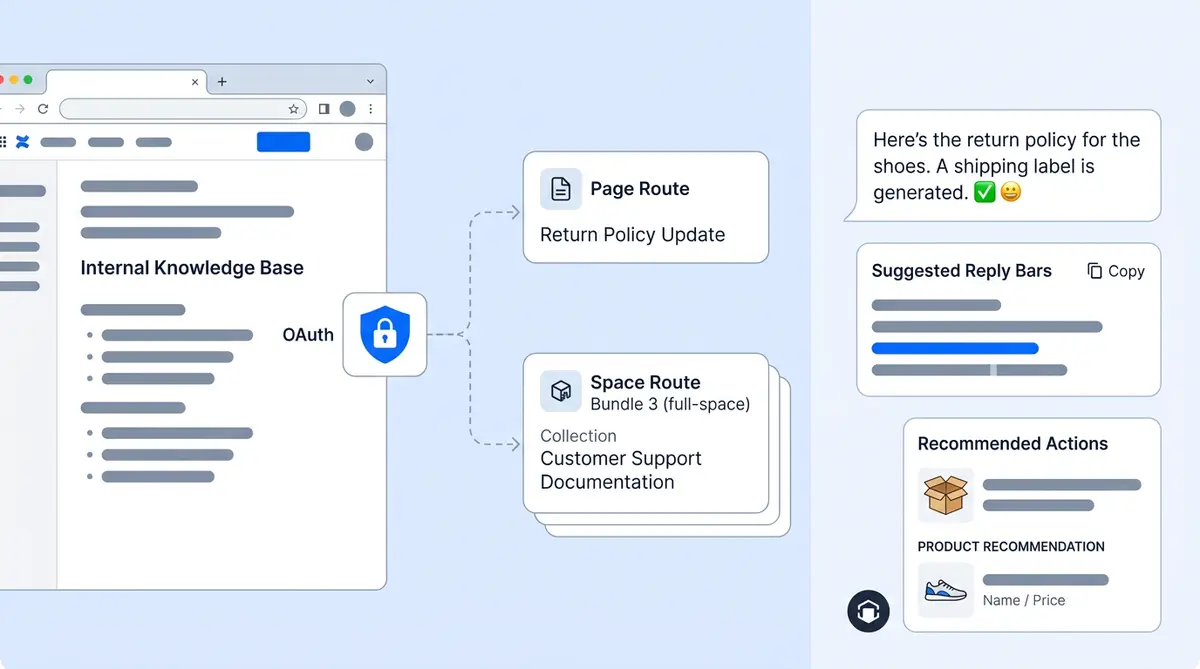
Alhena connects directly to your Confluence documentation through a secure OAuth connection.
The setup happens inside the Alhena dashboard, where users can add Confluence URLs as knowledge sources.
The process is simple:
- Add your Confluence page or space URL
- Connect through Atlassian OAuth
- Authorize read-only access
- Begin training
No API keys. No custom development. No CSV exports. No manual content migration.
The connection remains active between sessions, making future updates simple and efficient.
Read-only by design
The integration is read-only. Alhena can't write back, edit pages, create pages, or touch anything in your wiki. The connected account needs permission to view the pages you're training on, which means your existing Confluence access controls stay in effect. Internal-only spaces stay internal unless you specifically add them.
Single Pages vs. Full Spaces: You Pick What Gets Trained
There are two crawl modes, and the choice matters for e-commerce brands that mix public-facing product docs with internal operational content in the same Confluence instance.
Single page crawl
Add a specific page URL, and Alhena trains on just that page. This is useful when you want your AI to know your returns policy but not your internal escalation matrix. Or when you want it to learn your sizing guide, but not your wholesale pricing sheet.
Full space crawl
Add a space URL and select Multiple Page mode. Alhena pulls every page in the space and processes them individually. If you have a clean "Customer-Facing Product Docs" space in Confluence, one URL seeds your entire product knowledge into the AI.
The key detail
A page URL only crawls that page. It doesn't automatically pull in child pages. If you want an entire space, use the space URL. And you can blacklist specific pages you want excluded from training. For e-commerce brands, this is the safety valve: you can train on your product knowledge space while keeping internal margin data or vendor pricing out of your customer-facing AI.
What Happens to Your Confluence Content
Confluence stores content in its own markup format packed with macros, formatting, and layout elements. That raw format isn't great for AI retrieval. So before any of it reaches your chatbot, it goes through a few processing steps.
Here's what happens after you add a URL:
- Content fetch. Alhena pulls the page through the Atlassian API.
- Rendering. The raw Confluence format gets converted into the rendered HTML version, the one that looks like what you see when you read the page normally. This preserves tables, formatted lists, and structured content that matters for product information.
- Cleanup and conversion. The rendered HTML is cleaned, normalized, and converted to Markdown. This strips presentation noise while keeping the information structure: headings, lists, tables, bold callouts.
- Chunking. The Markdown gets split into smaller sections sized for search. NVIDIA research shows chunk size directly affects answer accuracy, so this step matters more than it sounds.
- Embedding and storage. Each section gets indexed (converted into a format the AI can search quickly) and stored. The original Confluence page URL is saved alongside each section, so every answer your AI gives can point back to the exact wiki page it came from.
One thing to know: Alhena doesn't live-query Confluence every time a customer asks a question. It answers from the trained knowledge base. That makes answers fast, but it means you need to trigger a recrawl when your wiki content changes. Most e-commerce teams do this weekly or after major content updates like seasonal policy changes.
What Confluence's Built-In AI Can't Do for Your Customers
Atlassian has its own AI layer called Rovo, and it's included in paid Confluence Cloud plans. Rovo does internal search and summarization well. But it's built for your employees, not your customers. And for e-commerce brands, that's a gap that matters.
Rovo faces inward. Alhena faces your shoppers.
Alhena's Support Concierge takes the same Confluence knowledge and serves it to customers across your website chat, email, Instagram DMs, WhatsApp, and voice. Same source material, but deployed where your buyers actually are.
Alhena sells. Rovo searches.
The Product Expert Agent uses your trained knowledge to recommend products, populate carts, and pre-fill checkout. The Order Management Agent handles returns, cancellations, and order tracking. Rovo can't do any of this because it has no connection to your Shopify, WooCommerce, or Salesforce Commerce Cloud store.
Answers grounded in your verified data
Alhena only answers from the content you've trained it on, including your Confluence pages. If the AI doesn't have a confident match, it says so and routes to a human agent. It won't guess or fill in gaps with made-up information. That principle of grounded answers is core to how Alhena works. Tatcha saw a 3x conversion rate and 82% chat deflection with Alhena across their full support and shopping experience.
How E-Commerce Brands Actually Use This
The Confluence integration works differently depending on what kind of brand you run and what knowledge lives in your wiki. Here are the patterns that show up most.
Beauty and skincare: ingredient and usage guides
Beauty brands often maintain Confluence pages covering ingredient safety, product interactions ("can I use retinol with vitamin C?"), application techniques, and regulatory claims. Training Alhena on these pages means your chatbot can answer ingredient questions accurately instead of deflecting to a generic "consult your dermatologist" response.
Fashion and apparel: sizing, care, and fit
Apparel brands store detailed sizing matrices, fabric care instructions, and fit notes in Confluence because PDPs don't have room for all of it. When a customer asks, "Will this shrink?" or "What's the inseam on a size 32 tall?", the AI pulls from the same reference your support agents use.
Home and furniture: assembly, dimensions, compatibility
Home brands deal with questions about weight limits, wall-mounting hardware, and which couch legs fit which frames. That information usually lives in operational docs, not product pages. Puffy hit 63% automated inquiry resolution and 90% CSAT with Alhena. For brands dealing with detailed specs like these, Confluence is one place that operational knowledge tends to live.
Any brand: returns, shipping, and warranty edge cases
Every e-commerce brand has return policy exceptions, seasonal shipping cutoffs, and warranty fine print that changes. When those policies live in Confluence and feed into Alhena, your AI gives customers the current answer without someone needing to manually update a separate FAQ page. Manawa cut response times from 40 minutes to 1 minute and automated 80% of inquiries after bringing their documentation into Alhena.
Getting Started
Here's the setup process if you're running an e-commerce operation with Confluence in the mix.
1. Decide what should be customer-facing
Walk through your Confluence spaces and separate what customers should know from what's purely internal. Product documentation, care guides, shipping policies, return rules? Train on those. Vendor margins, internal escalation procedures, team meeting notes? Leave those out.
2. Connect Confluence
In your Alhena dashboard, add your first Confluence URL in the knowledge settings. Complete the OAuth authorization. Takes about two minutes.
3. Set your crawl scope
Use space URLs for broad training and page URLs for targeted additions. Mix both across different spaces. Blacklist anything you want excluded.
4. Test before deploying
Use Alhena's Playground to ask questions your customers would ask. Check that the answers trace back to the right Confluence pages. Confirm that internal-only content isn't leaking into responses.
5. Deploy across your channels
Push your AI live on your store's web chat, email, or social channels. Use Alhena's Training Monitor to track when content was last crawled, and trigger recrawls after wiki updates.
Keeping it current
Confluence edits don't flow into Alhena automatically. When your team updates product info or seasonal policies, trigger a recrawl. Most brands do this weekly or right after big content changes. The FAQ Conflict Detection feature catches contradictions if older trained content conflicts with new updates.
Key Takeaways
- Confluence contains valuable ecommerce knowledge that customers frequently need, but traditional chatbots cannot access.
- Alhena connects directly to Confluence through secure OAuth authentication.
- Teams can train on individual pages or entire spaces depending on their needs.
- Documentation is processed into AI-searchable knowledge while maintaining source attribution.
- Customer-facing AI assistants benefit from verified, up-to-date information.
- Ecommerce brands can deploy AI support faster without rebuilding documentation from scratch.
- Existing Confluence content becomes a powerful foundation for AI customer support and shopping assistance.
Final Thoughts
A Confluence AI integration allows ecommerce brands to unlock customer support knowledge that already exists inside their organization.
Instead of recreating documentation across multiple systems, businesses can use existing Confluence knowledge bases to power AI customer support, ecommerce AI chatbots, shopping assistants, and automated customer experiences.
As AI search, conversational commerce, and customer expectations continue to evolve, brands that connect trusted documentation with customer-facing AI will be better positioned to deliver accurate, scalable, and personalized support.
The knowledge already exists. The opportunity is making it accessible where customers need it most.

Frequently Asked Questions
How does Alhena's Confluence integration work?
Alhena connects to Confluence through Atlassian OAuth with read-only access. You add a Confluence page or space URL in Alhena's knowledge settings, authorize the connection, and Alhena crawls the content. It converts Confluence storage format into rendered HTML, then Markdown, chunks it, generates searchable indexes, and stores it so the AI can answer customer questions from that content. The whole setup takes about two minutes.
Can I train Alhena on a single Confluence page instead of an entire space?
Yes. Alhena supports two crawl modes. You can add a single page URL to train on just that page, or add a space URL with Multiple Page mode to crawl every page in the space. Adding a page URL does not automatically include child pages. This gives you precise control over what enters your AI knowledge base.
Does Alhena sync with Confluence in real time?
No, Alhena doesn't live-sync with Confluence. It answers from a trained, vectorized knowledge base built during the crawl. When your team updates Confluence pages, you need to run a recrawl to pick up those changes. Teams that update content often typically schedule recrawls every few days or weekly to stay current.
How is Alhena different from Atlassian Rovo?
Rovo is Atlassian's native AI for internal search and team-facing chat inside Confluence. Alhena is a customer-facing AI that works across web chat, email, WhatsApp, Instagram DMs, and voice. Alhena also handles ecommerce actions like product recommendations, cart population, and order management. Rovo can't do any of that because it's not connected to your commerce platform.
Is my Confluence data secure when connected to Alhena?
Yes. The integration uses Atlassian OAuth, so you never share passwords with Alhena. The connection is read-only: Alhena fetches content for training but cannot write, edit, or delete Confluence pages. Access is scoped to the Confluence sites your connected Atlassian account can reach, and you can blacklist specific pages you want excluded.
What types of Confluence content work best for AI training?
Support playbooks, product documentation, troubleshooting guides, return and warranty policies, onboarding materials, and FAQ-style pages all work well. Content with clear headings, structured lists, and tables converts cleanly. Avoid training on pages with heavy Confluence macros or dynamically generated content, as these may fall back to raw storage format during conversion.
Can I combine Confluence with other knowledge sources in Alhena?
Absolutely. Confluence is one of many knowledge sources Alhena supports. You can combine it with website docs, product catalogs, PDF uploads, help center articles, and helpdesk ticket history. All sources feed into a single AI knowledge base, giving your chatbot a complete picture of your business.
How long does it take to set up Alhena with Confluence?
The technical setup takes minutes: connect OAuth, add your URLs, and run the crawl. Alhena deploys fully in under 48 hours with no developer resources needed. The biggest time investment is auditing your Confluence content to decide what should feed the AI and what should stay internal-only.