What Alhena Playground Is (and Why It Exists)
Every AI agent ships with a gap between "configured" and "ready". You've uploaded your knowledge base, written your guidelines, tuned the tone, and set up handoff rules. But you haven't actually talked to it as a customer would. That's the gap Playground closes.
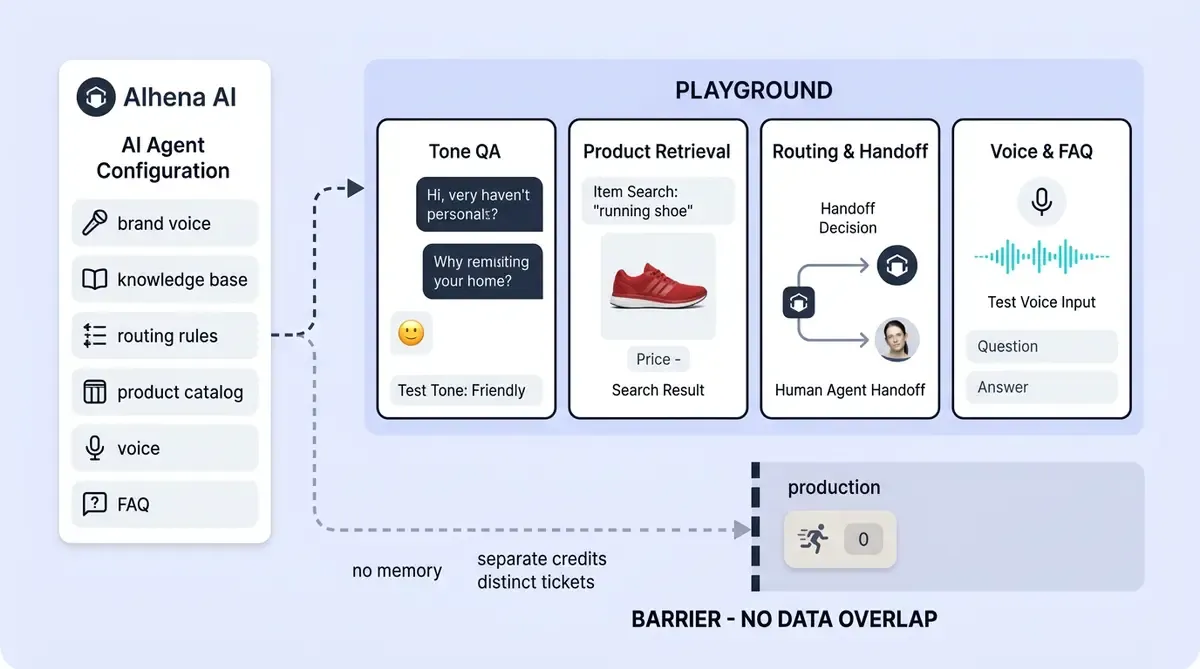
Alhena Playground is a built-in sandbox where your team can chat with your AI agent exactly as a shopper would, without any risk of a real customer seeing a bad answer. It uses your actual Alhena configuration: your knowledge base, your custom agents, your routing behavior, your product data, your agent instructions, your brand voice. Nothing is simulated. The only difference is that every Playground conversation is tagged PLAYGROUND and kept completely separate from production traffic.
You can access it from the Alhena dashboard or directly at alhena.ai/playground/<your_company_key>. Teams also reach it from onboarding flows, the Playground integration card, Voice AI settings, and Product FAQ configuration screens.
The point is simple: test before your customers do. Not with a mock bot. With the real thing.
How Alhena Playground Works Under the Hood
Playground isn't a lightweight preview mode. When you open it, Alhena loads your full bot profile and widget configuration, including branding, bot name, chat UI settings, enabled features, voice availability, and environment settings. The chat interface and test automation models mirror what shoppers see on your site.
When you send a message, the system runs the same core pipeline that powers your live widget:
- A conversation ticket is created (or reused) for the tester's fingerprint.
- The ticket is created in BOT_ONLY / playground mode.
- The conversation is tagged with source category PLAYGROUND.
- The message is saved as a standard Alhena ticket message.
- The AI server receives the request and runs the full response generation pipeline across every configured model and AI model.
- The answer streams back into the Playground chat.
- The response is saved and can be inspected later, just like any other Alhena conversation.
This is what makes Playground useful for real AI chatbot testing. You're not testing a simplified version of your agent. You're testing the actual production AI behavior, including retrieval, ranking, guideline application, and response generation. If the agent would hallucinate on your live site, it'll hallucinate in Playground too. If it would route to a human, it'll route to a human here.
That 1:1 fidelity is the whole point. The Conversation Debugger works on Playground conversations too, so you can trace exactly which knowledge sources the agent used and why it chose a specific answer.
What Your Team Can Test in Playground
Playground is built for manual QA and test automation and automation testing of your configured agent. It's where CX managers, customer service leads, and implementation teams ask real customer-style questions and prompt the AI and perform evaluation of the answers for consistency. Here's what teams typically test:
Guideline and Tone Behavior
Did the agent apply the right return policy? Does it sound like your brand, not a generic chatbot? When a customer asks about a sale that ended yesterday, does the agent handle it gracefully, testing its understanding of time-sensitive promotions? Playground lets you verify that your guidelines are actually controlling the AI's behavior, not just sitting in a settings panel.
Custom Agent Routing
If you've configured Alhena's Product Expert Agent and Order Management Agent, Playground shows whether the query routes to the right one. Ask, "Where's my order?" and see if the order management agent picks it up. Ask, "Which moisturizer is best for dry skin?" and confirm through validation that the product expert handles it.
Knowledge Base Accuracy
After adding or updating content in your knowledge base, Playground is the fastest way to run retrieval validation without needing test automation tools. Prompt the AI with questions that should pull from the new content. If the agent misses it or retrieves the wrong article, you've caught a problem before any customer encounters it. For brands managing large catalogs, this is especially valuable after knowledge base updates.
Product Recommendations
Ask vague questions like "I need a gift for my mom" or specific ones like "Show me running shoes under $120 in size 10." Playground lets you see whether the AI surfaces the right products, in the right order, with accurate pricing and availability.
Edge Cases and Handoff Behavior
Type "I need to talk to a person" or "This is urgent; get me a manager." Does the human handoff trigger correctly? Playground is the safest place for automation of escalation path testing, including edge cases like profanity, repeated complaints, security-sensitive questions, or requests outside your product scope.
Multilingual Responses
Test how the agent handles different browser locales or questions in Spanish, French, German, or any of the 90+ languages Alhena supports. Playground reflects the same locale-detection and language-understanding behavior your live widget uses across all channels.
How Playground Stays Separate from Production
One of the most common concerns with AI chatbot testing in a live-connected environment is: won't my test conversations pollute real data? Alhena designed Playground with strict separation at every layer.
Tagging and Filtering
Every Playground message is tagged as PLAYGROUND. This tag flows through the entire system, so Playground traffic is filtered out of production analytics and metrics views automatically. Where needed across different channels, Playground is available as its own source filter for teams that want to review test metrics and conversations separately.
No Memory Pollution
This is a critical detail. Playground skips user memory extraction and memory usage entirely. In production, Alhena builds a profile of each customer across conversations to personalize future interactions. In Playground, none of that happens. You can ask fake questions, use fake customer details, or simulate unusual behavior or adversarial prompts without teaching the agent incorrect long-term context.
Separate Billing
Playground has its own credit pool. Testing doesn't consume your production conversation credits. The UI shows available Playground credits, and Alhena admins can add more when needed. Your live billing stays clean.
Distinct Tickets
Playground tickets are separate from normal website widget tickets. There's no risk of a test conversation appearing in your helpdesk queue or being routed to a live agent through Zendesk, Gorgias, or whichever helpdesk you use.
Voice AI and Product FAQ Testing
Playground isn't limited to text chat. Two specialized testing surfaces extend it to voice and product-level FAQs.
Voice AI Playground
Voice AI carries higher stakes than text. A garbled pronunciation, awkward pause, or wrong tone can kill trust in seconds. In Voice AI settings, teams can enable voice specifically for Playground and test full voice conversations before publishing voice to the live chat widget.
Voice Playground sessions use your company's voice configuration but are tagged as playground sessions. They stay fully separate from normal website voice behavior. This is especially useful during initial voice AI setup, when you're fine-tuning pronunciation, pacing, handoff triggers, and automation rules.
Product FAQ Playground
Product FAQs have their own test surface. In Product FAQ settings, you select a product page URL and preview the FAQs that would appear for that specific product. Clicking an FAQ tests the answer behavior through the FAQ path, tagged separately as FAQS_PLAYGROUND.
This lets teams validate that AI-generated Product FAQs are accurate and relevant before they show up on product detail pages where they directly influence purchase decisions.
Playground vs. Guideline Studio: When to Use Each
Alhena now has two pre-deployment testing tools for AI chatbot QA, and they serve different purposes. Using the wrong testing tools at the wrong time wastes effort. Using the right one catches problems.
Guideline Studio is for structured, side-by-side comparison of draft guidelines against your current live settings. You write test questions, the system runs the AI pipeline twice (once with current settings, once with proposed changes), and you compare the outputs before publishing. It's a controlled evaluation and comparison tool.
Playground is for interactive, open-ended manual testing of your currently configured agent. You chat freely, explore edge cases, run test automation scenarios, follow conversation threads and test automation instructions, and perform evaluation of consistency and the overall experience as a customer would.
Think of it this way:
- Guideline Studio answers: "Will this guideline change break anything?"
- Playground answers: "How does my agent actually feel about talking to me right now?"
In practice, teams use both. They test specific guideline changes in Guideline Studio, publish them, then open Playground for a broader evaluation, smoke test, and automation check of the full agent experience.
When to Use Playground (and When It's Not Enough)
Playground is most valuable during these moments in your AI agent lifecycle:
- Initial onboarding: Before your agent goes live for the first time, Playground is your final check that everything works.
- Knowledge base updates: After adding, editing, or removing content, run validation that the agent retrieves the right information.
- Guideline changes: After publishing new guidelines from Guideline Studio, do a quick Playground session to confirm real-conversation behavior.
- Custom agent configuration: When setting up or modifying routing between Product Expert and Order Management agents.
- Human handoff tuning: Test escalation triggers, fallback messages, and the handoff experience.
- Voice AI setup: Before enabling voice on your live site, test every conversation flow by voice first using automation or manual testing.
- Product recommendation QA: Especially useful before seasonal launches, new collection drops, any new project, or major catalog changes.
- Pre-launch review: Run your brand safety checklist against Playground conversations before go-live.
Where Playground Has Limits
Playground is highly representative of your AI's behavior, but it doesn't replicate every real-world website condition. It won't perfectly reproduce live page context, active cart state, checkout events, security configurations, SDK installation or development issues, third-party script interactions, or customer-specific browser behavior.
For final launch QA, pair Playground with a real staging site with automated testing of your widget installation, cart events, checkout tracking, and any external helpdesk routing. Playground catches AI behavior issues through manual and automation testing. A staging site catches integration issues. Together, they cover the full surface.
Your AI Agent's Test Drive
The biggest value of Alhena Playground is risk reduction. Instead of discovering bad answers, missing knowledge, awkward tone, or broken routing from real customers, your team catches those problems in a safe evaluation environment first.
It also shortens the feedback loop dramatically. A support lead can make a change, open Playground, ask realistic questions, and see evaluation results in seconds. No staging deploys, no development environment setup, no waiting for QA cycles, no automation scripts to maintain, no asking the development team to set up a test environment. The AI chatbot testing environment is already built into Alhena, connected to your live configuration, and ready whenever you are.
Brands like Tatcha (3x conversion rate, 11.4% of total site revenue from AI) and Puffy (63% automated inquiry resolution, 90% CSAT metrics) didn't achieve those numbers by guessing at AI quality. They tested, tuned, and verified security and consistency before customers experienced the agent.
Ready to test your AI agent before it goes live? Book a demo with Alhena AI or start for free with 25 conversations.
For teams that store SOPs and product guides in the cloud, you can also train your AI directly from Google Drive using Docs, Sheets, and Slides as knowledge sources.
Teams that keep product knowledge in Atlassian wikis can also train their AI chatbot directly from Confluence using Alhena's integration.
Frequently Asked Questions
What is Alhena Playground?
Alhena Playground is a sandbox where you can test your ai chatbot before real customers interact with it. It runs your actual configuration, including your conversational ai setup, knowledge base, custom ai agent routing, and the response pipeline built on large language models. Every interaction is tagged PLAYGROUND and kept separate from production, so you can run through real shopper scenarios without affecting live data, billing, or customer memory. The goal is to validate full behavior before launch.
Does Playground testing count against my conversation credits?
No. Playground has its own credit pool, so any tester on your team can run as many conversations as needed without consuming production credits. Playground is a manual test tool rather than a scripted framework, but teams can automate test workflows by having multiple members validate different areas in parallel. The dashboard shows each user their remaining Playground credits, and admins can add more when needed.
Can I test Voice AI in Playground before enabling it on my site?
Yes. Voice AI has its own Playground mode where you can check pronunciation, pacing, response time, and handoff behavior before publishing voice to your live widget. Think of it as a performance test for your voice user experience. You can verify that every scenario, from product questions to escalation requests, sounds natural before any customer hears it.
Will Playground conversations affect my customer data or analytics?
No. Playground skips user memory extraction entirely, so test interactions never build false profiles for real customers. Every conversation is filtered out of production analytics, keeping your accuracy metrics clean. Playground tickets are also distinct from live tickets, so no test interaction ever reaches your helpdesk queue or skews your reporting.
What is the difference between Playground and Guideline Studio?
They serve different roles in your test strategy. Guideline Studio lets you evaluate draft guideline changes by running structured test cases side by side against your current live settings, making it ideal for regression test cycles before publishing. Playground is for open-ended manual testing of your currently live chatbot. Teams typically automate test comparisons in Guideline Studio first, then use Playground for broader regression checks and smoke testing after changes go live.
How do I access Alhena Playground?
You can open Playground directly from the Alhena dashboard, from onboarding flows, or via a direct URL at alhena.ai/playground/your-company-key. No api configuration, prompt engineering, or custom setup is needed. Voice AI and Product FAQ settings also link to their own Playground modes. Each use case has a dedicated entry point, and the look and feel matches your live widget design.
Can Playground test product recommendations and FAQ accuracy?
Yes. You can ask product discovery questions and confirm that the retrieval pipeline returns the right results. Playground runs the same nlp, natural language processing, and natural language understanding stack as production, so it tests intent recognition, response generation, and product matching exactly as your live chatbot would handle them. Product FAQs also have a separate test surface tagged FAQS_PLAYGROUND.
Does Playground replicate everything about the live website experience?
Playground mirrors your AI behavior with high fidelity, including the full response pipeline, but it does not replicate live page context, cart state, checkout events, or cross platform browser quirks. It also will not catch fail states tied to third-party scripts or security test edge cases in your SDK installation. For complete usability test coverage across real-world scenarios, pair Playground with a staging site test of your widget, cart events, and helpdesk routing.
How does Playground compare to testing tools like Botium?
Botium is a standalone test automation framework designed for scripted regression test suites, nlu validation, and bot benchmarking across channels. Playground is different: it is a built-in test tool inside Alhena that runs your actual production chatbot config in a sandbox. You do not need to write scripts or connect an external framework. Playground is best for manual QA and exploratory testing, while a dedicated external framework would help you automate scripted regression runs at scale.
Does Playground test NLP accuracy and language understanding?
Yes. When you test ai responses in Playground, you are running the same nlp pipeline and natural language understanding engine that handles live customers. That means you can simulate edge cases like slang, typos, vague phrasing, or multilingual queries and see how the chatbot interprets them. Playground gives your team a direct way to evaluate accuracy and user experience across any input style your shoppers might use.