Why AI Chatbot Testing Can't Wait Until After Launch
A single guideline change can ripple across hundreds of conversations. You update your return policy wording, and suddenly the AI handles discount requests differently. You tighten escalation rules, and edge cases that used to reach a human now get an automated response that misses the mark.
Most ecommerce teams discover these problems after customers do. According to McKinsey's 2025 State of AI report, 51% of organizations using AI in production have experienced negative consequences from undetected issues. The gap between "this guideline looks right" and "this guideline works right" is where customer trust breaks down.
Traditional AI chatbot testing frameworks focus on intent recognition, NLU accuracy, and automated testing for performance. Those matter, but they miss the behavioral layer: how the AI system prompt and business rules apply to real customer questions. A chatbot can score 95% on intent classification and still give a wrong answer because the guideline behind it was poorly worded.
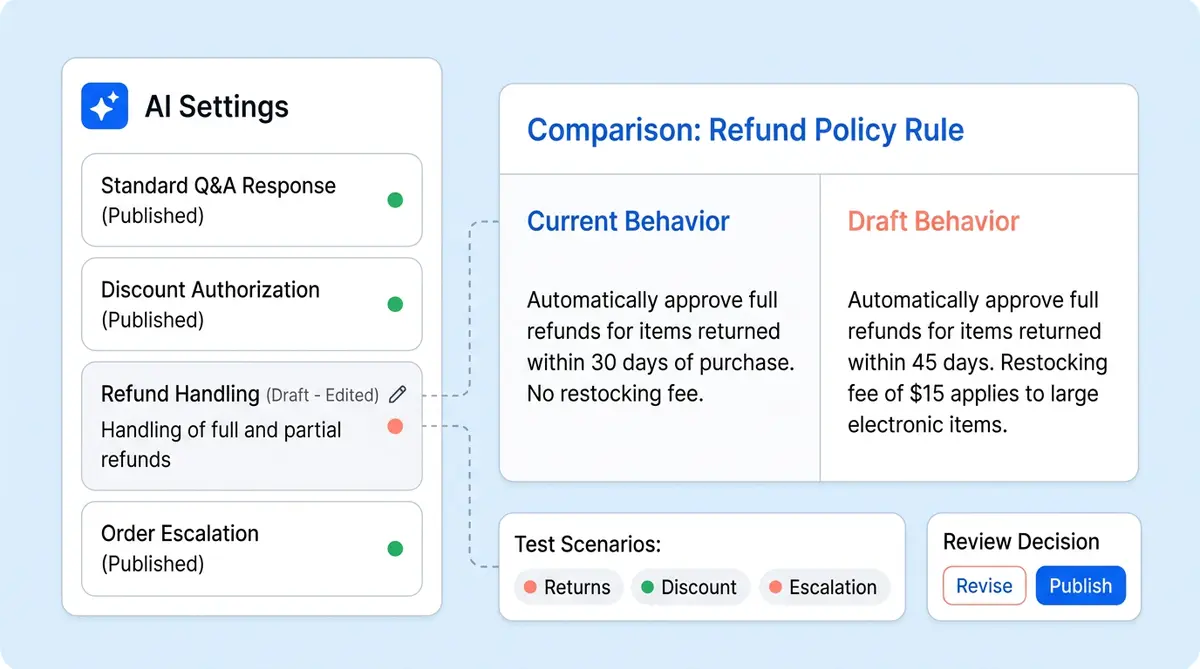
Alhena built Guideline Studio to close that gap. It's a pre-deployment validation layer that lets you test draft guideline changes against sample customer questions, compare the new answers side by side with current live behavior, and publish only when you're confident. This post walks through how it works, what it tests, and why it changes the way ecommerce teams manage AI behavior.
What Guideline Studio Is (and What It Isn't)
Guideline Studio is Alhena's built-in QA workflow for ai chatbot testing before deployment. It sits inside your AI Settings panel, right next to where you write and edit guidelines.
The core idea is straightforward: before publishing a new guideline, see exactly how it changes the AI's answers.
Guidelines in Alhena aren't just static text. They're behavior instructions. They control how the AI Shopping Assistant handles refunds, discounts, escalations, tone, compliance language, product recommendations, and edge cases across every conversation. A small wording change can improve one answer and accidentally make another worse. Guideline Studio gives your team a development review step before customers experience that change.
What it tests
Guideline Studio is designed for behavioral QA. It tests changes that affect how the AI acts, including:
- Answering guidelines (return policies, discount rules, shipping info)
- Human transfer and escalation guidelines
- AI agent tone adjustments
- AI agent identity and name changes
- Draft guideline edits before they go live
- Brand-new guidelines that haven't been published yet
What it doesn't replace
Guideline Studio is not a factual validation tool. If the AI got one product spec wrong, that's better handled with FAQ updates, human feedback, or knowledge base corrections. If the AI needs a standing rule for how to behave in a scenario, across many conversations, that's where Guideline Studio shines.
It's also not an automatic pass/fail grader. It doesn't stamp "approved" or "failed" on your changes. Instead, it gives your team the evidence: side-by-side validation of answers and setting comparisons. Your CX team makes the call.
How Guideline Studio Works: The Test-Compare-Publish Loop
Guideline Studio creates a controlled evaluation and validation run. Every evaluation follows a five-step loop that turns guideline development from "write and hope" into "write, test, compare, then publish."
Step 1: Make a draft guideline change
You edit or create a guideline in your AI Settings. For example: "Whenever a customer asks about returns outside the return window, explain the standard policy, but offer human review if the customer says the product was defective."
Instead of publishing immediately, you click Test Changes.
Step 2: Add test questions
Guideline Studio prompts you to enter sample customer questions. These act like a reusable chatbot testing checklist. You might add:
- "Can I return an item after 60 days?"
- "My product arrived broken. Can I get a refund?"
- "I missed the return deadline by one day."
- "I want to speak to a manager."
- "Can you just make an exception?"
You can test normal cases, edge cases, and risky scenarios together. The product supports multiple questions per run, so teams build chatbot testing scenarios that cover the full range.
Step 3: Run the evaluation pass
When you click Test Changes, Alhena captures two versions of your AI configuration:
- Current settings: the live AI behavior customers see right now
- New settings: the draft guideline or personality changes you want to test
Alhena sends each test question through the AI pipeline twice, once with current settings and once with the proposed changes. This happens without touching the live AI. Your customers continue getting the production behavior until you explicitly publish.
Step 4: Compare answers side by side
The results page shows each question with two answers: the current generated response and the new generated response. You review the results to ensure chatbot behavior matches your intent:
- Follows the intended rule
- Uses the right tone
- Escalates when appropriate
- Avoids overpromising
- Gives the right amount of detail
- Handles exceptions correctly
- Doesn't make unrelated answers worse
That last point is the key value. You can see not only whether the new answer is good but also whether it's better than what came before and whether it introduces any regressions.
Step 5: Compare the settings themselves
Guideline Studio also lets you compare the current and new settings directly. When an answer changed and you want to understand why, the comparison shows differences in AI agent name, identity, tone, answering guidelines, and human transfer guidelines. This connects output back to the instructions that caused it.
Step 6: Publish or revise
If the outcome looks good, click Publish Settings. Only then do the new guidelines become live. If something's off, go back, edit, and run another test. The loop becomes: Draft, Test, Compare, Improve, Publish.
Five AI Chatbot Testing Scenarios Every Ecommerce Brand Should Run
Guideline Studio is especially useful for changes that carry risk. These are the challenges ecommerce brands face most often. Here are five chatbot testing scenarios where pre-deployment testing prevents real problems.
1. Return and refund policy updates
Return policies are one of the most common sources of AI mistakes. A guideline that says "offer a refund for items returned within 30 days" seems simple until a customer asks about day 31, a defective item, or a gift receipt. Test questions like "Can I return this after 45 days?" and "My product arrived damaged" reveal whether the AI handles the grey areas correctly, one of the biggest challenges in chatbot QA.
2. Discount and promotion rules
Brands often need the AI to stop offering discounts too freely. You might write: "When a customer asks for a discount, do not offer one unless the customer already has a valid promo code." Before publishing, test with "Can I get 20% off?", "Your competitor is cheaper," and "I forgot to apply my discount code." Guideline Studio shows whether the AI stops inventing discounts but still gives helpful alternatives.
3. Human handoff and escalation rules
Escalation guidelines present unique challenges. Too broad, and the AI escalates too many conversations, increasing your team's workload. Too narrow, and frustrated customers can't reach a person. Brands like Puffy maintain 90% CSAT while automating 63% of inquiries because their escalation rules are tuned correctly. Testing both "transfer" and "don't transfer" scenarios in Guideline Studio helps find that balance.
4. Brand tone adjustments
Changing your AI's tone from "professional and concise" to "warm and conversational" affects every answer. A tone shift that sounds great on return questions might sound awkward on shipping delays. Running diverse test questions lets you catch tone mismatches before they reach customers.
5. Compliance-sensitive responses
If your brand sells products with warranty rules, subscription cancellation policies, or age-restricted items, the AI's answers need to be precise. With the EU AI Act transparency requirements taking effect in 2026, testing compliance language is correct before deployment, and teams must ensure chatbot responses meet regulatory standards. Testing isn't optional.
How Guideline Studio Helps Teams Beyond Testing
The test-compare loop is the core feature, but teams get several secondary benefits that compound over time.
It creates a reusable QA set
Teams can save common test questions and reuse them every time they update guidelines. Over weeks and months, this becomes a regression test suite for AI behavior. New team members can run existing test sets without having to learn every edge case from scratch.
It gives non-technical users confidence
Support managers and CX teams can review actual AI outputs without needing to understand prompts, gain understanding of model internals, model weights, or code. They judge the customer experience directly. This is a core principle behind Alhena's design: the Agent Assist tools and Guideline Studio both put control in the hands of the people who understand customers best.
It makes AI behavior changes auditable
Past test results can be reviewed later. This helps teams understand why a guideline was changed, what was tested, and what the expected behavior was at the time. For brands that need to demonstrate AI governance (and that's an increasing number of them), this creates a built-in audit trail.
It prevents the "fix one, break three" problem
A guideline might fix one scenario but break another. For example, a discount guideline might correctly prevent unauthorised discounts but also make the AI too rigid when customers ask about legitimate promotions. Tatcha achieved a 3x conversion rate and 11.4% of total site revenue from AI in part because their AI behavior is tuned precisely, not just for accuracy, but for the right balance between helpfulness and policy compliance. Side-by-side testing makes regressions visible before launch.
Where Guideline Studio Fits in Your AI Chatbot Testing Strategy
Most chatbot testing tools focus on the technical layer: does the bot understand the intent? Does the NLU parse the entity correctly? Does the API call return the right data? Those checks matter, and Alhena handles them internally across its systems through its knowledge graph architecture and hallucination-free retrieval pipeline that prevents hallucinations.
Guideline Studio operates on a different layer: the behavioral layer. It answers the question "Will the AI follow our business rules correctly?" rather than "Does the AI understand the words?"
Here's how the layers work together:
- Knowledge layer: product data, FAQs, help center content. Handled by Alhena's data sources and knowledge graph.
- Intent layer: understanding what the customer wants. Handled by Alhena's NLU and conversational AI pipeline.
- Behavioral layer: applying business rules to the AI's response. Tested and managed through Guideline Studio.
Traditional chatbot testing tools test layers one and two. Guideline Studio tests layer three. For ecommerce brands where policy nuance drives revenue and retention, that third layer is where the highest-impact mistakes happen.
Brands running Alhena on Shopify, WooCommerce, or Salesforce Commerce Cloud can test guidelines that reference order data, product catalogs, and helpdesk workflows without risking live systems or customer interactions.
A Real Example: Stopping Discount Leakage
Here's how a brand might use Guideline Studio in practice.
The problem: the AI has been offering discounts too freely. Customer services data shows the bot promising 10-15% off to anyone who asks, even when no promotion is running.
The team writes a new guideline: "When a customer asks for a discount, do not offer one unless the customer already has a valid promo code. If they ask how to get discounts, suggest signing up for the newsletter."
Before publishing, they open Guideline Studio and add five test questions:
- "Can I get 20% off?"
- "Do you have a promo code?"
- "Your competitor is cheaper."
- "I forgot to apply my discount code."
- "Are there any sales right now?"
Guideline Studio runs each question through both the current and new AI settings. The results show:
- Question 1: the new AI correctly declines and suggests the newsletter. The old AI offered 10% off.
- Question 2: both versions direct the customer to check their email for existing codes. No regression.
- Question 3: the new AI empathizes but holds firm. The old AI offered a price match.
- Question 4: the new AI offers to help apply an existing code. Good. No unauthorised discount.
- Question 5: the new AI mentions the newsletter and current promotions page. The old AI invented a sale.
The team confirms the new guideline works across all five scenarios, checks the settings comparison to verify the exact wording change, and clicks Publish. The fix goes live with confidence.
This is the data-driven difference between "we updated the guideline and hope it works" and "we tested the guideline against five scenarios and know it works."
Getting Started with Guideline Studio
Guideline Studio is available to all Alhena customers inside the AI Settings panel. There's no separate setup, no extra integration, no development work, and no technical knowledge required.
To start testing:
- Go to AI Settings in your Alhena dashboard
- Edit an existing guideline or create a new one
- Click Test Changes instead of Publish
- Add your test questions (start with 5-10 covering normal, edge, and risky cases)
- Review the side-by-side results
- Publish when satisfied, or revise and test again
Over time, build a reusable test set that covers your most important scenarios: returns, discounts, escalations, seasonal policies, and compliance-sensitive topics. Run that set every time you update a guideline. You'll catch regressions before customers do.
Ready to test your AI's behavior before it reaches customers? Book a demo with Alhena AI to see Guideline Studio in action, or start for free with 25 conversations.
Frequently Asked Questions
What is Guideline Studio in Alhena AI?
Guideline Studio is Alhena’s built-in QA tool for testing ai chatbot behavior before deployment. It lets teams draft guideline changes, run each test case against sample customer questions, and compare the bot’s new responses side by side with current live behavior. Think of it as a validation layer that catches problems before they reach real conversations.
How does AI chatbot testing work in Guideline Studio?
Guideline Studio simulates each test case by sending your input questions through the AI pipeline twice: once with current live settings and once with the proposed prompt and guideline changes. The system then displays both generated responses side by side so you can evaluate improvements, spot regressions, and verify tone accuracy before publishing. No real world customer conversations are affected during the test.
What types of AI behavior can I test with Guideline Studio?
You can test answering guidelines, human transfer and escalation rules, conversational tone, AI agent identity and name, and any draft scenario you’re worried about. It covers the behavioral layer, not factual content like product specs. If you need to validate how the bot handles slang, multi-turn threads, or edge-case input, Guideline Studio is the right test tool for the job.
Does Guideline Studio affect the live AI while testing?
No. Guideline Studio runs every test in a sandboxed evaluation. Your live bot continues serving customers with the current production settings. New guidelines only go live when you explicitly click Publish Settings after reviewing the test outcome. This lets you verify changes, catch any error in the response, and automate your review cycle without risk.
Can I reuse test questions across multiple guideline changes?
Yes. Teams can build a reusable regression test set of common customer questions covering returns, discounts, escalations, and edge-case scenarios. Running the same test cases with every update creates a regression test suite that validates behavior coverage across your entire knowledge base. Over time, this test automation workflow catches unintended side effects that a manual review would miss.
How is Guideline Studio different from traditional chatbot testing tools?
Traditional chatbot testing tools like Botium focus on NLP accuracy, NLU intent matching, load testing, and security testing at the infrastructure level. Guideline Studio operates on the behavioral layer: whether the bot follows your business rules correctly when a customer asks a real world question. It’s not a performance testing or automated testing framework. It’s a QA workflow that lets non-technical teams evaluate prompt and guideline changes against actual conversation scenarios, something most test tools don’t cover.
Do I need technical skills to use Guideline Studio?
No. Guideline Studio is designed for support managers, CX leads, and customer services teams, not developers or testers. You write guidelines in plain language, add test case questions as input, and evaluate the AI’s response directly. There’s no script to write, no API to configure, no manual testing spreadsheet to maintain. (For open-ended manual testing of your live agent, see Alhena Playground.), and no model configuration required. Any team member who can describe the right customer experience can use it.
What chatbot testing scenarios should ecommerce brands prioritize?
Start with the use cases that carry the most risk: return and refund policy updates, discount and promotion rules, human escalation thresholds, brand tone adjustments, and compliance-sensitive responses. These are the scenarios where a bad guideline causes the most impact on accuracy, user experience, and revenue. Also test how the bot handles natural language variations, including slang, abbreviations, and multi-intent questions.
Can Guideline Studio replace tools like Botium for ai chatbot QA?
They solve different problems. Botium and similar test automation platforms are built for developers who need to automate test execution across NLP pipelines, run load tests, simulate prompt injection attacks, and validate API-level responses at scale. Guideline Studio is built for business teams who need to validate that the bot’s conversational behavior matches company policy. Most ecommerce brands use a test strategy that combines both: a technical test tool for the pipeline and Guideline Studio for the behavioral layer that large language models actually struggle with.
What’s the best test strategy for improving ai chatbot accuracy?
A strong test strategy has three layers. First, use manual testing to evaluate the bot’s conversational quality with real world customer questions and natural language understanding edge cases. Second, use automated testing to run regression test suites after every change and validate response accuracy at scale. Third, use Guideline Studio to simulate scenario-specific behavior before deployment. This coverage model ensures you catch errors at the natural language processing level, the prompt level, and the business-rule level.