Ecommerce teams hear "AI deployment" and picture months of integration work and engineering sprints. That fear comes from enterprise software experience. But for ecommerce retailers, purpose-built ecommerce AI (for both DTC and B2B ecommerce) works differently. Alhena AI goes live in under 48 hours with no developer resources. Here is exactly what happens in those hours, step by step.
Hours 0 to 2: Account Setup and Commerce Platform Connection
Start at alhena.ai/sign-up. Create your account, log into the dashboard, and connect your ecommerce platform (Alhena is compatible with all major ecommerce platforms). Shopify connects via a one-click app install taking 10 to 15 minutes. WooCommerce uses REST API credentials. Salesforce Commerce Cloud connects through native integration setup.
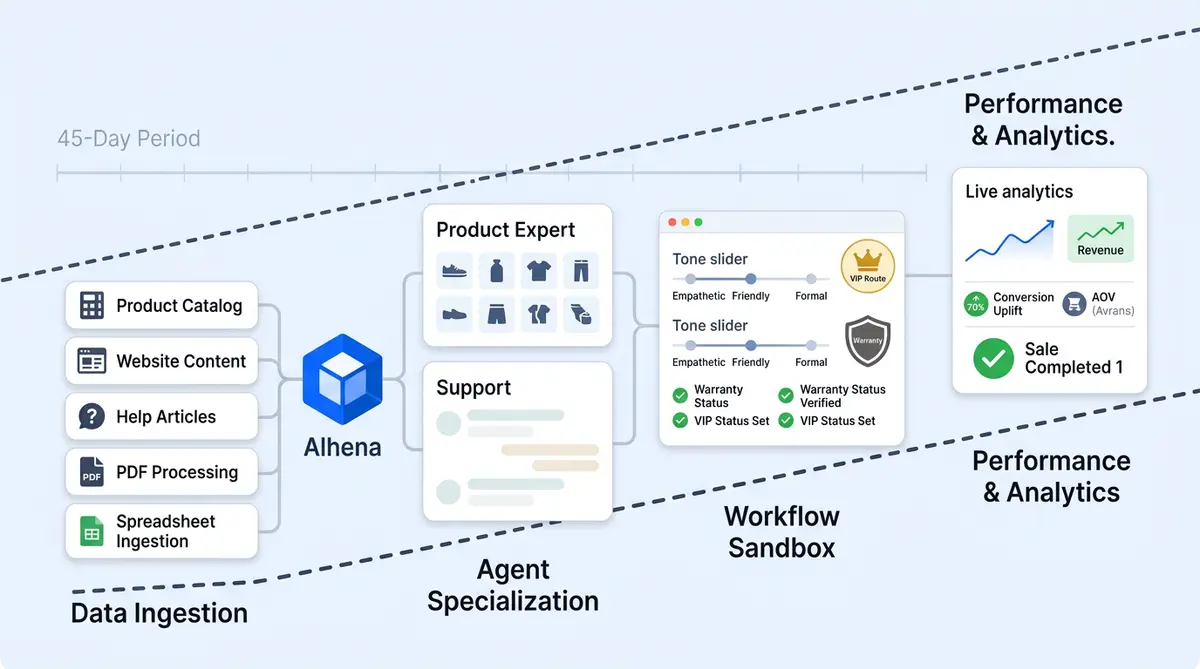
The AI shopping assistant immediately begins ingesting your full product catalog: titles, descriptions, product names, images, pricing, product discounts, variants, and specifications through API connections via CloudFront CDN. Alhena's AI modules process transaction history and purchase history automatically. New updates to product names, price changes, or promotion expiration dates sync in real time.
Hours 2 to 6: Knowledge Base Ingestion and AI Training
With your product catalog connected, the AI ingests additional knowledge sources: help center articles, FAQ pages, past helpdesk tickets and canned responses, return and shipping policies, delivery timelines, and any brand documentation you provide .
Alhena accepts messy, inconsistent knowledge and unstructured data: docs, spreadsheets, web pages, PDFs, wikis. Agentic chunking breaks content into smart AI segments for accurate retrieval, navigating content regardless of format.
The first training cycle runs automatically, implementing large language model generative AI to build ecommerce understanding of your products, policies, and brand context without prerequisites like intent mapping. By hour six, the AI knows your catalog and delivery timelines.
Hours 6 to 12: Helpdesk Integration and Channel Configuration
Connect your helpdesk so the AI can automate order lookups, handle support tasks, and escalate to human agents with full context. Alhena integrates with all major helpdesks (fully supported and compatible out of the box), connecting through backend API keys in the dashboard. No custom code, no syntax to learn, no engineering tickets.
Configure which channels the AI operates on: web chat widget for live chat, email, Instagram DMs and WhatsApp for social commerce, and voice for voice-powered phone support. Every channel runs the same customizable AI assistants, so customer interactions stay consistent whether shoppers browse your site or message on Instagram.
Set up human transfer rules: when a customer explicitly asks for a person, when AI confidence drops below your threshold, when negative sentiment is detected, or based on account-specific custom triggers tied to your policies (warranty claims, VIP accounts, privacy and security concerns).
Hours 12 to 24: Brand Voice and Guideline Configuration
Your AI powered shopping assistant knows your products. Configure customizable conversational shopping personality and tone to match your brand voice.
Set compliance guardrails. Use the Guideline Studio to write answering guidelines, then validate by running sample questions through the AI. Test, adjust, re-test through smart AI-driven execution workflows.
Hours 24 to 36: Testing and QA
Run the AI through your top 50 common customer inquiries and review every response for quality, accuracy, tone, and brand alignment. The AI Config Assistant provides step-by-step configuration instructions conversationally, surfacing questions most likely to reveal gaps.
Test edge cases: a product that's out of stock, a return outside the policy window, a question the knowledge base doesn't cover, or a feature not supported by your store. Verify personalized product discovery and find products workflows present accurate options.
Confirm escalation works with full context transfer: cart contents, checkout status, and the complete interaction stack across all channels.
Hours 36 to 48: Soft Launch and Real-Time Monitoring
Go live on a single channel (typically email or web chat) with real customer traffic. Monitor real-time customer input and ecommerce tasks through first conversations in real time through the dashboard. The Conversation Debugger lets you inspect any response, showing exactly which knowledge sources produced it.
Make rapid adjustments: add FAQs for questions the AI struggled with, refine guidelines where tone needs tuning, fill every knowledge gap identified from live personal concierges interactions. The Support Concierge flags gaps automatically.
By hour 48, the AI is handling real customer interactions: automating routine queries, delivering personalized product purchases through natural language product discovery with full context, and escalating complex issues with full context.
After the First 48 Hours
Weekly auto-training keeps AI agents current as you add products or update policies. The continuous learning flywheel provides accuracy improvement from every interaction without manual retraining. Meaningful customer experience metrics and performance data (deflection rate, CSAT, conversion lift) typically appears within 7 to 14 days.
Brands like Tatcha reached 3x conversion rates and 38% AOV uplift. Crocus hit 86% deflection with 84% customer satisfaction feedback. Results compound from the day retailers go live.
Three Objections That Delay Getting Started
"Our knowledge base is a mess."
Alhena ingests unstructured data from scattered docs, outdated PDFs, and inconsistent help articles. The backend processing handles the heavy lifting. You can clean up your knowledge base over time. You don't need to wait to launch chatbots that work.
"We need developer resources."
Shopify connects via app install. Helpdesks connect via backend API keys in the dashboard. The web widget is a single JavaScript snippet. No custom code at any point. Free credits let you experiment risk-free before committing.
"What if the AI says something wrong?"
The Guideline Studio validates responses before launch. Flagged conversations alert your team to anything that needs review. Start on email where time expectations give your team a natural review buffer before scaling to chat.
The Real Risk Is Waiting
Every week without AI accelerates the cost of missed conversational product purchases, unrecovered carts at checkout, and sizing questions handled manually. The brands seeing 3x conversion rates started with this same 48-hour process. Book a demo or start free with 25 free credits and see the setup firsthand.

Before you flip the switch, run a structured stress test to validate intent accuracy and safety compliance before launch.
Frequently Asked Questions
How long does it take to set up Alhena AI on a Shopify store with no developer resources?
Alhena AI connects to Shopify through a one-click app install that takes 10 to 15 minutes. The full setup, including product catalog ingestion, knowledge base training, helpdesk integration, and brand voice configuration, completes in under 48 hours with no custom code or engineering resources required.
Does Alhena AI require a clean, organized knowledge base before deployment?
No. Alhena AI ingests unstructured data including scattered documents, outdated PDFs, spreadsheets, help center articles, and past support tickets. The agentic chunking breaks messy content into smart segments the AI can retrieve and reason over, so you can launch without a perfectly curated knowledge base.
Want to see exactly what happens under the hood during this training phase? See inside the training pipeline.
How does the Guideline Studio help prevent AI errors before going live?
The Guideline Studio lets you write answering guidelines for specific scenarios, then validate them by running sample customer questions through the AI before any real customer sees a response. You review, adjust, and re-test until every answer matches your brand standards and quality bar.
What happens after the first 48 hours of Alhena AI deployment?
After launch, Alhena AI runs weekly auto-training cycles that re-ingest your knowledge sources and learn from every customer interaction. The continuous learning flywheel improves accuracy over time without manual retraining. Meaningful performance data like deflection rate, CSAT, and conversion lift typically appears within 7 to 14 days.
How does the AI Config Assistant guide ecommerce teams through the setup process?
The AI Config Assistant walks you through setup conversationally rather than through documentation. It surfaces your most common customer questions, guides testing and QA, identifies knowledge gaps, and recommends configuration adjustments, making the 48-hour deployment process structured and repeatable for teams with no prior AI experience.