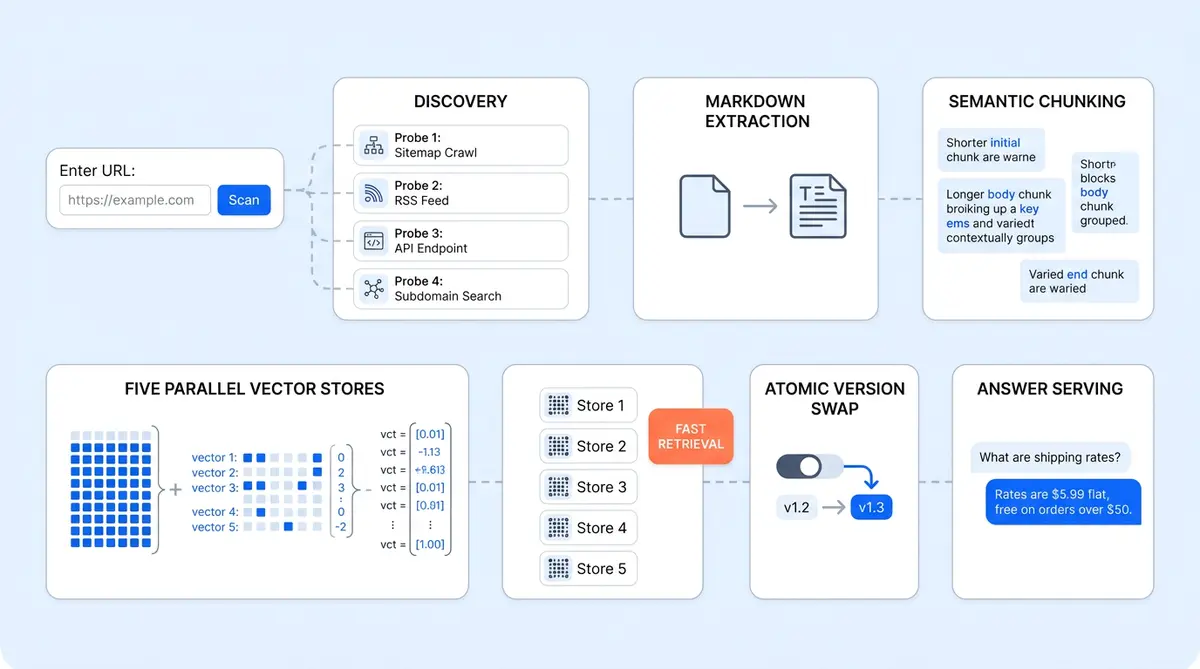
Alhena's RAG pipeline architecture turns a single URL into a production-ready knowledge base built for question answering. Most AI vendors ask you to tag, clean, and upload your data manually. Alhena asks for one URL, then does the rest: discovers every page on the site, crawls them in parallel, extracts clean Markdown, chunks documents semantically with an LLM, embeds every chunk, and indexes the results across five specialized vector databases. The whole process completes in minutes, not weeks.
By Q1 2026, 72% of organizations run production RAG systems, according to kapa.ai’s industry survey. But the engineering choices behind each pipeline stage, crawling, chunking, embedding, and retrieval, determine whether the system actually works in production. This post walks the full pipeline end-to-end, from raw URL to live AI answers. If you're a CTO or technical evaluator comparing how vendors handle data ingestion, this is the engineering story behind Alhena's speed.
The Pipeline at a Glance: Crawl, Chunk, Embed, Serve
You paste a URL into the Alhena dashboard. Behind the scenes, the retrieval augmented generation system runs six stages:
- Discover every page on the site (not just the one URL you pasted).
- Crawl those pages in parallel, pulling HTML, PDFs, tables, and images.
- Extract and clean raw content into Markdown.
- Chunk each document semantically using an LLM.
- Embed every chunk with OpenAI's text-embedding-ada-002.
- Index embeddings into Qdrant, across five separate vector stores trained in parallel, then version-swap atomically from old to new.
When a shopper asks a question, that index is queried, reranked by Cohere, and fed to the answering LLM to generate a response. This is the retrieval augmented generation engine in its most optimized form. First token streams back in under a second. The pipeline is designed so each stage can run independently and in parallel, which is why the total time from URL to live answers stays under two minutes for small-to-medium catalogs.
Stage 1: How Alhena Finds the Whole Site From One URL
Most vendors make you paste URLs manually or upload a CSV of pages. Alhena does auto-discovery, and the approach is more thorough than a simple sitemap fetch.
Four Parallel Probes
When you submit example.com, Alhena launches four simultaneous probes via a ThreadPoolExecutor:
- robots.txt: parsed for
Sitemap:directives. Handles sitemap indexes (sitemaps of sitemaps) recursively. - sitemap.xml: fallback if robots.txt contains no sitemap references.
- llms.txt: the emerging standard for declaring which pages AI systems should read. Proposed by Jeremy Howard of Answer.AI in 2024, over 784 domains, including Anthropic, Cloudflare, Docker, and HubSpot, had published an llms.txt file by mid-2025. Alhena supports it today.
- llms-full.txt / llms-ctx.txt: longer variants saved as complete documents for richer context.
The system deduplicates URLs, validates that llms.txt content actually belongs to the parent domain (to reject platform-hosted clones), and builds a crawl frontier of up to 5,000 URLs per seed. This discovery step alone gives Alhena a head start over vendors that require manual URL mapping.
Specialized Source Adapters
Not everything lives on a website. Real-world data sources span dozens of platforms. Alhena includes adapters for GitHub repos, issues, and discussions (<a href="https://alhena.ai/blog/train-ai-github-repos-issues-knowledge-base/">full GitHub training guide</a>); Confluence spaces; Google Drive; Zendesk; Freshdesk; Gladly; Salesforce; Notion; Slack; Discord; and raw CSV/PDF files in S3. Each adapter has its own scraper subclass, so the extraction logic is tailored to each source's data model.
The Actual Crawl
Each discovered URL becomes a job row in the database with status ADDED. The crawler executes them asynchronously with a SafeThreadPoolExecutor and configurable concurrency (10+ workers by default). Timeouts, retries with exponential backoff, scope enforcement, and automated workflows are built in. Submitting example.com/docs won't accidentally vacuum the marketing site.
Status tracking is granular. Each URL moves through ADDED → CRAWLING → CRAWLING_FINISHED → TRAINING → TRAINING_FINISHED. Stale jobs (no progress for five or more minutes) trigger an alert email. For a deep look at what happens during this phase from the business side, see our First 48 Hours setup walkthrough.
Stage 2: Turning Messy HTML Into Clean Markdown
The extraction stage handles the ugliest part of any data ingestion pipeline: real-world HTML. Pages have pop-ups, navigation cruft, duplicate headers, broken tables, and images with no alt text. Alhena's BaseScraper runs each page through a structured pipeline:
- Download the raw document: handles HTML, PDF (via pdfminer), CSV (pandas), JSON-LD, Schema.org structured data, and other unstructured formats.
- Parse with BeautifulSoup: the DOM is walked programmatically during preprocessing, not regex-mangled.
- Extract the title: tries
<title>, then Open Graphog:title, then Twitter Card, then the first<h1>. Multiple fallbacks to extract the right title because real-world markup is chaos. - Process tables: HTML
<table>elements are converted to Markdown key-value pairs. LLMs understand Markdown tables far better than raw<td>tags. - Process images: images are pulled, uploaded to S3, and replaced with Markdown links so the AI can cite visual content later.
- Preserve links: anchor tags are kept intact so the bot can reference and point users back to the source page.
The output is one .md file per page, uploaded to S3 at a structured path. Markdown is the universal format for every downstream stage. Whether the source was a webpage, a PDF, a Confluence page, or a CSV, once the chunker retrieves each normalized document, it always receives clean Markdown. This normalization step eliminates an entire class of bugs that plague any RAG pipeline built on raw HTML parsing.
Stage 3: LLM-Driven Semantic Chunking
This is where Alhena's pipeline diverges from most RAG implementations. The standard approach is fixed-size chunking: split every 500 or 1,000 tokens, add some overlap, move on. It's fast, cheap, and produces mediocre retrieval and generation quality. When a chunk boundary falls mid-instruction, a shopper asking "how do I configure X" gets half of the answer.
Alhena uses LLM-driven semantic chunking as the primary path. An LLM reads each document and inserts semantic breakpoint markers at natural boundaries: section transitions, topic shifts, the end of a Q&A block. Chunks respect these boundaries while staying within configurable size limits (default: ~2,000 tokens with 200-token overlap).
Retrieval augmented generation accuracy depends heavily on chunking. A 2025 study published in Bioengineering (PMC) found that adaptive chunking achieved 87% accuracy versus 50% for baseline approaches in retrieval-augmented generation tasks. A separate peer-reviewed study from Vectara, presented at NAACL 2025, tested 25 chunking configurations across 48 embedding models and found that chunking strategy had as much or more influence on retrieval quality as the embedding model itself. The tradeoff is computational cost: LLM-based chunking is slower and more expensive per document than recursive splitting. Alhena mitigates this by parallelizing the chunking across documents and falling back to a RecursiveTextDocumentChunker if the LLM chunker fails or times out.
Special-Case Handling
Not all content benefits from LLM chunking. Code files from GitHub repos skip it entirely and go straight to recursive splitting, since code doesn't respect prose boundaries. CSVs use a custom CsvSplitter that keeps rows intact. FAQs are chunked as Q+A units. Tables (already in Markdown by this stage) are kept whole when possible. This kind of content-aware routing is what separates a production pipeline from a tutorial.
Stage 4: Hybrid Embeddings for Precision and Recall
Chunks pass through OpenAI's text-embedding-ada-002 (1,536 dimensions) by default, with text-embedding-3-small (512 dims) and text-embedding-3-large (3,072 dims) as alternatives. Unlike fine tuning a full language model, switching embedding models requires only a re-index. Azure OpenAI is supported for enterprise deployments that need data residency.
Three optimizations keep this fast:
- Batched API calls via the OpenAI API: many chunks per request, not one at a time.
- Parallel embedding: a ThreadPoolExecutor with configurable worker count runs multiple batches simultaneously.
- Client reuse: the OpenAI client stays warm across requests, eliminating connection setup overhead.
But here's the part most competitors skip: alongside dense vector embeddings, Alhena generates a sparse BM25 embedding for every chunk. This is what makes the system work well for keyword-heavy queries like SKU numbers, error codes, or product names where pure semantic search misses. According to Weaviate's hybrid search research, combining dense and sparse retrieval in an augmented search layer improves recall by 15 to 30% over either method alone.
For ecommerce specifically, this matters because shoppers search with a mix of exact terms ("Nike Air Max 90 size 11") and natural language ("comfortable running shoes for flat feet"). A dense-only system handles the second query well but fumbles the first. Hybrid search handles both. For more on how this fits into the broader multi-agent architecture beyond RAG, see our architecture deep dive.
Stage 5: Five Vector Databases, Not One
Here's an architectural decision most people miss. Alhena doesn't run a single vector database per bot. It runs five, all trained in parallel:
- Documentation: website pages, help articles, PDFs.
- Products: catalog entries with title, description, price, and attributes.
- Human Feedback: curated FAQs and human-edited answers.
- Discord: community messages and discussions.
- Slack: internal channel content.
Each store holds chunks as structured datasets with rich metadata: source URL, page title, chunk order, document type, a run_id UUID per training run, and timestamps. A VectorStoreCreatorFactory spins up the right creator subclass per knowledge type, and all five build concurrently.
Why five stores instead of one? Because retrieval quality improves when the system retrieves documents from the right index. Documents retrieved from a focused store score higher than documents retrieved from a single mixed collection. A product question hits the Products store first. A policy question hits Documentation. A "how did other customers handle this?" question hits Human Feedback. The AI Shopping Assistant architecture uses this separation to route queries to the right knowledge domain before retrieval even begins.
Versioned Knowledge With Atomic Swap
Every training run gets a new version via the KnowledgeChunkVersionControl system. New chunks are written alongside the old version, then atomically swapped in once training completes successfully. The old version is cleaned up afterward.
This means three things for operations teams:
- Training never breaks the live bot. If training fails mid-run, the previous knowledge base keeps serving.
- Rollback is trivial. Point back to the prior version and you're live in seconds.
- Incremental retraining works. Only new or changed URLs are re-crawled; unchanged content keeps its existing vectors. This is why retrains after catalog updates take seconds, not minutes. For the full post-deployment maintenance playbook, see our Knowledge Base Ops guide.
Stage 6: From Query to Answer in Under a Second
The serving path is where the engineering investment in the training pipeline pays off. When a shopper types a question, here's what happens:
- Contextualize the query. Multi-turn chats are messy ("and what about the other one?"). A dedicated Contextualizer rewrites the user's question into a standalone query using chat history. It also generates a hypothetical answer (a technique (also available in LangChain as a built-in module) called HyDE) to improve retrieval quality through contextual expansion, searching for content similar to what a good answer to the question would look like, improving question answering accuracy.
- Embed the query. Same OpenAI model used at training time. Both dense and sparse embeddings are produced.
- Parallel vector search. The ContextRetrieverOrchestrator (the central retriever component) queries all five vector databases simultaneously via SafeThreadPoolExecutor. Top-K nearest neighbors are retrieved from each store.
- Deduplicate and separate. Duplicate retrieved chunks are merged. "Promoted" chunks (manually curated helpdesk articles and FAQs) are split out for guaranteed inclusion, up to 10 per query.
- Rerank with Cohere. All retrieved chunks are re-scored by Cohere's rerank model (hosted on AWS Bedrock). Retrieved chunks below a 0.5 relevance threshold are dropped. Promoted chunks always make it through. According to Kapa.ai's production benchmarks, reranking improves top-K chunk relevance by 20 to 30%.
- Assemble the prompt. The final reranked and promoted retrieved chunks are templated into the system prompt with chat history and the bot's custom configuration.
- Generate the answer. Streaming call to the configured model (GPT-4, Claude, or others). The model begins to generate output immediately. First token arrives in roughly one second, making this a real time question answering system.
Every step is instrumented: vector_search_seconds, context_retrieval_seconds, reranking_seconds, request_to_llm_sent_seconds, first_token_streamed_seconds. All recorded on every query. No black boxes, no fine tuning of the base model needed.
Promoted Chunks: The Escape Hatch
This feature deserves its own callout. Promoted chunks are curated answers that always make it into the LLM's context, regardless of vector similarity scores. Think of it as a hard pin for critical questions.
Your returns policy changed last week? Pin the new version as a promoted chunk. A product has a known defect? Pin the correct response. The continuous learning system captures these corrections over time, but promoted chunks give support teams an immediate override. RAG handles the long tail; promoted chunks handle the must-get-right answers.
Why 90 Seconds, Not 90 Days
The "90 seconds" headline isn't marketing fluff. It's the result of parallelism stacked at every level of the pipeline:
- URL discovery: four probes running simultaneously.
- Crawling: 10+ concurrent workers.
- Embedding: batched API calls plus threaded execution.
- Vector DB creation: all five stores built concurrently, not sequentially.
- Incremental training: only deltas re-processed on subsequent runs.
For a small site under 100 URLs or an incremental retrain of a handful of changed pages, sub-two-minute end-to-end is realistic. For a 5,000-URL initial crawl, it's minutes not hours. Compare that to vendors that require multi-week professional services engagements to get your data loaded. Ada’s enterprise deployment takes 8 to 16 weeks. Intercom Fin needs 4 to 6 weeks for knowledge base migration. Even Zendesk AI requires 1 to 2 weeks for production readiness.
According to Gartner, 91% of CX leaders face executive pressure to implement AI, yet most enterprise vendors take weeks or months to onboard. Ada’s enterprise deployment runs 8 to 16 weeks. Intercom Fin’s knowledge base migration alone takes 4 to 6 weeks. The RAG market is projected to reach $11 billion by 2030, according to industry research. As ecommerce brands evaluate AI vendors, pipeline speed and reliability are becoming deciding factors for generative AI adoption across AI applications in retail. A pipeline that takes weeks to set up creates weeks of delayed ROI.
What This Means for Technical Evaluators
If you're a developer or CTO comparing AI vendors for your ecommerce stack, here are the pipeline questions worth asking. Most open-source frameworks like LangChain provide building blocks, but they don’t answer these questions for you:
- How does it handle data ingestion? Manual upload of individual data sources, or auto-discovery from a single URL?
- What chunking strategy does it use? Fixed-size, or content-aware semantic boundaries?
- Does it support hybrid search? Dense vectors alone miss keyword-specific queries. When a shopper searches for a specific SKU, the system needs to retrieve an exact match, not a semantically similar product like SKUs and model numbers.
- How does it handle knowledge updates? Full retrain, or incremental with atomic version swaps?
- What's the retrieval architecture? Single vector store, or domain-separated stores with parallel search?
- Can you pin critical answers? Promoted chunks let your team override RAG when accuracy matters most, no prompt engineering required.
Alhena's Product Expert Agent and Support Concierge both run on this same pipeline. The training infrastructure is shared; the agents are specialized. Brands like Tatcha have seen 3x conversion rates with this architecture in production, and Puffy achieved 90% CSAT with 63% automated resolution.
Ready to see how fast your catalog can go live? Book a demo with Alhena AI or start for free with 25 conversations.
For a deeper look at the data generation layer, see how Alhena generates synthetic training data to cover long-tail queries.

Frequently Asked Questions
What is a RAG pipeline architecture?
A RAG (Retrieval-Augmented Generation) pipeline is an AI architecture that retrieves relevant documents from a knowledge base, retrieves metadata about those documents, then feeds the retrieved context as context to a large language model to generate grounded, accurate, and contextual answers. Alhena's pipeline adds LLM-driven semantic chunking, hybrid dense+sparse search, and five parallel vector databases to standard retrieval augmented generation, which improves both retrieval accuracy and answer quality.
How long does it take to train Alhena's AI on my ecommerce catalog?
For sites under 100 URLs, the full pipeline (crawl, chunk, embed, index) completes in under two minutes. A 5,000-URL initial crawl takes minutes, not hours. Incremental retrains after catalog updates are even faster because only changed or new URLs are re-processed.
What is semantic chunking and why does it matter for AI answers?
Semantic chunking uses an LLM to split documents at natural topic boundaries instead of fixed character counts. A 2025 study found that adaptive chunking achieved 87% accuracy versus 50% for baseline approaches. This means shoppers get complete, contextually coherent answers instead of truncated fragments.
How does hybrid search improve ecommerce AI?
Hybrid search combines dense vector embeddings (good for natural language queries) with sparse BM25 embeddings (good for exact keyword matches like SKU numbers and product codes). Research from Weaviate shows this combination improves recall by 15 to 30% over either method alone, which is critical for ecommerce where shoppers mix exact terms with conversational queries.
What happens if Alhena's training fails mid-run?
Nothing breaks. Alhena uses versioned knowledge with atomic swaps. New chunks are written alongside the old version, then swapped in only after training completes successfully. If a run fails, the previous knowledge base keeps serving without interruption. Rollback to any prior version takes seconds.
Does Alhena support the llms.txt standard?
Yes. Alhena probes for llms.txt, llms-full.txt, and llms-ctx.txt during URL discovery. This emerging standard (proposed by Jeremy Howard of Answer.AI) lets website owners declare which pages AI systems should read. Fewer than 1,000 domains supported it as of mid-2025, but Alhena's crawler already integrates it.
How is Alhena's pipeline different from Zendesk AI or Intercom Fin?
Most support-first tools like Zendesk AI and Intercom Fin use simpler data ingestion and fixed-size chunking. Alhena's pipeline adds auto-discovery from a single URL, LLM-driven semantic chunking, hybrid dense+sparse search, five domain-separated vector stores, and atomic version control. These architectural choices, which take minutes to implement, are designed specifically for ecommerce where product catalogs change frequently and search queries mix keywords with natural language. This same pipeline is what makes ecommerce replatforming possible without losing trained knowledge.
What data sources can Alhena ingest besides websites?
Alhena includes specialized adapters for over a dozen data sources including GitHub repos, Confluence, Google Drive, Zendesk, Freshdesk, Gladly, Salesforce, Notion, Slack, Discord, and raw CSV/PDF files in S3. Each adapter has its own extraction logic tailored to the source's data model, and all content is normalized to Markdown before chunking and embedding.