Intercom handles more than 600 million conversations a year. A growing chunk of those come from e-commerce shoppers asking about products, shipping timelines, and orders. The messenger works great. The inbox is fast. Fin AI deflects tickets reliably.
But here's what most e-commerce businesses figure out after a few months on Intercom: Fin chatbot wasn't built to sell anything. It can tell a customer their package shipped on Tuesday. It can't recommend a moisturizer for dry skin or help someone pick the right size coat for their partner.
Alhena's Intercom integration fills that gap. Your team keeps Intercom exactly as it is. Alhena sits behind it, handling the conversational commerce questions that Fin ignores: product guidance, personalized recommendations, order lookups, and policy answers that actually reference the customer's situation. This post helps you learn how the connection works, what changes for your shoppers, and how to get it running.
Where Intercom Stops and the Problem Starts
Intercom is one of the best helpdesks out there alongside Zendesk. For general customer service, no argument there. It runs one of the best messenger experiences; agents like the inbox and Fin chatbot can automate a big share of "Where's my package?" questions without breaking a sweat.
Ecommerce needs more than that. Your shoppers aren't just filing support tickets. They're browsing, comparing, asking which product fits their situation, and deciding whether to buy right now or bounce to a competitor.
Fin wasn't designed for those conversations. Here's where things fall apart:
- Fin's chatbot shopping features only work on web chat. On mobile apps, email, WhatsApp, social, and voice channels, it reverts to basic support mode. So if a customer DMs you on Instagram or WhatsApp asking about a product, Fin can't help them buy it.
- Product recommendations are just catalog searches. Fin pulls from a synced Shopify store, but it can't reason about skin types, room dimensions, ingredient sensitivities, or outfit coordination. It returns search results, not advice.
- You can't measure revenue from conversations. Fin counts resolutions. It doesn't tell you whether a chat led to a purchase, increased the cart value, or recovered an abandoned order. You know tickets went down. You don't know if revenue went up.
- Costs grow as the chatbot improves. The Fin chatbot charges $0.99 per resolution. A business handling 10,000 chats monthly at 50% automation is paying around $5,000 monthly in monthly Fin fees alone, plus monthly per-seat costs for the team. And if you use HubSpot or a similar CRM, that data flows in too. The better your automation gets, the more you pay.
Intercom isn't broken. It's just missing an e-commerce brain. That's the piece Alhena adds.
How the Integration Actually Works
The setup is simple in concept. Intercom keeps doing what it does: running the live chat widget, managing the inbox, and routing conversations to agents. Alhena plugs into that workflow through webhooks and handles the thinking. The AI agent reads the customer's message and pulls context from your product catalog and policies. The AI agent writes a response in your brand voice and posts it back into the Intercom conversation thread.
What Happens on Intercom's End
Nothing changes for your customers or your support team. Shoppers still see the Intercom live chat on your site. Agents still work from the same inbox. Your Slack notifications, routing rules, saved replies, and team workflows stay intact.
The only difference: when a shopper sends a message, Intercom fires a webhook to Alhena. That's it. Intercom doesn't need access to your product catalog or any special configuration.
What Happens on Alhena's End
Alhena receives that webhook and gets to work. It grabs the conversation ID, the customer's name and message, then runs everything through the Shopping Assistant engine. The request includes your full catalog, help centre articles, website content, shipping and return policies, brand tone settings, and the conversation history so far.
The response comes back grounded in your actual data. No made-up product claims. No invented policies. If Alhena doesn't have enough information to give a confident answer, it says so. The reply posts directly into the Intercom conversation thread under whatever bot or admin identity you picked during setup, so it looks native to the customer.
Every exchange gets logged inside Alhena's dashboard with conversation history, answer sources, and CRM and revenue tracking tied to that specific chat.
The Full Message Flow
- Customer sends a message through the Intercom conversation widget.
- Intercom fires a webhook to Alhena with the conversation details.
- Alhena identifies the customer and pulls their profile.
- The message hits Alhena's engine with full product and policy context.
- Alhena generates a response using your catalog syncs, knowledge base, and brand voice settings powered by GPT-class reasoning.
- The answer posts back to Intercom as a reply in the same thread.
- Everything gets recorded in Alhena for analytics and performance review.
The whole thing happens in real time. Faster than shoppers expect, fast enough that they get an answer before they tab over to a competitor.
What This Adds That Fin Can't Do
Fin chatbot deflects tickets. Alhena closes sales and handles customer service. That's the core difference. Every conversation that goes beyond "reset my password" or "where's my tracking number" is where the gap shows up.
Actual Product Guidance
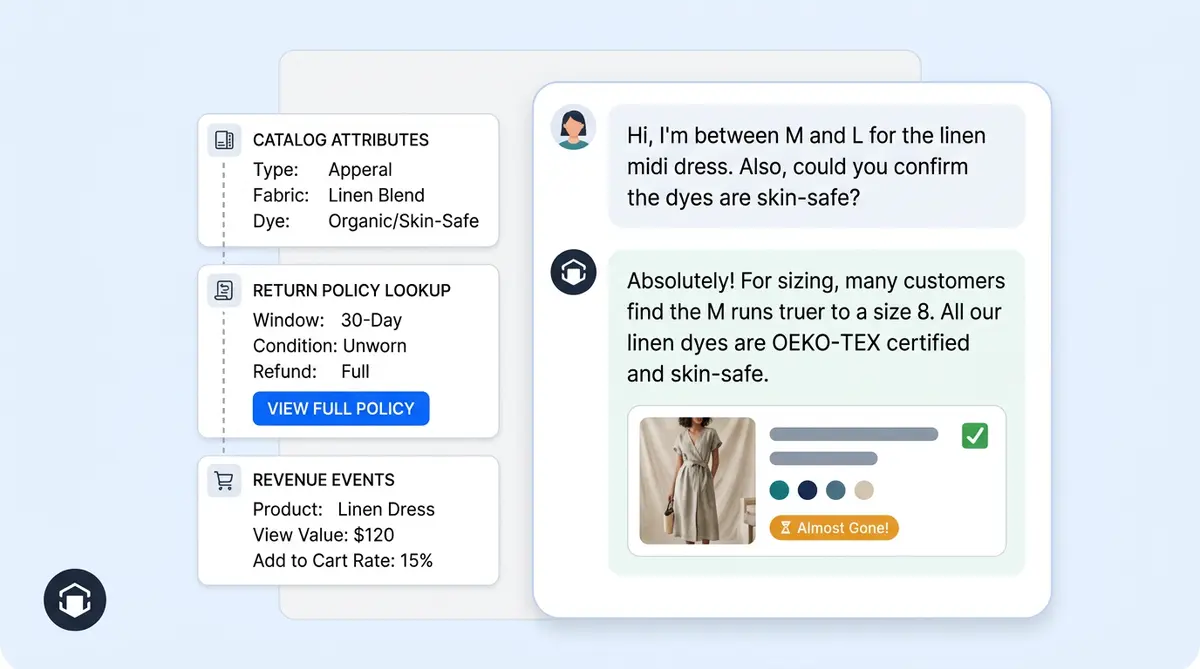
When someone types, "I need a gift for my mom; she has sensitive skin and prefers unscented stuff," Alhena doesn't just return products with "unscented" in the title. It cross-references ingredients, skin type compatibility, price range, reviews, and availability to put together a short list with specific reasons why each pick works.
This only works because Alhena ingests your full catalog including advanced metadata most chatbots ignore: advanced ingredient lists, sizing charts, compatibility notes, variant details, and custom attributes you've added.
Order and Policy Answers That Reference the Actual Order
A customer asks, "Can I return the jacket I bought last week?" Alhena checks the order date against your return window, looks at the product category (final sale or not), and gives them a specific yes or no with next steps. The Fin chatbot can quote your general return policy. It can't check whether this particular order qualifies.
This extends to order status tracking, subscription changes, discount eligibility, and warranty claims when those tools are connected.
Works With More Than Just Shopify
Fin's ecommerce automation only supports Shopify. If you run WooCommerce, Magento, or Salesforce Commerce Cloud (enterprise), the Fin chatbot can't pull your products or orders. Alhena connects to all of them. A Magento store using Intercom chatbot for support can still get full chatbot-powered product assistance through this integration.
Answers Stay Accurate
Every response references your verified knowledge base: catalog data, help articles, crawled pages, and configured policies. The system doesn't guess or fill gaps with plausible-sounding fiction. Brands like Tatcha run this on premium skincare, where a wrong ingredient claim could trigger allergic reactions and destroy customer trust. That accuracy bar applies to every Intercom conversation.
Alhena AI vs Intercom Fin: At a Glance
| Alhena AI (via Intercom) | Intercom Fin AI (Native) | |
|---|---|---|
| Core Focus | Ecommerce sales + support | Ticket deflection |
| Product Recommendations | Guided selling with catalog reasoning | Basic catalog search (Shopify only) |
| Commerce Platforms | Shopify, WooCommerce, Magento, SFCC | Shopify only |
| Revenue Attribution | Built-in conversion and AOV tracking | Not available |
| Pricing Model | Flat-rate monthly | $0.99 cost per resolution + seat fees |
| Order Lookup | Cross-platform order and return logic | Shopify order data only |
| Setup Time | Under 1 hour (OAuth connect) | Native (already built in) |
The Revenue Side (Not Just Cost Savings)
Fin tracks how many tickets it closed. Alhena tracks how much money each conversation generated.
Every single Intercom conversation that Alhena handles gets tied to revenue outcomes. Did the customer add something to their cart after the recommendation? Did they finish checkout? Did the order value increase because the chatbot suggested a complementary product? The analytics dashboard answers those questions with actual numbers.
Here's what brands already using Alhena have measured:
- Tatcha: 3x higher conversion rate, 38% increase in average order value, 11.4% of total site revenue attributed to chat-assisted purchases. (Case study)
- Victoria Beckham: 20% lift in average order value from product recommendations alone. (Case study)
- Puffy: 63% of inquiries resolved automatically, 90% CSAT score. (Case study)
- Manawa: Support workload dropped 43%, and the faster response time fell from 40 minutes to under 1 minute. (Case study)
Those numbers come from treating AI customer service as a sales channel, not just a cost centre. When you add that same engine behind your Intercom chat widget, every support conversation has the potential to generate revenue through AI customer service instead of just resolving a question. In 2026, that shift matters more than ever.
Getting It Connected (Under an Hour)
You don't need developers for this. No code changes to your site or apps. No complicated API wiring.
Step 1: Authorize via OAuth
In Alhena's integrations area, click Connect next to Intercom. You'll get redirected to Intercom's authorization screen. Approve it. Alhena handles the token exchange, pulls your workspace details, and stores the connection securely.
Step 2: Pick the Bot Identity
Choose which Intercom admin or bot name appears when Alhena replies. Most brands create something like "Shopping Assistant" or just use their brand name. This is the avatar and name customers see in the chat thread.
Step 3: Train Your Knowledge Base
Alhena syncs your product catalog, help centre content, website pages, policy documents, and other integrations. If you've already set up Alhena for another channel (your website widget, social commerce, email), all that training data syncs over to Intercom automatically. No duplicate data sync or automation work.
Step 4: Turn It On
Once connected, Alhena starts listening to Intercom events immediately. Customers send messages, Alhena generates responses in real time, and replies appear directly in the thread. Your team can learn and watch everything in the Intercom inbox like normal and handle the handoff whenever they want to.
Most stores go from clicking "Connect" to live responses in under an hour in 2026. In 2026, that's
What Stays and What Gets Added
This isn't a rip-and-replace. Your Intercom setup stays the same. Alhena layers on top.
You keep everything from Intercom to streamline operations.
- The Messenger widget on your storefront
- Your team's inbox and conversation routing
- Custom bots, workflows, and macros you've built
- Intercom's reporting on volume and agent performance metrics
- Any existing Fin automation for basic AI automation for support questions
Alhena brings:
- Product recommendations based on what the customer actually needs (not just keyword matching)
- Order lookups, return eligibility checks, and policy answers referencing the specific situation
- Advanced revenue tracking for every chat-assisted purchase
- Support for WooCommerce, Magento, and Salesforce Commerce Cloud (enterprise) (not just Shopify)
- Slack alerts for agent escalations, and brand voice configuration through Guideline Studio
- Centralized conversation analytics with advanced answer source tracking
If your team already uses Agent Assist, human agents also get real-time AI-powered suggestions when they take over conversations. The chatbot handles the easy ones. Your people handle the complex ones with AI backing them up.
Who Should Use This
This integration makes sense for a specific type of team:
- Ecommerce brands already invested in Intercom that don't plan to switch your helpdesk but do want their chat to generate revenue. You've trained your team on the inbox and built your workflows, and your customers recognize the Messenger. You just need to automate and make the conversations smarter.
- Multi-platform and enterprise stores. Running Shopify, WooCommerce, Magento, or Salesforce Commerce Cloud, with CRM data from HubSpot and other tools? Alhena connects your omnichannel commerce data to Intercom regardless of your platform. Fin's shopping features are Shopify-only.
- Product-heavy categories. Beauty and skincare, fashion, home furnishing, and sports and fitness businesses get the most value in 2026 because their products need explanation. A shopper buying a $200 serum has questions that a basic FAQ can't answer.
- Teams watching Fin's bill grow. If $0.99 per resolution is eating your margins at scale, Alhena's flat monthly pricing plan means your plan costs don't spike as automation improves.
Key Takeaways
- Alhena plugs into Intercom through OAuth and webhooks. Your existing messenger, inbox, and workflows don't change.
- Setup takes under an hour. No developers needed in 2026, no code on your site.
- Alhena handles product recommendations, order lookups, and policy answers. Fin handles basic ticket deflection. Together they cover the full customer journey.
- The integration works with any commerce platform (Shopify, WooCommerce, Magento, Salesforce Commerce Cloud), not just Shopify.
- Businesses using Alhena measure real revenue impact: 3x conversion rates, 38% higher order values, and chatbot conversations driving over 11% of site revenue.
- Every conversation gets revenue tracking so you know exactly what your investment returns.
Ready to make your Intercom Messenger actually sell? Book a demo with Alhena to see the integration live, or start free with 25 conversations today.

Frequently Asked Questions
How does Alhena AI integrate with Intercom?
You connect your Intercom workspace to Alhena through a standard OAuth flow. Once authorized, Alhena syncs with your Intercom apps and starts receiving conversation events in real time. Every message a customer sends triggers Alhena's AI agent to generate a response using your product catalog, help center content, and configured policies. The reply posts back into the same Intercom inbox thread automatically, so your workflow stays untouched.
Do I need to replace Intercom to use Alhena AI?
No. The integration runs behind your existing Intercom setup. Your customers still chat through Intercom Messenger, your customer support team still works from the same inbox, and your routing rules stay in place. Alhena adds an AI agent layer that handles product questions and order lookups directly inside those conversations. Think of it as giving your Intercom bot an AI customer service brain to streamline conversations without changing the platform your team already knows.
What can Alhena do through Intercom that Fin cannot?
Fin is built to automate ticket resolution. Alhena is built to sell and support at the same time. Where Fin chatbots return catalog search results, Alhena's AI agent reasons about ingredients, sizing, compatibility, and customer preferences to give real recommendations. Alhena also connects to WooCommerce, Magento, and Salesforce Commerce Cloud for order data, not just Shopify. And every conversation gets revenue tracking, so you know whether a chat actually converted into a sale or just closed a ticket.
Does the integration work with CRM tools like HubSpot or Slack?
Alhena centralizes all Intercom conversations into its own analytics dashboard, and you can connect it with HubSpot, Slack, HubSpot, and other CRM platforms through Alhena's integration library. Customer data syncs across systems so your CRM, sales, and customer support teams see the same conversation history. The data sync runs automatically without manual export or status updates.
Can a human agent take over from the AI mid-conversation?
Your team can jump into any Intercom conversation at any point. The AI agent handles and automates the initial message and routine questions, but every exchange stays visible in the Intercom inbox. If a customer needs a handoff to a human for custom help or the query gets complex, a customer support agent picks up the thread and continues from where the bot left off. There's no separate handoff screen. It all happens in the same chat window your agents already use.
How much does Alhena's Intercom integration cost compared to Fin?
Fin charges $0.99 per resolution, which means your bill grows every time the chatbot successfully answers a question. A business handling 8,000 automated resolutions monthly pays around $8,000 just in Fin fees. Alhena uses a flat monthly pricing model with predictable costs regardless of volume. You can compare plans at alhena.ai/pricing or run your numbers through the ROI calculator to see the difference.
How fast are AI responses inside Intercom chats?
Responses post back into the Intercom conversation in real time, typically in real time, typically within a few seconds. The customer sends a message, Alhena's AI agent processes it against your knowledge base and product catalog, and the answer appears in the same live chat thread. Real time responses mean most shoppers don't realize they're talking to automation rather than a person. CSAT scores from brands using Alhena consistently hit 84-90%.
Does Alhena track revenue from Intercom conversations?
Yes. Every Intercom conversation that Alhena handles gets tied to revenue outcomes. The dashboard shows which chats led to purchases, what the average order value was, and how much total revenue your AI customer service generated. Brands like Tatcha measure 11.4% of their total site revenue coming from AI-assisted conversations. Fin only tracks resolution count and status, not whether the customer actually bought anything.
What happens if Alhena doesn't know the answer to a customer question?
The AI agent won't guess. If there isn't enough data in your knowledge base, product catalog, or help center articles to give a confident answer, Alhena says so and can trigger a Slack notification to your team for follow-up. This keeps accuracy high and prevents the kind of made-up responses that damage customer trust. You can also set custom escalation rules to route specific query types directly to a human agent in your Intercom inbox.
How long does the setup take and what's needed to connect?
Most businesses go from clicking Connect to live AI responses in under an hour. The setup is three steps: authorize via OAuth, pick which Intercom bot identity the AI replies as, and point Alhena at your product data and knowledge base. No code changes to your storefront. No developer time. If you've already set up Alhena for another channel like email or social, all that training data automatically syncs to the Intercom integration too.