Why Typing Falls Short on Your Website
A shopper lands on your site from a mobile ad. She's pushing a stroller with one hand and holding her phone with the other. She has a question about sizing. The chat widget is right there, but typing with one thumb while walking? She leaves.
That scenario plays out millions of times a day. Traditional chat widgets assume the visitor is sitting at a desk, ready to type. In reality, many of your users are multitasking, browsing on the go, or simply prefer talking over typing. They need a way to meet the AI by voice, a faster input method that doesn't slow them down.
The use case is clear: Voice commerce solves this. Alhena Voice AI does it by adding a real-time voice commerce interface directly inside the website chat widget. Visitors tap a microphone button, speak naturally, and hear the AI-powered voice agent respond out loud. Same knowledge base, same brand personality, same product catalog. Just a faster, more natural way to get help and shop. Voice commerce will transform how visitors interact with your store. This post walks through how it works, what it can do on your site, and how you configure it.
What Alhena Voice AI Is (and Isn't)
Alhena Voice AI is a voice shopping assistant and customer support assistant embedded directly in your website chat widget. It's not a phone line, not a separate app, and not a third-party browser extension. It lives inside the same widget your visitors already use for text chat.
When Voice AI is enabled, the chat input area shows a waveform microphone button whenever the visitor isn't typing. One tap opens a voice commerce session. The browser asks for microphone permission on first use. Once granted, the visitor speaks naturally. Alhena runs in the background, listens, detects when they've stopped talking, and responds in a selected voice.
The visitor can interrupt the AI mid-sentence, just like a real conversation. If they navigate to another page, the voice session persists. It minimizes and resumes instead of dropping the connection, so customers can ask about a product on the homepage, browse to a collection page, and keep talking without starting over.
Here's what makes this different from bolting a generic speech-to-text layer onto traditional chatbots: the voice agent uses the exact same Alhena configuration as your text channels. Your AI Shopping Assistant and Support Concierge already know your products, policies, brand tone, and handoff rules. Voice AI inherits all of it, then adapts the interaction style for spoken conversation.
How Browser-Based Voice AI Works Under the Hood
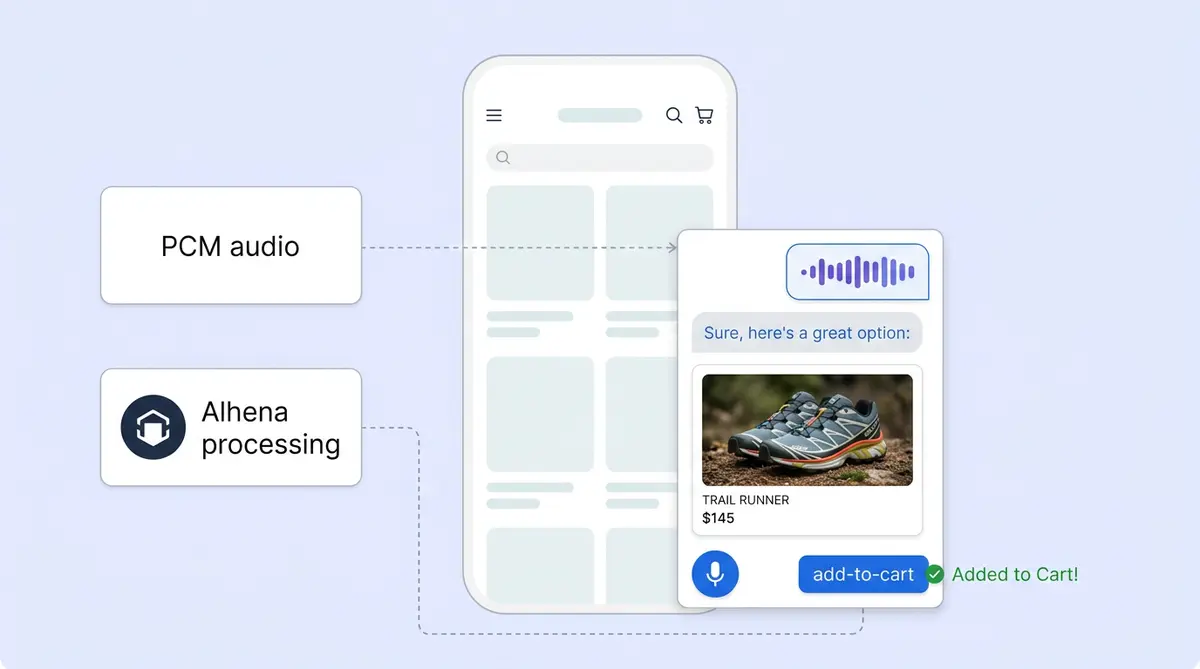
The browser captures microphone audio and converts it into raw PCM audio chunks. Those chunks stream over a WebSocket connection to Alhena's dedicated voice server in real time.
The voice server maintains a live connection to a realtime AI model. It sends the visitor's audio in, applies natural language processing (NLP) to understand intent, and receives the assistant's spoken response back. That audio streams to the browser, which schedules playback smoothly so the visitor hears a continuous, natural reply with instant, no awkward gaps.
The Full Data Path
The flow runs like this: browser chat widget sends audio to Alhena's voice server, which routes through the realtime AI model, pulls answers from Alhena's knowledge tools, and streams spoken audio back to the browser for playback. The tech behind each step adds intelligence without adding noticeable delay.
The voice server also connects to Alhena's app server for company configuration, ticket lookup, chat history, transcript saving, human handoff logic, and voice commerce billing. And it talks to the AI server for the voice system prompt, knowledge retrieval, dynamic tools, and integrations.
Voice commerce depends on low latency. For a technical deep dive on how Alhena keeps voice latency under one second, see our sub-second voice AI call stack breakdown.
The Intelligence Behind Every Spoken Answer
For ecommerce, generic speech-to-text gives you transcription. Alhena Voice AI gives you a brand-trained agent that delivers personalized answers by voice.
Every voice session draws from the same customer-specific configuration that powers your text-based Shopping Assistant:
- Brand personality: custom name, identity, and tone of voice
- First message and greeting: what the AI says when a voice session starts
- Answering guidelines: what info to share, what not to say, how to handle edge cases
- Knowledge base: product descriptions, FAQs, policies for products and services, size charts, reviews, ingredient lists
- Product catalog: full inventory with smart, personalized recommendation logic for ecommerce stores
- Conversation history: the visitor's earlier text messages in the same session
- Human transfer rules: when to escalate, business hours awareness, routing logic
- Current page context: the visitor's URL and page title, so the AI delivers personalized info about what they're browsing
When a visitor asks a question, the voice commerce agent uses Alhena's get_knowledge tool to pull answers from your configured knowledge base and available integrations. Answers are grounded in your verified data, not generated from the model's general training. This is how Alhena delivers AI-powered, hallucination-free responses across every retail channel, voice included.
The response style is intentionally voice-native: one to three short sentences, simple language, no long lists, and no reading URLs out loud. The AI offers to share more detail instead of overloading the listener. For e-commerce stores, it also acts as a conversational shopping assistant, guiding product discovery one question at a time ("What's the occasion?"), applying personalization to recommend products based on answers, and keeping spoken responses brief.
What Voice AI Can Do on Your Website
For retail and online stores, speaking is only half the story. Alhena Voice AI can take actions on the page while the visitor listens. Each use case moves beyond basic voice assistants. Unlike Alexa, Siri, or Google Assistant and into agentic voice commerce territory. Voice commerce on your own site, not through a third-party device. This is voice commerce that lives where your customers already shop.
Voice Commerce Action: Navigate to a Page
If a visitor asks "Where are your running shoes?" the voice agent can redirect them to the running shoe collection page. It asks for consent first, then triggers in-browser navigation. The visitor stays on the same domain, and the voice session continues on the new page. No typing a search query. No scrolling through menus.
Voice Commerce Action: Show Product Cards
While the AI speaks about a recommendation, it can send a rich product card into the chat widget below. The visitor hears "I'd recommend the Cloud Runner in your size" and simultaneously sees the product image, price, and an add-to-cart button in the chat panel. Voice and visual work together, a pattern that e-commerce shoppers respond to.
Voice Commerce Action: Add to Cart
On Shopify stores and other ecommerce platforms, the voice agent can add a product to the visitor's cart after verbal confirmation. "Would you like me to add that to your cart?" followed by a yes triggers the action. Voice shopping means customers explore your catalog by voice and purchase without touching the keyboard.
Voice Commerce Action: Transfer to Human
In any ecommerce workflow, when the conversation needs a human touch, the voice agent can escalate the website ticket to your human agents on the team through your connected helpdesk or CRM, whether that's Zendesk, Gorgias, or Intercom. The transfer respects your configured business hours, security policies, and routing rules.
Voice Commerce Action: End Session
When the conversation wraps up, the AI closes the voice session gracefully. It also handles inactivity: if the visitor goes silent, the agent checks in ("Are you still there?") and eventually ends the session to free resources. This keeps session volume manageable. There's also a maximum session duration as a safeguard.
Transcripts, Analytics, and Full Conversation Visibility
Voice conversations aren't a black box. Every voice session is saved back into Alhena as part of the same ticket, with VOICE_AGENT marked as the source. The system creates start and end markers, saves full transcripts of both the visitor's questions and the AI's responses, updates AutoQA records, and stores answer sources when knowledge was retrieved.
For ecommerce support teams, this means voice interactions show up alongside text messages in the same conversation timeline. Managers can analyze what was said, check if the AI cited correct sources, and spot opportunities to improve the knowledge base. All the info is in one place. No separate dashboard, no missing context.
For brands tracking revenue, Alhena's built-in attribution analytics capture voice-assisted conversions the same way they capture text-assisted ones. If a customer adds a product to cart during a voice session and completes checkout, that revenue is attributed to the AI interaction. Marketing teams can measure voice-driven conversions. every touchpoint alongside all other channels.
Admin Controls: Configure Voice Your Way
Admins configure Alhena Voice AI under Integrations in the Alhena dashboard. Creating a better customer experience doesn't need developer resources and the smart admin controls are granular enough to shape exactly how the voice agent sounds and behaves.
Voice Selection and Speed
Choose from multiple voice options, including OpenAI and ElevenLabs-powered voices. ElevenLabs voices, powered by ElevenLabs advanced speech synthesis, are especially popular for brands that want a warm, natural tone. Voice commerce brands adjust speaking speed to match your brand's pace. Luxury brands might pick a slower, warmer voice. Fast-fashion brands might want something quicker and more energetic.
Language and Accent
Set a default language and configure accent behavior. Alhena supports 90+ languages across its platform, and Voice commerce carries that multilingual capability into spoken interactions. For more on multilingual setup, see our multilingual AI guide.
Separate Voice Personality
Here's a detail that matters: Voice AI personality is independent from your text-channel personality. You can give the voice agent a different name, identity, and tone than your chat or email AI. A skincare brand might want their text bot to be detailed and educational, while their voice agent is warm, concise, and conversational. Alhena lets you tune each channel separately for the best customer experience. For more on this, check out our brand voice and identity guide.
Voice-Specific Guidelines and Handoff Rules
Voice-specific answering guidelines let you control what the AI says (and doesn't say) during spoken interactions. Human transfer behavior is also configurable: set when voice sessions should escalate, which team handles them, and whether transfers are available outside business hours. See our guidelines configuration guide for a detailed walkthrough.
Playground Testing Before Going Live
Before going live, test Voice AI in Alhena's built-in playground. Hear exactly what ecommerce visitors will hear, adjust the voice, refine guidelines, and validate that knowledge retrieval works correctly over spoken queries. No need to deploy your ecommerce site to production to iterate.
The Business Case for Voice on Your Website
Voice AI isn't just a nice-to-have feature. It opens your site to customers you couldn't reach through text alone.
Accessibility. Visitors with motor impairments, low vision, or literacy challenges can now interact with your store naturally. Voice removes the barrier that a text-only input creates, without the overhead of a call center.
Mobile shoppers. More than half of ecommerce traffic comes from mobile devices. Typing on a small screen is slow and frustrating. Voice lets mobile users ask questions, get product recommendations, and purchase items without fighting a tiny keyboard.
Faster resolution. Customer satisfaction and the overall customer experience improve when friction drops. Speaking is faster than typing for most people. A customer support question that takes 30 seconds to type can be asked in 5 seconds by voice. Brands like Tatcha already see 3x conversion rates and 38% increase in average order values with Alhena's AI. Voice AI extends those same results to customers whose preferences lean toward speaking. Puffy managed to automate 63% of inquiry resolution with 90% customer satisfaction (CSAT) with 90% CSAT, and In another case study, Manawa used AI to automate responses, cutting times from 40 minutes to under 1 minute.
Persistent transcripts. Unlike phone calls to a call center, every voice interaction on your site is recorded, transcribed, and tied to the same ticket. Your support team sees the full picture without switching tools. Voice and text automation scale together in one place. You can automate both support and sales from a single dashboard. Whether the automation covers product discovery, product recommendations, order tracking, or FAQ responses, Voice AI handles a number of them the same way text chat does.
Alhena Voice AI deploys in under 48 hours with no dev resources required. It works across Shopify, WooCommerce, Salesforce Commerce Cloud, and any online store running the Alhena chat widget. Turn it on, configure your voice settings, and your website starts listening.
Ready to let your customers talk to your store? Book a demo with Alhena AI or get started free with 25 conversations.

Frequently Asked Questions
How do I add voice AI to my ecommerce website without writing any code?
If you already use the Alhena chat widget, enable Voice AI in the Alhena dashboard under Integrations. The toggle activates a microphone button inside your existing widget. No code changes, no developer time, and most brands go live in under 48 hours. You can test it in the built-in playground first.
Can website visitors use voice to ask about products and add items to their shopping cart?
Yes. During a voice session, the AI can recommend products, show product cards in the chat panel, and add items to the cart after the visitor confirms verbally. On Shopify and other ecommerce platforms, voice commerce actions like Shopify add-to-cart work through the same widget callbacks used in text chat.
Does the voice AI remember what I said earlier in the conversation if I switch pages?
It does. Voice commerce sessions persist across page navigation. If a visitor starts talking on a product page and then browses to a different collection, the session minimizes and resumes on the new page. All prior context, including earlier text messages in the same ticket, stays available to the AI.
What languages does Alhena Voice AI support for international ecommerce stores?
Alhena supports 90+ languages for global voice commerce, and Voice commerce carries that multilingual capability into spoken interactions. Admins can set a default language and configure accent behavior in the dashboard. The voice agent detects the visitor's language and adjusts accordingly.
How does Alhena make sure the voice AI gives accurate answers instead of making things up?
Every time a visitor asks a question, the voice agent calls Alhena's get_knowledge tool to retrieve answers from your configured knowledge base, product catalog, and connected integrations. Responses are grounded in your verified data, not generated from the model's general training. This is the same hallucination-free approach Alhena uses across text chat and email.
Can I give the voice AI a different personality than my text chatbot?
Yes. Alhena lets you configure a separate name, identity, tone, and answering guidelines specifically for Voice AI. A beauty brand might want their text bot to be detailed and educational while their voice agent is warm and conversational. Each channel can have its own personality.
Are voice conversations saved so my support team can review them later?
Every voice session is transcribed and saved as part of the same Alhena ticket, with both visitor and AI responses recorded. Support managers see voice interactions alongside text messages in one unified timeline. AutoQA records and answer sources are also stored for quality review.
What happens when the voice AI cannot answer a question on my website?
The voice agent follows your configured human transfer rules. When it detects it can't resolve an issue, it can escalate the website ticket to your support team through Zendesk, Gorgias, Intercom, or another connected helpdesk. The handoff respects your business hours and routing rules, and the full transcript transfers with the ticket.
Does voice AI on the website work on mobile browsers like Safari and Chrome?
Yes. Voice AI works in any modern browser that supports the Web Audio API and microphone access, including mobile Safari and Chrome on iOS and Android. Mobile shoppers can speak instead of typing on a small screen, which is often faster and more comfortable.