Your Team Already Wrote the Knowledge Base. It's in Notion.
Most e-commerce brands already have everything they need to power an intelligent AI customer support experience. The problem isn't a lack of content. The problem is that the content lives inside internal tools where AI can't access it.
For many businesses, that tool is Notion.
From SOPs and troubleshooting guides to refund policies, product specifications, onboarding documents, and operational workflows, Notion has become the single source of truth for modern teams. Yet when customers ask questions, that knowledge often remains locked away, forcing support teams to search manually for answers.
A Notion AI integration changes that.
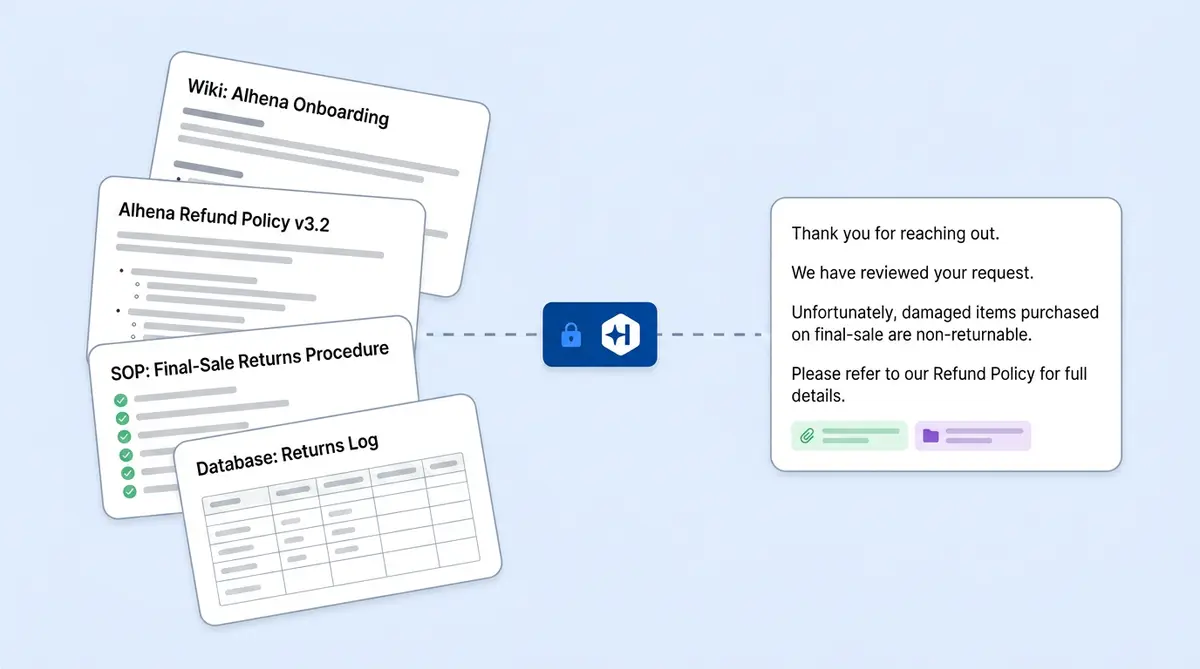
By connecting Notion directly to an AI knowledge base, businesses can turn internal documentation into a searchable source of truth that powers customer support, AI shopping assistants, conversational AI, and self-service experiences across chat, email, Instagram, WhatsApp, voice, and other channels.
With Alhena's Notion AI integration, you can connect your workspace through OAuth, ingest the pages and databases you choose, and make that knowledge instantly retrievable whenever customers ask questions.
In this guide, we'll explore how the integration works, what content Alhena can read from Notion, how AI training works, and why e-commerce brands are increasingly using Notion as the foundation of their AI knowledge management strategy.
What Is a Notion AI Integration?
A Notion AI integration connects your Notion workspace to an AI knowledge base, allowing AI systems to retrieve information from internal documentation, databases, policies, SOPs, and operational workflows.
Instead of manually copying information into a chatbot or help centre, businesses can train AI using existing Notion content.
The result is a more accurate, more useful AI experience that can answer customer questions using the same information your support team relies on every day.
Whether you're building an AI chatbot, AI shopping assistant, customer support AI, or conversational AI system, your internal documentation becomes significantly more valuable when AI can access it.
Why Notion Makes an Excellent AI Knowledge Base
Notion has evolved far beyond simple note-taking.
Today, many e-commerce businesses use Notion to manage virtually every aspect of their operations.
Inside a typical Notion workspace you'll often find:
- Refund and exchange policies
- Product troubleshooting documentation
- Shipping and fulfillment workflows
- Subscription management procedures
- Customer support playbooks
- Internal escalation processes
- Team onboarding materials
- Product specifications
- Brand guidelines
- Response templates and macros
This content contains the operational knowledge that customers frequently ask about.
A chatbot trained only on public-facing product pages can answer basic questions.
A chatbot trained on Notion can answer nuanced questions such as:
- Can I return a final-sale item if it arrives damaged?
- How do I pause my subscription?
- What happens if my package is lost in transit?
- Can warranty claims be submitted after 30 days?
- How should I troubleshoot a product issue?
Those answers often exist in internal documentation, not on public webpages.
That's why Notion content frequently becomes the missing piece between generic AI responses and truly helpful customer support.
Why Internal Knowledge Matters for AI Customer Support
Many support issues occur not because information doesn't exist, but because it's difficult to find.
Support agents spend significant time searching internal documentation, switching between tools, and locating the right answer for each customer question.
When that knowledge becomes available through AI, several things happen:
- Customers receive answers faster.
- Support agents spend less time searching.
- Response consistency improves.
- Escalations decrease.
- Customer satisfaction increases.
Instead of relying solely on public FAQs, AI can leverage the same internal knowledge your support team uses every day.
How the Notion AI Integration Works
Connecting Notion to Alhena takes about five minutes. The integration uses Notion OAuth, so you don't need to export anything, share API keys, or involve your dev team.
Here's the flow:
- In Alhena, go to AI Settings > Knowledge Base > Ingest from other sources > Notion.
- Click Connect Notion. Alhena redirects you to Notion's authorization screen.
- In Notion, choose which pages, structured tables, or workspace content Alhena can access.
- Notion confirms the connection with Alhena.
- Alhena securely stores your workspace connection details.
- Alhena creates a
Notionknowledge source in your knowledge base settings.
That's it. Your Notion workspace now appears as a trainable source in Alhena's AI Shopping Assistant and Support Concierge.
What Happens During Training
When you trigger a training run (manually or on Alhena's automatic schedule), the system processes your Notion content step by step:
- Alhena starts pulling your Notion content.
- Alhena looks up pages you shared during the authorization step.
- It scans through all accessible pages, collecting their locations.
- Each Notion page gets processed individually.
- Page content is pulled and converted to clean, readable text.
- The training system processes the content and makes it searchable.
When a customer asks a question, the most relevant Notion content surfaces in the answer. Alhena applies the same retrieval approach to all knowledge sources, so your Notion content gets the same accuracy safeguards as your product catalog or help centre articles.
If you want a deeper look at how Alhena processes content from all sources, our behind-the-scenes deep dive covers the technical details.
What Notion Content Alhena Can Read
Alhena doesn't just grab plain text from your Notion pages. The integration understands Notion's rich content structures, so your formatting and organization carry over into the AI's knowledge.
Page Content Types
Alhena processes all common Notion block types:
- Text blocks: Paragraphs, headings (H1/H2/H3), bulleted and numbered lists, to-do items, callouts, quotes, and toggles
- Code blocks: Preserved as-is for technical documentation
- Tables: Converted to structured text the AI can parse
- Media: Images, files, PDFs (as linked references), videos, and embeds
- Navigation: Child page links, so nested documentation structures stay connected
Notion Databases
Databases are where this gets interesting. If your team tracks product specs, warranty terms, or FAQ entries in a Notion database, Alhena converts each database row into indexed, retrievable text.
Supported database property types include:
- Select and multi-select fields
- Checkboxes, dates, emails, numbers, and URLs
- Relation fields linking to other databases
- Status fields, people fields, formulas, and rollups
For example, if you maintain a product database in Notion with columns for SKU, material, care instructions, and sizing notes, Alhena ingests all of that. When a customer asks "How do I wash the silk blouse?", the AI can pull the care instructions directly from your database row.
This works similarly to how Alhena handles Google Sheets data from Google Drive, where each row becomes a separate piece of knowledge. Notion databases get the same row-level treatment.
Private Pages vs. Public Notion Pages
Alhena supports two paths for Notion content, and knowing the difference matters for your setup.
Private Notion pages use the OAuth integration described above. These are pages that require workspace access. Alhena can only see pages you explicitly granted during the authorization step. If a page isn't shared with the integration in Notion, Alhena won't see it during the crawl.
Public Notion pages don't need the full workspace connection. If you've published a Notion page publicly (common for changelogs, public roadmaps, or community FAQs), you can add that page's URL as a regular website data source in Alhena's Knowledge Base. The web crawler handles it like any other URL.
Most e-commerce teams use the private integration for internal docs (policies, SOPs, and troubleshooting guides) and the public URL path for customer-facing Notion pages. You can use both at the same time.
What to Know Before You Connect
A few things are worth understanding before you start:
The integration is read-only. Alhena reads from Notion. It doesn't write back, edit pages, or create new content in your workspace. Notion stays your source of truth, and you keep full ownership of the content.
Updates aren't instant. The integration isn't a live webhook sync. When you update a Notion page, those changes reach Alhena on the next training cycle. For paid e-commerce accounts, automatic training runs every 7 days by default. You can also trigger a manual retrain from the dashboard whenever you need faster updates.
Permissions are granular. During OAuth setup, you pick exactly which pages or databases Alhena can access. If you later add new pages to your Notion workspace, you'll need to update the integration's permissions in Notion for Alhena to see them.
Disconnecting is clean. If you remove the Notion connection from Alhena's AI settings, the saved connection and the Notion knowledge source are removed from future training runs. Your Notion workspace itself isn't affected.
Content formatting matters. Pages with clear headings, structured lists, and labelled database columns produce better AI answers than walls of unformatted text. If your docs are already well-organized (and most Notion users keep them organized that way), you're in good shape.
Why Ecommerce Teams Should Care About This
Connecting Notion to your AI isn't just about convenience. It changes what your AI can do for customers and for your support team.
Your AI stops giving generic answers. Trained only on product pages, an AI chatbot gives surface-level responses. Add your internal docs, and it can answer the detailed, edge-case questions that usually require a human agent. "Can I return a final-sale item if it arrived damaged?" Your refund policy page in Notion has that answer.
Your support team gets backup. Alhena's Agent Assist tool surfaces relevant knowledge to human agents in real time. When that knowledge includes your Notion docs, agents spend less time searching wikis and more time handling complex cases. Brands like Manawa cut their support workload by 43% and dropped response times from 40 minutes to 1 minute after connecting their knowledge sources to Alhena.
You don't duplicate content. Without a Notion integration, teams end up copying internal docs into their help center, their chatbot's FAQ module, and their training spreadsheets. Every copy drifts out of sync. With Alhena's Notion integration, you maintain one version of the truth in Notion, and the AI pulls from it directly.
It works across every channel. Content from your Notion workspace feeds Alhena's responses on Instagram DMs, WhatsApp, email, web chat, and voice. A customer asking about your exchange policy over Instagram gets the same accurate answer as someone calling your support line.
Crocus, a UK gardening retailer, achieved an 86% deflection rate with 84% CSAT after training Alhena on their full knowledge base. The more complete your training data, the more questions the AI handles through automation without escalating to your team.
Notion vs. Other Knowledge Sources in Alhena
Alhena doesn't limit you to one data source. Most teams combine several. Here's how Notion fits alongside the other options:
- Websites and help centers: Great for public-facing product pages, FAQs, and documentation. But they don't cover internal processes or edge cases.
- Google Drive: Ideal for spreadsheets (pricing tables and sizing charts) and shared Docs. If your team lives in Google Workspace, this is your go-to.
- Slack: Captures the informal, tribal knowledge that lives in channels. Good for supplementing structured docs with real-world answers your team has given before.
- PDFs and uploaded documents: Useful for static files like brand guidelines, supplier agreements, or compliance docs.
- Zendesk/Freshdesk tickets: Teach the AI from past support interactions and resolved tickets.
- Notion: Best for structured internal wikis, SOPs, and databases that your team actively maintains. Notion's database support makes it especially strong for product specs and policy tables.
A typical e-commerce setup combines Notion for internal SOPs, website crawling for product pages, Zendesk tickets for support context, and Google Drive for spreadsheets. Alhena searches across all sources when answering a question, picking the most relevant content regardless of where it came from.
For a broader look at choosing the right AI-powered knowledge base software, our buyer's guide compares platforms on source diversity, retrieval accuracy, and e-commerce-specific features.
How to Set It Up
Getting your Notion workspace connected to Alhena takes a few steps:
- Log into Alhena and go to AI Settings > Knowledge Base.
- Click Ingest from other sources and select Notion.
- Click Connect Notion. You'll be redirected to Notion's authorization page.
- In Notion, select the pages and databases you want Alhena to access. Only grant access to content you want the AI to learn from.
- Confirm the connection. Your Notion workspace will appear in Alhena's Knowledge Base.
- Trigger a training run from the dashboard, or wait for the next scheduled cycle.
- Test in the Playground. Ask questions that should be answered from your Notion content and verify the responses.
The whole process takes about five minutes and easily fits into any team's workflow. No API keys to manage, no CSV exports to create, no dev resources needed. The automation runs in the background. Alhena handles the ingestion, processing, and indexing automatically. Like all Alhena integrations, the Notion connection works alongside your existing e-commerce and helpdesk integrations.
If something in your Notion docs changes (updated return windows, new shipping partners, revised product specs), just retrain from the dashboard or let the automatic cycle pick it up. Your Notion pages are the source of truth. Alhena re-reads them on every training run.
Key Takeaways
- Alhena connects Notion directly to your AI knowledge base through OAuth.
- No exports or manual document transfers are required.
- Pages, databases, tables, and structured content are fully supported.
- Private and public Notion content can both be used.
- The integration is read-only and permission-controlled.
- AI can answer questions using internal documentation stored in Notion.
- Notion content powers responses across chat, email, Instagram, WhatsApp, and voice channels.
- Combining Notion with websites, Google Drive, Slack, and support tickets creates a more complete AI knowledge ecosystem.
Your team already built the knowledge base. Now you can put it to work.

Frequently Asked Questions
How does Alhena connect to Notion?
You connect through Notion's standard authorization flow. Click Connect Notion in Alhena's AI Settings, pick which pages to share in your Notion workspace, and confirm. Alhena registers a dedicated Notion knowledge source and starts reading the content you granted access to. The whole setup takes about five minutes with no dev work or prompt configuration required.
What types of Notion content can Alhena read?
Alhena reads paragraphs, headings, lists, toggles, callouts, quotes, code blocks, tables, images, and child page links. For Notion databases, it picks up property types including select, multi-select, checkbox, date, email, number, relation, status, URL, formulas, and rollups. Each database row becomes a separate piece of indexed knowledge the AI assistant can use when answering questions.
Does Alhena write back to or edit my Notion workspace?
No. The connection is read-only. Alhena reads your Notion pages during training but never edits, creates, or deletes content in your workspace. You keep full control. Notion remains your single source of truth, and Alhena simply uses it to generate better answers for your customers.
How often does Alhena sync with Notion?
Alhena re-reads your Notion content on each training cycle. For paid ecommerce accounts, automation runs every 7 days by default. You can also trigger a manual retrain from the Alhena dashboard whenever you update important docs. If you write or rewrite policies or change product specs in Notion, just retrain and the AI picks it up.
Can I use both private and public Notion pages with Alhena?
Yes. Private Notion pages use the workspace authorization, giving Alhena access only to pages you select. Public Notion pages, like changelogs or community FAQs, can be added as regular website URLs in your Knowledge Base. Teams that use AI for customer support can use both methods at the same time to cover every use case.
How is this different from training on a website or help center?
Websites and help centers cover public-facing content. Notion captures internal knowledge that customers never see, like refund edge cases, escalation workflows, troubleshooting steps, and product specs stored in databases. Think of it this way: your help center tells customers what your return policy is, but your Notion docs tell the AI agent how to handle the tricky exceptions. Combining both gives your AI the full picture.
What happens if I disconnect Notion from Alhena?
Disconnecting removes the saved Notion connection and the dedicated knowledge source from future training runs. Your Notion workspace is not affected. Previously trained content stays in the knowledge base until the next retrain overwrites it. You can reconnect anytime to automate the flow again.
Can Alhena read Notion databases with custom properties?
Yes. Alhena supports all standard Notion database property types, including select, multi-select, checkbox, date, email, number, relation, status, URL, people, formulas, and rollups. Each row with its properties is converted to structured text for retrieval. If you use a Notion database as a project tracker or CRM, the AI can pull specific details from individual records.
Can Alhena use Notion meeting notes and action items as training data?
Yes. If your team stores meeting notes, action items, or task lists in Notion, Alhena can ingest those pages and use them to answer related questions. For example, if a meeting note documents a policy change or a new shipping partner, the AI can reference that decision when helping customers. Teams that summarize calls or transcribe discussions into Notion can feed that content to Alhena too. Meeting notes are treated the same as any other Notion page.
How is Alhena different from Notion AI or other AI tools like Claude?
Notion AI is a built-in writing and brainstorm tool. It helps you draft documents, summarize pages, autofill database properties, and generate text inside your workspace. Claude and similar AI tools are general-purpose assistants you can prompt for almost anything. Alhena is different because it is an AI powered ecommerce AI agent built to answer customer questions across chat, email, and social channels. It reads your Notion content not to help you brainstorm ideas or fix grammar, but to give your customers and support team accurate, grounded answers about your products and policies. You can also set up custom agents for specific product lines or departments.
What are common use cases for connecting Notion to Alhena?
The most popular use cases include training the AI on internal SOPs, refund and exchange policies, product troubleshooting guides, and onboarding documents. Some teams connect Notion databases they use as a CRM or project tracker so the AI can pull order handling rules or translate product specs into plain language for customers. Others feed in draft business plans or brainstorm notes to give the AI agent richer context about upcoming launches. Any Notion doc or wiki page that contains knowledge your customers might ask about is a good candidate.
Can Alhena automate responses from Notion docs without a human in the loop?
Yes. Once trained on your Notion content, Alhena can automate customer-facing responses on its own. The AI assistant handles tasks like answering product questions, explaining return policies, and walking customers through troubleshooting steps, all based on what you wrote in Notion. If a question falls outside the AI's knowledge or needs a judgment call, the system can triage the conversation and hand it off to a human agent with a summary of what was discussed. You control the output through the AI prompts and permissions you configure.