Your best technical documentation probably isn’t on your documentation website.
It’s hidden inside GitHub repositories, buried across thousands of closed issues, scattered through discussion threads, and sitting in README files that never made it into your help center.
For developer-focused companies, SaaS platforms, API providers, SDK vendors, and integration-heavy products, GitHub is often where the most valuable product knowledge lives.
The setup guides. The edge-case fixes. The undocumented workarounds. The implementation details that customers actually need when something breaks.
Yet most AI knowledge bases and support systems only train on help centre articles and documentation pages. That means your AI misses some of the most useful technical knowledge your team has already created.
In this guide, you'll learn how to train AI on GitHub repositories, issues, and discussions, why GitHub is a powerful source for AI-powered customer support, and how Alhena AI turns GitHub content into a searchable AI knowledge base that delivers accurate technical answers across every support channel.
What Is a GitHub AI Knowledge Base?
A GitHub AI knowledge base is an AI-powered support system trained on GitHub repositories, documentation, issues, discussions, code examples, troubleshooting threads, and technical resources.
Instead of relying solely on traditional documentation, the AI can retrieve answers from:
- GitHub repositories
- Closed GitHub issues
- GitHub Discussions
- README files
- Configuration guides
- Technical examples
- Community troubleshooting conversations
This allows AI support agents to answer technical questions using real-world engineering knowledge rather than just surface-level documentation.
Why Traditional Documentation Misses Critical GitHub Knowledge
Documentation teams write for the happy path. They cover installation, basic usage, and a few common configurations. But customers don't stay on the happy path for long.
The moment someone hits a version conflict, an undocumented parameter, or a platform-specific quirk, they search GitHub. And they find answers there because closed issues contain the exact symptoms, reproduction steps, maintainer explanations, and final fixes. That's knowledge your docs site never captured.
Discussions add another layer. They capture implementation questions, roadmap clarifications, community-sourced workarounds, external integration guides, and setup advice that's too conversational for a formal doc page. When a user asks, "How do I configure this SDK with Next.js 14?" and three community members share working configs, that thread becomes a better answer than any official guide.
Repository files round out the picture. READMEs, API examples, config references, deployment notes, and troubleshooting docs all contain implementation truth. They're the source code of knowledge, literally. Yet most AI knowledge base software never sees any of it.
So your AI answers questions using polished marketing docs while your customers need the raw, real-world answers sitting in GitHub. Alhena's training pipeline closes that gap by ingesting GitHub content directly into your AI knowledge base.
What GitHub Repositories, Issues, and Discussions Can Be Used to Train AI
Alhena doesn't treat GitHub as a single content type. There are three distinct source categories, each handled differently.
Repository Files
Point Alhena at a repo root like github.com/org/repo and it reads through the repository. What gets pulled in: READMEs, markdown docs, source files, config-style docs, code examples, and text files. Binary files, dependencies, build output, lock files, and hidden directories are all skipped automatically. You don't need to curate a list of "safe" files. It knows what's noise and what's knowledge.
Closed Issues
For issues, Alhena pulls recently updated, closed issues including the title, body, and all replies. Closed issues are the priority because they represent resolved problems with confirmed answers. Each issue typically contains the user's symptom, reproduction steps, maintainer clarification, and the actual fix or workaround. Automated comments (CI notifications, merge bots) get filtered out so noise don't pollute your AI knowledge base.
Discussions
Discussions work the same way. Alhena captures recent threads, including the title, body, and all comments. Discussions are especially valuable for FAQ-style content, community answers, product usage patterns, and integration guides written by real users. Personal details get stripped. The AI can still tell a maintainer response from a first-time poster, so the AI knows a maintainer response carries more weight than a first-time poster.
You can add any of these as a training source individually. Pass a repo root URL to get all three, or pass a specific issues URL or discussions URL to target just one category.
How GitHub AI Training Works
Once you add a GitHub URL in Alhena's AI training area, the pipeline kicks off in a sequence that mirrors how Alhena handles any other data source, with GitHub-specific logic handling the details.
First, URL classification. Based on the URL pattern, it gets classified as a repo root, an issues source, a discussions source, or a code/docs source. A repo root triggers all three types. A direct issues URL triggers only issues.
Next, content collection. Alhena reads the content from GitHub. Recently closed issues get pulled in, including the full conversation. Discussions come through with all replies included. Repo content gets read selectively. Text and code files come through. Dependencies, binaries, media, and generated output are skipped.
Then cleanup. Each piece of raw GitHub content becomes clean, structured text. Issue threads get organized so the problem, discussion, and resolution are easy for the AI to parse. Code and documentation files each get processed appropriately. Automated noise like CI bot messages gets filtered out.
After that, chunking. Cleaned content goes through Alhena's processing pipeline. Content gets organized and stored alongside all your other training data.
Finally, retrieval. When a customer asks a question, Alhena searches across all your knowledge sources, including content from GitHub. If a closed issue thread contains the best answer, that's what surfaces. What comes back is a grounded answer built from the retrieved context. Answers stay grounded in real source material.
All of this runs automatically. You add the URL, hit train, and GitHub knowledge becomes part of your AI within minutes. No custom pipelines. No data engineering.
What Changes After You Train on GitHub
You notice the difference immediately in the types of questions your AI can handle.
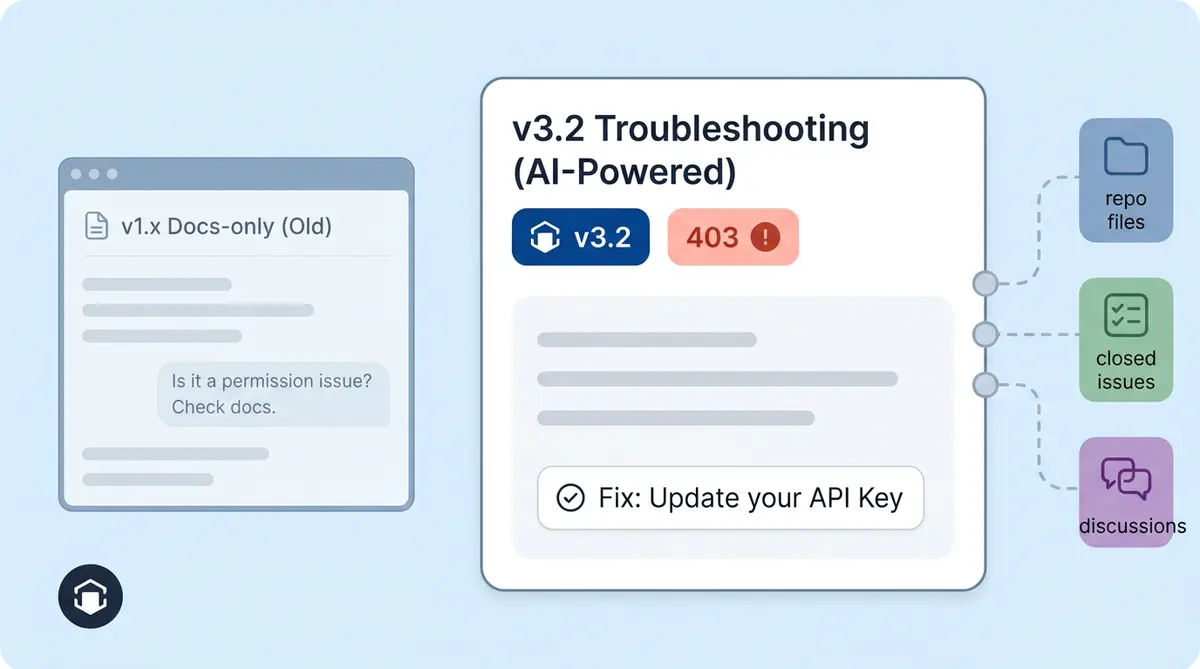
Before GitHub training, your AI knows what's in your docs site and help centre. It can answer "How do I install the SDK?" and "What plans do you offer?" But when a user asks, "Why does the webhook return a 403 after upgrading to v3.2?" the AI either hallucinates an answer or says, "I don't know."
After GitHub training, the AI pulls up a closed issue where a maintainer explained the 403 was caused by a breaking change in auth headers, and the fix is to regenerate the API token. That answer came from the engineering team, preserved in an issue thread, and now your AI delivers it in seconds without anyone pinging a developer.
Here are the types of questions that suddenly become answerable:
- "How do I configure this SDK with Docker Compose?"
- "What environment variables does the CLI need?"
- "Is there an example for the batch import endpoint?"
- "What does error code E4012 mean?"
- "Does this work with Node 20 or only 18?"
- "How do I migrate from v2 to v3?"
These are the questions that used to land on your engineering team's plate, taking 15 to 30 minutes of an engineer's time per answer. If you have an active GitHub community, your support team reclaims hours of developer time each week. Alhena's GitHub support automation goes even further by letting the AI respond directly in GitHub Issues and Discussions, but training alone makes a noticeable difference across every support channel.
GitHub Training vs. GitHub Channel Support
This distinction trips people up, so let me spell it out.
GitHub as a training source means Alhena reads your GitHub content and adds it to the AI knowledge base. Your website chat, email responses, social commerce replies, and helpdesk answers all get smarter because the AI now knows what's in your repos, issues, and discussions. Training is passive. It doesn't change anything in GitHub itself.
GitHub as a support channel means Alhena connects as a GitHub App and actively monitors new issues and discussion posts. When a question comes in, the AI drafts a response (using all trained knowledge, including the GitHub-sourced content) and posts it as a comment. That's active participation in GitHub.
GitHub AI Training vs Traditional Documentation
| Feature | Traditional Docs | GitHub AI Knowledge Base |
|---|---|---|
| Installation Guides | ✓ | ✓ |
| Real Troubleshooting | Limited | ✓ |
| Community Solutions | No | ✓ |
| Resolved Bugs | No | ✓ |
| Integration Examples | Limited | ✓ |
| Developer Discussions | No | ✓ |
You can use one without the other. Many companies start by training on GitHub to improve answers across their web chat and email support, then add the GitHub channel later once they see the knowledge quality improve. Others do both from day one.
Bottom line: training on GitHub makes your AI smarter everywhere, not just on GitHub. A customer asking via voice, Intercom, Zendesk, or Instagram DMs gets the same GitHub-informed answer that a developer asking in a GitHub discussion would.
Which Companies Should Train Their AI on GitHub?
Not every company needs this. If you sell candles on Shopify, your AI knowledge base probably lives in your product catalog and FAQ page. But for these types of businesses, GitHub training is a real differentiator:
Developer tool companies. SDKs, CLIs, APIs, and libraries generate a constant stream of "how do I..." questions. Your GitHub issues are your best troubleshooting database. Train on them.
Open-source projects with commercial support. Your community has already answered hundreds of questions in Issues and Discussions. Training your AI on those threads means paying customers get instant answers instead of waiting for a maintainer to show up.
SaaS platforms with integrations. If your product connects to third-party services, your customers hit integration-specific edge cases that internal docs rarely cover. Closed issues from real integration debugging sessions are gold for your AI knowledge base.
API-first businesses. Webhook configs, auth flows, rate limit behavior, error codes. All of this lives in your repo docs and issue history. Alhena's API Tools let you extend the AI with live API actions, and GitHub training gives the AI the context it needs to guide users through complex setups.
Ecommerce platforms with developer communities. Think Shopify app developers, WooCommerce plugin builders, or Magento extension creators. Their customers ask questions that span product docs and code. Alhena's ecommerce AI already handles product and order queries. Adding GitHub training extends that coverage to the technical layer.
Getting Started: Adding GitHub to Your AI Knowledge Base
Setup takes five minutes, not five sprints.
- Open your Alhena dashboard and go to the AI Training section under Data Sources.
- Click "Add Source" and paste your GitHub URL. This can be a repo root (
github.com/org/repo), an issues URL (github.com/org/repo/issues), or a discussions URL (github.com/org/repo/discussions). - Start training. It classifies the URL, processes the content, and adds it to your knowledge base.
- Test it. Open your AI chat widget and ask a question you know is answered in a closed issue or repo README. Your AI should pull from that content.
- Iterate. Add more repos, more issue URLs, or discussion URLs as needed. Each source trains independently and stacks with everything else in your knowledge base.
All of that joins your existing training sources, including websites, PDFs, help center articles, Notion pages, Google Drive files, Slack channels, Zendesk tickets, Freshdesk tickets, and more. At retrieval time, GitHub content is treated the same as everything else. It picks the most relevant answer from any source.
If your team already uses Alhena's Training Monitor, GitHub sources show up alongside all other data sources with full visibility into training status and when each source was last updated.
Why This Matters for AI Knowledge Base Quality
Most AI chatbots don’t fail because of the model. The failure is the training data. Feed an AI nothing but polished marketing copy and it'll give polished, unhelpful answers to technical questions. Feed it real-world GitHub content, the actual problems customers ran into and how your team solved them, and the AI becomes genuinely useful.
Closed issues are often better than formal docs for edge cases because they contain context that docs strip out: the specific version, the exact error message, the failed approaches, and the final working solution. That's the kind of information that turns a "maybe try this" AI response into a "here's exactly what to do" response.
Brands using Alhena AI have seen strong results from thorough knowledge base training. Tatcha saw 82% chat deflection by giving the AI deep product knowledge. Puffy achieved 90% CSAT with AI-handled inquiries. Crocus hit 86% deflection rates with 84% customer satisfaction. The pattern is clear: better training data leads to better AI answers, which leads to less escalation and happier customers.
GitHub is the missing training source for technical products. That knowledge already exists. Your team already wrote it, one issue thread and discussion reply at a time. Alhena just makes it retrievable.
Why Alhena Uses GitHub for AI Training
At Alhena AI, we've seen that some of the highest-quality support answers come from engineering discussions, resolved GitHub issues, and implementation examples rather than traditional documentation alone. GitHub training helps organizations surface technical knowledge that would otherwise remain buried inside repositories and community conversations.
This creates first-hand experience signals.

Frequently Asked Questions
Can Alhena AI train on private GitHub repositories?
Yes. You can add any GitHub URL you have access to as a training source. Alhena works with both public and private repos, issues, and discussions. For private repos, appropriate access credentials are needed during setup.
What types of GitHub content does Alhena ingest?
Alhena ingests three types of GitHub content: repository files (READMEs, markdown docs, source files, config files, examples), closed issues (with all replies), and discussion threads (with all replies). Binary files, dependencies, build output, and automated bot content are excluded automatically.
How is training on GitHub different from Alhena replying in GitHub?
Training on GitHub means Alhena reads your repo content, issues, and discussions and adds that knowledge to the AI. It makes your AI smarter across all channels like web chat, email, and voice. Replying in GitHub means Alhena connects as a GitHub App and actively posts AI-generated comments on new issues and discussions. You can use one or both.
Does GitHub training work alongside other knowledge sources?
Yes. GitHub content gets embedded into the same knowledge base as your website pages, PDFs, help center articles, Notion pages, Zendesk tickets, and every other training source. At answer time, the AI retrieves the best match regardless of source.
How often should I retrain on GitHub content?
It depends on how active your repos are. For fast-moving projects with daily issue closures, weekly retraining keeps the AI current. For stable projects, monthly retraining is enough. Alhena's Training Monitor shows you when each source was last updated so you can schedule retraining accordingly.
Why does Alhena only train on closed GitHub issues?
Closed issues represent resolved problems with confirmed answers. Open issues often contain unresolved questions, partial information, or ongoing debates that could lead to inaccurate AI responses. By focusing on closed issues, Alhena ensures the knowledge base reflects verified solutions.
What companies benefit most from GitHub AI training?
Developer tool companies, open-source projects with commercial support tiers, SaaS platforms with integrations, API-first businesses, and ecommerce platforms with developer communities. Any company whose customers ask technical questions that are answered in GitHub repos or issue threads will see immediate value.
How long does it take to train Alhena on a GitHub repository?
Training typically completes within minutes for a standard repository. The exact time depends on the number of issues, discussions, and files being ingested. You add the GitHub URL, click train, and the pipeline handles reading, cleaning, and indexing the content automatically.