Most AI agents can only repeat what they've been told. They pull from a knowledge base, match a FAQ, and deliver a scripted answer. That works until a customer asks something live: "Where is my order?" "Do I have warranty coverage?" "What's my loyalty balance?" The answer isn't in a doc. It's in your OMS, your CRM, your subscription platform, or a custom backend service or third-party application.
API tools inside Alhena AI close that gap. They let you turn any REST endpoint into an action your AI agent can call mid-conversation, with no code and no developer sprint required. The agent collects the right inputs, hits your API, reads the response, and explains it to the customer in natural language.
This post walks through what API tools are, how they work step by step, what brands build with them, the products and services they support, and how they compare to more complex integration approaches like MCP.
Why Most AI Agents Hit a Wall
A knowledge-base chatbot is useful up to a point. It handles FAQs, explains return policies, and links to sizing guides or products. But the moment a customer needs something specific to their account, order, or subscription, the bot stalls.
According to Gartner, 33% of enterprises will include agentic AI by 2028, up from less than 1% today. The reason is straightforward: customers expect answers drawn from live systems, not static articles.
Think about the questions that fill your support queue right now:
- "Where is my order?"
- "Is this item in stock at the warehouse?"
- "Do I have warranty coverage?"
- "What's my loyalty point balance?"
- "Can I book an appointment for next Thursday?"
- "Is my ZIP code eligible for same-day delivery?"
Every one of those questions has an answer sitting in a backend system. The data is there. The problem is that your AI agent can't reach it. It doesn't have a bridge between the conversation and your business logic.
That's exactly what API Tools provide.
What API Tools Are (and What They Replace)
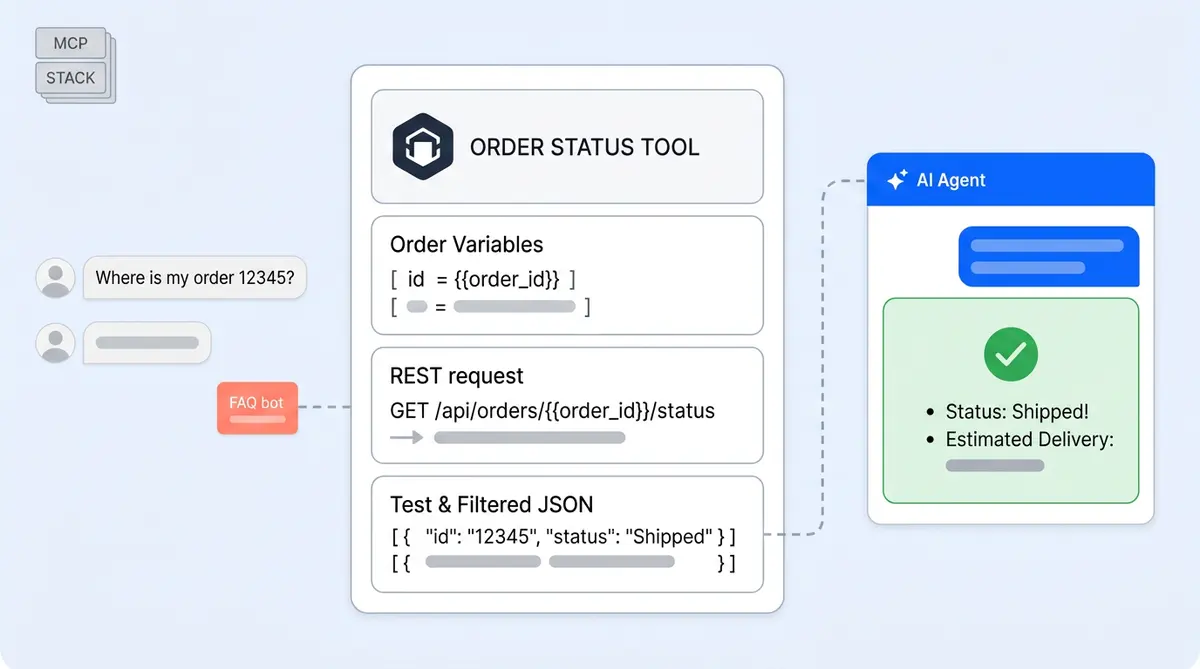
API Tools are custom HTTP integrations you configure directly inside the Alhena dashboard. No code. No deployment pipeline. No API gateway to manage. You define a tool, point it at a REST endpoint, describe when the agent should use it, and save.
Each API tool has six components:
- Tool name so you can identify it (e.g., "Order Status Lookup")
- Tool description that tells the AI when to call it (this is the key part)
- Agent assignment so only the right agent sees the tool
- Variables like
order_id,email, orcustomer_idthat the API needs - API configuration including endpoint URL, HTTP method, headers, and request body
- Response filters using JMESPath to trim the payload before the AI reads it
Before API Tools, connecting an AI agent to a custom backend meant building a dedicated integration: writing middleware, handling auth, parsing responses, and maintaining it over time. For brands running on Shopify or WooCommerce with standard workflows, Alhena's native integrations already cover order tracking, returns, shipping, and product data for e-commerce businesses. But many brands also have proprietary systems: a custom loyalty engine, an internal warranty database, a homegrown appointment scheduler, or a fulfillment API specific to their 3PL or e-commerce stack.
API tools enable those cases. If your system has a REST endpoint, Alhena's agent can call it.
How API Tools Work: A Step-by-Step Walkthrough
Setting up an API tool inside Alhena takes about 10 minutes. Here's how the process works from configuration to live conversation.
Step 1: Name the tool and write a clear description
You start by giving the tool a name and a description. The description matters more than you might expect, because it's what tells the AI when to use the tool.
A vague description like "Gets data from the API" won't work well. A specific one does: "Retrieves the latest order status using an order number." Use this when a customer asks about order tracking, shipping status, or delivery ETA."
The more precise your description, the more reliably the agent picks the right tool at the right time.
Step 2: Define the variables
Variables are the inputs your API needs. Alhena supports two sources:
Asked by AI: The agent collects the value from the customer during the conversation. If a shopper says, "Where is my order?" but doesn't include the order number, the agent asks, "Can you share your order number so I can look that up?" You define the variable name (e.g., order_id), its type (text, number, boolean, array, or object), and whether it's mandatory.
From SDK: The website passes the value automatically via user metadata. If the customer is logged in, you can send their customer_id, email, or membership_tier to Alhena's SDK, before the conversation even starts. The agent already has the data it needs, so it never asks for information the brand already knows.
This split is what makes API tools practical for real e-commerce. Logged-in customers get faster answers. Guest customers still get helped, just with one extra question.
Step 3: Configure the API request
You set the endpoint URL, HTTP method (GET, POST, PUT, PATCH, or DELETE), headers, and request body. Variables go anywhere using double curly braces: {{order_id}}.
A typical setup looks like this:
- Endpoint:
https://api.brand.com/v1/orders/{{order_id}}/status - Method: GET
- Header:
Authorization: Bearer {{api_token}}
For POST requests, you add a JSON body:
- Body:
{"email": "{{email}}", "order_id": "{{order_id}}"}
The configuration supports any standard REST pattern. If your backend team can give you a working cURL command, you can turn it into an API tool.
Step 4: Test the API call
Before saving, you test the tool with sample values right in the dashboard. Alhena confirms that the endpoint is reachable, auth works, the response is valid, and the payload isn't too large. This catches configuration errors before they reach a live human conversation.
Step 5: Filter the response with JMESPath
API responses often return far more data than the agent needs. A full order payload might include 40+ fields when the customer only asked about delivery status.
Alhena's response filtering uses JMESPath expressions to extract just the relevant fields. For example, from a large order object, you can keep only:
order.statusmapped to "status"order.tracking_urlmapped to "tracking_url"order.estimated_deliverymapped to "estimated_delivery"
Filtering does three things: it makes the agent faster (less data to process), cheaper (fewer tokens consumed), and more accurate (less noise to get confused by).
Step 6: Assign to an agent and save
You assign the API tool to a specific Alhena agent: the Product Expert Agent, the Order Management Agent, or any custom agent you've built. This scoping prevents every agent from seeing every tool and keeps tool selection accurate.
Once saved, the tool is live. No deployment to your existing codebase, no code review, no waiting for a release cycle.
Step 7: The agent calls the tool during a conversation
Here's where it all comes together. A customer types, "Where is my order 12345?"
The AI reads the natural language message, recognizes that the Order Status tool is relevant, extracts order_id = 12345, calls the REST endpoint, receives the filtered JSON, and responds: "Your order 12345 shipped on May 22 and is expected to arrive by May 29. Here's your tracking link."
The customer never sees the API call. They just get a fast, accurate, personalized answer.
What Brands Build with API Tools
In the agentic commerce era, the flexibility of API Tools means brands use them for far more than order tracking. Here are real patterns we see across Alhena customers in ecommerce, beauty, fashion, and home furnishing:
Order and shipment tracking. The most common use case. Brands connect their OMS or 3PL API so the AI can pull live tracking data on products and shipments. Customers get real-time shipping and delivery updates without filing a ticket. Brands like Puffy already automate 63% of support inquiries, and API tools extend that automation to custom fulfilment workflows.
Warranty and coverage verification. A customer asks, "Is my product still under warranty?" The agent looks up the purchase date and warranty terms via the brand's warranty API, then gives a clear yes-or-no answer with the expiration date.
Loyalty point balance and redemption. Brands with custom loyalty programs connect their points API. The agent tells customers their current balance, how close they are to a reward, and what they can redeem, all inside the chat.
Inventory and availability checks. "Is this available at the downtown store?" or "Can you ship this to 90210?" The agent calls a stock or eligibility API and generates an instant response. This is especially valuable for brands with complex fulfillment rules that go beyond standard Shopify or WooCommerce inventory, pricing, or shipping rules.
Appointment and service booking. Travel and hospitality brands, salons, and service-based businesses use API tools to let the assistant check availability and book appointments through their scheduling system. Brands like Manawa cut response times from 40 minutes to 1 minute with Alhena's automation.
Return status lookups. When a customer asks, "What's the status of my return?" Alhena calls the returns API and shares the current stage: received, inspected, refund processed. No ticket needed, no human handoff required.
Backend workflow triggers. API tools support POST, PUT, PATCH, and DELETE, so they're not limited to reading data. Brands use them to submit requests, update records, or trigger workflows in backend systems. The AI doesn't just answer questions. It takes action.
API Tools vs. MCP: When to Use Each
Alhena supports both API tools and MCP (Model Context Protocol) servers. They serve different integration capabilities, and picking the right one depends on the complexity of your backend.
Use API tools when:
- You have one endpoint or a small set of REST endpoints to connect
- The integration is straightforward request-response
- The inputs are easy to describe as variables (order ID, email, ZIP code)
- The endpoint already exists as a REST API
- You want it live quickly, without writing any code
Use MCP when:
- You have a complex tool ecosystem where one server exposes many capabilities
- You need stateful interactions or multi-step workflows across multiple tools
- Your integration requires custom logic beyond simple HTTP calls
- You're connecting to services and systems that don't expose clean REST endpoints
Most brands start with API tools. They're faster to set up, easier to maintain, and cover 80% of custom integration needs. MCP becomes valuable when your agent needs to orchestrate across multiple services in a single workflow.
You can also combine both. Use API tools for simple lookups (order status, loyalty balance) and MCP for complex multi-step processes (processing a return that involves checking eligibility, creating a label, and issuing a refund across three different systems).
For more context on how these integration approaches fit into the broader agentic commerce shift, see our guide on the Agentic Commerce Protocol.
Why API Tools Change What Your AI Agent Can Do
The difference between a chatbot that knows things and an agent that can do things is backend access. API tools are the best solution for closing that bridge.
Real-time answers replace stale FAQ responses. When a customer asks about their order, they get live data from your OMS, not a generic "check your email for tracking info" reply.
Fewer tickets hit your support team. Customers self-serve on order status without waiting for a human, return tracking, warranty checks, inventory questions, and account lookups. Brands using Alhena see deflection rates as high as 86% (Crocus) and 82% (Tatcha). API tools extend that automation to every system you connect.
Support becomes personalized. When the agent knows the customer's tier, purchase history, or subscription status (passed through SDK variables), it tailors every response. A VIP customer on their shopping journey gets a more human, tailored experience than a first-time visitor.
Implementation is fast. No custom middleware. No developer sprints. Support teams, ops managers, or CX leads can configure an API tool in 10 minutes and test it before going live. Alhena already deploys in under 48 hours, and API Tools keeps that speed for custom integrations too.
Responses stay clean. JMESPath filtering means the AI only sees the fields that matter. This reduces hallucination risk and keeps product data clean, keeps responses focused, and lowers token costs.
Getting Started with API Tools
API tools are available on Alhena's Pro plan (check pricing for details). Here's what you need to get started:
- Identify your top support questions that need live data. Pull your most common ticket types. Which ones require looking something up in a backend system? Order status, return tracking, and account balance are the best starting points.
- Get the REST endpoint details from your backend team. You need the URL, HTTP method, required parameters, auth headers, and a sample response. If they can give you a working cURL command, you're set.
- Configure the API Tool in Alhena. Go to Integrations, then Custom Extensions, then API Integrations. Name it, describe it, add your variables, paste the endpoint details, and test.
- Filter the response. Use JMESPath expressions to trim the API response down to just the fields the agent needs. Less data means faster, more accurate answers.
- Assign it to the right agent. Attach the tool to your order management agent, product expert agent, or a custom agent you've built for a specific workflow.
- Test with real conversations. Ask your agent the questions customers would ask. Verify the tool fires correctly, the response makes sense, and the agent explains it naturally.
Alhena also supports Sheet Search for connecting spreadsheet data and MCP servers for complex integrations. API tools sit right in the middle: more powerful than a spreadsheet, simpler than a full protocol server, and perfectly suited for modern agentic commerce.
Ready to turn your AI agent from a knowledge-base chatbot into a real-time operator? Book a demo with Alhena AI to see API Tools in action, or start for free with 25 conversations.

Frequently Asked Questions
What are API Tools in Alhena AI?
API Tools are custom REST API integrations you configure inside Alhena’s dashboard. They let your agentic AI agent call any HTTP endpoint during a live conversation to retrieve real-time data or complete tasks on behalf of the customer, all without writing code. Think of them as the bridge that turns a traditional bot into an intelligent agent that can act autonomously on live business data. Whether a shopper needs an order update, a loyalty balance, or a checkout correction, the AI-powered agent executes the request in seconds.
How do API Tools differ from Alhena’s native integrations?
Native integrations (like Shopify or Zendesk) come pre-built and handle standard ecommerce and commerce workflows automatically. API Tools are for custom systems that Alhena doesn’t have a native connector for yet, such as proprietary loyalty engines, warranty databases, or merchant-specific scheduling tools. You define the endpoint, variables, and filters yourself. Where native connectors cover common commerce platform needs out of the box, API Tools give retailers and merchants the interoperability to connect any REST API in their infrastructure, adapting to unique consumer behavior patterns that off-the-shelf connectors can’t anticipate.
Do I need a developer to set up an API Tool?
No. A support ops manager or CX lead can configure an API Tool in about 10 minutes. You need the REST endpoint URL, HTTP method, auth headers, and parameter names from your backend team, but the setup itself is entirely no-code inside the Alhena agentic AI platform. This autonomous setup process means any retailer or merchant can automate new shopping journeys and interaction models without a developer sprint, adapting quickly as consumer preferences change and your digital commerce stack evolves.
What types of variables can API Tools use?
API Tools support two variable sources. ‘Asked by AI’ variables are collected from the shopper during the agentic conversation (like an order number or preference). ‘From SDK’ variables are passed automatically by your website via user metadata (like a logged-in consumer’s email, membership tier, or checkout status). Variable types include text, number, integer, boolean, array, and object. This lets the AI agent act on behalf of the customer with the right context for personalization, executing requests autonomously without asking the shopper to repeat information the merchant already has.
How does JMESPath response filtering work?
JMESPath is a query language for JSON. When your API returns a large response, you write JMESPath expressions to extract only the fields the AI system needs, such as order status, tracking URL, and delivery date. This makes the generative AI response faster, reduces token costs, and prevents the agentic agent from being distracted by irrelevant data. For product discovery use cases in retail and ecommerce, filtering lets you surface just the product attributes, pricing, and availability a shopper actually asked about, keeping the interaction model clean and the shopping power of your assistant focused.
Can API Tools trigger actions in backend systems, or only read data?
Both. API Tools support GET, POST, PUT, PATCH, and DELETE methods, so the agentic AI agent can act on your systems, not just read from them. That means agents can execute tasks like submitting return requests, updating account preferences, processing transactions, or triggering fulfillment workflows. This is what separates an autonomous AI commerce assistant from a traditional chatbot: the ability to autonomously complete tasks, mediate between the shopper and your digital commerce infrastructure, and handle real transactions on behalf of the retailer without human intervention.
When should I use API Tools instead of MCP servers?
Use API Tools when you have a straightforward REST endpoint or a small set of endpoints to connect. They’re best for simple request-response interactions like order lookups, loyalty balance checks, or inventory queries. Use MCP servers when you need a complex, interoperable tool ecosystem with stateful, multi-step workflows across multiple services. Many merchants start with API Tools for quick wins that automate common shopping journeys, then adopt MCP as their agentic AI platform matures and they need agent-to-agent (A2A) orchestration or deeper interoperability across their commerce platform and retail systems.
What Alhena plan includes API Tools?
API Tools are available on Alhena’s Pro plan. You can configure them under Integrations, then Custom Extensions, then API Integrations in the dashboard. There’s no limit on the number of API Tools you can create, so retailers and merchants can connect every part of their retail and digital commerce stack. Whether you’re powering product discovery, checkout flows, transaction processing, or post-purchase interactions, the agentic AI platform scales with your needs and adapts as your commerce infrastructure grows.
How does the AI agent decide when to call an API Tool?
The agent uses the tool description you define during setup. A clear, specific description like ‘Retrieves order status using an order number. Use when a customer asks about tracking or delivery ETA’ tells the generative AI exactly when the tool is relevant. Vague descriptions lead to missed or incorrect tool calls. Well-described tools let the autonomous AI agent interact with your backend intelligently, adapting to each shopper’s intent, mediating between the consumer and your systems, and powering a more personalized shopping journey from first question to checkout.
How do API Tools compare to using ChatGPT or general-purpose AI for ecommerce?
ChatGPT and similar generative AI models are powerful for open-ended conversation, but they can’t call your backend systems out of the box. A general-purpose bot doesn’t know your order database, loyalty program, or inventory API. Alhena’s API Tools turn the agentic AI into an intelligent agent that’s wired directly into your commerce infrastructure. The interaction model is fundamentally different from a traditional chatbot: instead of generating responses from training data alone, the AI powered agent executes real API calls, retrieves live data, and completes tasks autonomously on behalf of the shopper. That’s the difference between an assistant that sounds smart and one that actually delivers real AI power and shopping power.
Can API Tools connect to payment providers like Stripe or transaction platforms?
Yes. Any service with a REST API can be connected through API Tools, including payment providers like Stripe, transaction processors, and commerce platforms that handle Mastercard or other card network flows. For example, a merchant could create an API Tool that checks a transaction status, verifies a refund, or confirms payment on behalf of a consumer. The key is interoperability: API Tools give your agentic AI agent the shopping power to execute actions across your entire retail stack, from the product discovery layer all the way through checkout and post-purchase. This turns the agent into a true commerce mediator, not just a conversational bot.