The N×M Problem Every Ecommerce AI Team Hits
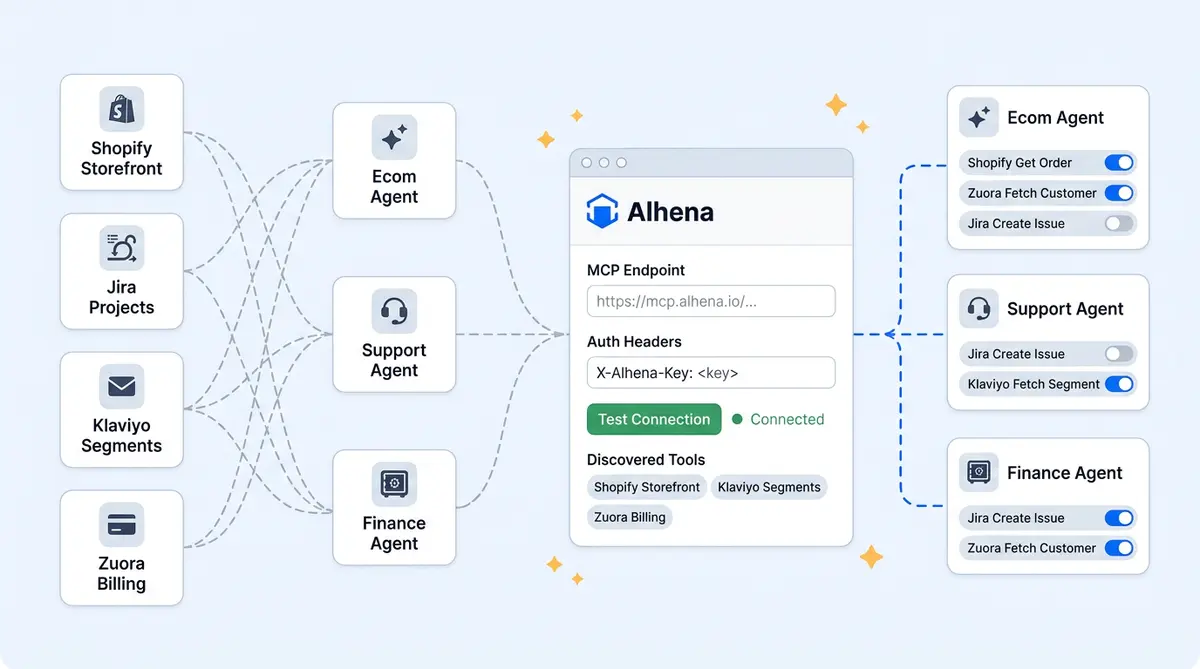
Your AI agent needs to check orders in Shopify, look up subscriptions in a homegrown billing system, file tickets in Jira, and push segments to Klaviyo. That's four backends, four external services, four authentication schemes, and four custom adapters your team has to maintain. Add a fifth system next quarter, and every agent that needs it gets another round of integration work.
For pre-order platforms like Purple Dot, Alhena offers anative pre-order integration.
The Model Context Protocol (MCP) was designed to kill this problem. One protocol, one technology layer for connecting external systems to any backend. Alhena's MCP support takes that further: register an MCP server once in the dashboard, and every agent you assign it to can discover and call its tools at runtime. No redeployment, no code changes.
This post walks through Alhena's three-tier extensibility model: 35+ native connectors for major platforms, API Tools for single-endpoint REST calls, and MCP Servers for rich multi-tool integrations. You'll see how each tier works, when to use which, and the safety model that keeps everything locked down.
A Quick MCP Primer
MCP is an open protocol (donated by Anthropic to the Linux Foundation in December 2025) that standardizes how AI agents and LLMs connect to external tools and data sources. The client sends JSON-RPC 2.0 requests to an MCP server, and that server exposes tools and information the agent can discover and call. With 97 million monthly SDK downloads across Claude, ChatGPT, and other LLMs, and over 17,000 public protocol servers indexed by early 2026, MCP is today the default integration layer for agentic AI systems.
The MCP specification defines three primitives: Tools (functions the model can invoke), Resources (contextual data), and Prompts (templated workflows). For ecommerce AI, tools are the star. A single MCP server wrapping your order management system might expose get_order_status, initiate_return, and apply_store_credit as callable tools, each with a typed input schema and documentation the LLM uses to generate correct arguments.
Our ACP vs UCP vs MCP breakdown covers how MCP fits alongside commerce-specific protocols. This post focuses on implementation so you can learn how to get started quickly.
Dashboard Registration: Endpoint to Live Tools in Five Minutes
Connecting an MCP server starts at Integrations → Custom Extensions → MCP Integrations → Add new MCP server. The flow has four steps.
1. Server name, endpoint, and auth headers. Enter a human-readable name, the MCP server URL (for example, https://mcp.example.com/api or a Zapier MCP URL), and authentication headers. Most servers use bearer tokens or API keys. The MCP specification (updated in 2025) also supports OAuth 2.1 authorization. Sensitive header values can be toggled hidden, and all credentials are stored encrypted.
2. Test Connection. Alhena opens a session, performs the MCP initialize handshake, and confirms the server is reachable and speaks MCP. Transport is auto-detected: Streamable HTTP by default, SSE if the endpoint suffix indicates it (for example, /sse). You don't choose; the system negotiates.
3. Auto-discover tools. Alhena calls the server's list_tools method and renders a table of every tool with its name, description, and JSON input schema. You see exactly what the server offers before enabling anything.
4. Enable, assign, finish setup. Toggle individual tools on or off, assign each to a specific agent, and click Finish Setup. The server and its tool-to-agent mapping persist in Alhena's Remote Tool Registry. This is where the planner-led architecture meets MCP: the planner routes queries to the right specialist, and each specialist only sees the MCP tools you assigned.
The Remote Tool Registry
Most MCP clients call list_tools on every startup. That works locally, but in enterprise production with dozens of agents across thousands of conversations, round-tripping to every MCP server on cold start creates latency and hard availability dependencies.
Alhena's Remote Tool Registry stores two things when you register a server: server metadata (endpoint, encrypted auth headers, ownership) and tool registry entries (one row per tool with name, description, JSON schema, enabled/disabled state, and agent assignment). Agents load tool definitions from this registry at startup, not from the live server. The MCP server only gets called when an agent actually invokes a tool. A 300-second cache sits in front of list_tools to prevent hammering when many agents spin up at once.
This gives you fast startup (agents boot with their full catalog in milliseconds), explicit permissioning (only enabled tools appear, even if the server exposes fifty), and resilience (agents get a clean error on invocation if a server is down, not a missing definition at boot).
Refresh Tools
When your MCP server adds or removes tools, click Refresh Tools. Alhena re-queries list_tools, diffs the result, surfaces new tools for review, and flags removed ones. No redeployment needed.
Dual-Scope Assignment
Alhena supports Model Context Protocol tools at two scopes, backed by two parallel registries (RemoteMCPMetadata and AgenticRemoteMCPMetadata).
Bot-profile-level makes a tool available to every agent under that profile. Good for universal capabilities any agent can access like get_customer_profile. Agent-level restricts a tool to one specialist. Your billing agent sees get_invoice and apply_credit; the product expert can't touch them. The LLM powering the product expert never even knows those tools exist, because they aren't in its catalog.
This isn't just convenience. It's a security boundary. An LLM can only call tools it can see, and dual-scope assignment controls visibility. The planner routes to each specialist accordingly.
Runtime Mechanics
When a shopper asks "Where's my order?" and the answer requires an MCP tool call, here's what happens:
- Check for MCP servers. The agent looks up its MCP registrations.
- Instantiate a connection manager. Server objects are created synchronously and wired into the agent; actual network connections happen inside the async event loop.
- Open connections in parallel. All MCP sessions open concurrently (90 to 120 second handshake timeout, 300-second read timeout for SSE streams).
- Merge tool catalogs. Every enabled MCP tool joins the LLM's tool list alongside Alhena's built-in tools. A short capability prompt tells the LLM that external tools are available. The LLM can't distinguish MCP tools from native ones.
- Run the LLM loop. When the model picks an MCP tool, the Alhena client routes the
tools/callrequest to the correct server, awaits the response, and feeds it back into context.
The action layer handles fan-out when an agent needs tools from multiple servers simultaneously.
Three Integration Patterns Worth Stealing
Pattern 1: Zapier MCP for Long-Tail Automations
The Zapier MCP server (launched in 2025) exposes over 30,000 actions across 9,000+ apps. Register it in Alhena, enable actions like slack_send_message, google_sheets_add_row, or jira_create_issue, and assign them to specific agents. Long-tail automation without a single custom adapter.
Pattern 2: Custom Internal MCP Server
Wrap your OMS or subscription platform in a lightweight MCP server exposing tightly-scoped tools: get_order_status, cancel_subscription, pause_subscription, initiate_refund. Each tool gets a typed inputSchema. Because the MCP server sits between Alhena and your backend, you control cloud-side rate limiting, audit logging, and data filtering. The AI agent never touches your database directly.
Pattern 3: Same Endpoint, Different Credentials
Register the same MCP server URL twice with different API keys. One read-only registration goes to the product expert agent. The other read-write registration goes to the order management agent. The server returns different tool sets from list_tools based on the credential. Same codebase, two permission boundaries. This is explicitly supported and especially useful when you can't modify the server itself.
Safety and Governance
Alhena's MCP implementation has five control layers:
- Admin-only registration. Only organization admins or bot-profile members can add, modify, or remove MCP servers.
- Plan-gated access. MCP access is gated to enterprise plans (currently Pro).
- Encrypted headers. Credentials are encrypted at rest and injected only during live connections. They never appear in logs or the dashboard after entry.
- Test Tool Call. Fire a test invocation from the dashboard with canned arguments before exposing a tool to customers in live conversations.
- Instant disable with cascade. Disabling a tool takes effect on the next conversation. Deleting a server cascades: all its tools disappear from every agent.
Dashboard endpoints that talk to the AI server require authenticated service-to-service credentials, preventing unauthorized MCP calls through.
For more on how Alhena's December product update expanded the integrations framework MCP builds on, see the full product update.
Native Connectors: What Ships Out of the Box
Before you reach for MCP or API Tools, check whether Alhena already has a native connector. Native integrations sync data automatically, require zero code, and activate in minutes. Here's the current lineup:
Helpdesks (11): Zendesk, Freshdesk, Freshchat, Gorgias, Gladly, HubSpot, Intercom, Kustomer, Re:amaze, Salesforce Service Cloud, Zoho Desk.
Ecommerce platforms (6): Shopify, WooCommerce, Magento, Salesforce Commerce Cloud, BigCommerce, and Solidus. Plus Narvar and Ship24 for post-purchase tracking.
Channels (7): WhatsApp, Instagram, Facebook Messenger, email (Gmail and Outlook), Slack, Discord, and GitHub.
Marketing, CRM, and reviews (5): HubSpot (CRM + lead gen), Klaviyo, mParticle, Trustpilot, and Feefo. For the full list and setup guides, see the integrations docs.
API Tools: The Single-Endpoint Alternative to MCP
Not every integration needs a full MCP server. If you just need your agent to hit one REST endpoint, like checking warehouse inventory or looking up a customer in your CRM, API Tools are the faster path. You configure the endpoint URL, HTTP method, headers, and request body in the dashboard. No code, no server to host.
Variables work two ways. "Asked by AI" variables let the agent ask the customer for input during the conversation (like an order number). "From SDK" variables pull from your site's userMetadata, so the agent already knows who the customer is without asking. You can filter responses with JMESPath to return only what the agent needs.
Common API Tools setups include inventory checks, pricing lookups, appointment scheduling, form submissions, and triggering workflows in automation platforms. If your use case involves a single request-response cycle, API Tools will save you the overhead of building and hosting an MCP server. API Tools are available on the Pro plan.
Choosing the Right Integration Tier
The decision is straightforward:
| If you need… | Use | Plan |
|---|---|---|
| Catalog, order, or ticket sync with a major platform | Native connector | All plans |
| One REST endpoint (lookup, action, webhook) | API Tools | Pro |
| Multiple related tools or long-tail SaaS apps | MCP Server (incl. Zapier MCP) | Pro |
| Agent to know documented content from Confluence, Notion, etc. | Knowledge ingestion | All plans |
| Phone or voice channel | Voice AI (SIP or Freshcaller) | Pro |
Most teams start with native connectors, add one or two API Tools for internal systems, and reach for MCP only when they need multi-tool orchestration or Zapier's long-tail catalog. For a walkthrough of how native connectors work across channels, see The Complete Omnichannel AI Setup.
What This Means for Your Stack
Alhena's three-tier model, native connectors, API Tools, and MCP, means you're never stuck. Major platforms connect in minutes. Internal APIs plug in through the dashboard. And MCP gives your agents access to anything with a standard server, including 30,000+ Zapier actions. One protocol layer, scoped permissions, and a planner that treats every tool the same whether it's built in or bolted on.
Ready to connect your systems? Book a demo with Alhena AI to see MCP in your stack, or start for free with 25 conversations.

Frequently Asked Questions
What is MCP integration and how does it work with ecommerce AI?
MCP (Model Context Protocol) is an open standard that lets AI agents discover and call tools exposed by external servers using JSON-RPC 2.0. In ecommerce, this means your AI agent can connect to order systems, CRMs, and helpdesks through a single protocol instead of building custom adapters for each backend. Alhena's MCP integration adds scoped permissions and a cached tool registry on top of the base protocol.
How do I connect a custom internal system to Alhena via MCP?
Build a lightweight MCP server that wraps your internal API and exposes tools like get_order_status or cancel_subscription with typed input schemas. Then paste the server's endpoint URL and auth headers into Alhena's Integrations Hub, hit Test Connection, and assign the discovered tools to specific agents. The whole process takes under five minutes once your MCP server is running.
What is the difference between bot-level and agent-level MCP tool assignment?
Bot-profile-level assignment makes a tool available to every agent under that profile, which is useful for universal tools like customer lookup. Agent-level assignment restricts a tool to a single specialist, so your billing agent can access payment tools while your product expert agent can't even see them. This dual-scope model creates a security boundary at the tool-catalog level.
Does MCP add latency compared to direct API calls?
MCP adds roughly 5 to 15 milliseconds of overhead per call compared to direct API integration. In practice, connection pooling and Alhena's Remote Tool Registry (which caches tool definitions so agents don't call tools/list on every startup) offset most of that overhead. For customer-facing ecommerce interactions, the difference is not perceptible.
Can I use Zapier's MCP server with Alhena?
Yes. Register Zapier's MCP endpoint in Alhena's Integrations Hub, then enable specific actions like slack_send_message, google_sheets_add_row, or jira_create_issue. You can assign each action to the agent that needs it. This gives you access to 30,000+ automations across 9,000+ apps without building any custom integrations.
How does Alhena handle MCP server credentials and security?
Auth headers are encrypted at rest and injected only during live MCP connections. They never appear in conversation logs or debug output. Only workspace admins can register or modify MCP servers. You can test tool calls from the dashboard before assigning them to production agents, and disabling a server instantly removes its tools from all assigned agents.
What happens when an MCP server adds or removes tools?
Click Refresh Tools in the Alhena dashboard. The system calls tools/list again and diffs the result against the cached registry. New tools appear as unapproved for you to review and assign. Removed tools get flagged so you can update affected agents. No redeployment or code changes are needed.
What are Alhena API Tools and how are they different from MCP?
API Tools let you connect a single REST endpoint to your agent without writing code or hosting a server. You configure the URL, method, headers, and variables in the dashboard, and the agent calls it during conversations. MCP is better when you need multiple related tools from one system or want to tap into Zapier's 30,000+ actions. Use API Tools for quick, single-endpoint integrations; use MCP for richer, multi-tool setups.
How many native integrations does Alhena support?
Alhena has 35+ native connectors across helpdesks (Zendesk, Freshdesk, Gorgias, Gladly, and 7 more), ecommerce platforms (Shopify, WooCommerce, Magento, Salesforce Commerce Cloud, BigCommerce, Solidus), communication channels (WhatsApp, Instagram, email, Slack, and more), marketing tools (Klaviyo, mParticle), and review platforms (Trustpilot, Feefo). Beyond native connectors, API Tools and MCP Servers let you connect any additional system.