Eighty-nine percent of consumers expect businesses to respond to their online reviews, according to BrightLocal's 2025 Consumer Review Survey. Only 5% actually do. For ecommerce brands on Feefo, that gap is both a risk and an opportunity: every unanswered review is a missed chance to build trust, recover a frustrated buyer, or turn a happy customer into a repeat one.
Feefo's verified-only model already gives your reviews more weight than open platforms. But collecting great reviews is only half the job. Responding to them quickly, consistently, and in your brand's voice is where most teams fall behind. The volume is too high, the hours are too long, and templated replies turn off 50% of shoppers.
This guide shows you exactly how to reply to Feefo reviews using Alhena AI's Review Management, from the OAuth connection to the approval logic that keeps your brand safe. If you've been wondering whether an AI review reply generator can handle Feefo responses without sounding robotic, the answer is yes.
Why Feefo Review Responses Drive Revenue (Not Just Goodwill)
Feefo isn't an open review platform. Every review comes from a verified buyer, which means each one carries more credibility with shoppers than reviews on platforms where anyone can post. That credibility makes responding even more valuable.
Businesses that reply to at least 25% of their reviews earn 35% more revenue than those that don't, according to data from WiserReview. Shoppers spend up to 49% more at businesses that engage with feedback. And 88% of consumers say they'd choose a business that responds to all its reviews over one that stays silent.
Speed matters too. Same-day response expectations jumped from 6% to 19% year-over-year in BrightLocal's latest survey. For an ecommerce website getting hundreds of Feefo reviews a month across service and product categories, that's a workload that doesn't scale with a manual process.
There's also the recovery angle. ReviewTrackers found that responding to 1- or 2-star reviews within 24 hours gives you a 33% higher chance of the reviewer upgrading their rating by up to 3 stars. On a verified platform like Feefo, where every negative review sticks, fast responses can directly improve your overall score.
How Alhena AI Connects to Your Feefo Account
The integration uses Feefo's OAuth 2.0 client credentials flow. There's no custom development, no API wrangling, and no IT tickets. Here's what the setup looks like:
- Create an app inside your Feefo account to generate a Client ID and Client Secret.
- Paste those credentials into the Alhena Feefo Settings page.
- Alhena exchanges them at Feefo's token endpoint for an access token.
- Tokens last one hour and are refreshed automatically by a background task. You never need to reauthenticate.
The entire connection takes under five minutes. Once it's live, Alhena has secure, ongoing access to your Feefo account for reading reviews and posting replies.
Real-Time Webhooks, Not Polling
Alhena doesn't poll Feefo on a schedule. Instead, it uses webhooks for instant review ingestion:
- Alhena generates a unique webhook URL with Basic Auth credentials (a randomly generated username and password pair).
- You register that URL in Feefo → Settings → WebHooks → Register WebHook.
- The moment a customer submits a review, Feefo POSTs the event to Alhena.
- Alhena validates the auth, hands the event to an async processing task, and returns immediately.
The processor fetches the full review payload, separates service reviews from product reviews, and creates a ticket for each. This webhook-first design means replies can go out within seconds of a review being posted, not minutes or hours. For a deeper look at this architecture, see our guide on setting up Feefo webhooks for real-time review management.
How the AI Generates Context-Aware Feefo Replies
Each incoming review triggers Alhena's AI request handler with a Feefo-specific prompt generator. The AI response generator doesn't work from generic templates. It pulls from three sources to craft each reply as a reply generator built for ecommerce:
- Your product documentation: Product reviews get answered using your website's product data, specs, and FAQs.
- Your support knowledge base: Service reviews pull from your support documentation for accurate, brand-consistent responses.
- The review itself: The AI reads the customer's name, star rating, specific comments, and locale to personalize every reply.
Built-In Guardrails
The prompt includes eight answering guidelines that keep replies safe and on-brand:
- Keep responses to 1-2 sentences. No walls of text.
- Never leak confidential information or paste source links.
- Reply in the customer's language (locale detected automatically from the review).
- Address the customer by first name when available.
- Thank customers for positive reviews. Apologize and offer resolution for negative ones.
- Never fabricate details. If the AI can't confidently answer, it skips the auto-reply entirely rather than posting something inaccurate.
That last point is what makes this reply generator different. When the AI returns a "not found" signal, it holds the reply instead of guessing. This is the same hallucination-free approach Alhena uses across its shopping assistant and support tools.
The Two-Track Approval System: Auto-Post or Human Queue
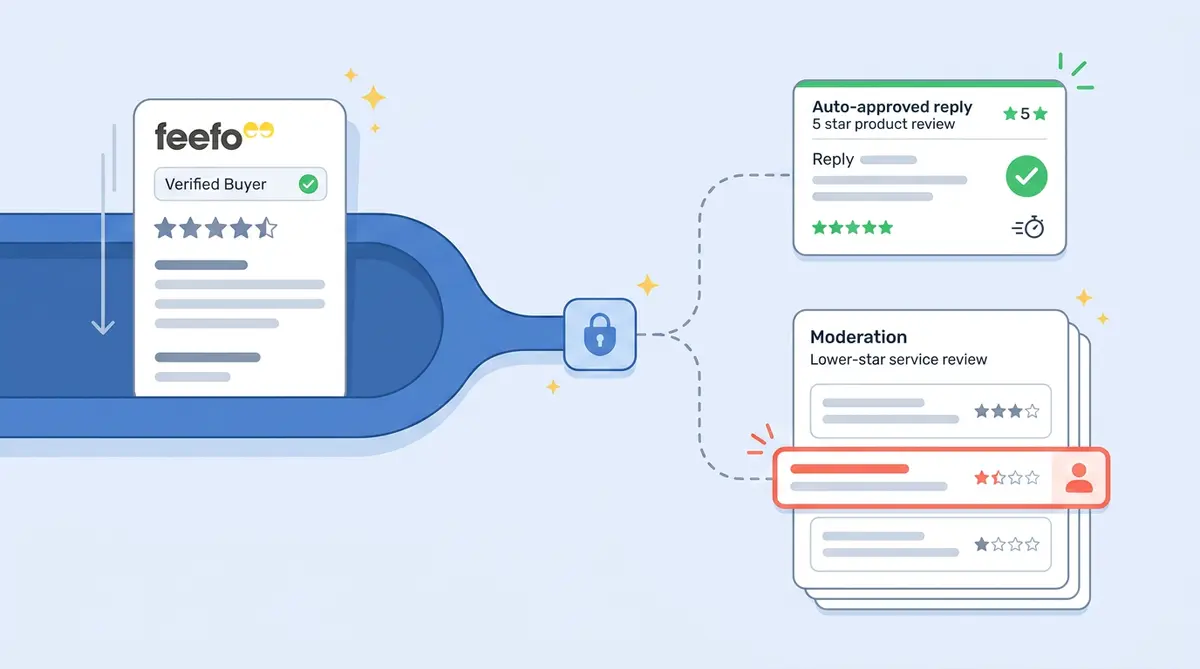
Not every review should get an instant AI reply. A five-star thank-you is low risk. A one-star complaint about a defective product needs human judgment. Negative reviews require careful, empathetic handling. Alhena gives you three independent control modes, set separately for product reviews and service reviews:
- Allow All: Publish every AI reply instantly. Best for high-volume brands with strong knowledge bases.
- Allow 4-5 Stars: Publish replies to positive reviews only. Negative reviews below 4 stars go to the human approval queue.
- Block All (default): Every reply queued for human approval before publishing. The best and safest starting point for any response generator workflow.
Star ratings are pulled directly from the webhook payload and checked before any reply goes live. For example, a practical setup for best results with most brands: use Allow 4-5 Stars for service reviews (safe to thank happy customers automatically) and Block All for product reviews (where more nuance is needed).
This kind of granular control isn't available in Feefo's native AI Replies feature, which generates responses you still need to manually review and post one at a time. Alhena's Support Concierge handles the routing automatically based on your rules.
The Human-in-the-Loop Dashboard
For reviews routed to the approval queue, Alhena's Social Conversations page gives agents full control:
- Pending replies displayed alongside the original review for context.
- Approve for publishing, Reject, or Edit each AI-drafted reply individually.
- Bulk approve up to 50 replies at once for high-volume days.
- Edited replies post the human-corrected version, not the original AI draft.
Every edit becomes a learning signal. When your team adjusts tone, adds detail, or changes phrasing, the AI learns and improves over time. This is review management that gets smarter the more your team uses it.
Brands like Tatcha have seen 82% chat deflection using Alhena's AI across their customer interactions, and the same intelligence powers the review response engine. Puffy achieved 90% CSAT with 63% automated inquiry resolution, These case studies show that AI-generated responses can match or beat human quality when grounded in real product data.
How Replies Get Posted Back to Feefo
When a reply is approved (either automatically or by a team member), Alhena calls Feefo's review reply API with three pieces of data:
- The response text.
- Your business-unit author ID (so the reply shows as coming from your brand).
- A
notify_customerflag that controls whether Feefo emails the reviewer about your response.
Rate limiting is handled automatically. If Feefo returns a 429 (too many requests), Alhena retries with exponential backoff. Your team never needs to monitor API limits or rate caps or worry about failed posts.
Multi-Language Support Without Extra Configuration
Locale detection happens at the review level. A French review gets a French reply. A German review gets a German response. There's no separate language configuration needed. The AI prompt instructs the response to match the customer's language automatically. This is especially useful for brands on Feefo that sell across the UK, Europe, and beyond.
What Alhena Does That Feefo's Built-In AI Cannot
Feefo introduced its own AI Replies feature for generating review responses. It's a solid starting point: click a button, get a draft, review it, and post. But it has clear limitations for brands that need scale and control.
Feefo's AI Replies generate one response at a time. You click "Generate," read the draft, optionally regenerate, then manually post. There's no automatic publishing based on star ratings. There's no bulk approval queue. And the AI doesn't pull from your product documentation or support knowledge base to ground its answers.
Alhena's Feefo review response generator works differently:
- Automatic triggering: Replies are generated the moment a review arrives via webhook, not when someone clicks a button.
- Star-based routing: Positive reviews can auto-post while negative ones queue for humans. Feefo's native tool doesn't offer this.
- Knowledge-grounded responses: The AI pulls from your actual product docs and support KB, so replies contain accurate product details instead of generic acknowledgments.
- Bulk operations: Approve up to 50 replies at once instead of handling them one by one.
- Separate logic for product vs. service reviews: Two different AI brains handle two different review types. Product reviews get answered against product documentation. Service reviews draw from your support knowledge base.
For brands managing review responses across multiple platforms, Alhena also connects to Trustpilot, Bazaarvoice, Yotpo, and other review channels from a single dashboard. You don't need to switch between tools.
Setting Up Feefo Auto-Reply in Under 10 Minutes
The Feefo Settings page in Alhena is intentionally minimal. Here's the full setup:
- Connect your Feefo account: Paste your Client ID and Client Secret from Feefo's app settings.
- Register the webhook: Copy Alhena's generated webhook URL and paste it into Feefo → Settings → WebHooks → Register WebHook.
- Toggle AI replies: Enable AI replies for product reviews, service reviews, or both.
- Choose your approval mode: Select Allow All, Allow 4-5 Stars, or Block All for each review type.
- Start receiving reviews: The next review that comes in will trigger an AI-drafted reply.
No developer resources needed. No staging environments. No multi-week onboarding. If your Feefo account and Alhena account are both active, you can be live in under 10 minutes.
Key Takeaways
- Feefo's verified reviews deserve verified responses. Auto-replying with AI grounded in your product data keeps replies accurate and on-brand.
- Webhooks make it instant. Reviews trigger AI replies in seconds, not hours. No polling, no delays.
- Star-based routing protects your brand. Auto-post positive review replies. Route negative ones to your team.
- Two brains for two review types. Product reviews pull from product docs. Service reviews pull from your support KB.
- Feefo's native AI is manual and single-threaded. Alhena adds automation, bulk approval, and knowledge grounding.
- Every edit trains the AI. Your team's corrections make future replies better.
- Multi-language is automatic. The AI detects locale from the review and responds in the same language.
Ready to stop leaving Feefo reviews unanswered? Book a demo with Alhena AI to see the Feefo auto-reply in action, or start a free trial with 25 conversations to test it yourself.

Frequently Asked Questions
Can you auto-reply to Feefo reviews without manual approval?
Yes. Alhena AI offers three approval modes: Allow All (auto-post every reply), Allow 4-5 Stars (auto-post positive reviews only), and Block All (queue everything for human approval). You set these independently for product and service reviews, so you can auto-reply to happy customers while routing complaints to your team.
How does Alhena AI connect to Feefo?
Alhena uses Feefo's OAuth 2.0 client credentials flow. You create an app in Feefo to get a Client ID and Client Secret, paste them into Alhena's settings, and the connection is live in under five minutes. Tokens refresh automatically, so you never need to reauthenticate.
Does Alhena poll Feefo for new reviews?
No. Alhena uses webhooks for real-time review ingestion. You register a unique webhook URL in Feefo's settings, and the moment a customer submits a review, Feefo sends it to Alhena instantly. This means replies can go out within seconds, not on a polling schedule.
How is Alhena different from Feefo's built-in AI Replies?
Feefo's native AI Replies generates one response at a time and requires manual posting. Alhena adds automatic triggering via webhooks, star-based routing, bulk approval (up to 50 at once), and knowledge-grounded responses that pull from your actual product docs and support KB. It also handles product and service reviews with separate AI logic.
What happens if the AI can't answer a Feefo review?
If the AI can't generate a confident response, it skips the auto-reply entirely instead of posting something inaccurate. The review stays in your queue for a human team member to handle. This hallucination-free approach prevents low-quality or fabricated responses from reaching your customers.
Does Alhena support multiple languages for Feefo review replies?
Yes. Alhena detects the reviewer's locale directly from the Feefo review data and responds in the same language automatically. A French review gets a French reply, a German review gets a German response. No separate language configuration is needed.
Can I use Alhena for reviews on platforms other than Feefo?
Yes. Alhena's Review Management connects to Trustpilot, Bazaarvoice, Yotpo, Walmart, Home Depot, Amazon, and other review channels from a single dashboard. You can manage all your review responses in one place instead of switching between platform-specific tools.
How much does it cost to auto-reply to Feefo reviews with Alhena?
Alhena offers a free trial with 25 conversations to test the response generator. Paid plans scale based on volume. You can check current pricing at alhena.ai/pricing or use the ROI calculator at alhena.ai/roi-calculator to estimate your return based on review volume and current response rates.