Fix the Product Facts AI Shopping Agents Actually Read
A shopper gets the wrong answer. Someone corrects the assistant. The conversation looks better.
The next day, another assistant reads the same catalog field and repeats the mistake.
The first fix helped one customer. It did not repair the information behind the store.
Imagine a product page with a familiar brand name, while its machine-readable record contains an internal development-store label. Or a page showing the correct price while an app-generated offer still describes an older one. These are illustrative examples, not findings about a particular merchant.
Nothing has to crash. The information can be retrieved successfully and still be wrong.
For ecommerce teams preparing for AI shopping agents, the useful question is not only, “How do we improve this answer?” It is, “Which record caused the answer, who owns it, and where else does it appear?”
What is a product-fact correction workflow?
A product-fact correction workflow identifies missing, unsupported, or inconsistent product information; proposes an evidence-backed change; obtains the right approval; updates the responsible source through a permitted interface; and verifies the result across the relevant shopping channels.
The distinction is between improving an explanation and correcting the fact it explains. Both can matter, but they are different jobs.
Use the following workflow as an operating model for catalog, merchandising, customer experience, and AI teams. It is not an announcement of an automated catalog-rewriting feature.
1. Find the field behind the failure
Start with the exact statement that caused the problem. Was the assistant wrong about the brand, a measurement, stock, price, compatibility, or a return condition?
Record the product and sellable variant, the value observed, the expected value, and the evidence for that expectation. Include the market, language, currency, and observation time where relevant. Save the source response or page extract, not just a summary that says “AI got it wrong.”
Then trace the field back to its owner.
An approved specification may establish dimensions. A product-information management system may maintain descriptions. The commerce platform may control the applicable offer. A policy owner may maintain return exceptions. Do not assume the most polished page is authoritative for every field.
Ask where the value is created, which systems copy it, and whether another app or import can override it. Fixing a downstream copy without changing the rule that recreates the error is a temporary repair.
Also check whether the source is wrong at all. If the records are correct but the assistant selected another variant or overstated an answer, investigate retrieval, matching, or explanation. Do not change accurate product data to compensate for a different failure.
Alhena’s guide to AI shopping assistants provides the broader context. For this task, keep the focus on the evidence behind the recommendation.
2. Compare the same offer before calling two prices a conflict
A product can legitimately have several prices. Different sizes, markets, quantities, subscription terms, or membership conditions can produce different offers.
Before proposing a correction, compare the same variant under the same conditions. Check whether the amount is a product price, a unit price, a conditional discount, or a delivered total.
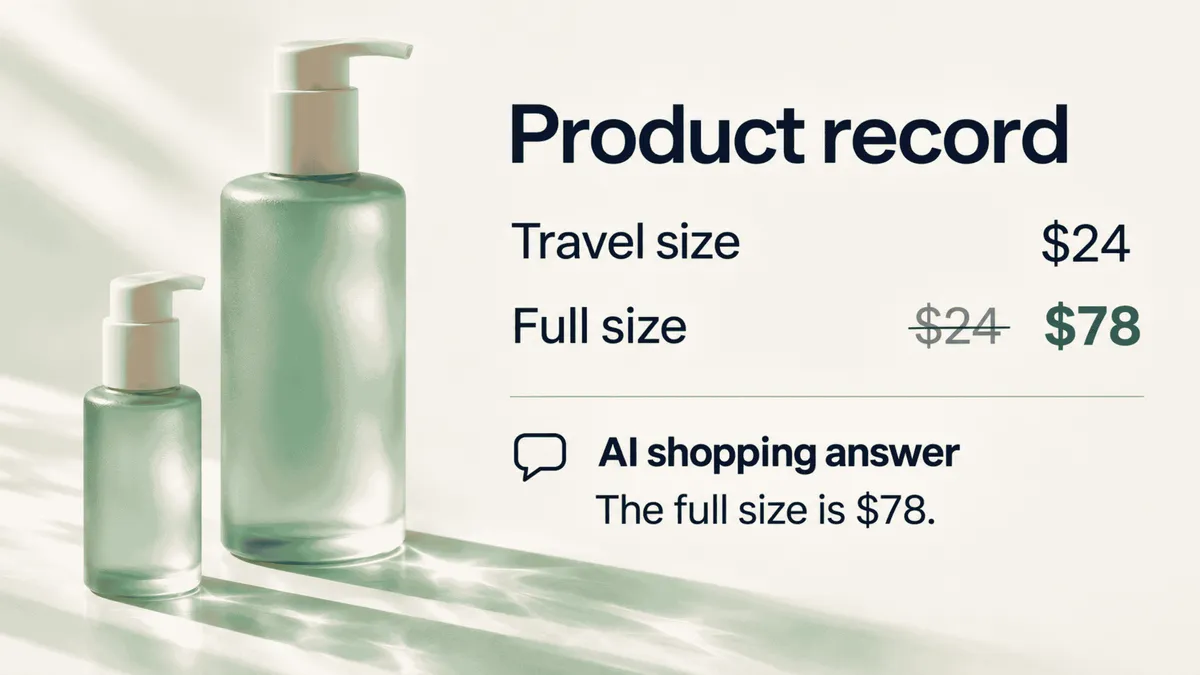
Consider a hypothetical skincare product with a $24 travel size and a $78 full size. The lower amount is not wrong simply because both appear on one page. It becomes misleading if a record attaches $24 to the selected full-size variant without the relevant conditions.
The repair is to restore the relationship between the item and its offer, not delete every lower price.
Google’s product-variant documentation uses ProductGroup and individual Product records to describe related variants. It also requires unique variant identifiers and explains how a variant-specific URL should show the corresponding image, price, and availability. These are Google-specific requirements, not proof that every shopping agent interprets data identically.
Apply that precision to your audit: product identity first, offer comparison second. Otherwise, a correction process can turn a valid distinction into a new error.
3. Use shopper questions to build a useful repair queue
A technical audit can tell you which fields are missing. Shopper questions help establish why the missing information matters.
Can the cover be removed? Does the adapter fit the older model? Is that measurement for the packaging or the assembled item? Does the return policy apply to the discounted variant?
Combine recurring questions with observed inconsistencies. Each proposed repair should preserve the question, affected item, conflicting sources, expected answer, responsible owner, and verification method.
Alhena’s AI Shopping Assistant provides conversational product discovery and guidance using catalog and knowledge-base context. Those conversations offer a useful setting for identifying questions to investigate. That is different from automatically approving or writing changes to product records.
Do not treat every unanswered question as a catalog defect. Some require personal judgment. Others concern a specification the manufacturer has never confirmed.
| Finding | Appropriate next step | Shortcut to avoid |
|---|---|---|
| A wrong value with supporting evidence | Propose a correction to the responsible source. | Patch only one assistant’s response. |
| Ambiguous wording | Clarify the verified meaning. | Strengthen the claim to make it sound more helpful. |
| A missing specification | Request evidence from the product owner. | Infer the answer from a similar item. |
| A policy disagreement | Route it to the policy owner. | Treat an old email or customer review as current policy. |
Keep “awaiting evidence” as a legitimate status. A frequently asked question is a reason to investigate, not permission to invent a compatibility guarantee or certification.
4. Make approval specific enough to be meaningful
“Improve the catalog” is too broad an instruction for a factual correction.
Show the approver the current value, proposed value, supporting source, affected variants and markets, intended destination, and reason for the change. Make clear whether the proposal repairs the source record or only overrides a value in one distribution channel.
A suggested ownership model looks like this:
| Proposed change | Evidence to review | Suggested approver |
|---|---|---|
| Brand or product identity | Approved brand record and matching identifiers. | Catalog or merchandising owner. |
| Dimensions or compatibility | Validated specification for the exact model or variant. | Product specialist. |
| Price or availability | Applicable commerce or inventory record. | Ecommerce operations owner. |
| Return-policy explanation | Approved policy and relevant exceptions. | Customer service or policy owner. |
| Generated product answer | Verified facts and an accurate interpretation. | Content or AI operations owner. |
Adapt the roles to the business. The important point is that approval comes from someone with authority over the fact, not merely access to the editing screen.
Include a reversal plan. An approver should know how the previous value can be recovered and whether reversing the change also requires refreshing dependent records.
Keep factual repair separate from brand-voice editing. A clearer description may be useful, but it should not hide a change to what the product promises.
5. Update the smallest permitted scope, then read it back
Separate permission to suggest a correction from permission to publish one. Give the integration only the access needed for the approved stores, records, and operations. Where platform permissions are broader than an individual field, enforce narrower limits in the application and review process.
The platform’s API matters. Shopify’s productUpdate documentation requires write_products access and appropriate user permission. It explicitly excludes variant updates and directs developers to productVariantsBulkUpdate for variant changes, including prices. A general product-edit operation is not the right tool for every correction.
For each platform, confirm the supported operation instead of assuming that product fields, translations, inventory, and policies share one update path. If safe automated access is unavailable, create a task for the authorized owner.
Before writing, check whether the underlying record has changed since approval. Do not let an old automated proposal overwrite a newer human correction. Use version checks or conditional writes where supported; otherwise, stop and reconcile the difference.
After writing, read the resulting record. Check the actual value and any returned errors. A successful request is not sufficient evidence that the intended field now contains the approved correction.
Alhena’s API Tools documentation describes HTTP connections for live retrieval and actions beyond a knowledge base. A catalog-write workflow would still require a supported endpoint, explicit configuration, validation, and merchant authorization. The integration mechanism alone does not establish a general-purpose product-facts fixer.
Keep policy changes with the policy owner
A return exception is not simply an inconvenient product field. A shipping restriction may need a fulfilment decision rather than a sentence rewrite.
Create a human-owned task when the relevant policy or knowledge source cannot be changed safely through the catalog integration. Include the evidence, requested decision, and checks needed afterwards.
Once approved, update the responsible source and the explanations derived from it. Do not create an AI-specific promise that exists only inside a conversation.
6. Use supplemental feeds without creating a second catalog
A supplemental feed can be a useful correction route. It should not become an unexplained parallel version of the business’s product information.
Google Merchant Center distinguishes primary and supplemental data sources. Supplemental sources update or enrich existing products; they cannot independently add or remove products or function as a standalone source.
Matching and processing determine whether an update reaches the intended item. Google’s Merchant API guidance specifies matching offerId, contentLanguage, and feedLabel when submitting supplemental product inputs. The correct value attached to the wrong product is still an incorrect update.
There is another important distinction: the file or API payload you submit is not necessarily the final record. Google’s product-management documentation separates ProductInput, the submitted data, from Product, the processed result after primary inputs, supplemental inputs, and rules have been applied. Inspect the processed product, not only the upload confirmation.
Label the scope of the repair accurately. A correction in Merchant Center does not itself rewrite the storefront, the merchant’s source system, or another assistant’s feed. Map those delivery paths separately and track any remaining work.
Where an override is temporary, give it an owner and a removal condition. Prefer repairing the authoritative source when possible, so the next refresh does not require another exception.
7. Verify what the next shopper or agent receives
A completed database write starts verification. It does not finish it.
Check the updated merchant record, initial HTML, rendered product page, structured data, relevant feed output, and connected tool response wherever each is in scope. Use the same product, variant, market, and customer conditions throughout.
Google’s structured-data guidance for Merchant Center requires the markup to match what users see and explains how multiple offers should be associated with their identifiers. Adding another correct markup block is not a substitute for resolving a contradictory record.
Check whether an older app-generated value remains beside the corrected one. Investigate caches, translated records, import jobs, or rendering logic that could reintroduce the discrepancy. Repair the responsible output without removing valid variants or conditional offers.
Then rerun the original shopping task.
A corrected width is not enough if the answer now promises the item will fit every doorway. The test should confirm the fact, the product it describes, and the limits of the explanation.
Alhena AI Visibility provides a separate view of how products appear in AI-generated shopping answers. Use that observation alongside internal checks, not as a replacement for verifying your own records.
Keep three statuses separate: the source has been corrected; the controlled destinations have been verified; and the external answer has been rechecked. Google documents processing delays for Merchant API updates and recrawling time for web changes, so record timestamps and avoid promising an immediate change in every external answer.
If the source is now accurate but an outside answer remains wrong, investigate the source it actually used before editing your catalog again.
Measure corrections that last, not suggestions generated
Prioritize by the customer’s decision and the consequence of being wrong. Incorrect product identity, incompatible variants, safety-sensitive specifications, price, availability, and delivery or return conditions deserve attention before cosmetic wording changes.
Track approved corrections, verified downstream consistency, recurring defects, and time waiting for evidence or approval. Record whether the affected shopping tasks now pass. Keep generated suggestions separate from confirmed repairs.
A useful pilot is a small set of recurring questions and high-impact discrepancies. Establish the baseline, make approved changes, and repeat the same checks. Report what improved without treating a change in conversion as proof of causation unless the test design supports it.
The correction should survive the next import. Otherwise, the team has created a maintenance task, not resolved the problem.
Fix the fact where it lives
The goal is not to make the assistant sound more certain. It is to give every shopper and supported system better evidence.
An answer correction helps the person in the current conversation. A verified source correction helps prevent the next person from encountering the same mistake.
For the wider operating context, see Alhena’s agentic commerce guide. To evaluate how your own catalog supports merchant-side product guidance, book an Alhena demo with a difficult product question and the sources behind it.
Start with that question. Follow it to the record. Make the approved repair. Then check what the next buyer actually receives.
Frequently asked questions
How do you fix incorrect product data for AI shopping agents?
Identify the exact product, variant, conditions, and source behind the incorrect claim. Propose a correction supported by approved evidence, obtain the responsible owner’s approval, update through a permitted interface, and verify the relevant downstream records and shopping task.
Why is correcting the chatbot answer not enough?
It may improve one interaction while leaving the original record unchanged. Other pages, feeds, and assistants can still use that record. Fix the responsible source when it is wrong; investigate retrieval or interpretation when the source is already correct.
Should AI automatically rewrite product information?
Not without appropriate evidence, permissions, and controls. Start with narrowly scoped proposals, merchant approval, change history, and rollback. Missing specifications need confirmation. Do not infer compatibility, certification, or performance claims from similar products.
Is adding more structured data enough to fix a wrong price?
No. First establish which offer applies to the selected variant and conditions. Correct the responsible record and resolve contradictory output. Google requires structured data to match the information shown to users, not merely to contain a syntactically valid price.
Can a supplemental Google feed replace the primary product source?
No. A supplemental source updates or enriches existing Merchant Center products under the relevant matching and processing rules. It is not a standalone source for adding or removing products, and it does not automatically repair other shopping channels.
What should happen when a proposed correction cannot be verified?
Keep it unresolved and route it to the responsible owner. Make the evidence gap explicit. An unanswered question is preferable to publishing an unsupported specification that could change a buying decision.
When is a product-data correction complete?
When the approved source value and agreed downstream checks pass for the relevant variant, market, and conditions. Record external AI-answer observations separately. “Source repaired” should not imply that every outside system has already refreshed its information.