Vibe Coding Meets Real Product Data: Why AI Page Builders Need Your Live Catalog
Quick answer: AI page builders need real product data because a store page is only finished when its products, prices, stock, and cart are real. General-purpose builders can't see your catalog, so they invent one. The page looks done, gets approved, and then has to be rebuilt. Starting from the live catalog removes that rebuild, and it's the idea behind Vibe Studio from Alhena AI.
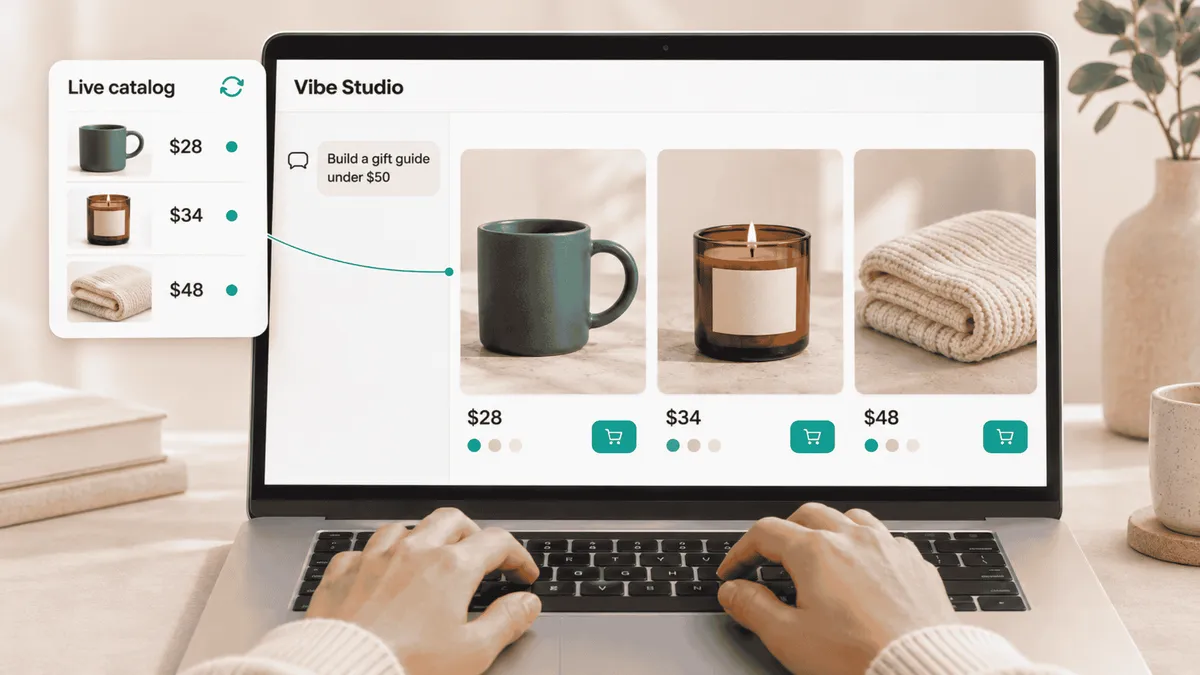
It's Thursday afternoon and Black Friday is around the corner. A merchandiser types one line into an AI builder: “Make a gift guide for everything under $50.”
The page arrives before her coffee cools. Soft photography, a tidy grid, warm copy. “Hand-Poured Soy Candle, $34.” “Chunky Knit Throw, $48.” It looks exactly like a store page.
It isn't one. None of those products are in her store. The photos are stock, and the prices were made up, very convincingly.
The team loves it anyway. Then someone in the thread asks the question that turns two minutes into three weeks: “Great, can we make it real?”
That question is the hidden cost of vibe coding for ecommerce. This post covers why it keeps coming up, why “we'll plug in the data later” is the wrong plan, and what changes when a page builder starts from your catalog instead.
What is vibe coding, and why did it reach ecommerce so fast?
Vibe coding is building software by describing what you want in plain language, letting an AI write the code, and refining the result through conversation. Andrej Karpathy named the practice in early 2025. Within a year it had moved from weekend side projects into marketing teams.
Ecommerce took to it quickly because ecommerce teams are always short on pages. A gift guide for every season. A landing page for every campaign. A comparison grid for every product line. A finder quiz for every category with too many choices.
Each of those used to be a ticket in a developer's queue. Vibe coding promised to turn that queue into a chat box. The promise is real. The catch is what the chat box knows about your store, which by default is nothing.
A general-purpose AI builder can write any page. It just can't write your page, because it has never seen what you sell.
Why do general AI page builders use dummy data?
General AI page builders use dummy data because they're built for every kind of website, so they can't assume a product catalog exists. The same tool makes a dentist's booking page, a SaaS pricing table, and your gift guide. When you ask for products, it does the only thing it can: it invents some.
The inventions are good. Modern models write believable product names, believable prices, and believable descriptions. That's exactly the problem, because a believable fake gets approved.
Some builders let you paste a CSV or point at a product feed. That helps with the first draft. It doesn't help with what makes catalog data hard: variants, price ranges, sold-out items, regional pricing, multiple images per product, and the fact that all of it changed since Tuesday.
What does a dummy-data prototype really cost?
A dummy-data prototype costs you a second project, design decisions made on the wrong data, an approval you'll have to repeat, and a page that starts going stale the day it ships. Here's how each one shows up.
1. The second project nobody budgeted for
The prototype took two minutes. Making it real takes a developer. They have to pull products by ID, handle variants, map images, show prices in the right currency, respect stock, and make Add to Cart put the right item in the right cart.
None of that was in the prompt, and none of it is what vibe coding is good at. The two minutes were the demo. The three weeks are the actual work.
2. Design decisions made on data that doesn't exist
Dummy data is polite. Titles are short, every product has one perfect photo, prices are round, and nothing is ever sold out.
Real catalogs are messy. Titles run to 90 characters. One product has 40 variants and the next has none. A price reads “from $29.99.” By launch day, a third of the “under $50” guide costs more than $50. A layout designed on polite data breaks on real data, and it breaks on mobile first.
Product data isn't content you pour into a finished design. The data is the design.
3. Approving a page that will never exist
When a stakeholder signs off on placeholder products, they're approving fiction. The real page, with titles wrapping to three lines and a sold-out badge in the hero spot, has to be reviewed again. Sometimes it gets rejected again. The review cycle you thought you'd skipped comes back, after the developer's time is already spent.
4. Drift from the day it ships
A page built from pasted data is a snapshot. Prices move, products sell out, new arrivals land, and the page doesn't know. Usually someone notices when a shopper complains that the “best seller” has been gone for a month. Static pages always had this problem; vibe coding just lets you make more of them, faster.
5. Security shortcuts
To get real data into a prototype, people do whatever works: paste a private API key into the page, or scrape their own storefront. Both are fine on a laptop and risky on a live site. A store page should only ever carry public credentials and call endpoints designed to be called from a browser.
6. Pages that AI shopping agents can't trust
Shoppers aren't the only ones reading your pages anymore. AI shopping assistants and answer engines read them too, and they favor product information that is structured, current, and consistent across your store. A page full of invented products adds nothing for them at best, and contradicts your real catalog at worst. If you want to measure how your product data shows up in AI answers, Alhena's 90-day GEO test framework is a practical place to start.
Why doesn't “add the real data later” work?
Adding real data later fails because the hardest parts of a store page only exist once the data is real. You can't add them to a page that was built without them. You end up rebuilding it.
Take a product card. It looks like a rectangle with a photo and a price. It's really a promise: give it any product, and it shows the right name, the right image, the current price, the right variant picker, the correct stock status, and a working Add to Cart. On a phone. With a 90-character title.
A placeholder card keeps none of those promises, so there's nothing to add the data to.
The same goes for a quiz that recommends products, a comparison grid where each product has different specs, or a “complete the look” panel. Each one is a chain of catalog-aware behavior. Adding the catalog at the end means building the chain backwards.
A prototype on placeholder data isn't an early version of your page. It's a different page.
What is a catalog-first AI page builder?
A catalog-first AI page builder composes pages from building blocks that are already connected to your live product data. The first preview shows your real products, prices, and images, and every version after it stays that way.
That's how Vibe Studio from Alhena AI works. You still start by typing a sentence. What happens next is different.
How Vibe Studio builds on real product data
It understands before it builds. You describe the page in plain English and attach whatever you have: a wireframe, a screenshot of a page you like, a brand guide, a product list. The designer asks what shoppers should see first, what they do at each step, and what they get at the end. It also asks for a design reference, then plays the plan back before writing any code. That first conversation is where most dummy-data mistakes would have happened.
It builds from blocks that know your store. A product card in Vibe Studio takes a product and returns its real name, price, image, and link, from the catalog Alhena already syncs for your AI shopping assistant. A product finder quiz returns real recommendations. A product FAQ panel answers from real product information. Virtual try-on and see-it-in-your-room work from real product pages.
The blocks chain together. “A quiz, then a try-on, then a comparison” is one page, not three separate integrations.
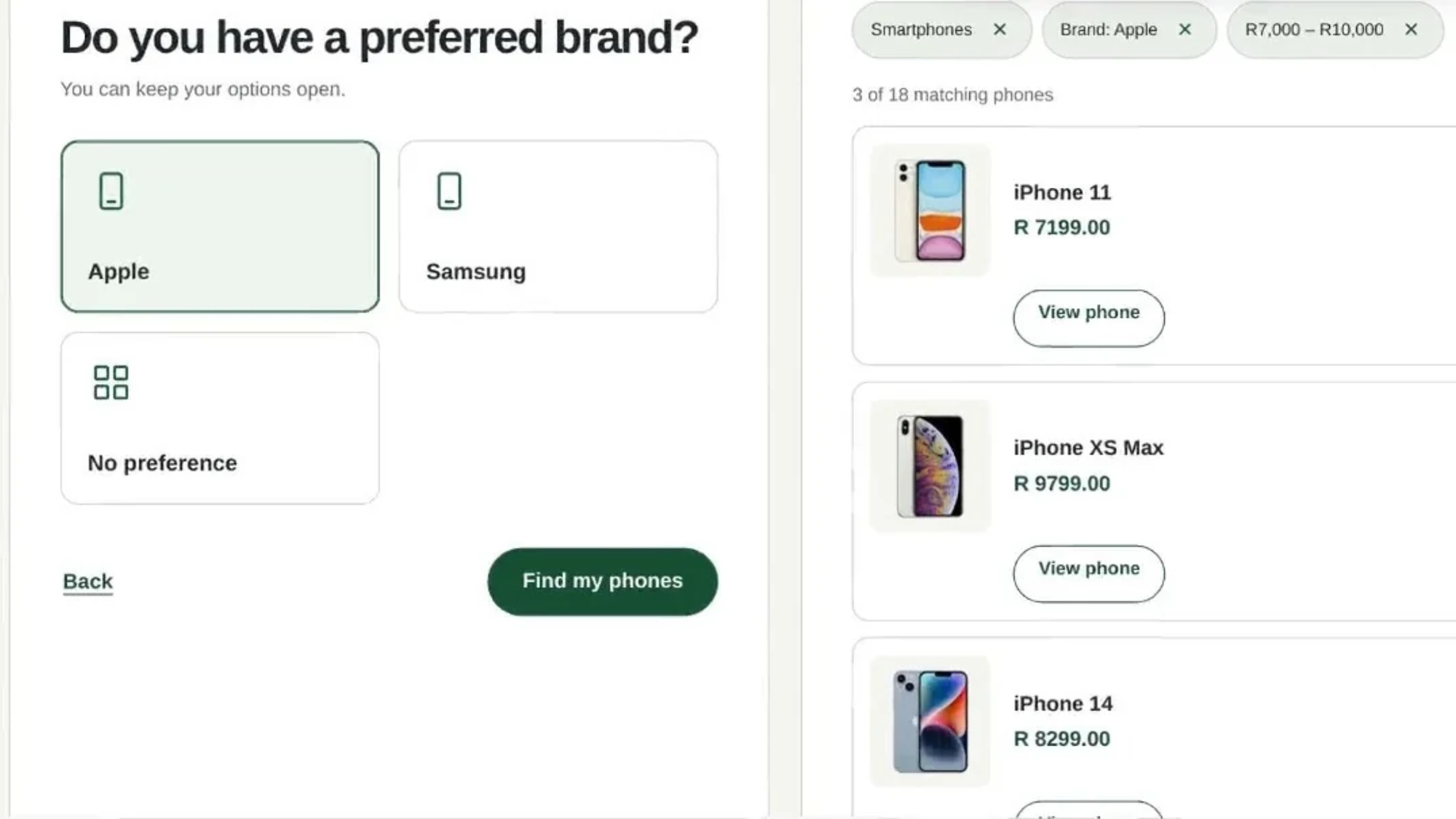
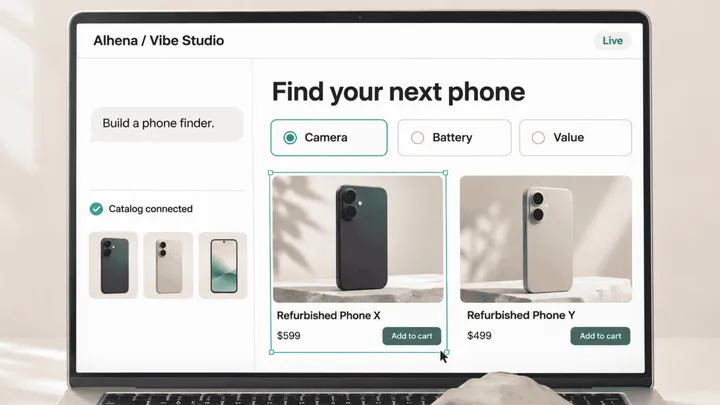
A product finder built in Vibe Studio: every phone, photo, and price comes from the store's catalog.
It stays current without a rebuild. The page reads from the same catalog sync that powers your Alhena agent, so price and stock changes show up on the page. There's no CSV to re-paste and no snapshot going stale. If you're curious how that works under the hood, we've written about how Alhena keeps product data fresh without a warehouse.
You review the real page, together. The live preview sits next to the chat and updates as the designer works. Switch to Mobile and watch that 90-character title wrap. Draw a box around anything you don't like with Annotate and type a note. Steer the build while it runs, or queue a change for after. Teammates can work in the same project, every version is kept, and you can compare any two before you pick one.
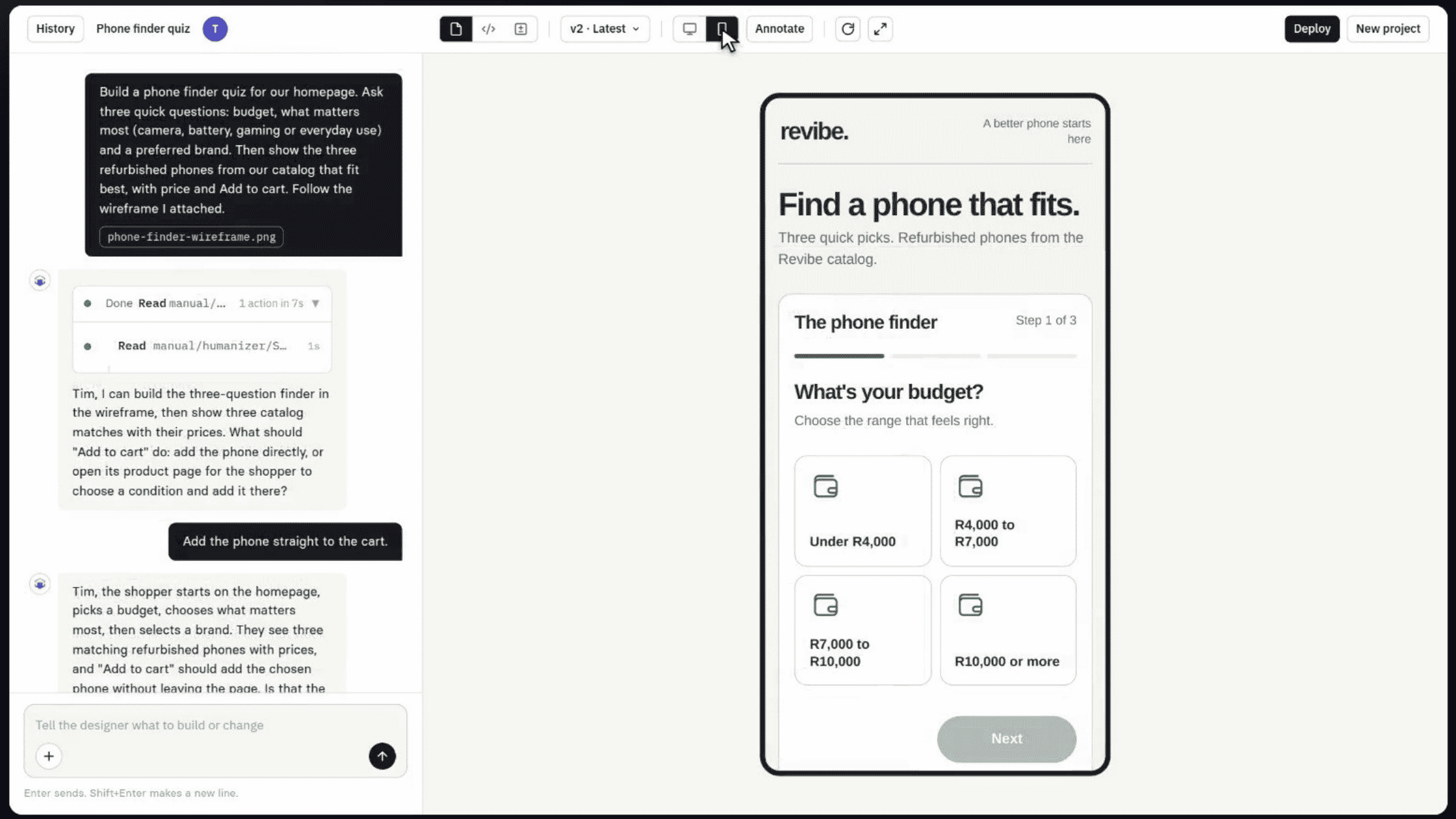
The chat on the left, the live page on the right. Here it's in Mobile view, so you see what phone shoppers see.
You can ship it, and un-ship it. Deploy hosts the page on Alhena's infrastructure and gives you a lightweight snippet to embed in your storefront. Restore rolls back to any earlier deploy. The page carries only your public company key, so there's no secret to leak and nothing to scrape.
For the full walkthrough, with a screenshot of every step, read the launch post: Introducing Vibe Studio: Describe a Page, Ship It to Your Store.
General AI page builder vs. catalog-first page builder
The difference shows up in every part of the page, from the first preview to the day prices change.
General AI page builder | Alhena AI Vibe Studio | |
|---|---|---|
Product data in the first preview | Invented or pasted in | Your live catalog |
Product cards | Static markup | Real name, price, image, and link |
Add to Cart | You wire it up yourself | Connected to your store's cart |
When prices or stock change | The page goes stale | The page shows the current value |
Quizzes, FAQs, try-on, room preview | Built from scratch each time | Ready-made blocks that chain together |
Who reviews it | Whoever gets the link | Teammates in the project, with annotations and version compare |
Publishing | Export and hand off | Deploy, embed snippet, one-click Restore |
Who should care about this?
- Marketers who want the campaign page live this week, without opening a ticket to make it real.
- Merchandisers who know an “under $50” guide only works if everything on it is actually under $50.
- Designers who would rather critique a page with real titles than one full of “Lorem Ipsum Throw.”
- Developers who are tired of being the “make it real” step at the end of someone else's vibe coding session.
How do I build a page on real product data with Vibe Studio?
You can build your first catalog-connected page in five steps.
- Open Vibe Studio from your Alhena dashboard. If you don't see it yet, ask your Alhena team to turn it on for your store.
- Describe the page and attach your references. Answer the designer's questions about the shopper's flow.
- Watch the first version build on your catalog, then check it in Mobile view.
- Refine it. Annotate, steer, and queue changes until it's right, and invite a teammate to review.
- Deploy it. Copy the snippet, embed it in your storefront, and use Restore if you ever need to roll back.
The launch post walks through each step with screenshots, and the Alhena docs cover setup details.
The point of vibe coding was never the prototype
Vibe coding is a good idea. Going from a sentence to a page is the right workflow. The mistake was letting it run on invented data and calling the result a draft.
It isn't a draft. It's a demo, and demos are where ecommerce projects get approved and then rebuilt.
Start from the catalog and the loop closes. The first version is the real page. The review is of the real page. What you ship is what you saw.
Vibe coding, meet your catalog. You two should have been introduced a long time ago.
Start for free or book a demo and build your first page on real products this week.
Frequently Asked Questions
What is e-commerce vibe coding?
E-commerce vibe coding means describing your landing page, buyer quiz, or product layout in plain language, generating the UI with AI, and refining it conversationally. It unlocks immense speed when integrated directly with a store's live catalog backend.
Why do general AI builders default to fake data?
Horizontal page builders are designed for generic websites, so they lack native integrations into e-commerce inventory feeds. When prompted for products, they generate realistic placeholder text and stock imagery instead of querying live database records.
What makes dummy-data prototyping expensive?
The hidden cost lies in the mandatory engineering rebuild. Developers must manually connect real product SKUs, variant selectors, live pricing, and checkout functions into a static layout. Furthermore, designs crafted around clean dummy text often collapse when exposed to authentic product content.
What defines a catalog-first AI page builder?
A catalog-first page builder constructs interface components bound directly to your store's live inventory feed. The initial preview renders authentic products, prices, and assets, keeping content in sync as your catalog evolves.
Does Vibe Studio integrate with live store catalogs?
Yes. Vibe Studio utilizes Alhena’s real-time catalog sync. Product grids, recommendation engines, interactive quizzes, and visual drawers display verified inventory, pricing, and images from the initial draft onward.
How are pricing and stock updates handled in Vibe Studio?
Because pages query your live catalog backend directly, price adjustments and inventory changes reflect automatically on published pages without requiring manual edits or redeployments.
Is engineering support required to build pages in Vibe Studio?
No. Marketers and merchandisers can build, refine, and deploy landing pages independently using conversational prompting and visual editing tools. Developers can inspect output code when desired, but dev support isn't required for launch.
Is Vibe Studio compatible with Shopify?
Yes. Vibe Studio integrates seamlessly with Shopify and other leading e-commerce platforms connected to Alhena. Published pages embed directly into your existing theme via a lightweight script tag.
How does Vibe Studio differ from traditional quiz builders?
Dedicated quiz plugins focus exclusively on multi-step forms. Vibe Studio builds full-featured landing pages that seamlessly embed dynamic quizzes, product comparisons, FAQ drawers, and visual recommendation engines together on a single canvas.
How do I deploy a page built in Vibe Studio?
Click Deploy in the dashboard. Alhena hosts the page asset and generates a lightweight script snippet to embed in your store. One-click version restoration lets you roll back changes instantly whenever necessary.