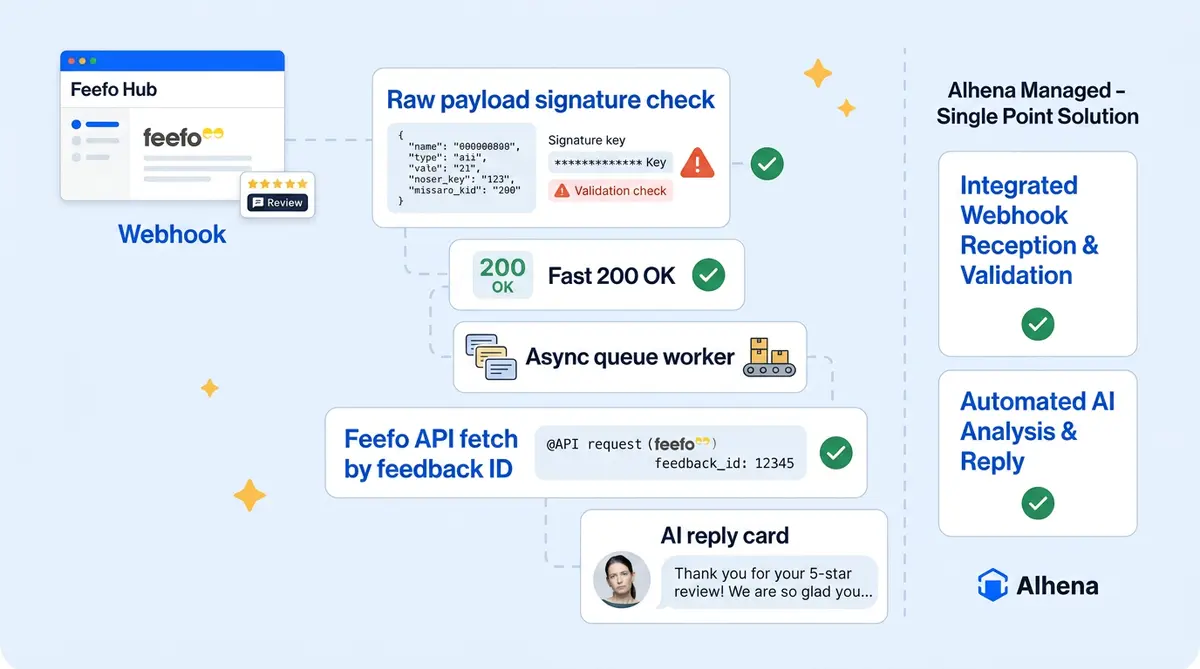
Most review-management integrations poll the Feefo API endpoint on a schedule. That works, but reviews sit unanswered for minutes or hours, and you burn API calls fetching nothing 99% of the time. Webhooks can flip the model: Feefo pushes each review to Alhena AI the moment it's submitted, and the AI drafts automated review response messages within seconds. No polling. No delays. Just real-time feedback notifications and alerts that notify your team the moment new feedback arrives.
The catch is that webhooks are a two-sided configuration. You generate a URL in Alhena, paste it into Feefo's admin panel, and both sides need the auth, payload format, rule name, and event subscription to line up. That's exactly where teams trip. Here's how the full pipeline works, step by step, in real time.
The OAuth Handshake
Before any webhook can fire, Alhena needs API credentials to fetch customer feedback content. In the Alhena dashboard, the admin enters their Feefo App ID and App Secret. Alhena calls Feefo's OAuth endpoint with grant_type=client_credentials, stores the returned access_token and expires_at, and auto-generates a random webhook username and password (12 characters each). These are the credentials Feefo will use to call Alhena back.
Generating the Webhook URL
Once OAuth is done, the admin clicks "Get Webhook URL" in Alhena's Feefo settings page. Alhena base64-encodes the webhook credentials and returns a URL like:
https://app.alhena.ai/external_integrations/feefo_webhook/{company_key}?token={base64(user:pass)}
Three design choices matter here. The company_key sits in the path (not the token), so routing and auth are cleanly separated. The auth token is a query param because Feefo's webhook UI only asks for a URL. And credentials are per-company and rotatable, so a leaked URL affects one tenant, not the whole integration.
Pasting It into Feefo (Where Teams Get Stuck)
The admin pastes this URL into Feefo's webhook setup panel in the Feefo Hub and subscribes to service and product feedback events. Feefo sends a test POST via https to verify your https endpoint, Alhena returns 200 OK, and the pipe is live.
This is the step that trips teams up. The top three failure modes:
- Token wasn't copied fully. The base64 string has
=padding that some copy/paste flows mangle. Result:401 Unauthorizedon every hook. - Wrong company_key in the URL. Regenerating a URL after changing company_key means the old URL fails because the lookup breaks.
- WAF blocking Feefo's IPs. If there's a firewall in front of Alhena, Feefo's outbound IPs need to be allowlisted.
Alhena logs every rejected webhook attempt with the exact failure reason (Token parameter is required, Invalid token format, Unauthorized), which makes debugging fast from the support side.
What Feefo Actually Sends
When a customer submits a review, Feefo POSTs a single field: a URL pointing to the review on Feefo's API. The webhook payload is a pointer, not the content. This keeps the payload small, avoids signing issues, and means a leaked webhook URL alone can't expose feedback data.
Alhena validates Basic Auth, then immediately returns 200 OK and hands off to an async Celery workflow task. This workflow pattern ensures reliable notification delivery. Fast acknowledgment matters: Feefo retries on timeouts, and duplicate processing is a real source of bugs.
Fetching and Processing the Review
The async task uses the stored OAuth token to fetch the full feedback from Feefo's API: customer name, star rating, title, body, timestamps, and two parallel structures, service (overall service review) and products (an array of per-product reviews).
A single webhook call can contain both a service review and multiple product reviews. Alhena splits them and processes each independently, tagged as FEEFO_SERVICE_COMMENT or FEEFO_PRODUCT_COMMENT. Each becomes a standard Alhena ticket, unified with chat, email, social conversations, and customer CRM records in the same ticketing system inbox. The ticketing system tracks.
Before creating the ticket, the processor verifies the business_unit_id matches the connected merchant account, checks per-category nps rating and scoring toggles (product_comment_enabled, service_comment_enabled), and de-duplicates against existing tickets using review_id.
AI Drafts the Reply
The ticket triggers a call to Alhena's AI server, which uses a dedicated prompt generator aware of the feedback context (rating, title, body, product), the brand's voice and tone guidelines, product knowledge, and policy guardrails. The generated reply is saved and wrapped in an approval record with status = PENDING.
Each review type has a separate auto-reply mode:
- ALLOW_AI: the AI-drafted reply posts to Feefo automatically.
- BLOCK_AI: the AI drafts, but a human must approve before it posts.
- BLOCK_ALL: no AI draft; reviews just land in the inbox.
Brands typically start in BLOCK_AI for product reviews, watch approval and edit rates for a week, then flip to ALLOW_AI once they trust the output. Service reviews stay on BLOCK_AI longer because service complaints are higher-stakes. This is the same graduated rollout pattern that helped Tatcha achieve a 3x conversion rate and Puffy reach 90% CSAT across their AI-powered customer interactions.
Posting the Reply Back to Feefo
When a reply is approved (or auto-approved), Alhena calls Feefo's reply endpoint with the stored OAuth token. The reply appears publicly on the Feefo message board for public display. The message board shows, helping display positive feedback alongside brand responses, building consumer trust through positive feedback visibility across your review channels, attributed to the brand's configured display name. The approval record flips to APPROVED, closing the loop.
End-to-end, from review submission to public reply: under 10 seconds on ALLOW_AI, or however long it takes a human to click approve on BLOCK_AI. Compare that to the industry average, where only 5% of businesses respond to reviews at all.
Why This Is Hard to Get Right
The webhook step looks simple: a URL and a paste. But the design choices behind it are where the real engineering lives. Pointer payloads for security. Per-tenant rotatable credentials for blast radius control. Fast ack plus async processing for retry resilience. Per-category auto-reply modes for rollout safety. De-duplication for idempotency. Business-unit verification for cross-tenant safety.
The integration is production-safe because every one of those pieces exists.
Ready to connect Feefo to AI-powered review management and automation? Book a demo with Alhena AI or start for free with 25 conversations.

Frequently Asked Questions
What events can trigger a Feefo webhook?
Feefo supports three webhook event triggers: Feedback Created (when a consumer submits a new review), Feedback Updated (when an existing review is modified), and Feedback Published (when a review becomes publicly visible). You can also filter by rating type to trigger webhooks only for specific star ratings or NPS (nps) rating scores.
Does the Feefo webhook payload include customer information?
No. Feefo deliberately excludes consumer-sensitive information like names and email addresses from webhook payloads. To get full reviewer details, you need to make a follow-up call to the Feefo Reviews API using the feedback ID from the webhook payload.
Why does my Feefo webhook signature verification keep failing?
The most common cause is a body parser conflict. If your web framework (like Express.js) parses the request body before your verification logic runs, the raw bytes change and the signature hash won't match. The fix is to capture the raw request body before parsing, then use that raw buffer for signature comparison.
How fast should my webhook endpoint respond to Feefo?
Most webhook providers enforce a 5 to 10 second timeout. If your handler takes longer, the delivery gets marked as failed and may trigger retries. Best practice is to return a 200 status within one second, then process the review data asynchronously using a message queue.
Can I use Zapier instead of building a custom Feefo webhook handler?
Yes. Feefo integrates with Zapier and supports triggers on new feedback, creating feedback requests, and responding to reviews. Zapier and similar apps work well for low-volume, simple workflows (under 100 reviews per month). For higher volumes, complex routing logic, or AI-powered response pipelines, a custom handler or a platform like Alhena AI is a better fit.
How does Alhena AI connect to Feefo for automated review responses?
Alhena AI connects to review platforms including Feefo, Trustpilot, Bazaarvoice, and Yotpo. The platform handles webhook setup, payload processing, and AI response generation in one layer. You set approval thresholds (auto-publish positive reviews, queue negative ones for humans), and the system handles roughly 70% of reviews without human intervention.
What is the best way to test Feefo webhooks during development?
Use ngrok to create a tunnel from Feefo to your local machine. Point your Feefo webhook URL at the ngrok address, submit a test review through your Feefo account, and inspect the payload using ngrok's web inspector at localhost:4040. This lets you capture the actual payload structure since Feefo doesn't publish a sample schema.
How quickly should brands respond to customer reviews?
Consumer expectations are rising fast. BrightLocal's 2026 survey found that 19% of consumers expect a same-day response (up from 6% the year before), and 32% want a reply by the next day. Brands that respond to all reviews are preferred by 88% of consumers, compared to just 47% for brands that stay silent.