Most AI chatbots sound robotic because they're treated as black boxes. A team pastes in a system prompt and hopes the output doesn't read like a user manual. Alhena AI takes a different approach: a layered humanization technology stack where every component is designed to make AI conversations feel natural. Here's what happens under the hood.
Brand Voice and Personality: The Core Layer
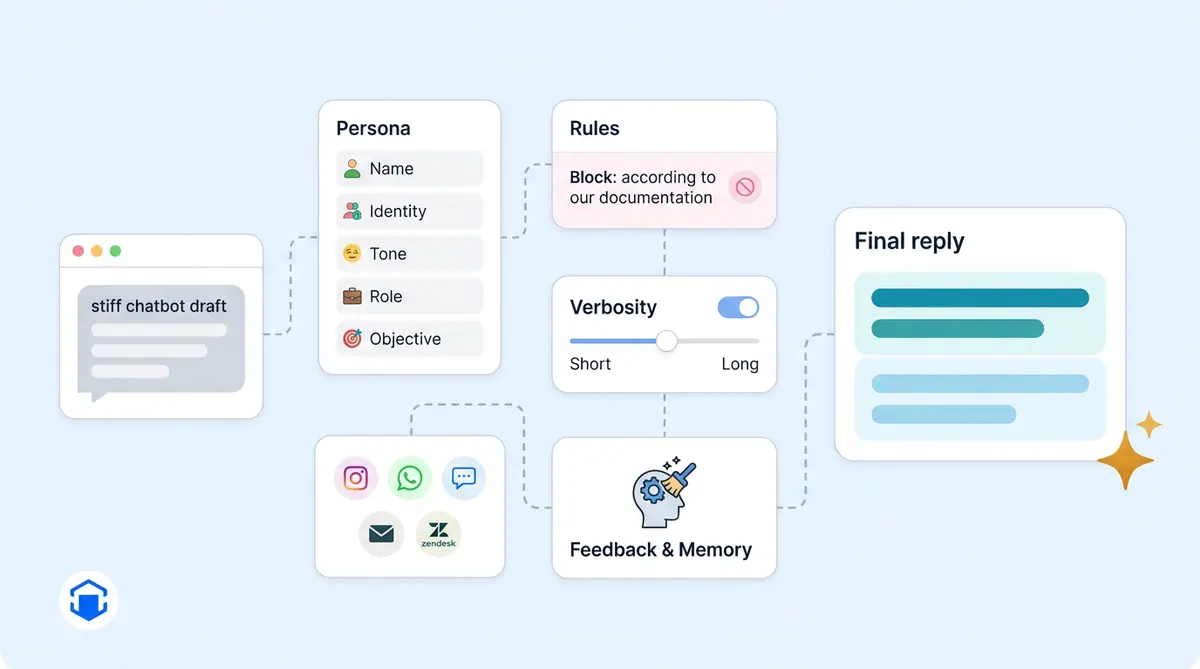
Every AI response starts with a configurable persona that gets injected into the LLM's system prompt on each request. In Alhena's dashboard, in 2026 you’re defining five elements: Name (what the AI calls itself), Identity (who it is, like "the friendly customer service and support agent for Acme"), Tone (communication style, such as "business informal with light humor"), Role (its function), and Objective (what it's trying to accomplish in every conversation).
Because this is a system-prompt layer and not model fine-tuning, businesses can switch from "polished and professional" to "casual and playful" in seconds. Responses update instantly. No engineering tickets, no retraining.
The Anti-Robotic Guideline
One instruction baked into Alhena's default prompt targets the single biggest AI tell: referencing sources robotically. The system explicitly tells the LLM to incorporate knowledge from documentation seamlessly, and to never use the word "documentation" in a reply. It’s what stops the bot from saying "according to our documentation" and instead weaves answers into natural-sounding human speech. This makes responses sound less robotic. The prompt also allows casual conversation: greetings, small talk, and the kind of back-and-forth that makes interactions feel natural, authentic, and human.
Verbosity Control
A single toggle called Verbose Answers controls response length. When it's off (the default), the system adds a hard constraint: keep answers brief, never exceed 100 words, ideally under 50. When it's on, the bot gives longer, more detailed responses. It’s simple: short replies feel conversational. Customers notice. Walls of text feel like a bot dumping a manual on you.
Situational Guidelines and Channel Adaptation
Beyond persona, you add Guidelines: natural-language rules that trigger based on context. "For Instagram DMs, use a friendly tone with appropriate emojis." "After business hours, apologize for the delay and promise a follow-up." "Always recommend the matching warranty when discussing electronics." Each guideline is evaluated against the relevant current query, so the customer experience adapts to channel, time of day, or topic.
The backend also detects the channel automatically, whether that's Instagram, WhatsApp, web chat, email, or Zendesk, and swaps formatting rules accordingly. Customers on Instagram get natural, casual, short replies. An email reply keeps full sentences. The underlying personality stays the same; the delivery and response style adapts.
Voice AI: A Separate Persona Layer
Voice conversations get their own personality fields because spoken style differs from written. You configure voice-specific name, identity, tone, a spoken greeting, voice selection (10+ options to speak with), accent, and speaking speed. Without natural pauses and phrasing, the same sentence that reads fine in chat can sound stiff when spoken aloud.
Memory, Nudges, and Conversation Shape
Nothing makes a bot feel more robotic than amnesia. Alhena extracts and stores digital facts about each user (name, preferences, past purchases, stated concerns) and references them naturally in later sessions. Instead of starting from zero, the bot can say "Last time you were looking at the Pro model. Are you still deciding between that and the Lite?"
Two features of the platform prime natural-feeling dialogue. Icebreakers are tappable starter questions in the chat widget that auto-generate from product data ("Is this snowboard good for beginners?"). Suggested Questions are AI-generated follow-ups that appear after each response, guiding the conversation forward the way a good human agent would. Both reduce the cold-start awkwardness that makes chatbot interactions feel scripted.
AI Nudges take it further: contextual prompts that trigger based on scroll depth, time on page, or product type. It’s proactive: the bot responds like a helpful store associate instead of passively waiting.
The Human Feedback Loop and Post-Processing
When a human reviewer corrects a response in the dashboard, that correction propagates in near real time. The system auto-generates an FAQ entry with insights from the correction so similar future questions get the right tone. Over weeks, this pulls the bot's voice closer to your human team's voice.
After every LLM response, a post-processor runs cleanup: removing broken image links, rewriting awkward escalation messages, translating handoff phrasing into the user's language, and generating clarifying follow-ups when needed.
Ecommerce Gets a Different Default Voice
If the bot is configured for an ecommerce store, defaults shift automatically. Tone becomes "engaging, persuasive, focusing on benefits and value." Identity becomes "Customer Service and Sales Agent." Extra guidelines kick in: ask only one question per message, run a short quiz (three questions max) before recommending, and tailor pitches to stated needs. A customer service bot sounds natural as support. A shopping bot sounds like a helpful associate.
You can also build multiple specialized agents (General Support agents, Product Expert agents, Order Management agents) each with its own personality, and route conversations to whichever fits. Different voices for different moments.
The Pipeline, End to End
- You define persona and guidelines in the dashboard
- A user sends a message and the channel is detected
- The system prompt assembles: persona block, objective, channel-aware guidelines, user memory, and retrieved knowledge
- The LLM generates an answer shaped by that full context
- Post-processing cleans and adapts the response
- The reply is delivered via chat, voice, email, or social channel
- Human feedback flows back into the tuning layer
The result: an AI assistant with a consistent identity that adapts to context, remembers its users, and never says "according to the documentation."
Want to see the humanization stack in action? Book a demo with Alhena AI or start for free with 25 conversations.

Frequently Asked Questions
How does Alhena AI make chatbots sound less robotic?
Alhena uses a layered humanization stack: brand voice persona injection, anti-robotic guidelines that prevent stiff phrasing, verbosity controls, channel-specific tone adaptation, user memory across sessions, and post-processing cleanup. All layers are configurable in the dashboard without code changes.
Can I change my chatbot's personality without retraining the model?
Yes. Alhena's personality system works through system-prompt injection, not model fine-tuning. You can change your bot's name, tone, identity, and behavioral guidelines instantly in the dashboard. Changes take effect on the next conversation.
Does the chatbot adapt its tone for different channels?
Alhena automatically detects whether a conversation is on web chat, email, Instagram, WhatsApp, or voice, and adjusts formatting and tone accordingly. Instagram replies lean casual and short while email replies use full sentences. The core personality stays consistent across channels.
How does user memory help chatbots sound human?
Alhena stores facts about each user, including name, preferences, past purchases, and stated concerns, and references them in future conversations. Instead of starting every chat from zero, the bot recalls context from previous sessions, which eliminates the robotic amnesia that frustrates customers.
What is the anti-robotic guideline in Alhena AI?
It's a built-in system prompt instruction that prevents the AI from referencing its knowledge sources in a stiff, mechanical way. Instead of saying 'according to our documentation,' the bot weaves answers into natural speech. The prompt also enables casual conversation like greetings and small talk.
How does the human feedback loop work?
When a human reviewer corrects a response in Alhena's dashboard, the correction propagates in near real time. The system auto-generates FAQ entries from corrections so similar future questions get the right tone and content. Over time, this pulls the bot's voice closer to your human team's voice.