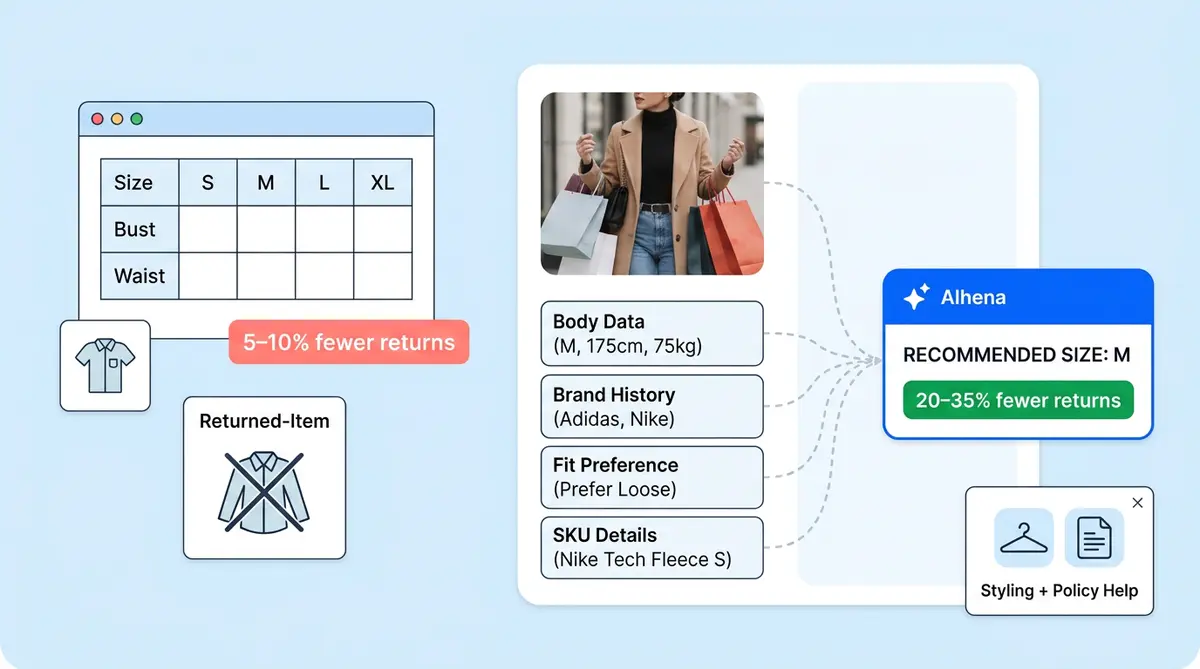
A size chart is a dictionary. A fit analyzer is a translator for apparel sizing. Both give you sizing information, but only one shows what the fit will look like on the shopper, and that's where sizing tools prevent returns.
70% of fashion returns cite poor fit as the top return rate driver, according to McKinsey research. The uncomfortable truth? 71% of those shoppers checked the size chart before buying, per SAIZ. Size charts make data available. Fit analyzers make the decision. Here's how each one works inside Alhena's AI Shopping Assistant, and why one consistently outperforms the other.
How the Size Chart Works in Alhena
When a shopper asks about sizing and the brand has published a size chart, Alhena's Product Expert Agent surfaces the relevant section inside the chat. It pulls data from product metadata and the brand's documentation retriever, so the shopper sees chest, waist, and hip measurements (bust, waist and hips, inseam) mapped to sizes (XS, S, M, L or 4, 6, 8) without leaving the conversation.
It's transparent and trust-building. Shoppers who already know their measurements can match themselves to the right size quickly.
But most shoppers don't know their bust measurement in centimeters. They don't own a tailor's tape. And the chart can't resolve the questions that actually cause returns: "I'm between a 6 and an 8, which do I pick?", "This brand runs small; should I size up?", and "I wear M in Zara, what's my size here?" The size chart pushes these decisions onto the shopper, and that's exactly where returns get created.
How the Fit Analyzer Works in Alhena
The Fit Analyzer is powered by Alhena's Sizing Assistant Agent, a specialized agent inside the Shopping Assistant's multi-agent system. Instead of handing over a table, it interviews the shopper and delivers a single, precise size recommendation.
The six-step process
1. Intent detection. When a shopper asks "What size should I get?" or "I wear M in Zara, what's my size here?", the Planner Agent recognizes the sizing intent and routes to the Sizing Assistant Agent.
2. Context gathering. Before asking a single question, the agent pulls from four sources: product variants and stock status, SKU-level dimensions and brand-specific sizing attributes, the brand's own size chart and fit notes, and past customer feedback ("runs small", "generous in the shoulders"). It also checks conversation history and stored user information (with full data privacy controls), so if the shopper mentioned their height earlier, it won't ask again.
3. Asking only what's missing. The agent renders an inline form with only the fields it needs. For apparel: height, weight, self-measuring chest measurements and fit preference (Slim / Regular / Relaxed). For shoes and footwear: foot length, width, and arch shape. For cross-brand sizing: current brand, current size, and product type. If just one field is missing, it skips the form and asks in plain text.
4. Size determination. The agent uses the brand's own size chart as its source of truth, falls back to regional conventions (UK/US/EU) if needed, and matches the shopper's measurements to the brand's exact format. It applies fit preference to resolve borderline cases: if you're between sizes and prefer slim fit, it sizes down; if relaxed, it sizes up. It also checks live inventory for that variant.
5. Definitive recommendation. The agent gives one confident answer: "You're a size 8." Not "try a 6 or an 8." No one-size-fits-all answer. Hedging is actively discouraged because it drives bracketing (ordering both sizes, returning one). The response includes a fit note: "This will give you a relaxed, flowing fit through the waist, perfect for tailored clothing."
6. One-tap checkout. The response includes a product card pre-bound to the exact recommended variant. The shopper adds the correct size to cart in one tap, feeding conversion analytics. If that size is out of stock, it tells them their size anyway and offers alternatives.
What this looks like in practice
Shopper: "What size should I get in the Cashmere Wrap Dress?"
Fit Analyzer: "Quick questions: what's your height and weight, and do you prefer a slim, regular, or relaxed fit?"
Shopper: 170 cm / 65 kg / Regular
Fit Analyzer: "You're a size 8. It'll give you a relaxed, flowing fit through the waist, perfect for tailored clothing." [Product card, Size 8 pre-selected, Add to Bag]
Why the Fit Analyzer Reduces Returns More
Every return starts with a failed decision. Here's where each approach fails and succeeds:
- Shopper doesn't know their measurements: Size chart leaves them stuck. Fit Analyzer accepts height, weight, or cross-brand sizing.
- Between-sizes ambiguity: Size chart forces the shopper to guess. Fit Analyzer resolves it through fit preference.
- Brand-to-brand inconsistency: Size chart can't help. Fit Analyzer maps across brands via cross-brand input. Online shopping makes this worse, especially for fashion and apparel brands with inconsistent grading.
- Unit confusion (cm vs inches): Size chart puts it on the shopper. Fit Analyzer handles it with unit selectors.
- Ordering both sizes "to be safe": Common with size charts. Eliminated by the Fit Analyzer's single-size recommendation.
- Picking an out-of-stock size: Discovered at checkout with a chart. Checked before recommendation by the Fit Analyzer.
The data backs this up. AI fit tools reduce returns by 20 to 35%, while size charts top out at 5 to 10%, according to FitEz. Brands like Mammut saw a 22% conversion lift after adding AI sizing, and Tatcha achieved 3x conversions with Alhena's guided shopping approach.
Size charts aren't useless. They're the underlying source of truth the Fit Analyzer consults. The point is that shoppers shouldn't be the ones reading them. Alhena's fashion solution keeps the chart data for transparency while letting the Sizing Assistant do the interpretation, so your customers get confidence instead of confusion.
Ready to see how the Fit Analyzer works with your product catalog? Book a demo with Alhena AI or start free with 25 conversations.