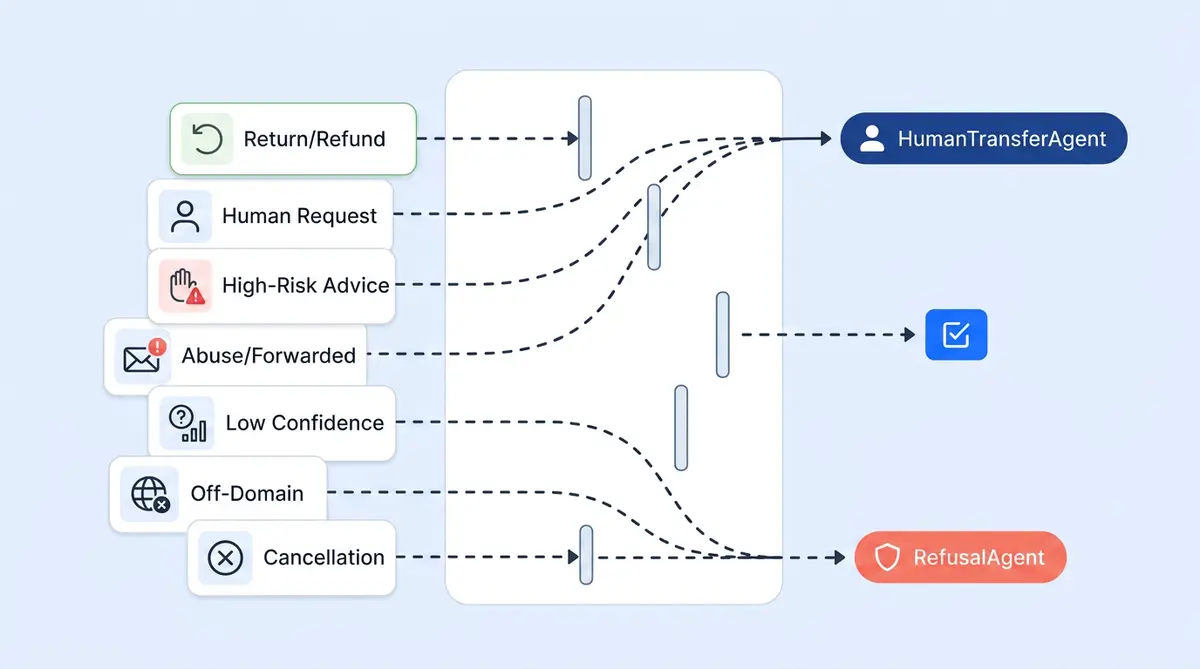
Most ecommerce AI support platforms talk about what their bot can do. Fewer explain what it deliberately won't do, and why that's the more important question for ecommerce brands. Alhena AI is built so that seven specific customer support ticket categories never auto-resolve end-to-end. The gating isn't a single safety check. It's a layered architecture for ecommerce ticket resolution where classification, policy rules, tool-level confirmations, and admin config all work together so a risky request can't slip through any single layer.
Here are the seven ticket types, why each is gated, and how the gating actually works under the hood.
1. Refund and Return Requests
Money-back scenarios require policy judgment and manual review. Alhena's ReturnManagementAgent has an explicit rule: never create a return without the customer clearly confirming "yes." It re-fetches fresh order and return data through live tools on every request, so it never acts on cached assumptions. If the case is complex or the customer disputes eligibility, the agent escalates to a human. Admin-configured return policy guidelines override default behavior, so your helpdesk rules always win. For a deeper look at how this connects to the full returns workflow, see our returns automation guide.
2. Order Cancellations and Subscription Changes
These are irreversible state changes on a customer's account. CancelOrder and ManageSubscription are opt-in tools, meaning not every company enables them. Even when enabled, the agent must collect verifying information (order number, email) before calling the tool. Complex cases still route to a human.
3. "I Want a Human" Requests
User intent overrides AI confidence, always. Alhena's PolicyEnforcer classifies every inbound message into one of four categories (ANSWERABLE, NOT_ANSWERABLE, HUMAN_TRANSFER_REQUEST, or FUNCTION_CALL) before any answer is generated. A human transfer request immediately invokes the HumanTransferAgent and skips the answering pipeline entirely. The customer never gets an AI response they didn't ask for.
4. Out-of-Scope and Off-Domain Messages
Answering off-topic questions erodes trust and invites misuse. The RefusalAgent intercepts anything outside the company's domain: prompt injection attempts, requests for internal system prompts, identity manipulation, unrelated coding or creative tasks, and spam. The chatbot declines gracefully in the customer's language. This is the same approach described in our brand safety audit checklist.
5. High-Risk Personal Advice
Medical, legal, financial, and mental health questions fall here. Liability and duty-of-care make AI "best guesses" unacceptable. The RefusalAgent's prompt explicitly lists these categories. It won't attempt resolution and won't produce a speculative answer. Period.
6. Ambiguous or Low-Confidence Tickets
An AI that makes up answers is worse than one that hands off. When Alhena's retrieval pipeline can't produce a grounded answer from the knowledge base, it transfers to a human instead of fabricating. The HumanEscalationClassifier also detects when an AI response mentions a handoff and flags the ticket so it doesn't get counted as auto-resolved. This is the principle behind designing uncertainty thresholds: knowing when to say "I don't know" is a feature, not a failure.
7. Automated, Forwarded, and Abuse-Signal Emails
No human is on the other end of an automated email, and forwarded threads need investigation, not AI replies. Email-specific triggers detect automated senders and "Fwd:" prefixes and transfer to a human. Security-flagged messages (prompt injection, jailbreak attempts) route to the RefusalAgent.
How the Gating Architecture Works
Alhena's gating isn't one filter. It's ten layers, each catching what the previous one might miss:
- Layer 1, Pre-answer classification: The PolicyEnforcer classifies every message before any answer is attempted. Human-transfer and out-of-scope requests branch off here.
- Layer 2, Agent-level refusal: Any agent can hand off to the RefusalAgent when it detects off-domain, high-risk, or manipulative content.
- Layer 3, Tool-level confirmation: Destructive operations (returns, cancellations) require explicit user confirmation and fresh tool data. Agent prompts forbid acting on cached state.
- Layer 4, Admin-configurable Guidelines: You define your own gating rules with trigger conditions, channel filters (web, email, WhatsApp, Instagram), business-hours scope, customer metadata (VIP tier, A/B group), and actions (transfer, refuse, custom message).
- Layer 5, Business hours and availability: Outside hours, Alhena either collects an email for async follow-up or suppresses transfer per your config.
- Layer 6, Smart routing to the right humans: Integrations with Zendesk, Freshdesk, and Salesforce support escalation group IDs and escalation keywords. "Refund" routes to Billing. "Bug" routes to Engineering. Escalation isn't just "hand to a human." It's "hand to the right human."
- Layer 7, Auto-close gating: Only tickets the bot actually resolved get auto-closed. CSAT pre-checks (needs_human_response, has_answer_found, is_relevant) prevent escalated or low-quality tickets from being silently closed.
- Layer 8, PII protection: The PIIMasker strips emails, phone numbers, credit cards, SSNs, and tracking numbers from ticket summaries before the LLM sees them.
- Layer 9, Post-handoff behavior: Per-integration config controls whether Alhena continues responding after a human takes over, or stays silent.
- Layer 10, Context-aware handoff messaging: Four message variants based on (email on file: yes/no) x (business hours: yes/no), so customers always get the right message when transfer happens.
The result: every quality assurance check is built into the architecture itself, not bolted on after the fact. Your AI coaching efforts focus on improving what the AI handles, not worrying about what it shouldn't. That's how successful ecommerce customer support solutions handle high-volume ticket escalations.
Want to see how Alhena's gating works with your ticket mix? Book a demo or start free with 25 conversations to test it yourself.

Frequently Asked Questions
Which ticket types should AI not auto-resolve?
Refund and return requests, order cancellations, subscription changes, explicit human-transfer requests, out-of-scope messages, high-risk personal advice (medical, legal, financial), low-confidence tickets with no knowledge base match, and automated or abuse-signal emails. These categories carry financial, legal, or brand risk that requires human judgment.
How does Alhena AI decide when to escalate to a human?
Alhena uses a 10-layer gating architecture. The PolicyEnforcer classifies every message before any answer is generated. If it detects a human-transfer request or out-of-scope query, it branches off immediately. Tool-level confirmations, admin-configured guidelines, and confidence thresholds add additional layers of protection.
Can I customize which ticket types get escalated?
Yes. Alhena's Guidelines system lets you define gating rules based on trigger conditions, channel (web, email, WhatsApp, Instagram), business hours, customer metadata like VIP tier or A/B group, and specific actions like transfer, refuse, or custom message. Your rules always override defaults.
How does Alhena prevent AI hallucinations on support tickets?
When Alhena's retrieval pipeline can't produce a grounded answer from the knowledge base, it transfers to a human instead of fabricating a response. The HumanEscalationClassifier also flags tickets where the AI mentioned a handoff, preventing them from being counted as auto-resolved.
Does Alhena route escalated tickets to the right team?
Yes. Integrations with Zendesk, Freshdesk, and Salesforce support escalation group IDs and keywords. A ticket mentioning 'refund' routes to Billing, while 'bug' routes to Engineering. Escalation targets the right human, not just any available agent.
What happens to PII in escalated tickets?
Alhena's PIIMasker strips emails, phone numbers, credit cards, SSNs, and tracking numbers from ticket summaries before the LLM processes them. Sensitive data never reaches the AI model, reducing data exposure risk on both auto-resolved and escalated tickets.
How does Alhena handle after-hours escalations?
Business-hours logic checks per-day schedules, timezone, and holidays. Outside hours, Alhena either collects an email for async follow-up or suppresses transfer per your configuration. Customers always get a context-appropriate message based on whether email is on file and whether agents are available.