Why Standard APM Falls Short for AI Pipelines
Traditional observability was built for request-response systems with predictable code paths. A REST call hits a controller, queries a database, and returns JSON. You trace it with OpenTelemetry, search it in Datadog, and move on.
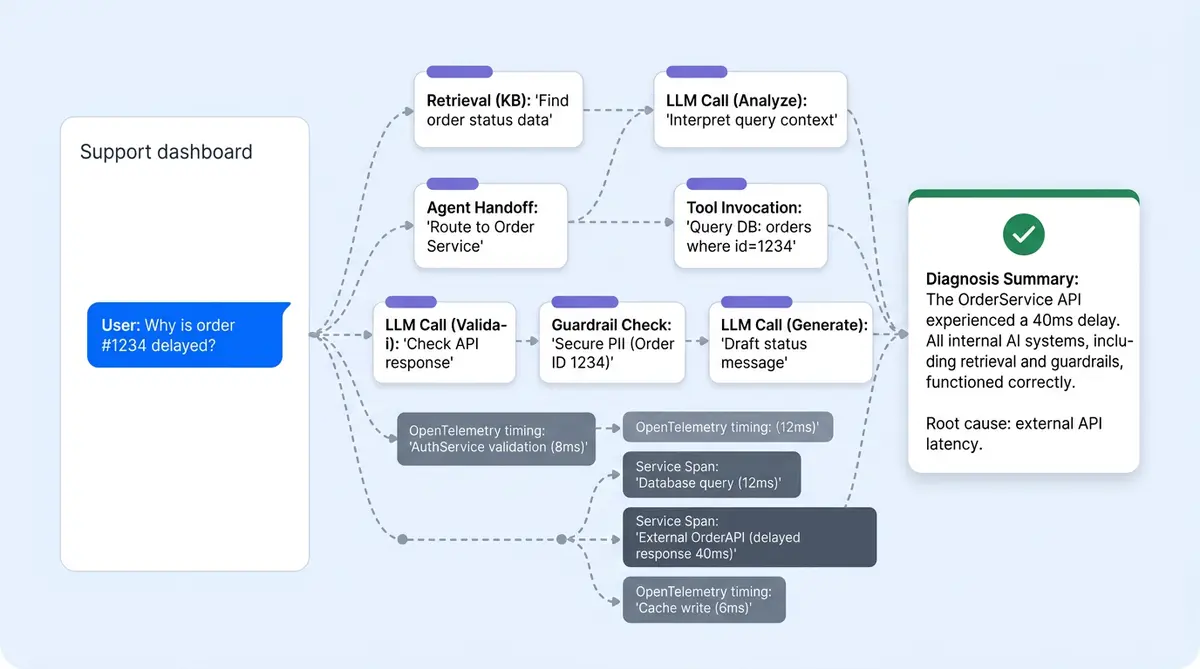
AI-powered conversations don't work that way. A single customer inquiry can fan out to 5 to 15 LLM requests, multiple retriever queries, agent handoffs, tool invocations, and guardrail checks. The same question takes different execution workflows depending on context, memory, and the planner's routing decisions. When something goes wrong, you need to reconstruct the entire reasoning chain, not just the HTTP request.
That's the problem Alhena's observability stack solves. Two tracing systems run in parallel; 13 timing measurements capture every pipeline stage; structured logs flow to queryable storage; and an AI agent can parse its own traces to explain why a response happened. Here's how the full workflow works.
Dual Tracing Architecture: Opik + OpenTelemetry
Alhena runs two complementary tracing systems on every AI-powered message, each purpose-built for a different layer of the stack:
- Opik traces the AI-powered pipeline: agents, LLM requests, retrievers, tools, and guardrails. It captures token counts, model names, LLM models, prompt templates, completion text, and latency natively because it understands AI semantics.
- OpenTelemetry traces infrastructure: HTTP requests, Celery task queues, database queries, and service-to-service calls. Standard format, compatible with New Relic, Zendesk integrations, and any OTEL-compatible backend.
Both trace IDs are persisted on every AI-generated message via a TicketMessageSaveTrace record. This is the critical bridge. From any chat conversation turn in the support dashboard, you can jump directly into either tracing system with a single click.
The data model is simple and straightforward:
trace_id+span_id: OpenTelemetry identifiers for infrastructure correlationopik_trace_id: Opik identifier for the full AI pipeline tracedebug_metadata: JSON blob with additional context (bot profile, request source, timing markers)
Why not just one system? Opik doesn't know about your Celery queue depth or Postgres query plans. OTEL doesn't know which retriever chunks scored highest or how many tokens the LLM consumed. You need both to debug production e-commerce chatbot conversations, and the TicketMessageSaveTrace join table is what ties them together.
What an Opik Trace Actually Captures
Every AI chat turn produces a trace with a full span tree. The @track decorator wraps the pipeline entry point, and child spans are created automatically for each component:
LLM spans record the model name, the full prompt sent, the completion returned, input and output token counts, and wall-clock latency. When you're debugging a bad answer, this is where you see exactly what the model was asked and what it said.
Retriever spans capture which knowledge base was searched, what chunks came back, and their rerank scores. If the AI cited the wrong product spec, you'll see the retrieval results ranked by relevance score right here.
Tool spans log every external action: Shopify product lookups, order tracking, status checks, order tracking updates, cart additions, payment status checks, and any other API actions the agent performed. Each span records the tool name, input arguments, output, and duration.
Agent spans show which agent handled the turn (Planner, GeneralSupport, Returns, OrderManagement) and its sub-reasoning. When the planner routes a question to the wrong agent, this span tree makes it obvious.
Guardrail spans contain hallucination scores, policy check results, and safety filter outcomes. If a response was blocked or flagged, the guardrail span shows the exact score and threshold that triggered it.
Trace metadata includes the bot_profile_key, request_source (web, voice, email, social) streaming status and timing markers like request_received_at and first_token_streamed_at. For voice conversations via Alhena Voice, the same Opik instrumentation wraps the Twilio session, as covered in our sub-second call stack deep dive.
13 Timing Measurements per Message
Raw traces tell you what happened. Timing measurements tell you where the bottleneck is. Alhena captures 13 discrete timing checkpoints on every AI message:
- Contextualization step time: how long the system spent building the conversation context
- Contextualization question time: query rewriting and intent classification
- Contextualization total: combined context-building duration
- Context retrieval: time spent querying the knowledge graph and vector stores
- Reranking: time to score and reorder retrieved chunks by relevance
- Policy enforcement: guardrail checks, safety filters, hallucination scoring
- Request-to-LLM-sent: time from receiving the customer message to dispatching the LLM request
- First-token-streamed: time to first byte from the LLM (critical for perceived latency)
- LLM completion time: total generation duration
- Tool execution time: aggregate time spent in external tool executions
- Agent routing time: planner decision latency
- Post-processing time: response formatting and final checks
- Total end-to-end time: request received to response delivered
When a merchant or customer reports "the bot feels slow," these 13 numbers can help you instantly identify whether the problem is retrieval (knowledge base indexing), reranking (model inference), the LLM provider (API latency), or tool calls (Shopify API response time). No guessing. The conversational analytics dashboard surfaces aggregate timing trends, while the debugger shows per-message breakdowns.
The ConversationDebuggerAgent: AI That Debugs AI
This is the piece that makes the observability stack accessible to non-engineering team members. The ConversationDebuggerAgent is an AI agent whose job is to read Opik traces and write plain-English explanations of what happened.
When a merchant, CX manager or team lead, or customer support manager clicks "Analyze this response" on any conversation turn, the flow is:
- The frontend sends the
opik_trace_idto the ConversationDebuggerAgent - The agent calls a
GetAgentTracetool, which fetches the raw trace from the Opik REST API - It parses the span tree: filters out planner spans to find the primary answering agent, extracts the system prompt to identify which knowledge sources were injected, pulls out tool outputs and their results, and identifies which guidelines matched
- It writes a structured markdown report explaining what the bot did and why
The output isn't a dump of JSON. It's a narrative: "The Returns agent handled this turn. It retrieved your 30-day return policy from the FAQ knowledge base (relevance score 0.94). It also called the Shopify Order API to check order #4821's status. The guardrail scored faithfulness at 0.91, above your 0.85 threshold. The response was grounded in these two sources."
This is a direct companion to flagged conversation detection. Detection tells you that something went wrong. The Debugger Agent tells you why.
Structured Logging Pipeline: From Pod to Query
Every service in the stack emits JSON logs with a standard schema. A TraceIdInjectFilter automatically pulls the current OTEL trace and span from context and stamps it onto every log line, so any log, anywhere in the stack, can be correlated back to the originating request.
The pipeline routes these logs to three destinations:
- S3 (via Fluent-bit): logs are partitioned by year, month, and day, then gzipped. AWS Athena runs SQL queries over this data. A one-click Athena query generator in the debugger copies a SQL statement pre-scoped to the exact
trace_idand correct date partitions. - CloudWatch: a filtered stream of business metrics (AI_MESSAGE_PROCESSED, HALLUCINATION_DETECTED, TOOL_CALL_FAILED) for real-time alerting and dashboards
- BigQuery: trace spans exported asynchronously via Celery for long-term analytics and cross-referencing with QA audit data
Three correlation keys stitch everything together across services: gleen_log_id (application-level request UUID, present in every log line), trace_id (OTEL distributed trace for Athena and New Relic), and opik_trace_id (full AI pipeline trace). Given any one of these, you can find the other two.
The Closed Loop: From Bad Answer to Training Data
Observability without action is just operational monitoring. The debugging stack closes the loop between detection, explanation, and correction.
The sequence works like this: Alhena's guardrail layer flags a conversation when the faithfulness score drops below the merchant's configured threshold. The merchant sees the flag in their dashboard and clicks "Analyze." The ConversationDebuggerAgent fetches the Opik trace, parses the span tree, and writes a plain-English report explaining which knowledge source was misinterpreted or missing.
Then the merchant clicks "Add to FAQs." The bad answer becomes new training data. The knowledge base updates. The same question, asked again, gets a grounded, verified response. The hallucination doesn't repeat.
Corrections propagate across every channel, including web chat, email, social DMs, and voice, within minutes. There's no per-channel patching. Brands using this continuous tuning loop have reached results like 82% chat deflection at Tatcha and 86% deflection with 84% CSAT at Crocus.
This is the operational difference between deploying AI and hoping it works vs. operating AI with confidence. You can't trust what you can't inspect. Alhena's observability stack makes every AI response inspectable, explainable, and improvable.
Want to see the Conversation Debugger trace a live response from your product catalog? Book a demo with Alhena AI or start free with 25 conversations.

Frequently Asked Questions
Why does Alhena use two tracing systems instead of one?
Opik understands AI capabilities natively: token counts, model names, prompt templates, retriever scores, and guardrail outputs. OpenTelemetry covers infrastructure: HTTP latency, Celery queue depth, database query plans, and service-to-service calls. Both trace IDs are persisted on every message via TicketMessageSaveTrace, so you can jump from a chat turn into either system with one click.
What are the 13 timing measurements captured per AI message?
Alhena measures contextualization (step, question, total), context retrieval, reranking, policy enforcement, request-to-LLM-sent, first-token-streamed, LLM completion, tool execution, agent routing, post-processing, and total end-to-end time. These pinpoint exactly which pipeline stage is slow when customers and merchants report latency issues.
How does the ConversationDebuggerAgent work?
It's an AI agent that reads Opik traces via the REST API, parses the span tree to identify which knowledge sources were injected, which guidelines matched, and which tools fired. It then writes a structured markdown report in plain English explaining why the bot gave a specific answer. Merchants access it by clicking Analyze on any virtual assistant conversation turn.
Where do conversation logs go and how can I query them?
JSON logs flow through Fluent-bit to three destinations: S3 (partitioned by date, queryable via AWS Athena), CloudWatch (real-time business metric alerts), and BigQuery (long-term analytics). A TraceIdInjectFilter stamps OTEL trace and span IDs onto every log line automatically, and the debugger includes a one-click Athena query generator scoped to the exact trace.
How does ai conversation debugging help prevent repeated hallucinations?
When a hallucination is flagged, the merchant clicks Analyze to get a plain-English explanation of what went wrong. They can then click Add to FAQs, turning the bad answer into new training data. The knowledge base updates, and the correction propagates across all channels (web, email, social, voice) within minutes. The same hallucination won't recur.
Does Alhena's tracing work for voice conversations too?
Yes. Voice flows through the voice-ai-server follow the same dual tracing pattern. Twilio session spans are wrapped with Opik instrumentation, and the voice server calls the AI server with propagated trace context. The sub-second call stack deep dive covers the voice-specific observability details.
What's the difference between the merchant dashboard and internal debugging tools?
The merchant dashboard shows a curated view: agent timeline, knowledge sources used, tool calls, and the Analyze button for the ConversationDebuggerAgent. Internal tools expose the full trace with all 13 timing measurements, the generated prompt and answer, chat history, pre-built Athena queries, and both OTEL and Opik trace IDs inline for every message.