Re:amaze pulls email, live chat, social media, and SMS into a single view. It's a solid help desk, especially for Shopify stores. But when your team spends half the morning answering "Where's my order?" for the twentieth time, the inbox alone stops being enough.
Most Re:amaze brands hit this wall eventually. The platform handles routing and organization well. What it doesn't do is answer those repetitive customer questions on its own, recommend products to shoppers mid-conversation, or close a sale without a human typing every reply.
Alhena AI plugs into Re:amaze and handles exactly that. It answers customer questions through your website live chat and email, pulls real product and order data so the answers are actually correct, and passes the conversation to your Re:amaze team when a real person is needed. Below: how the integration works, what data moves where, and why this matters for ecommerce brands running Re:amaze.
The Problem with Running Re:amaze Without an AI Layer
Re:amaze is a powerful help desk for ecommerce. Native connections to Shopify, BigCommerce, and WooCommerce. A unified platform covering email, live chat, social media, SMS, and even video calls. Flat per-user pricing between $29 and $69 a month, so your bill doesn't double when a product goes viral.
Where it falls short is automation. The Re:amaze agent AI is still in beta. It can detect basic intents, draft reply suggestions, analyze sentiment, and run pre-built chatbots (Hello Bot, Order Bot, and Bot FAQ). These are rule-based tools, though. They can't pull live inventory from your catalog, process a return inside a conversation, or walk a shopper through picking the right product.
So your customer support reps still answer the same ten questions by hand. IBM estimates that AI can handle up to 80% of routine service tasks. For e-commerce customer support teams on Re:amaze, skipping that means slower responses, higher labour costs, and lost sales from shoppers who won't wait around for a reply.
Alhena AI fills that gap without asking you to rip out Re:amaze. Your team keep working where they already work. Alhena now handles the AI-powered automation layer around it.
How the Alhena + Re:amaze Integration Actually Works
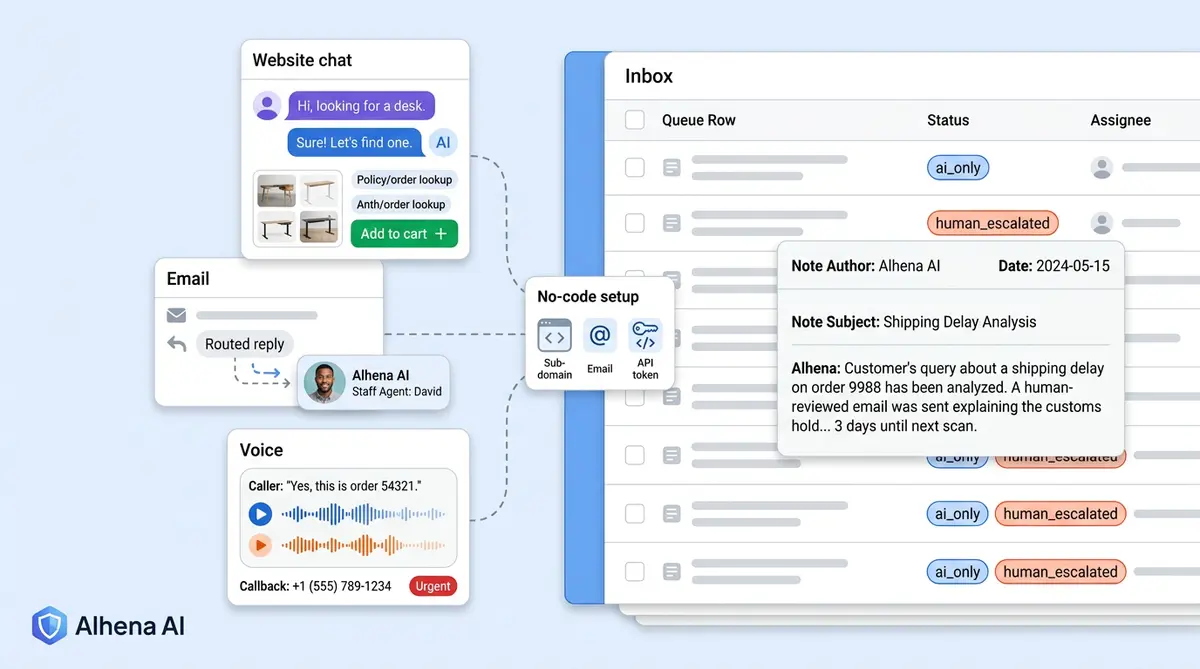
Connecting the two takes under an hour, and you don't need a developer. From Alhena's integration settings, you enter four things: your Re:amaze brand subdomain, login email, API token, and the default Re:amaze channel where new tickets should land.
The system checks those credentials against the Re:amaze API, sets up an Alhena AI staff user in your Re:amaze account, and turns on polling. From there, two channels go live: website live chat and Re:amaze email.
Website Chat: AI Answers First, Humans Step In When Needed
A shopper opens the Alhena live chat widget on your site and asks a question. The AI responds right away, pulling from your product catalog, order data, product knowledge, and policy documents so the answer is based on real information, not guesses.
If the chat needs a human, Alhena creates a Re:amaze ticket in your selected channel. That ticket includes the full chat transcript, customer details (name, email, phone when available), any attachments converted to readable links, and tags like alhena_chat, business-hours status and whether the AI handled the whole thing or handed it off. There's also a direct link back to the Alhena thread for extra context.
Once a Re:amaze rep replies, Alhena detects the staff response through polling, saves it back into Alhena, and stops responding. No duplicate messages. No confused customers wondering who they're talking to.
Email: AI Replies Land Right Inside Re:amaze
The email flow starts on the Re:amaze side. You set up a workflow that routes incoming support emails to the Alhena AI staff user. Polling picks up new threads assigned to that bot user.
When a new customer email comes in, Alhena imports it, strips out quoted content and signatures, runs the message through its AI pipeline, and posts the response back into Re:amaze as a staff reply. It can append your email signature or disclaimer before closing the thread.
Customer replies again? Re:amaze reopens the thread. Alhena picks up the new message and generates a fresh response. Your team only sees the threads that genuinely need human attention, because the routine ones are already resolved.
How Handoffs Work (Without Dropping the Customer)
A conversation gets sent to a human in three situations: the customer asks for a person, the AI isn't confident it has the right answer, or your configured transfer rules kick in.
On the Re:amaze side, the thread reopens with a human_escalated tag and an internal note explaining why the AI stepped back. Once a human team member responds, the AI backs off completely.
Everyone wins. The Re:amaze rep picks up with full context: the transcript, the shopper's question, what the AI already covered, and why it decided to escalate. No "can you tell me your issue again?" moments.
Manawa runs a similar setup and cut response times from 40 minutes to 1 minute while automating 80% of inquiries. Same help desk, radically better experience.
What Alhena Adds That Re:amaze's Native AI Can't Do Yet
Alhena AI vs Re:amaze Built-In AI: At a Glance
| Alhena AI | Re:amaze Built-In AI | |
|---|---|---|
| Core focus | Ecommerce sales + support automation | Agent assist and FAQ deflection |
| AI maturity | Production-grade, hallucination-free | Beta AI Agent |
| Product recommendations | Real-time catalog-aware guided selling | Not available |
| Order management | Autonomous (returns, tracking, modifications) | View-only via Shopify sidebar |
| Checkout actions | Agentic cart population and checkout pre-fill | Not available |
| Voice support | Voice AI with callback ticket creation | VoIP calling (manual only) |
| Revenue attribution | Full analytics (conversions, AOV, attributed revenue) | Ticket volume and response time only |
| Setup time | Under 48 hours, no dev resources | Built-in (limited configuration) |
The native Re:amaze agent tools handle the basics: drafting replies, suggesting FAQ articles, and running simple chatbots and workflow bots. Useful, but limited. The two products split in five areas that matter for ecommerce.
On product answers, the Product Expert in Alhena pulls from your live catalog and knowledge base. It knows what's in stock, what each product costs right now, and what your current policies say. Re:amaze's bot FAQ surfaces articles, which helps, but it doesn't understand product attributes, real-time pricing, or inventory levels.
On order handling, the Order Management side of Alhena looks up order information, processes returns, tracks shipments, and modifies subscriptions without leaving the chat. Re:amaze lets your team view Shopify order information in a sidebar, but the AI can't act on any of it.
On actual selling, instead of just answering customer questions, Alhena recommends products based on what the shopper needs, runs interactive quizzes, populates the cart, and pre-fills checkout. This agentic checkout approach helped Tatcha see 3x conversion rates and 11.4% of total site revenue from AI-powered chats.
On channel coverage, Re:amaze handles email, live chat, and social in its platform. Alhena extends AI to Instagram DMs, WhatsApp, and voice calls too. A shopper who starts on Instagram and follows up by email gets a consistent, context-aware experience across both.
On revenue tracking, Re:amaze reports ticket volume and response time. Alhena tracks which AI interactions led to purchases, the average order value of AI-assisted sales, total attributed revenue, and actionable insights. You see whether the AI is paying for itself, not just saving time.
Turning Support Chats Into Actual Sales
Most help desk AI tools measure success by how many tickets they deflect. Deflection saves money, sure. But if a shopper lands on your site at 11 PM, asks about a product, and gets a canned "we'll get back to you" response, that sale is gone. The real question isn't how many tickets you closed. It's how many customers bought something because your AI was smarter than a FAQ page.
When a shopper asks, "which moisturizer works best for dry skin?" in the Alhena live chat widget on your site, the AI doesn't just answer the question. It recommends specific products from your catalog, explains why each one fits, and can add the chosen product to the cart right there. A support question just became a sale.
Victoria Beckham saw a 20% increase in average order value after adding Alhena. Puffy hit 63% automated inquiry resolution with 90% CSAT. Crocus reached 86% deflection with 84% CSAT.
These numbers come from pairing a solid help desk (Re:amaze handling the agent workspace and ticket routing) with an AI layer (Alhena handling automation, product expertise, and guided selling). Neither tool alone delivers this different kind of result. Together, they turn your customer support operation into something that actively makes money.
You can estimate the impact for your own store using the Alhena ROI Calculator.
Voice AI and Callback Tickets in Re:amaze
The integration goes beyond chat and email. When a customer calls your Alhena Voice AI line and the call needs human follow-up, Alhena creates a Re:amaze ticket with the full call transcript, tagged as ai_only or human_transferred.
After-hours calls get special treatment. If no one's available, Alhena's callback ticket system offers the caller a structured callback. With their consent, it creates a Re:amaze ticket containing the transcript, phone number, and urgency classification. Your support rep opens Re:amaze Monday morning and sees exactly what the caller needed, word for word.
For Shopify brands using Re:amaze as their primary support platform, this means phone support gets the same AI treatment as chat and email. Everything funnels into the same Re:amaze dashboard your team already knows.
Getting Started: What You Actually Need
Three things:
- A Re:amaze account with admin access (you'll need to generate an API token and set up a workflow).
- An Alhena AI account to run the AI side. You can sign up with 25 free conversations to test the integration before committing.
- Your ecommerce platform connected to Alhena (Shopify, WooCommerce, BigCommerce, or Magento) so the AI has access to your product catalog and order data.
From Alhena's dashboard, go to integration settings, pick Re:amaze, enter your subdomain, email, API token, and default channel. Alhena validates the connection, creates the AI staff user, and starts polling. Most brands are live within 48 hours.
For email automation, create a Re:amaze workflow that assigns incoming emails to the Alhena AI bot. For website chat, drop the Alhena widget on your site. Both channels now work independently, so start with whichever feels more urgent and add the other when you're ready.
If you're already on Re:amaze with Shopify or WooCommerce, the Agent Assist feature also gives your human team AI-suggested responses inside Re:amaze, speeding up the cases they do handle manually.
Under the Hood: How Polling and De-Duplication Keep Things Clean
Unlike integrations that depend on webhooks, Alhena's Re:amaze connection uses polling. It checks recent Re:amaze threads at regular intervals, de-duplicates messages using Re:amaze message IDs, skips internal notes and API-origin messages, and only processes new customer or staff replies.
Why polling instead of webhooks? Fewer failure points. If one polling cycle misses a message because of a brief network blip, the next cycle catches it. Messages don't get lost, and the same message never gets processed twice.
Attachments from Alhena chat get converted into readable links or markdown when pushed to Re:amaze. Tags are applied automatically: alhena_chat, your company key, business-hours status, and escalation state. Filtering AI-handled vs human-handled interactions in Re:amaze's reporting becomes straightforward.
The Short Version
Re:amaze gives you the shared inbox, the team workspace, and multi-channel coverage. Alhena gives you AI-powered automation, product intelligence, and revenue tracking that native Re:amaze beta AI tools can't match yet.
Together: fewer repetitive tickets for your team, faster responses for your customers, and a support channel that contributes to revenue instead of just costing money. Brands using Alhena across platforms like Re:amaze, Zendesk, Freshdesk, and Gorgias consistently see 60 to 80% of routine inquiries resolved automatically, with measurable lifts in conversion rates and average order value.
Want to see how it works with your Re:amaze setup? Book a demo or start free with 25 conversations.

How does Alhena AI connect to Re:amaze?
You connect Alhena to Re:amaze through Alhena's integration settings using your Re:amaze subdomain, login email, API token, and a default channel. Alhena validates the credentials, creates an AI Agent staff user in Re:amaze, and starts polling for conversations. The entire setup takes under an hour with no developer involvement.
Can Alhena AI answer Re:amaze emails automatically?
Yes. You create a Re:amaze workflow that routes incoming support emails to the Alhena AI Agent. Alhena polls for new emails, generates AI responses using your product catalog and policy data, and posts the reply back into Re:amaze as a staff message. When the customer replies, Re:amaze reopens the conversation and Alhena handles the next response.
What happens when Alhena AI can't answer a question in Re:amaze?
Alhena escalates to a human agent by reopening the Re:amaze conversation, adding a human_escalated tag, and leaving an internal note with the escalation reason. Once a Re:amaze team member replies, Alhena stops auto-responding. The agent sees the full transcript and customer context, so the handoff is smooth.
Does Alhena replace Re:amaze or work alongside it?
Alhena works alongside Re:amaze. Your agents continue using Re:amaze as their helpdesk. Alhena adds an AI automation layer that handles routine questions, product recommendations, and order lookups. Think of it as an AI teammate inside your existing Re:amaze workflow, not a replacement.
How is Alhena AI different from Re:amaze's built-in AI Agent?
Re:amaze's AI Agent is in beta and focuses on drafting replies, summarizing conversations, and running rule-based chatbot flows. Alhena AI is production-grade and purpose-built for ecommerce: it provides hallucination-free product answers, autonomous order management, guided selling with agentic checkout, and full revenue attribution analytics. Brands like Tatcha have seen 3x conversion rates from Alhena-powered interactions.
Can Alhena create Re:amaze tickets from voice calls?
Yes. When a phone call handled by Alhena Voice AI needs human follow-up, Alhena creates a Re:amaze ticket containing the full call transcript, caller phone number, and urgency tags. For after-hours calls, the AI offers a callback and creates a ticket so your agent can call back with complete context.
What ecommerce platforms work with Alhena + Re:amaze?
Alhena integrates with Shopify, WooCommerce, BigCommerce, Magento, and Salesforce Commerce Cloud. Any of these can be paired with Re:amaze. Alhena pulls product catalog, order, and customer data from your ecommerce platform to power accurate AI responses inside Re:amaze.
How much does Alhena AI cost to add to Re:amaze?
Alhena uses per-conversation pricing, so you only pay when the AI resolves an interaction. You can start free with 25 conversations to test the Re:amaze integration. Visit the Alhena pricing page or use the ROI calculator to estimate your savings and revenue lift based on your current ticket volume.
Does Alhena support Re:amaze multi-brand accounts?
Yes. If you manage multiple brands from a single Re:amaze account, Alhena can be configured per brand with separate product catalogs, policies, and AI guidelines. Each brand gets its own Alhena configuration while your agents manage everything in one Re:amaze dashboard.