A Problem Every Salesforce Service Cloud Team Knows Too Well
Over 12,000 companies run their customer service operations on Salesforce Service Cloud in 2026, according to 6sense. Cases get routed. SLAs get tracked. Customer service teams rely on it daily. Agents work inside a system that handles support workflows better than almost anything else on the market.
But here's what Salesforce wasn't designed to do: answer "which moisturizer is best for dry skin?" or "Can I exchange my order for a different size?" Those questions need product knowledge, order history, and shopping context that lives outside the CRM.
Most e-commerce support teams feel this gap daily. For example, a customer asks which shade of foundation matches their skin tone. A customer writes in, and the agent has to jump between Salesforce, the storefront admin, a shipping dashboard, and maybe a product spreadsheet just to answer one question. It's slow. It burns agents out. And it costs you sales when customers don't wait around.
Alhena AI plugs directly into Salesforce Service Cloud as a Salesforce AI chatbot that handles 60-80% of routine conversations before they ever hit an agent's queue. Your team keeps working in Salesforce. Customers get answers in seconds instead of hours. And unlike Salesforce's own Agentforce, this conversational AI chatbot actually understands your product catalog, not just your case history.
Two Ways the Salesforce AI Chatbot Integration Works
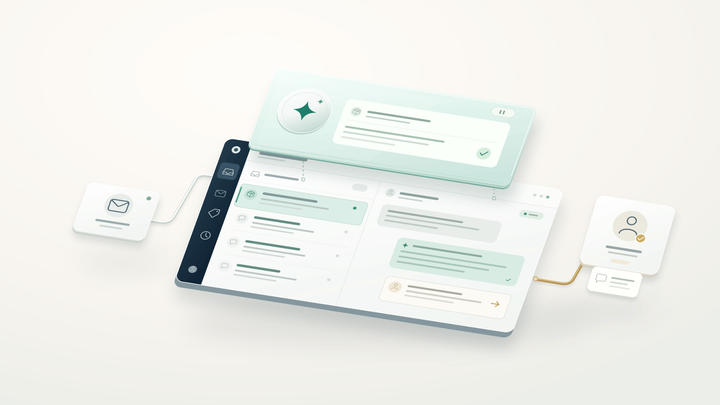
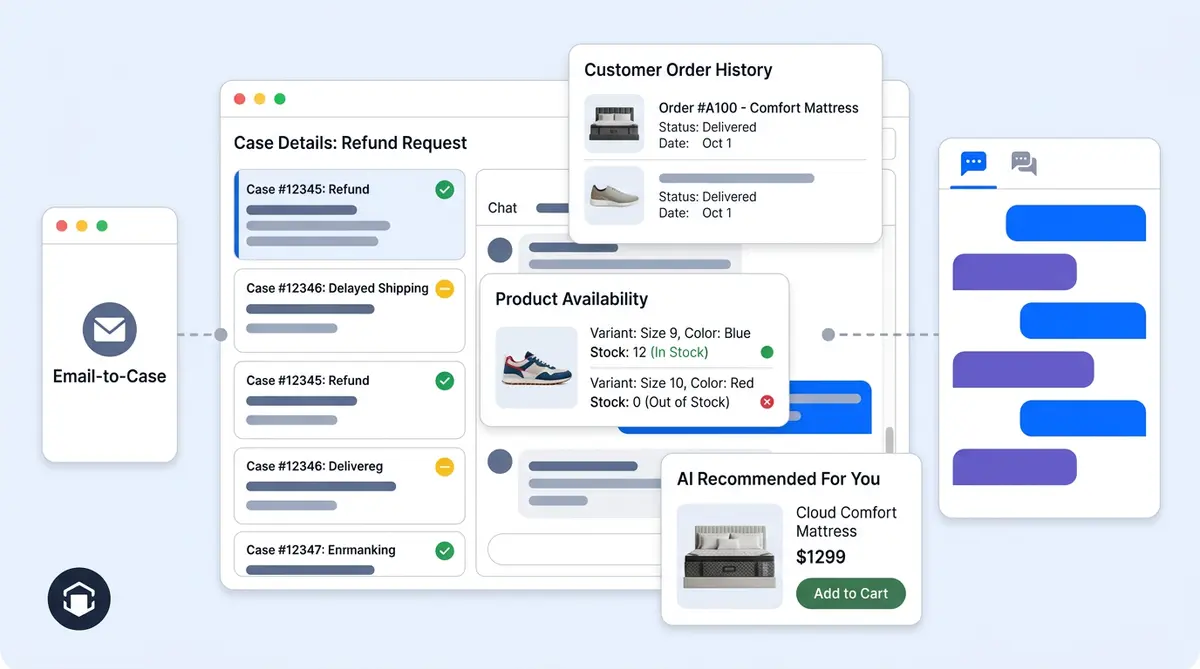
Not every brand handles customer service the same way. Some teams live in email. Others run live chat. This Salesforce Service Cloud chatbot integration supports both workflows through two distinct modes.
Email Cases: For Teams Using Email-to-Case
If your support inbox feeds into Salesforce Email-to-Case, this conversational mode works without changing anything about your existing setup:
- A customer sends an email to your support address.
- Salesforce creates a case, same as always.
- When that case lands on the configured bot user, Salesforce fires a signed webhook to Alhena.
- Using machine learning and your brand's knowledge base, the AI pulls the case details and related
EmailMessagerecords, strips out all the quoted text and repeated signatures, and builds a clean picture of what the customer actually needs. - It generates a response grounded in your return policies, past ticket resolutions, and whatever customer data is available.
- That reply goes back through Salesforce via a custom Apex email endpoint. Email threading stays intact. Your customer sees a normal reply from your support address.
- Straightforward issues get closed automatically. Anything that needs a human stays open and routes to the right Salesforce queue.
Say a customer emails at 2 AM asking about your return window. The Salesforce AI chatbot checks your policy, writes a personalized reply with the specific order details, and closes the case. By morning, your agents have one fewer ticket in the queue. Multiply that by a few hundred emails a week, and the workload difference is hard to ignore.
Live Messaging: For Chat and In-App Support
Brands running Salesforce Messaging for In-App and Web get a different flow:
- A shopper opens the AI Shopping Assistant chat widget on your site and asks a question.
- Chatbots can answer instantly and accurately: product specs, shipping timelines, sizing guidance, and stock availability.
- If the conversation needs a human (a billing dispute, a damaged item, or something outside the AI's confidence range), it creates a Salesforce Messaging Session.
- Full chat transcript and customer profile go into Salesforce before the agent even picks up.
- Your agent responds inside the Salesforce Service Console. Agents can see the full transcript without asking the customer to repeat anything. A Salesforce-side component sends those replies back through the chat widget so the customer never has to switch channels.
- When the agent wraps up, the linked ticket closes on both sides.
Handoff quality is what separates a good Salesforce AI chatbot from a frustrating one. Nobody wants to repeat their issue to a live agent after spending five minutes explaining it to a bot. With this setup, agents see everything: what was asked, what the AI said, and what still needs resolving. Conversations pick up right where they left off.
What Actually Moves Between Salesforce and Alhena
A lot of Salesforce chatbot integrations are surface-level. They sit on top of your helpdesk but don't really talk to it. This one is different because data flows both ways, keeping Salesforce and the chatbots in sync.
What Salesforce sends to Alhena
- Case records: ID, number, subject, description, status, owner, supplied email and phone
- Email threads: Full
EmailMessagecontent for Email-to-Case conversations - Chat history: Messaging Session entries from previous interactions
- Contact info: Contact ID, email, and linked records when they exist
- Past interactions: Historical Case and Messaging data so the AI knows what happened before
- Knowledge articles: Salesforce Knowledge content, if you've configured it as a source
What Alhena sends back to Salesforce
- New Cases: Created when conversations escalate or come in after hours
- Full transcripts: Chat history and visitor info attached to every Case
- AI replies: Email responses threaded through Salesforce's own system
- Status updates: Cases close automatically when resolved, or get reassigned when agents can step in
- Internal notes: Case comments and Chatter posts so agents have visibility
- Custom fields: Conversation attributes mapped to your Salesforce field structure
Your reporting doesn't split across two dashboards. Every AI-handled conversation, every escalation, every resolution shows up in Salesforce exactly where your team expects it.
Where Alhena Pulls Ahead of Agentforce
Salesforce's own AI chatbot solution, Agentforce, does solid work inside the CRM. Case classification, reply drafts, knowledge article surfacing. For internal workflows, it's capable. But e-commerce customer service asks for things Agentforce wasn't built to do.
Product knowledge that goes deep. Ask Agentforce, "Which running shoe has the most arch support under $120?" and it won't have an answer. It works with Salesforce data objects, not product catalogs. Alhena's Product Expert Agent knows your full catalog: attributes, variants, pricing, inventory, and how products compare to each other.
Shopping actions inside the chat. When a customer finds what they want, the chatbot can add it to their cart and pre-fill checkout. Agentforce doesn't touch the storefront.
Tracking revenue, not just deflection. AgentForce measures how many cases got closed without a human. Useful, yes, but it misses the sales angle entirely. Alhena tracks which conversations led to purchases, what the average order value was, and how much revenue the AI directly influenced. Tatcha saw 3x higher conversion rates and 38% larger orders after adding Alhena to their stack.
More channels, fewer gaps. Alhena runs on web chat, email, Instagram DMs, WhatsApp, and voice. All those conversations feed back into Salesforce as cases. Agentforce works within Salesforce's own channel ecosystem.
Live in days, not months. Getting Agentforce running typically takes 6 to 16 weeks and needs a Salesforce admin, according to industry benchmarks. Alhena deploys in under 48 hours with no-code setup.
Pricing that doesn't scale with your Salesforce contract. Agentforce charges $2 per conversation on top of Service Cloud editions starting at $550/user/month. Alhena's pricing is independent of your Salesforce seat count entirely.
Alhena AI vs Salesforce Agentforce: At a Glance
| Alhena AI | Salesforce Agentforce | |
|---|---|---|
| Built for | Ecommerce sales + support | CRM workflows and case management |
| Product catalog AI | Native product intelligence with comparisons | Relies on Salesforce data objects |
| Cart and checkout | Agentic cart population and pre-filled checkout | No cart or checkout actions |
| Revenue attribution | AI-attributed revenue, AOV, conversion tracking | Case deflection and resolution metrics |
| Channels | Web chat, email, Instagram, WhatsApp, voice | Salesforce-native channels |
| Deploy time | Under 48 hours, no dev needed | 6-16 weeks, Salesforce admin required |
| Pricing model | Independent of Salesforce seat count | $2/conversation + $550+/user/month editions |
Turning Customer Service Conversations Into Actual Sales
Most Salesforce chatbot solutions stop at ticket deflection and call it a win. How many issues did we keep away from agents? It's the metric they optimize for. Valuable, sure, but it ignores what e-commerce brands actually care about: did we help that customer buy something?
When a shopper asks, "Do you have this jacket in navy?" that's not a support ticket. It's a buying signal. The AI Shopping Assistant recognizes it as one. It shows the navy variant, suggests a matching scarf, and lets the customer add both to their cart without leaving the chat window.
Brands already using this approach have the receipts to prove it:
- Tatcha: 3x conversion rate, 38% higher average order value, 11.4% of total site revenue came through AI conversations
- Victoria Beckham: 20% jump in average order value from personalized product recommendations
- Puffy: 63% of inquiries resolved automatically, 90% customer satisfaction
- Crocus: 86% deflection rate with 84% customer satisfaction
- Manawa: Agent workload dropped 43%; response time went from 40 minutes to 1 minute
Two specialized agents make this work. One handles shopping and pre-purchase questions (the Product Expert Agent). The other covers post-purchase issues like order tracking, returns, and exchanges (the Order Management Agent). Both feed activity back into Salesforce Service Cloud, so your reporting stays in one place.
Curious what the numbers would look like for your team? Run your scenario through the ROI calculator.
Quick Clarification: Service Cloud vs. Commerce Cloud
This question comes up in almost every demo, so let's clear it up. Salesforce Service Cloud and Salesforce Commerce Cloud are separate products. Alhena connects to both, but they serve different purposes.
Service Cloud is your helpdesk. Cases, agent queues, routing rules, SLAs, knowledge base. Everything we've covered in this post is about the customer service workflow: AI chatbot responses, case creation, escalation, and messaging handoff.
Commerce Cloud (SFCC) is your storefront. Product catalog, orders, cart, checkout. That integration gives chatbots access to what you sell, what's in stock, and what a specific customer has ordered before.
You get the strongest results when both are connected. Service Cloud manages the support workflow. Commerce Cloud provides the shopping data. Alhena uses both to give customers accurate, personalized answers whether they're asking about a product or checking on a package. If you're on SFCC, our guide to AI shopping assistants for Commerce Cloud covers that side in detail.
Setting It Up (Faster Than You'd Expect)
If you've been through a Salesforce implementation before, you're probably bracing yourself. Good news: this isn't one of those. No multi-month project plan, no dedicated Salesforce developer required, no-code configuration.
What you need before starting
- An active Salesforce Service Cloud org (any edition with Cases and API access)
- Admin access to set up a bot user and configure webhooks
- An Alhena account (sign up free, you get 25 chatbot conversations to test with)
Six steps to go live
- Authenticate your Salesforce org from the Alhena dashboard. Webhooks and bot user assignments get configured during this step.
- Pick your integration mode. Email cases, messaging, or both. Most e-commerce brands enable both.
- Load your knowledge sources. Salesforce Knowledge articles, historical cases, your product catalog, help centre docs, and policy pages. More training data and machine learning mean better, more personalized answers.
- Map your custom fields. If you use custom Salesforce fields for priority, category, or customer tier, map them so the chatbot can read and write those values during conversations.
- Set escalation thresholds. You decide what the AI handles and what goes straight to a human. Billing disputes? Always escalate. Simple questions like "Where's my order?" Let the AI chatbot handle it.
- Test and launch. Run a few test cases and messaging sessions, verify the data flows look right, and go live. Once running, chatbots can handle customer issues 24/7 without manual intervention.
Start to finish, the process typically wraps up within 48 hours. Alhena chatbots also connect to your ecommerce platform (Shopify, WooCommerce, Salesforce Commerce Cloud, Magento) so the Salesforce AI chatbot has product and order data alongside your support data. That combination is what keeps answers accurate and grounded in real information, not guesswork.
Already using another helpdesk alongside Salesforce for certain workflows? Alhena connects to Zendesk, Freshdesk, and others too. Our WooCommerce + Zendesk integration guide shows how that works in practice.
What Changes for Your Team (And What Doesn't)
After going live, the daily experience for your Salesforce agents barely changes. They still open their service console in the morning. They still see cases, queues, and messaging sessions. Fewer tickets are waiting for them, though, and the ones that do come through already have context attached.
Agents can spend their energy on conversations that actually need a human: frustrated customers, complicated returns, edge cases that don't fit a template. Repetitive questions like "what's your return policy?" and "where's my package?" get resolved before they reach the queue.
On the revenue side, chatbots can turn product questions into purchases, and they do it well. A browsing customer asks about fabric care for a jacket, gets a helpful answer, and adds the jacket plus a care kit to their cart. Not a support interaction at all. A sale that would've been lost if that customer had to wait 20 minutes for a live agent or, more likely, just bounced from the site.
If you want to see this working with your own Salesforce Service Cloud setup, book a demo with Alhena AI or start free with 25 chatbot conversations to test it yourself.

Frequently Asked Questions
How does Alhena AI integrate with Salesforce Service Cloud?
Alhena connects through two integration modes. Email Cases handles Email-to-Case workflows where the AI agent reads incoming Cases, generates a reply using your knowledge base and CRM data, and sends it back through Salesforce email threading. Messaging mode covers live chat, where the AI chatbot answers questions in real time and creates a Salesforce Messaging Session for live agent handoff when needed. You can deploy both modes in under 48 hours with no-code setup.
Does Alhena replace Salesforce Service Cloud?
No. Alhena works inside your existing Salesforce setup. Your agents stay in the Service Console, your Cases and queues stay in Salesforce, and your analytics and reporting stay unified in one place. Alhena adds an AI-powered layer that resolves routine inquiries before they reach your team, which improves agent productivity without changing your service operations.
What is the difference between Alhena AI and Salesforce Agentforce?
Agentforce is built for CRM workflows: case classification, reply suggestions, and knowledge retrieval using Salesforce Einstein. Alhena is designed specifically for ecommerce customer service, with capabilities like personalized product recommendations, agentic checkout (cart population and pre-filled forms), revenue attribution, and conversational AI across web chat, email, Instagram, WhatsApp, and voice. Alhena also deploys in under 48 hours versus 6-16 weeks for Agentforce.
Can Alhena AI handle Email-to-Case in Salesforce?
Yes. When a customer emails your support address and Salesforce creates a Case, the AI agent picks it up via webhook, uses natural language processing to understand the customer need, and generates a reply grounded in your knowledge base, policies, and historical ticket data. The response goes back through Salesforce so email threading stays intact. Straightforward inquiries get resolved and closed automatically.
Does the Salesforce AI chatbot integration support live agent handoff?
Yes. When the conversational AI determines an interaction needs human help, it creates a Salesforce Messaging Session with the full chat transcript and customer data attached. The live agent picks up in the Service Console with complete context, so the customer doesn't repeat anything. Replies flow back to the customer through Alhena's chat widget in real time.
How much does Alhena AI cost for Salesforce Service Cloud teams?
Alhena's pricing is independent of your Salesforce seat count, so you don't pay per-agent fees on top of your CRM costs. You can start free with 25 conversations to test the integration, then scale based on volume. That makes it more accessible than Agentforce, which charges $2 per conversation plus Service Cloud edition fees starting at $550 per user per month. Visit alhena.ai/pricing for current plans.
Can Alhena connect to both Salesforce Service Cloud and Commerce Cloud?
Yes, and that's the strongest setup for ecommerce. Service Cloud handles your customer support workflows (Cases, escalation, agent routing), while Commerce Cloud provides product catalog, order, and customer data. The AI assistant uses both data sources, to unify data through Alhena, to answer questions accurately and make personalized product recommendations. No guesswork, no fabricated answers.
What results have brands seen with Alhena AI on Salesforce?
Tatcha achieved 3x conversion rates, 38% AOV uplift, and 11.4% of total site revenue from AI powered conversations. Puffy reached 63% automated inquiry resolution with 90% customer satisfaction. Manawa cut agent workload by 43% and dropped response time from 40 minutes to 1 minute. These results come from the AI's ability to resolve routine questions while improving the customer experience on every interaction.
Is the Alhena AI Salesforce chatbot grounded in real data?
Yes. Every response the AI chatbot generates is grounded in your verified product data, approved policies, historical ticket resolutions, and Salesforce Knowledge articles. Unlike generic bots or basic decision tree flows, Alhena uses generative AI with strict guardrails to make sure it never fabricates information. That's critical for ecommerce brands where a wrong answer about sizing, availability, or return policy can cost a sale.
How does Alhena compare to Salesforce Einstein for customer support?
Salesforce Einstein handles CRM-native tasks well: predictive case routing, reply recommendations, article suggestions, and sentiment analytics within your Service Cloud console. It's a strong, intelligent fit for general service operations. Alhena adds what Einstein doesn't cover: deep product catalog intelligence, agentic cart and checkout actions, AI powered self service for shoppers, and revenue attribution that ties conversations to actual sales. Many brands use Salesforce Einstein for internal agent insights and Alhena as the customer-facing AI chatbot.
What types of customer interactions can the AI chatbot handle?
Common use cases include answering product questions, explaining shipping and return policies, checking order status, providing personalized recommendations, and handling account inquiries. The conversational AI uses natural language understanding to identify customer intent and resolve each interaction without routing to a human agent. For complex or sensitive issues, the bot escalates with full context so agents can respond faster. It covers self service for the most common customer support queries around the clock, acting as a self service portal that customers can use across any channel.
Does the Salesforce integration support agentic AI workflows?
Yes. Alhena runs two specialized AI agents inside the integration. The Product Expert Agent handles shopping queries, product comparisons, and proactive recommendations. The Order Management Agent covers post-purchase interactions like tracking, returns, and exchanges. Both agents can take action (populate carts, update Cases, trigger escalations) rather than just generating text replies. This agentic capability goes beyond what traditional chatbots or basic automation can do, giving your team a real productivity boost without adding headcount.