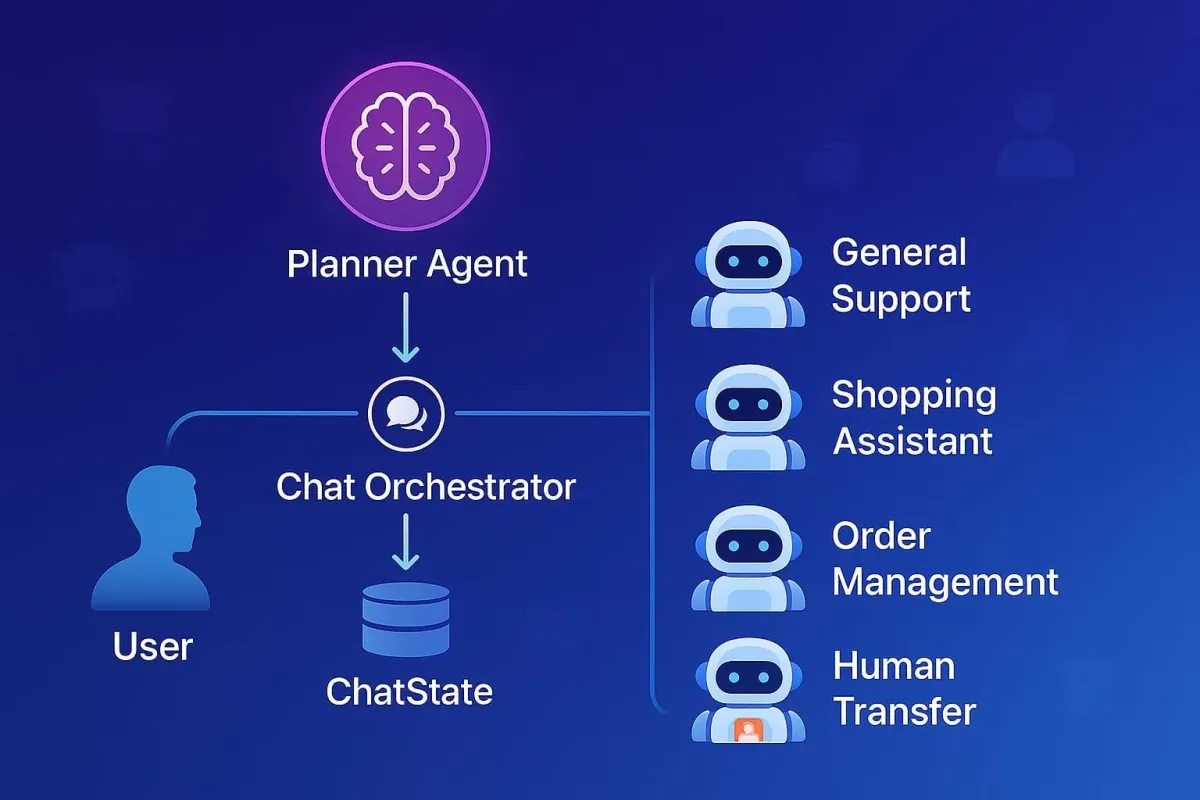
Deep-dive into a multi-agent LLM architecture (Planner, Orchestrator, Specialized Agents and ChatState) transforming e-commerce with specialized AI for support, sales, and CX.
Introduction
Modern AI-powered e-commerce shopping experience requires instant answers, personalized product recommendations, seamless order management, and empathetic support. While a single Large Language Model (LLM) can initially seem capable, it quickly becomes an unmanageable tangle of guidelines and tools as complexity increases.
We at Alhena have evolved beyond the one-agent-does-everything design. We've developed a multi-agent LLM architecture that mirrors a highly effective real-world retail team: product specialists, support representatives, back-office experts, and operations managers, all coordinated by an intelligent orchestration layer. This article offers a deep dive into this architecture, the key agents involved, and the transformative results we've observed in a demanding e-commerce environment.
Related reading: Multi-Model, Multi-Agent: Why Modern Ecommerce AI Needs Both
The Growing Pains of a Monolithic "One Big Agent"
The initial appeal of a single, all-encompassing AI is understandable. However, in the dynamic world of e-commerce, this approach quickly encounters significant hurdles:
| Pain Point | Symptoms | Why It Happens |
|---|---|---|
| Instruction Overload |
|
|
| Tool Confusion |
|
|
| Conflicting Objectives |
|
|
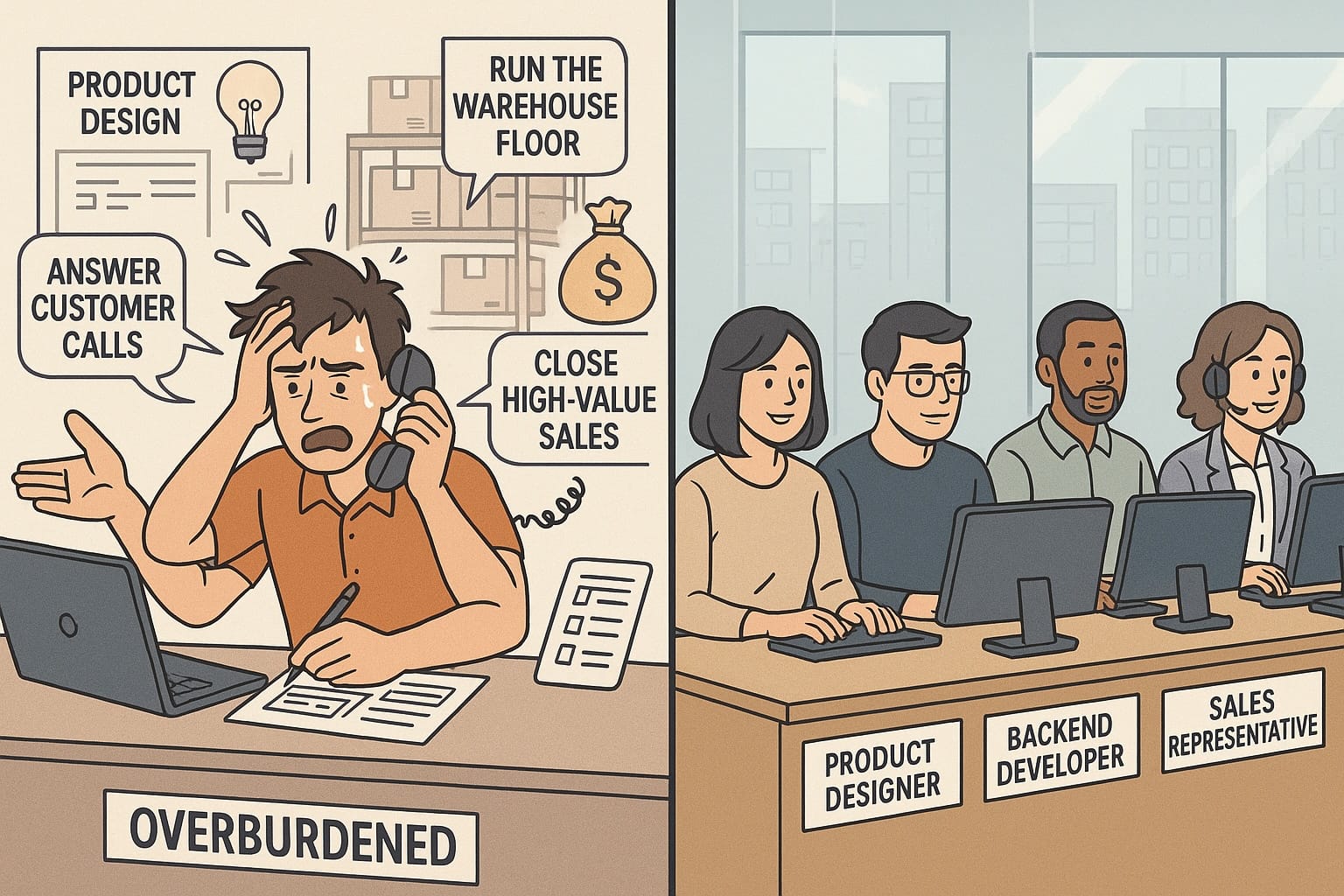
Analogy – The Overstretched All-Rounder
Picture an exceptionally talented employee who is simultaneously expected to:
- lead product design
- code the backend checkout pipeline
- run the warehouse floor
- answer customer calls
- close high-value sales
Even a superstar would burn out, miss details, and disappoint customers because no single person can give every role the focus it deserves. A monolithic LLM that has to perform every e-commerce function at once faces the same overload, leading to mistakes and inconsistent service.
Our Multi-Agent Architecture: A Deep Dive
To overcome these challenges, we adopted a system where tasks are planned and delegated to distinct, purpose-built agents.
Want to see the planner in action? Read how Alhena's planner agent decides what to do before it answers.
Core Components
PlannerAgent- The Strategist
- When a user sends a message, our
PlannerAgentis the first stop. - It reads the entire conversation plus a registry of available agents, their skills and available tools.
- Its primary role is to devise a
Plan– a structured JSON output that breaks down the user's request into one or more specific tasks, assigning each task to the most appropriate specialized agent.
ChatOrchestrator- The Conductor
- This central component takes the
Planfrom thePlannerAgentand iteratively executes the plan. - It instantiates each required agent (via an Agent Factory which knows about all available agent types)
- Attaches any dynamic hand-offs through
AgentHandoffManager(e.g., to aHumanTransferAgent). - Streams the plan execution status to the end user.
- Instantiates and updates the ChatState as per the state of plan execution.
ChatState- The Shared Memory
- This is critical.
ChatStateacts as the single source of truth for the entire conversation. - It holds the full chat transcript (
messages), the currentplan, a pointer to the activeagent task, and a chronologicaloutput eventslog (PLAN,MESSAGE,TOOL CALL,HANDOFF). - It keeps the common context to be used by each agent cached. Example: brand voice guidelines, user information, business hours, and retrieved knowledge so every agent sees the same ground truth.
- Because
ChatStateis updated by theChatOrchestratorafter each agent turn, the next specialist always receives an up-to-date state, eliminating context drift.
- Specialized Agents - The Actors
- Specialist agents with concrete roles like: General Support Agent, Shopping Assistant Agent, Human Transfer Agent, Order Management Agent etc.
- All specialist agents inherit from a common
BaseAgentthat assembles:- A role-specific system prompt (built from templates + brand voice + agent specific instructions).
- The tools that agent is allowed to call.
- Handoffs to other agents.
- Each specialized agent speaks directly to the user and its output is merged back into
ChatState.messagesand logged as anoutput event.
The Anatomy of ChatState
Our ChatState object is pivotal for seamless inter-agent collaboration and consistent user experience. It is instantiated once per conversation and then passed—by reference, not by copy—to every component that needs it.
What ChatState Stores |
Why It Matters |
|---|---|
|
messages Full conversation transcript |
|
|
Plan JSON plan from Planner Agent |
|
|
Agent Task Pointer to task in progress |
|
|
Events PLAN / MESSAGE / TOOL CALL / HANDOFF log |
|
| Contextual Knowledge |
|
| Brand Voice |
|
| Collaborating Agents Cards |
|
| User Information |
|
| Human Transfer Scenarios |
|
The Anatomy of ChatOrchestrator
A common pitfall in LLM architectures is to recursively let models call other models. That approach feels “autonomous” but quickly becomes non-deterministic, opaque, and hard to govern. Our ChatOrchestrator purposely sits between every model invocation and is more of a deterministic code execution layer.
| Step | Orchestrator Action | Importance |
|---|---|---|
| Parallel Initialization |
|
|
| Streaming Task Status |
|
|
| Agent Execution (Streaming or Standard) |
|
|
Add Results to ChatState |
|
|
How Agents Understand "Who Said What"
To prevent agents from repeating work or contradicting each other, it’s crucial they know the origin of previous assistant messages if multiple agents have contributed. Our system handles this transparently.
When the ChatState prepares the conversation history as input for the next LLM call (for a subsequent agent or the same agent in a new turn), it injects a system note if the previous assistant message was from a different named agent.
This would look like this in the prompt history sent to the next agent:
User: Do you have blue shirts?
Assistant: Yes, we have several blue t-shirts...
System: [System Note] The assistant message above was authored by ShoppingAssitantAgent.
When an agent (e.g., Shopping Assistant Agent) generates a response, it's recorded in ChatState output events as a MESSAGE event, which includes the agent name.
Example snippet from output events:
{
  "event_type": "MESSAGE",
  "event_data": {
    "role": "assistant",
    "content": "Yes, we have several blue t-shirts...",
    "agent_name": "ShoppingAssistantAgent" // Clearly attributed
  }
}
Agents often need to interact with external systems (e.g., your product database, order management system). Example TOOL CALL event in output events:
{
  "event_type": "TOOL_CALL",
  "event_data": {
    "agent_name": "OrderManagementAgent",    // Agent that invoked the tool
    "tool_name": "get_order_status_api",     // Name of the tool called
    "tool_output": "{'status': 'Shipped', 'tracking_id': 'XYZ123'}" // Result from the tool
  }
}
This simple mechanism allows subsequent agents to understand the conversational context fully, respecting prior specialized contributions without complex explicit "handoff messages" between agents in the prompt.
Our Team of Specialized E-commerce Agents
Here's how some of our key e-commerce agents are defined and what they do:
| Agent | Primary Goal in E-commerce | Typical Tools Leveraged | Example AgentTask |
|---|---|---|---|
| Product Expert Agent |
|
Semantic Product Search Read Full Document |
“Handle this part: ‘I need a breathable blue t-shirt under $40.’” |
| General Support Agent |
|
Knowledge-base search tool | “Handle this part: ‘How long do I have to return an item?’” |
| Order Management Agent |
|
Order API client Shipping API client |
“Handle this part: ‘Can you change my shipping address to 15 Market St?’” |
| Return Management Agent |
|
Returns API client OMS integration |
“Handle this part: ‘I received the wrong size and want to return it.’” |
| Product Upsell Agent |
|
Upsell engine Product association rules |
“Handle this part: ‘(After item added) and find matching socks.’” |
| Lead Generation Agent |
|
Email validator CRM integration |
“Handle this part: ‘Notify me when your XL black hoodie is back in stock.’” |
| Human Transfer Agent |
|
Ticket-creation tool User-info form tool |
“Handle this part: ‘Your system double-charged me for this order!’” |
Crucially, all agents inherently use the brand voice, refusal messages, and other global settings stored in ChatState, ensuring a consistent personality.
On-boarding a new specialist is friction-less: just define its name, skills, and permitted tools into the database. The Planner automatically picks up the new agent's card and routes relevant requests its way—no extra code required.
Example Session: "Track My Package and Recommend Shoes"
Let's see how this comes together.
🗣️ Customer: “Where’s my order #123, and by the way, do you have any red sneakers in men's size 9?”
-
ChatOrchestratorreceives the message. TriggersKnowledgeRetrieverto fetch general info about sneakers andPlannerAgentto create a plan. PlannerAgentanalyzes: Recognizes two distinct intents and creates a plan.ChatOrchestratorbegins execution:- Streams to User: "Checking on the status of your order #123..."
- Invokes
OrderManagementAgentwith itstask. Agent likely uses a tool to call an Order API. Result: "Order #123 shipped yesterday, tracking ID is TRK456." This is added toChatState. - Streams to User: "\n\n—\n\nLooking for red sneakers in men's size 9 for you..."
- Invokes
Shopping Assistant Agent. Agent usesSemanticProductSearchtool with "red sneakers men's size 9". Result: "Found 3 matching pairs: [Details of Shoe A, Shoe B, Shoe C]." This is also added toChatState.
- Final Unified Reply (composed from
output eventsbyChatState):
"Okay, for your order #123, it shipped yesterday and the tracking ID is TRK456.
For red sneakers in men's size 9, I found these options:- The 'Speedster Red Edition' - Great for running.
- The 'Casual Crimson Loafer' - Perfect for everyday wear.
- The 'Ruby Runner Pro' - Top reviews for comfort."
Implementation Tips & Key Pitfalls to Avoid
Below are the practical lessons that saved us countless engineering hours (and a few grey hairs). Use them as a checklist before you scale a planner-led, multi-agent stack.
- Code First Approach: Fancy agentic framework libraries (langgraph, llamaindex etc.) hide bugs and limit control. Write the orchestration yourself; we have written most of it ourselves with slight usage of the code-first OpenAI Agents SDK.
- Invest in prompts: A great Planner prompt and clear specialist prompts solve 80 % of routing mistakes. Tweak them often.
- MCP for tooling: Use Model Context Protocol servers for tool execution and hosting. An article coming on MCP in the future.
- Trace every event: Record PLAN, MESSAGE, TOOL CALL, and HANDOFF with timestamps. Our <a href="https://alhena.ai/blog/debug-ai-plan-replanning-traces/">debugging replanning traces guide</a> shows how ops teams read these logs to fix routing issues.. Debugging later will be painless.
Conclusion: Specialization and Orchestration is the Future of Ecommerce CX
By moving from a single, overburdened AI to an orchestrated team of focused agents, we've unlocked a new level of capability, efficiency, and adaptability for our e-commerce interactions. This modular architecture not only resolves the pain points of monolithic systems but also empowers us to rapidly develop and integrate new specialized agents (e.g., a WarrantyClaimAgent or a ProactiveCartRecoveryAgent) with minimal disruption to the existing ecosystem.
At Alhena, we are leading the industry in transforming the customer support using an Agentic AI architecture. Implementing Multi-Agent systems is inherently a complex problem. Instead of building it from scratch, consider leveraging solutions from experts like Alhena.
- Learn More: Alhena AI Products
- Create and Test Your Own AI Agent for Free: Sign Up
- Read Customer Success Stories: Customer Success stories