What the AI Help Agent Actually Is
Every AI platform gives you a customer-facing bot. Alhena gives you two: one for your customers, and one for your team.
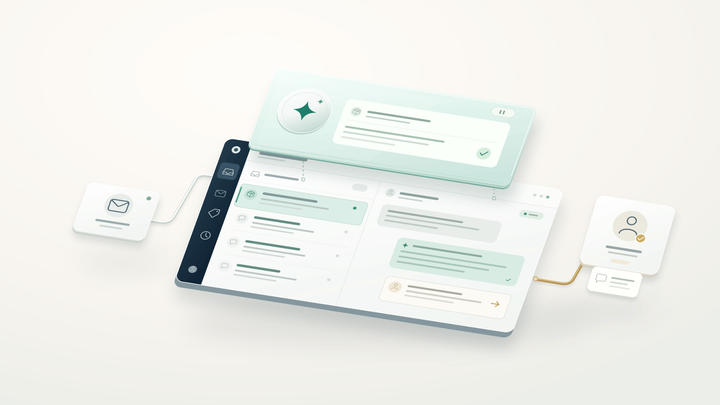
The AI Help Agent is an admin-facing assistant built into the Alhena dashboard. It doesn't talk to shoppers. It talks to the people configuring, debugging, and improving the shopper-facing AI. It makes agent management a conversation instead of a settings hunt. Think of it as a configuration partner that knows your entire bot setup, from guidelines and FAQs to agents, tools, and integrations.
Instead of hunting through menus to find the right setting, admins can ask plain-language questions like "Why did the AI give the wrong return-policy answer?" or "How do I stop the bot from mentioning competitor names?" The Help Agent pulls the relevant configuration, explains what happened, and drafts a fix.
That distinction matters. Most AI platforms treat operations as a settings page with no clear visibility into agent behavior. Alhena treats it as a conversation that gives you full access to monitoring data and controls.
Why Most AI Failures Are Configuration Problems
A 2025 study found that 52% of users identify "bots misunderstanding my question" as the worst chatbot experience. And MIT research shows 95% of generative AI projects fail to deliver significant value. But here's what those numbers don't tell you: the model itself is rarely the problem.
When an AI chatbot gives a bad answer, the root cause is almost always a configuration gap. And the cost of these failures adds up: lost interactions, lower CSAT, and governance risks from inaccurate data. A missing FAQ. An overly broad guideline. A knowledge base with outdated content. A tool that isn't enabled. An agent routing rule that sends the conversation to the wrong specialist.
The challenge is that these failures don't throw errors. As Braintrust's 2026 debugging research found, "most agent failures do not trigger visible errors because the system still returns a successful status code even when the result is wrong." The bot responds confidently with the wrong answer, and your team has no idea why. Without proper monitoring, agents can keep repeating the same mistake across hundreds of interactions.
That's the gap the AI Help Agent fills. It gives admins the ability to trace any conversation back to its source, understand which configuration element caused the issue, and fix the right thing the first time.
How It Works: Tool-Grounded, Not Guesswork
The AI Help Agent runs as a specialized admin agent inside Alhena's dashboard. When you ask a question, it doesn't just search documentation. It actively inspects your live bot configuration data to give you a grounded, accurate answer. This unified approach to agent management surfaces features that traditional dashboards bury in nested menus.
The decision engine
Every question triggers a routing step. The Help Agent determines which internal workflow to run based on what you're asking:
- Feature question: It searches Alhena's documentation and answers from the knowledge base. "How do product FAQs work?" gets a precise walkthrough.
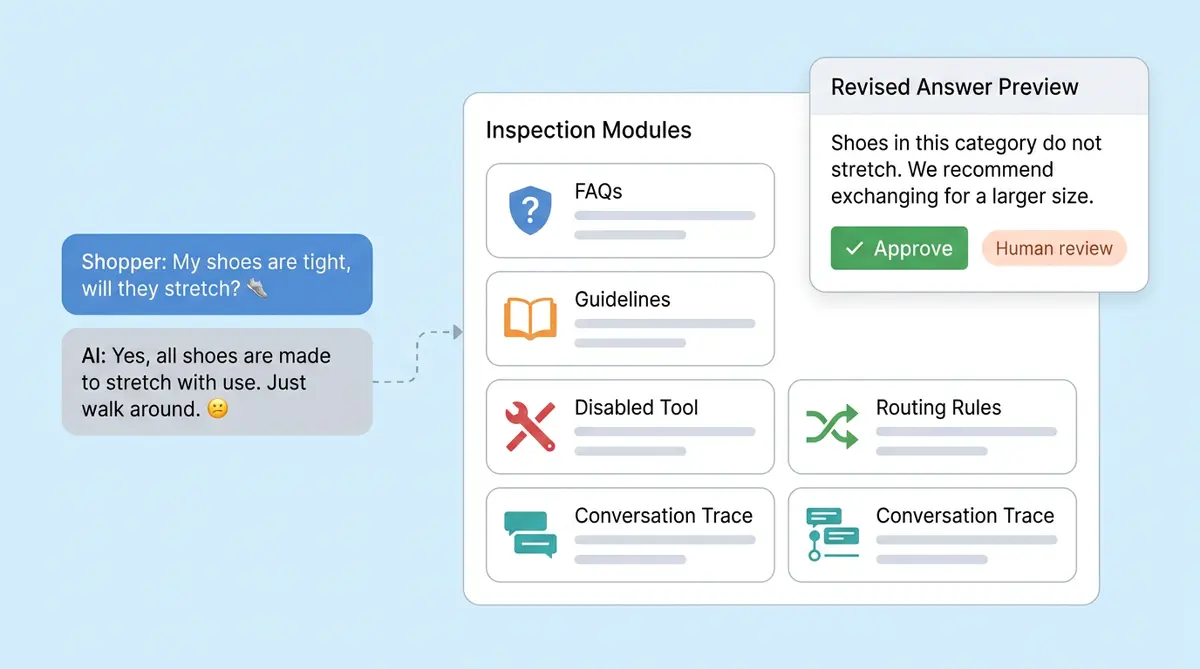
- Conversation diagnosis: It pulls the conversation trace and explains which agent, guideline, tool, or data source drove the response. "Why did the bot say this to a customer?" becomes a traceable answer.
- Behavior change: It reads your current configuration first, then drafts the right fix. No guessing whether you need a guideline, an FAQ, or a knowledge base update.
- Navigation help: It points you to the exact dashboard page where you can take action. No more clicking through menus.
- Platform issue: If the problem is a bug or billing question that configuration can't solve, it escalates to a human.
This ensures every diagnosis is clear and traceable. The key design principle is that every answer is tool-grounded. The Help Agent can inspect your active bot profile, registered agents, attached tools, FAQ entries, guidelines, conversation traces, nudge settings, and Shopper FAQ configurations. It doesn't guess. It reads the actual state of your system.
What You Can Configure with the Help Agent
The AI Help Agent covers every major configuration surface in Alhena. Here's what it can guide you through:
Guidelines are broad behavior rules that shape how your AI responds. Examples: "Always ask for an order number before checking status" or "Never recommend products over $500 without confirming budget." The Help Agent can draft new guidelines, explain existing ones, and flag conflicts between rules.
FAQs handle specific factual questions that come up repeatedly. If shoppers keep asking about your return window, an FAQ gives the AI a definitive answer instead of relying on inference from source documents. The Help Agent recommends FAQs when it detects factual gaps.
Knowledge base sources are the documents your AI draws from for product details, policies, and brand information. When the bot gives a stale answer, the Help Agent can trace it back to an outdated source and tell you exactly what to update.
Custom agents are specialist AI workers for tasks like order management, order recommendations, or return processing. The Help Agent shows you which agents are active, what tools each one can access, and how conversations route between them.
Tools and integrations connect your AI to external systems like Shopify, Zendesk, or custom APIs. The Help Agent can check whether a tool is enabled, verify MCP connections, and troubleshoot integration issues.
Nudges and Product FAQs are AI-generated prompts and questions that appear in the chat widget and on product pages. The Help Agent explains how they work and where to customize them.
The point isn't just that admins can configure these things. It's that the Help Agent recommends which configuration mechanism to use. Many teams overuse guidelines for everything. The Help Agent keeps your AI configuration clean by matching the fix to the problem type.
Diagnose Before You Fix: Conversation Trace Analysis
Here's a scenario every ecommerce team has lived through. A customer complains about a bad AI answer. The support manager opens the dashboard, reads the transcript, and thinks "that's wrong." But then what? Where do you start? Without visibility into agent data and monitoring logs, most teams can't ensure they're fixing the right thing.
The AI Help Agent turns that moment from a guessing game into a structured diagnosis. When an admin asks "Why did the AI say this?", the Help Agent traces the full conversation path:
- Which agent handled the conversation? Was it the general support agent, the shopping expert, or the order management agent?
- What data sources did it use? Did the AI pull from the knowledge base, an FAQ entry, or a live API tool?
- Did a guideline affect the response? Sometimes a broadly written guideline overrides a correct answer from the knowledge base.
- Was the information current? If the source document has stale content, the AI will confidently repeat outdated data across all customer interactions.
- What's the safest fix? The Help Agent recommends whether to add an FAQ, update the knowledge base, revise a guideline, or adjust agent routing.
This matters because different problems need different fixes. A factual error (wrong return window) needs an FAQ or knowledge base update. A behavioral issue (AI is too pushy about upsells) needs a guideline change. A routing problem (customer asked about orders but got the product expert) needs an agent configuration adjustment.
Without this kind of trace analysis, teams default to adding more guidelines for everything. That creates a tangled web of rules that eventually conflict with each other, creating governance risks. Agents can drift when rules contradict, and there's no clear way to ensure consistency without trace-level visibility. Alhena's FAQ conflict detection catches contradictions, but the Help Agent prevents them from being created in the first place.
Simulation Testing: Try Before You Save
One of the most powerful parts of the AI Help Agent is simulation. Before a guideline or FAQ change goes live, the Help Agent can run a test conversation against your bot profile with the draft change applied only in memory. This gives AI assistants and agent management controls a usage pattern that most platforms lack: test before deploy.
That means you can see whether a proposed rule actually changes the bot's behavior before a single customer is affected.
Consider a common scenario. Your team wants to add a guideline: "Escalate to a human agent when the customer mentions a product defect." Before saving, the Help Agent can simulate several conversation paths:
- Does the AI correctly escalate when someone says "this arrived broken"?
- Does it incorrectly escalate when someone asks "can this product break if dropped?" (a pre-purchase question, not a complaint)?
- Does it still handle standard return requests without unnecessary escalation?
This is the same philosophy behind Alhena's Playground testing environment and Guideline Studio, but embedded directly in the admin conversation flow. You don't need to open a separate tool. The Help Agent handles the test inline.
Simulation testing is especially valuable for behavior-level changes like:
- Escalation rules for frustrated or angry customers
- Blocking the AI from mentioning competitor brand names
- Requiring specific disclaimers for medical, legal, or financial topics
- Adjusting the AI's tone for different product categories
The result is a safer feedback loop: diagnose, draft, simulate, review, save. Each step reduces the risk of breaking something that's already working.
The Safety Model: AI Proposes, You Approve
The AI Help Agent is intentionally not allowed to change production behavior on its own. It can draft changes, explain them, show before-and-after context, and open prefilled editors. But the admin always clicks Save.
That design choice is deliberate. AI configuration changes affect live customer conversations. A poorly worded guideline can change how your bot responds to thousands of shoppers, with real cost implications. The unified safety model ensures that data changes go through a feedback loop with clear access controls. An FAQ with incorrect information gets repeated verbatim. An agent routing change can send order questions to the product expert instead of the order management agent.
So the workflow is collaborative: the AI proposes, the human approves.
In practice, this looks like:
- The Help Agent drafts a new guideline card with the exact wording ready to save
- It drafts an FAQ edit with the corrected answer pre-filled
- It shows which knowledge base document needs updating and links directly to it
- It displays before-and-after configuration context so you can see what will change
This approach matters even more as Gartner projects the average Fortune 500 company will have over 150,000 AI agents in use by 2028, up from fewer than 15 in 2025. At that scale, uncontrolled configuration changes create real operational risk. The Help Agent adds a human-in-the-loop checkpoint without slowing teams down.
Why This Changes How Teams Manage AI Agents
Most AI platforms give you a setup wizard when you first deploy and then leave you on your own. Configuration becomes a settings hunt. Debugging becomes a guessing game. And the people running the AI (often CX managers, not engineers) are expected to understand prompt logic, agent routing, and tool connections without any guidance.
Alhena's AI Help Agent changes that equation. It turns AI agent management from a manual, costly process into a guided conversation. Built-in monitoring and agent management features ensure that every change is traceable. Every admin gets a configuration partner that knows the full system, can diagnose real issues, and recommends the right fix.
The practical benefits add up fast:
- Shorter debugging cycles: Instead of guessing why the bot said something wrong, admins get a traced explanation in seconds.
- Fewer configuration mistakes: The Help Agent recommends the right mechanism (FAQ vs. guideline vs. knowledge base) so teams don't create rule conflicts.
- Safer changes: Simulation testing catches problems before they reach customers.
- Lower learning curve: New team members can ask the Help Agent how things work instead of reading documentation or asking colleagues.
- Continuous improvement: With easier diagnosis and faster fixes, teams can iterate on their AI quality weekly instead of quarterly.
Brands already using Alhena are seeing the difference. Tatcha achieved a 3x conversion rate with their AI shopping assistant, and Puffy reached 90% CSAT with 63% automated inquiry resolution. Those results don't happen with a "set it and forget it" approach. They come from teams that can quickly diagnose, adjust, and improve their AI configuration, and that's exactly what the Help Agent enables.
Alhena doesn't just give you an AI agent. It gives you an AI operator that helps keep the agent correct.
Ready to see how the AI Help Agent can simplify your AI operations? Book a demo with Alhena AI or start for free with 25 conversations.
Frequently Asked Questions
What is the AI Help Agent in Alhena?
The AI Help Agent is an agentic AI assistant built into Alhena’s dashboard. It acts as the control plane for your customer-facing AI agent, helping admins manage every part of the workflow without needing to know where each setting lives. Organizations of all sizes use it as their agent management command center. Think of it as an AI assistant that handles orchestration behind the scenes: it can inspect agents, tools, guidelines, FAQs, and integrations, then recommend the right configuration change. Enterprise organizations use it to keep their AI agent running accurately across thousands of daily interactions.
How does the AI Help Agent diagnose bad chatbot answers?
When an admin asks why the AI agent gave a wrong answer, the Help Agent pulls the full conversation log and traces which agent tool, prompt, or data source drove the response. It checks whether the LLM drew from an outdated knowledge base, whether a guideline overrode correct information, or whether agent drift caused the output to shift from its intended behavior. The result is a clear audit trail that gives you observability into every step of the AI agent’s reasoning, so you fix the actual root cause instead of guessing. With continuous monitoring, agents can flag recurring interaction patterns that signal deeper configuration issues.
Can the AI Help Agent change my live bot configuration?
No. The Help Agent follows a strict governance model where AI proposes and the human approves. It can draft guideline cards, pre-fill FAQ edits, and show before-and-after context, but the admin must click Save before any change goes into deployment. This enforcement layer matters for compliance: it means no AI agent can silently alter production behavior. Access control ensures only authorized team members can approve changes, and every edit is logged for SOC-readiness and audit trail purposes. This governance-first approach to agent management gives organizations the controls and monitoring they need to trust their AI agent in production.
What’s the difference between the AI Help Agent and Alhena’s Playground?
Alhena’s Playground is a standalone testing environment where you run full test conversations against your AI agent before deployment. The AI Help Agent embeds simulation directly into the admin workflow. You can test a draft guideline or FAQ change inline without leaving the conversation. The key use case difference: the Playground is for broad testing across the AI agent lifecycle, while the Help Agent is for quick, targeted diagnosis and fixes during day-to-day operations. Both tools help you deploy changes safely.
Does the AI Help Agent work with all Alhena integrations?
Yes. The Help Agent can inspect and troubleshoot configurations across all connected platforms, including Shopify, WooCommerce, Zendesk, Freshdesk, Gorgias, and others. It covers API management for connected agent tools, verifies MCP server connections, and can check A2A (agent-to-agent) routing between specialist agents. If you’ve connected an external API or infrastructure through Alhena’s API gateway, the Help Agent can verify whether the integration is active, check access controls, and diagnose issues tied to those connections. It gives you agent management visibility across all API interactions.
How does the Help Agent decide whether I need a guideline, FAQ, or knowledge base update?
The Help Agent analyzes the type of problem with fine-grained precision. Factual errors like wrong return windows or incorrect product specs typically need an FAQ or knowledge base update. Behavioral issues where the AI agent is too pushy or doesn’t escalate properly need a guideline to define the right boundary. Routing problems where the wrong agent handles a query need an agent configuration change. This capability to distinguish problem types is what keeps your AI agent’s configuration clean and prevents guideline sprawl.
Can the AI Help Agent simulate guideline changes before I save them?
Yes. The Help Agent can apply a draft guideline or prompt change in memory and run a test conversation against your AI agent profile. You see whether the proposed rule changes the bot’s behavior before you deploy it to production. This workflow is especially useful for escalation rules, topic restrictions, and tone adjustments. You test, review the simulated output, and only then save the change to your live agent.
How long does it take to set up the AI Help Agent?
The AI Help Agent is built into Alhena’s dashboard, so there’s no separate deployment or infrastructure setup required. Once your Alhena AI agent is configured, the Help Agent is available immediately. Alhena itself deploys in under 48 hours with no developer resources needed. Enterprise teams on cloud or on-premise setups get the same experience. Even a platform engineer unfamiliar with the system can start using the Help Agent on day one, since it explains how every feature works through conversation.
How does Alhena handle AI agent governance and compliance?
Alhena builds governance into the AI agent lifecycle at every level. The AI Help Agent enforces a human-in-the-loop approval model, so no configuration change reaches production without admin sign-off. Every edit creates an audit trail with full log visibility, which matters for SOC 2 compliance and enterprise security reviews. Access control policies govern who can modify agents, guidelines, and tools. The enforcement model prevents unauthorized changes, and observability tools let you monitor how each AI agent behaves over time, catching drift before it affects customers. For organizations that need strict governance controls, Alhena provides monitoring dashboards and access logs that track every agent management change and its impact on customer interactions.
What makes Alhena different from other AI agent management platforms?
Most AI agent management platforms focus on orchestration and LLM infrastructure for developers. Alhena’s AI Help Agent is purpose-built for the people who actually operate the AI agent day-to-day: CX managers, support leads, and ecommerce teams. It doesn’t require you to write code, manage API endpoints, or define agentic workflows manually. Instead, it gives non-technical admins the same capability that platform engineers get from developer-facing tools. Alhena also supports MCP integrations, A2A agent routing, and API management, but wraps it all in a conversational interface that anyone in the organization can use for day-to-day agent management and monitoring of AI agent interactions.