Why Generic AI Falls Short for Ecommerce Brands
Most AI chatbots operate as a single, monolithic prompt. One set of instructions tries to handle warranty claims, product recommendations, order tracking, subscription changes, and loyalty rewards all at once. The result? Vague answers, wrong routing, and customers who feel like they're talking to a script rather than a specialist.
Alhena AI takes a different approach. Instead of one agent doing everything, brands build a team of custom AI agents, each with a focused role, specific tools, behavioral guidelines, and intelligent routing that puts the right specialist in front of the right user at the right time.
This post walks through how Custom Agents work inside Alhena's platform, from the routing logic that selects the right agent to the tools and guidelines that control what it does once selected.
What Is a Custom Agent in Alhena AI?
A custom AI agent in Alhena isn't just a prompt with a different name. It's a fully routed, configurable specialist with its own identity, behavior rules, and capabilities. Every custom agent includes:
- Name: The role that customers and admins recognize (e.g., "Warranty Agent" or "VIP Concierge")
- Description: The routing signal that tells Alhena's planner when to activate this agent
- Guidelines: Behavior rules scoped to this agent, covering tone, policies, escalation logic, and channel-specific instructions
- Tools: APIs, integrations, spreadsheet lookups, MCP tools, or ecommerce actions the agent can call
- Channel targeting: Rules that vary by website chat, email, WhatsApp, Instagram, Slack, or other channels
- Runtime context: Brand voice, knowledge base, customer metadata, memory, conversation history, and retrieved documents
Custom agents sit alongside Alhena's built-in specialists: the Product Expert Agent, Order Management Agent, General Support Agent, Human Transfer Agent, Returns Agent, and Sizing Agent. They extend the platform without replacing what already works.
How Agent Routing Works: The Planner System
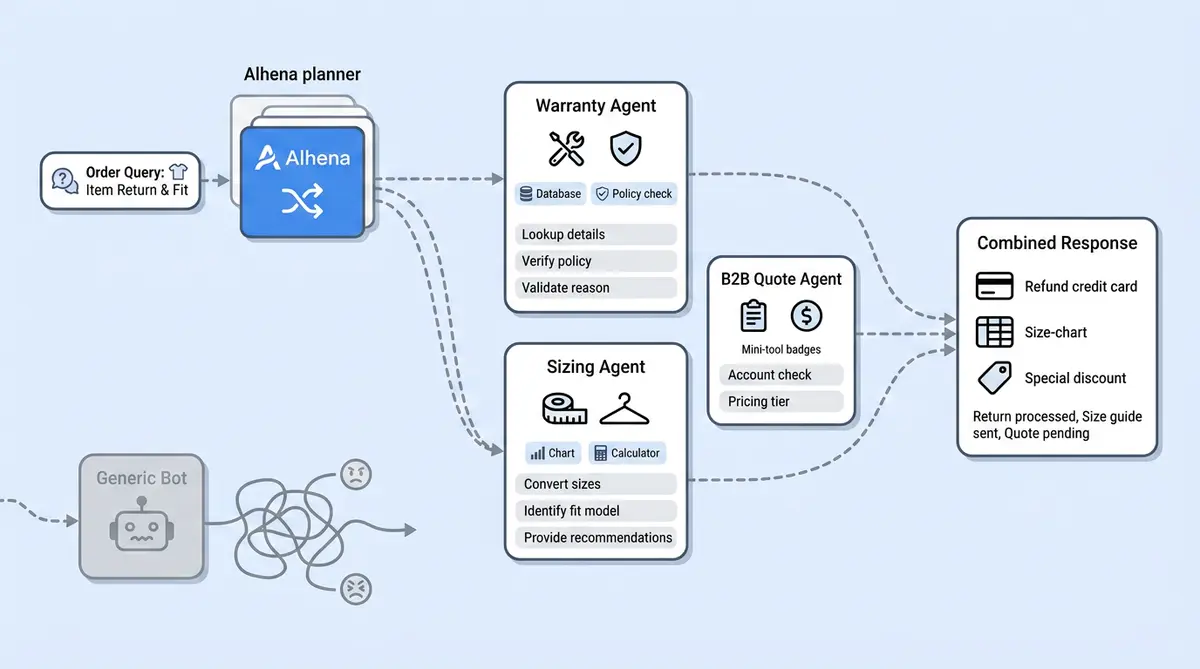
When a customer message arrives, Alhena doesn't just keyword-match it to a department. The platform loads every active agent's "agent card" and presents them to an LLM-powered planning layer. Each card includes the agent's name, description, skills, connected tools, and MCP capabilities. (For a deeper look at how the planner works, see our post on how Alhena decides what to do before it answers.)
The planner then evaluates the customer's message against conversation history, knowledge context, and those agent cards to decide which specialist should respond.
Simple routing
"Where is my order?" routes to the Order Management Agent. No ambiguity, no delay.
Custom agent routing
"Can I register this product for extended warranty?" routes to a Warranty Custom Agent that the brand built specifically for this workflow.
Multi-agent routing
"I want to exchange this jacket and also know if the new one runs small." The planner splits this into two tasks: one for the Returns Agent, one for the Sizing Agent. Each specialist handles its piece, and the planner stitches the response together.
After each agent runs, the planner reviews progress. If the first agent discovers the request actually belongs elsewhere, needs additional information from another specialist, or requires human transfer, re-routing happens automatically. This is what separates intelligent AI agents for ecommerce from simple chatbot flowcharts. This shift from RAG to agentic AI is where the industry is heading.
Descriptions: The Routing Contract
The description field is the single most important element of a custom AI agent. It's not marketing copy. It's operational routing guidance that tells the planner exactly when to use this agent and when not to.
A good description defines:
- What the agent owns
- When it should be activated
- What it should not handle
- What outcome it should produce
Example for a Subscription Concierge:
"Handles subscription questions, including plan changes, skipped shipments, renewal dates, cancellation policy explanations, and subscription troubleshooting. Do not use for one-time order tracking."
That last sentence is as important as the rest. It creates a boundary that prevents overlap with the Order Management Agent. When you're building ecommerce AI agents, clean routing boundaries between specialists are what keep answers accurate and customers satisfied.
Example for a Warranty Agent:
"Use this agent when a customer asks about warranty coverage, product registration, replacement eligibility, or warranty claim steps. Hand off to Human Transfer if the customer reports a safety issue."
Clear ownership. Clear boundaries. Clear escalation rules. The planner can compare any incoming message against these descriptions and make a confident routing decision.
Guidelines: The Behavior Layer
Once the planner routes a conversation to a custom agent, guidelines tell that agent how to behave. Think of descriptions as the "when" and guidelines as the "how."
Guidelines can define:
- Tone and phrasing: "Use a warm, empathetic tone. Avoid technical jargon unless the customer uses it first."
- Policy rules: "Offer a replacement for items damaged in transit within 30 days of delivery."
- Escalation triggers: "Transfer to a human agent if the customer mentions legal action or a safety concern."
- Required questions: "Always ask for order number and photos before processing a damage claim."
- Tool usage rules: "Check warranty eligibility before offering a replacement."
- Guardrails: "Do not guarantee approval before verification is complete."
Channel-specific behavior
Guidelines can be filtered by channel: website chat, email, WhatsApp, Instagram, Facebook, Trustpilot, Feefo, product FAQ pages, or agent assist mode. This matters because the same brand often wants different behavior in different places.
A website chat answer can be short and interactive, with two or three sentences and a quick follow-up question. An email response needs a greeting, fuller explanation, and a signature. An Instagram DM should feel casual and conversational. One set of guidelines handles all of these by scoping rules to specific channels. For more on setting up effective AI training, read our guide on how to train your AI agent for ecommerce.
Business-hours logic
Guidelines also support time-based behavior. An agent can follow one set of rules during business hours (when human backup is available) and switch to a different set after hours (when it needs to be more self-sufficient or more cautious about promises). Brands using Alhena's social commerce on Instagram and WhatsApp find this particularly useful since customer messages arrive around the clock.
Tools: How Custom Agents Take Action
Static knowledge answers questions. Tools let agents do things. A custom AI agent in Alhena can be connected to:
- API tools for brand-specific backend systems and applications
- Ecommerce tools for orders, returns, promotions, subscriptions, gift cards, inventory, and shipping
- Spreadsheet/table search tools for structured data lookups
- MCP tools from external systems (Model Context Protocol)
- Custom internal tools configured by the brand
Each tool has a name, description, input schema, and execution path. The agent sees the tool descriptions and decides when to call them based on the customer's request and its guidelines.
Tool isolation: the key design choice
Tools are assigned per agent. A Warranty Agent doesn't need access to subscription management tools. A Subscription Concierge doesn't need returns processing capabilities. This isolation makes behavior more predictable, reduces errors, and keeps each agent focused on its job.
Compare this to a monolithic chatbot where every capability is available to every prompt path. When everything can access everything, the AI is more likely to take wrong actions or leak information between unrelated workflows. Alhena's per-agent tool assignment prevents that.
Real examples of tool-equipped agents
A Warranty Agent might have tools to look up product registration, check warranty eligibility by serial number, and fetch claim status from the brand's warranty system.
A B2B Quote Agent might have tools to validate a business email domain, look up tiered pricing for bulk orders, and submit quote-request details to the sales team's CRM.
A Loyalty Agent might have tools to check point balances, apply reward redemptions, and look up tier-specific benefits from a spreadsheet.
Brands running on Shopify, WooCommerce, or Salesforce Commerce Cloud can connect their platform's native capabilities as tools, giving custom agents direct access to order data, product catalogs, and fulfillment status.
Building Your First Custom Agent: A Practical Walkthrough
Here's how a brand would set up a Warranty Agent from scratch inside Alhena:
Step 1: Define the name and description.
Name: "Warranty Support Agent"
Description: "Handles warranty coverage questions, product registration, replacement eligibility checks, and warranty claim submissions. Do not use for general product questions, returns, or order tracking."
Step 2: Write focused guidelines.
Keep guidelines specific to this agent's job. For a Warranty Agent:
- "Ask for the order number or product serial number before checking warranty status."
- "If the product is within the warranty period, explain replacement options. If outside warranty, offer paid repair options."
- "If the customer reports a safety defect, immediately transfer to a human agent."
- "Do not guarantee a replacement until eligibility is confirmed via the warranty lookup tool."
Step 3: Connect tools.
Assign only the tools this agent needs: warranty status lookup, product registration check, and claim submission API. Don't connect order management or returns tools here.
Step 4: Set channel and hours behavior.
On website chat: keep answers concise and use quick-reply buttons for common warranty questions. On email: include the full warranty policy link and a case reference number. After business hours: inform customers that claims submitted will be reviewed the next business day.
Step 5: Test and refine.
Run test conversations to verify routing accuracy. If the planner sends general product questions to the Warranty Agent, tighten the description's boundaries. If the agent promises replacements too early, add a guideline requiring tool confirmation first.
The whole setup requires no code for the agent behavior itself. Brands that have set up Alhena's Support Concierge can deploy a custom agent in under a day.
Custom Agent Use Cases for Ecommerce Brands
The flexibility of custom AI agents means they can cover workflows that generic support tools never handle well. Here are the most common use cases brands build:
- Warranty Agent: Product registration, eligibility checks, claim processing
- Subscription Concierge: Plan changes, pause/skip, renewal management, win-back offers
- VIP Customer Agent: Priority handling for high-value customers with elevated access and faster escalation
- B2B Quote Agent: Business verification, volume pricing, custom quote generation
- Store Locator Agent: Location search, stock availability by store, appointment booking
- Product Care Agent: Care instructions, maintenance schedules, compatibility checks
- Claims Agent: Insurance or damage claims with evidence collection and status tracking
- Installation Support Agent: Step-by-step installation guidance with tool-based troubleshooting
- Loyalty/Rewards Agent: Points balance, redemption options, tier benefits explanation
- Compliance or Policy Agent: Regulatory questions, return policy edge cases, legal disclaimers
Each of these would be impractical to handle well with a single prompt. But as focused custom agents with their own routing descriptions, guidelines, and tool sets, they become accurate specialists that resolve requests without human involvement.
Brands like Tatcha have seen 82% chat deflection and 3x conversion rates by using Alhena's specialized agent system. Puffy achieved 63% automated inquiry resolution with 90% CSAT, and Manawa cut response times from 40 minutes to 1 minute while automating 80% of inquiries.
Custom Agents vs. Monolithic Chatbots: Why Specialization Wins
The traditional approach to AI customer service is a single bot that handles everything. Platforms like Zendesk AI, Tidio, and basic Intercom setups work this way. One prompt, one flow, one size fits none.
Custom agents in Alhena solve the problems this creates. As we explored in our look at why modern ecommerce AI needs multi-agent architecture, specialization outperforms generalization every time.
- Accuracy: A focused agent with narrow guidelines and specific tools produces higher quality answers with fewer hallucinations than a generalist trying to cover 50 workflows
- Maintainability: Change warranty policy? Update one agent's guidelines. Don't risk breaking subscription logic in the process.
- Auditability: When something goes wrong, you know exactly which agent handled the conversation, which guidelines applied, and which tools were called
- Scalability: Add new workflows by creating new agents. No need to rewrite a master prompt that's already 10,000 tokens long.
This is the same principle that makes real support teams effective. You don't ask your warranty specialist to also handle B2B quoting. You hire domain experts and specialists. Custom agents let you build that same organizational structure in AI, without the headcount.
Getting Started with Custom Agents
Building a custom AI agent in Alhena takes minutes, not months. You don't need engineering resources, prompt engineering expertise, or custom model training. The platform provides the routing, the runtime context, and the tool execution layer. You provide the business logic: what the agent owns, how it should behave, and what systems it can call.
Start with your highest-volume workflow that current automation handles poorly. That's your first custom agent. Give it a sharp description, a small set of focused guidelines, and only the tools it needs. Test it, refine the routing boundaries, then move on to the next specialist. (Avoid the common mistakes brands make when implementing AI agents.)
The best custom agents feel like specialized team members, not generic chatbots with a new label. They act as domain experts that handle their job with precision, know when to escalate, and never overstep their boundaries.
Ready to build your first custom AI agent? Book a demo with Alhena AI to see Custom Agents in action, or start for free with 25 conversations to test the platform yourself.
Frequently Asked Questions
What is a custom AI agent in Alhena?
A custom AI agent in Alhena is an agentic specialist built for a specific workflow your brand needs to automate. It has its own name, routing description, behavioral guidelines, and connected tools. Unlike a generic chatbot prompt that tries to handle everything, a custom agent only activates when the planner identifies a matching request. It operates with its own context, knowledge base, and scoped tool access, so it behaves more like a trained AI assistant than a one-size-fits-all bot.
How does Alhena route customer messages to the right AI agent?
Alhena uses an orchestration layer called the planner. When a message arrives, the planner reads the customer's natural language input, conversation history, and agent cards for every active agent. Each card lists what that agent handles, its skills, and available tools. The AI model compares the request against those cards and picks the best-fit specialist. For multi-part requests, the planner can orchestrate work across two or more agents and merge their responses into one reply.
Do I need coding skills to build a custom AI agent?
No. Alhena is a low-code platform for agent creation. You don't need Python, a framework like AutoGen, or any developer resources to build AI agents. You write the description and guidelines in plain English, connect tools through the admin interface, and deploy the agent. Most brands go live in under a day. If you do have a technical team, Alhena also supports API-based tool configuration and MCP connections for deeper automation.
What tools and APIs can a custom agent use?
Custom agents can call API tools connected to your brand's backend systems and applications, ecommerce tools for orders and returns, spreadsheet lookups, MCP tools from external services, and automation tools like Zapier integrations. Each tool has a name, input schema, and execution path. The agent interface shows available tools, and the agent decides when to call them during a conversation. Tools are assigned per agent, so a Warranty Agent won't accidentally trigger subscription automation.
How do custom agents compare to building with OpenAI, Anthropic, or AutoGen?
Frameworks like OpenAI's Agents SDK, Anthropic's Claude agent tools, or Microsoft AutoGen give developers building blocks to create autonomous AI agents from scratch. That approach requires significant code, prompt engineering, and infrastructure. Alhena is purpose-built for ecommerce, so you get agent routing, enterprise AI guardrails, and tool orchestration out of the box with no framework to learn. The learning curve is minimal compared to self-hosting an open-source agent stack, and you don't need to manage your own AI model deployment.
How are custom agents different from Alhena's built-in agents?
Built-in agents like Product Expert, Order Management, and Returns handle common ecommerce workflows as soon as you connect your store. Custom agents extend that roster with use cases unique to your brand: warranty claims, B2B quoting, loyalty programs, installation support, or any repeatable agent workflow you want to automate. Both types run on the same planner and share the same runtime context, so they work together during multi-step conversations.
Can guidelines change based on channel or business hours?
Yes. Guidelines can be scoped by channel (website chat, email, WhatsApp, Instagram, Slack, Trustpilot, agent assist) and by time of day. A prompt to your Warranty Agent might say "keep answers under three sentences" on chat but "include full policy details" on email. After-hours guidelines can tell the agent to collect information and set expectations for next-day follow-up rather than attempting to complete tasks that need human review.
How many custom agents can a brand create and deploy?
There's no hard cap. Brands typically start with one or two agents for their highest-volume use cases, then deploy more as they identify new workflows worth automating. The best practice is to give each agent a narrow, non-overlapping description so the planner can route cleanly. Enterprise customers often run ten or more custom agents alongside Alhena's built-in roster without performance issues.
What ecommerce platforms and helpdesks work with custom agents?
Custom agents work across every platform Alhena integrates with: Shopify, WooCommerce, Magento, and Salesforce Commerce Cloud on the ecommerce side, plus Zendesk, Freshdesk, Gorgias, Intercom, and others on the helpdesk side. You can also self-host tool endpoints or connect to external services through MCP. The tool and API layer is platform-agnostic, so any system your brand uses can be wired into a custom agent's execution path.
What does a custom AI agent cost? Are there paid plans for enterprise?
Alhena offers a free tier with 25 conversations so you can create AI agents and test them before committing. Paid plans scale based on conversation volume and the features you need. Enterprise pricing includes dedicated support, advanced analytics, and priority deployment. You can check the pricing page or use the ROI calculator to estimate what automation saves you relative to the plan cost.