The Hidden Cost of Manual GitHub Support
Engineering teams at developer-facing companies spend 15 to 30% of their time answering the same setup, configuration, and troubleshooting GitHub support questions in Issues and Discussions. According to Deloitte's DevEx research, developers spend only 30 to 40% of their time on actual feature development, feature requests, and new features. The rest disappears into meetings, context switching, and answering questions that your documentation already covers and GitHub Copilot doesn’t touch. While Copilot handles GitHub code suggestions, community questions need a different approach. Every answer pulls an engineer away from the roadmap.
The same five GitHub support questions appear every week. How do I install this plugin? Why does authentication fail on v3.2? How do I configure the webhook? Your team writes the same answer, again, for the third time this month. Multiply that across a growing developer community, and you're burning senior engineering hours on work that doesn't ship product.
For open-source maintainers, the burden is worse. The 2024 Tidelift State of the Open Source Maintainer Report found that 60% of maintainers are unpaid, and 58% have quit or considered quitting their projects. 44% cite burnout as their reason. These are unpaid volunteers whose project's growth creates a support load they never signed up for. The result is stale tickets, unanswered questions, and communities that stop contributing because nobody responds for days.
Meanwhile, GitHub's Octoverse 2025 report shows 36 million new developers joined the platform in a single year. More users means more questions, more bug reports, and more support demand, with no corresponding increase in the people who can answer them.
Why Traditional Bots Fail in Developer Communities
Developers are the most bot-hostile audience online. They build software for a living and can spot a canned response in seconds. Generic auto-replies get downvoted, mocked in comment threads, and erode trust in the project. Keyword-matching bots that respond "check the docs" to every question are worse than no response at all.
GitHub's own ecosystem proves this. Angular's use of stale bots to manage hundreds of daily tickets created perverse incentives: locked tickets led to duplicate reports, lost context, and frustrated users who felt their contributions were dismissed by automation. Developer Drew DeVault called stale bots "a terrible, horrible, no good, very bad idea."
Template replies that don't understand the specific error, configuration, or version context feel dismissive to developers who took time to write a detailed issue. A developer who posts a stack trace with their Node.js version, OS, and reproduction steps doesn't want "Have you tried restarting?" They want an answer that addresses their specific situation.
The Stack Overflow 2025 Developer Survey confirms this skepticism: 75.3% of developers don't trust AI answers, and 66% say their top frustration is "AI solutions that are almost right, but not quite." The bar for AI in developer communities isn't speed. It's accuracy and contextual relevance grounded in the actual codebase.
How Alhena AI's GitHub Integration Works Differently
Most AI tools for developers focus on writing code. GitHub Copilot handles code completion and code review. Cursor helps with editing. GitHub Copilot’s coding agent submits pull requests. But Copilot, GitHub’s most popular AI tool, only helps with code, not community support. None of them answer the GitHub support questions piling up in your Issues tab and Discussions tab. Alhena AI fills that gap with a GitHub integration built on two distinct capabilities: learning from your repository and responding in real time.
GitHub as a Knowledge Source
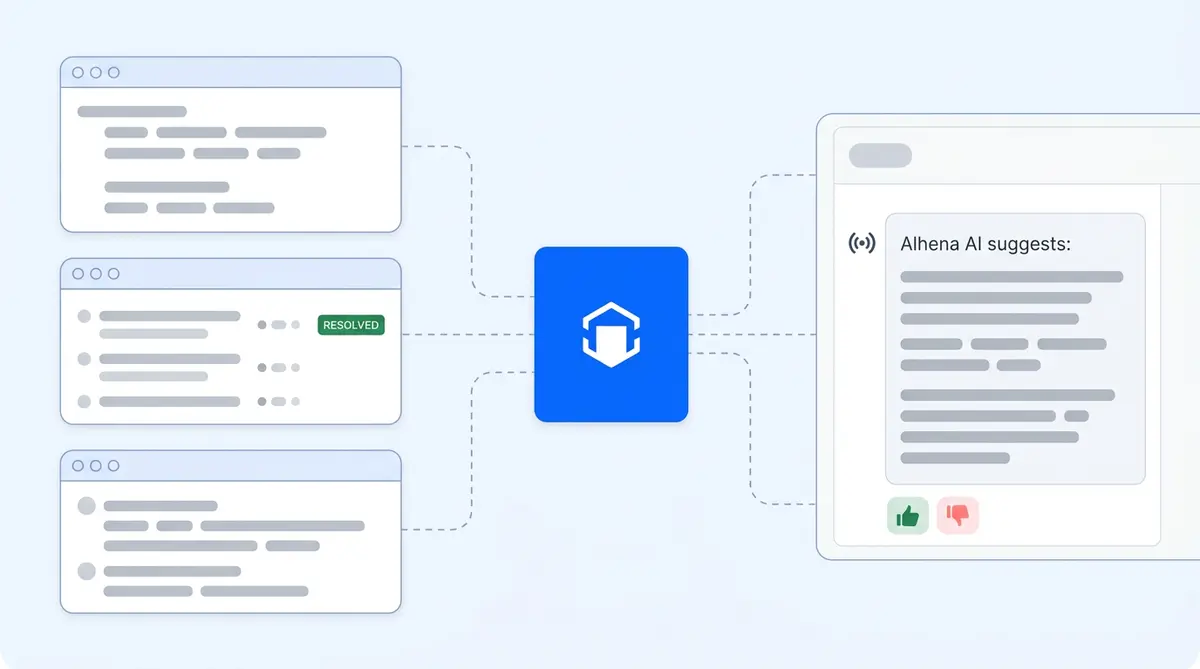
Alhena ingests your actual repository content through three specialized scrapers, not just your documentation site. The code scraper ingests entire repo structures, converting files up to 50KB into markdown for embedding. This means the AI understands your SDKs, APIs, themes, and plugins at the code level, not just what you wrote about them in your docs.
The issue scraper pulls closed issues from the last six months with all comments, author roles (maintainer, contributor, user), and resolution context. This teaches the AI about known bugs, workarounds, and troubleshooting patterns from real resolved conversations. If your team solved a tricky authentication error in March, the AI knows that fix and can surface it when someone hits the same wall in July.
The discussion scraper does the same for community discussions, capturing FAQ patterns from Discussions, feature requests, and community-sourced answers. This means Alhena AI learns not just from your docs but from six months of your best human answers to real developer questions.
GitHub as a Live Communication Channel
When a user posts a question in GitHub Discussions or an Issue, GitHub fires a webhook to Alhena AI. The system validates and filters the request by user type and discussion category, creates a ticket in Alhena's system, sends the question to the AI for answer generation, and posts the answer back as a GitHub comment. Every reply includes thumbs-up and thumbs-down reaction buttons for instant community feedback. An admin gets an email alert for every new interaction.
Filtering is configurable. You can set the AI to respond to all users, all users except maintainers, or only maintainers. You can also filter by discussion category and labels so the AI only engages where you want it. If you want AI answering setup questions in a "Help" category but staying silent in "Feature Requests," that's a single configuration change.
Five Use Cases for Ecommerce and Developer Tool Brands
While AI GitHub community support works for any developer-facing organization, ecommerce brands with public repositories see some of the clearest returns.
- Shopify app and theme developers can automate installation and configuration support in their public repos. When merchants post questions about theme customization or app conflicts, Alhena AI draws from the codebase and resolved tickets to provide accurate, version-specific answers without pulling engineers off product features.
- WooCommerce plugin maintainers handling GitHub support questions about compatibility across WordPress versions get relief from the most repetitive support load. Questions about PHP version conflicts, database migration errors, and plugin conflicts make up the bulk of tickets, and most have documented solutions the AI can surface instantly.
- Headless commerce API providers supporting integration developers who post questions about endpoints, authentication, and data formatting. These questions are highly technical but often repetitive, making them ideal for AI that understands the actual API code.
- Brands with developer portals reduce time-to-resolution from days to seconds on questions their documentation already answers. Instead of a developer waiting 48 hours for a maintainer in a different timezone, they get an accurate response within minutes.
- Internal engineering teams using GitHub Discussions as an AI-powered knowledge sharing tool. The AI assistant serves as always-available documentation search that answers in natural language, so new engineers don't need to interrupt senior team members for onboarding questions.
For Shopify and WooCommerce brands already using Alhena AI for web chat and social commerce, GitHub support plugs into the same training infrastructure. Unlike Copilot, GitHub support through Alhena uses your full documentation. Documentation you've already loaded for customer-facing support is immediately available for developer-facing GitHub support answers without duplicate training effort.
Best Practices for AI in Developer Communities
Getting AI-powered GitHub support right in developer communities requires a different playbook than consumer-facing chatbots or code-focused tools like Copilot. GitHub community support demands transparency, domain knowledge, and context. Developers demand transparency, accuracy, and control. Here's what works.
Label AI answers clearly. Developers should always know they're talking to a bot. Alhena AI's GitHub replies are posted as bot comments, so there's no ambiguity. Transparency builds trust; deception destroys it.
Always allow human override. The AI handles the 60 to 80% of questions your documentation already answers. Complex architectural decisions, genuine bugs that need debugging, and edge cases that require human judgment should always route to your team. Alhena AI's Agent Assist gives human team members full context from the AI conversation so they can pick up without asking the developer to repeat themselves.
Train on your actual documentation and resolved threads, not generic content. Developers notice immediately when answers don't match the codebase. If your API changed in v4.0 but the AI references v3.x behavior, you'll lose credibility fast. Alhena's scraper approach, pulling from your live repo code and recent closed threads, keeps the AI grounded in your current reality.
Monitor accuracy through the feedback loop. The thumbs-up and thumbs-down reaction buttons on every AI reply create a continuous signal. When accuracy drops after a documentation change or a major release, you'll see it in the feedback data and can retrain. This isn't a set-and-forget tool.
Treat the AI as a first responder, not a replacement. Your maintainers and DevRel team focus on genuine bugs, architectural decisions, and community building. The AI handles the repetitive setup and configuration questions that consume their days. That's the split that works.
Setting Up AI GitHub Community Support with Alhena
Setup takes minutes, not weeks. In the Alhena dashboard, go to Settings, then Integrations, and find GitHub. Toggle it on, and you'll be redirected to GitHub to install the Alhena app on your organization. Authorize with GitHub admin permissions, then select which specific repositories the AI should monitor.
Configure the knowledge base with your documentation, code, and training data. If you're already using Alhena AI for other channels like voice, email, or Instagram and WhatsApp, your existing training data carries over. The AI uses the same infrastructure that powers all of Alhena's channels, so you don't need to retrain from scratch for GitHub.
Once activated, configure your filtering preferences: which user types get AI answers, which GitHub Discussions categories the AI monitors, and which labels trigger or suppress replies. Then activate and let the AI start handling incoming questions.
The entire process works without any code changes to your repositories. No GitHub Actions to configure, no YAML files to write, no CI/CD pipeline modifications. You connect, configure, and go.
Why Developer Community Health Depends on Responsiveness
Projects where questions get answered quickly attract more contributors, more GitHub stars, and more adoption. Stars signal a healthy project. Tools like Copilot help GitHub developers write code, but community engagement drives growth. A developer who posts a question and gets a helpful answer within minutes is far more likely to contribute back, file detailed bug reports, and recommend your tool than one who waits three days and gets a stale bot closing their issue.
The math is simple. With 180 million developers on GitHub and 36 million joining in 2025 alone, the support demand curve only goes up. DevRel teams can't scale fast enough: the global talent pool is roughly 500 professionals against millions of developers who need help. Something has to give.
AI doesn't replace maintainers. It gives them back the hours they currently spend on questions their documentation already answers. That means more time for the work only humans can do: designing new features, shipping product features, reviewing complex PRs, mentoring contributors, and evolving the project's architecture.
For ecommerce brands with developer ecosystems, this translates directly to business outcomes. Faster developer support means faster integrations, fewer abandoned implementations, and stronger partner ecosystems. When your Shopify app's GitHub repo answers setup questions instantly, merchants adopt faster and churn less.
Ready to stop burning engineering hours on repetitive GitHub support? Book a demo with Alhena AI to see the GitHub integration in action, or start for free with 25 conversations to test it on your repos. You can also use the ROI calculator to estimate how many engineering hours you'll recover.

Frequently Asked Questions
How does Alhena AI learn from resolved GitHub issues and repository code instead of just documentation?
Alhena AI uses three specialized scrapers that go beyond static documentation. The code scraper ingests your entire repository structure, converting files up to 50KB into embeddings so the AI understands your SDKs, APIs, and plugins at the code level. The issue scraper pulls six months of closed issues with all comments, author roles, and resolution context, teaching the AI real troubleshooting patterns from your best human answers.
Can I configure which users and discussion categories the AI responds to on GitHub?
Yes, Alhena AI offers granular filtering for GitHub responses. You can set the AI to respond to all users, all users except maintainers, or only maintainers. You can also filter by discussion category and labels, so the AI only engages in specific areas like a "Help" category while staying silent in "Feature Requests" or other categories you want humans to handle.
How does the thumbs-up and thumbs-down feedback loop improve AI accuracy over time?
Every AI response posted by Alhena AI on GitHub includes thumbs-up and thumbs-down reaction buttons. Community members click these to rate answer quality, creating a continuous accuracy signal. When feedback scores drop after a documentation change or major release, you can identify weak spots and retrain the AI on updated content to restore accuracy.
Can ecommerce brands with Shopify themes or WooCommerce plugins use Alhena AI for GitHub community support?
Absolutely. Alhena AI is built for ecommerce brands, and the GitHub integration extends that to developer-facing support. Shopify app and theme developers can automate installation and configuration support in their public repos. WooCommerce plugin maintainers can handle PHP version conflicts and compatibility questions across WordPress versions without pulling engineers off feature work.
How do I connect specific repositories within a GitHub organization to Alhena AI?
In the Alhena dashboard, go to Settings, then Integrations, and find GitHub. Toggle it on and you will be redirected to GitHub to install the Alhena app on your organization. After authorizing with admin permissions, you select exactly which repositories the AI should monitor. You don't need to connect every repo; choose only the ones where you want automated AI responses.
Does the same AI training that powers Alhena web chat and email also work for GitHub responses?
Yes. Alhena AI uses a single training infrastructure across all channels, including web chat, email, Instagram, WhatsApp, voice, and GitHub. Documentation and training data you have already loaded for customer-facing support is immediately available for developer-facing GitHub responses. You don't need to duplicate training effort when adding GitHub as a new channel.
How long does it take to set up Alhena AI on a GitHub organization with multiple repos?
Setup takes minutes, not weeks. The process involves toggling on the GitHub integration in the Alhena dashboard, authorizing with GitHub admin permissions, selecting which repositories to monitor, and configuring filtering preferences. No code changes to your repositories are required. If you already have training data loaded in Alhena AI for other channels, the AI can start responding to GitHub questions immediately after activation.