Most AI Conversations Vanish. This One Doesn't Have To.
A shopper spends eight minutes in your AI chat, getting sizing advice, comparing two moisturizers, and learning your return policy. Then they close the tab. The conversation is gone from their perspective, locked inside a widget they can't reopen once the session ends.
That's the problem Alhena's Send Transcript feature solves. It gives shoppers the ability to email themselves a formatted copy of their AI chat transcripts, turning a temporary live chat exchange into a permanent, portable reference they can revisit, share, or act on later.
This post walks through exactly how Send Transcript works, how shoppers and brands benefit from it, and what makes it different from a support ticket or conversation summary.
What Send Transcript Does
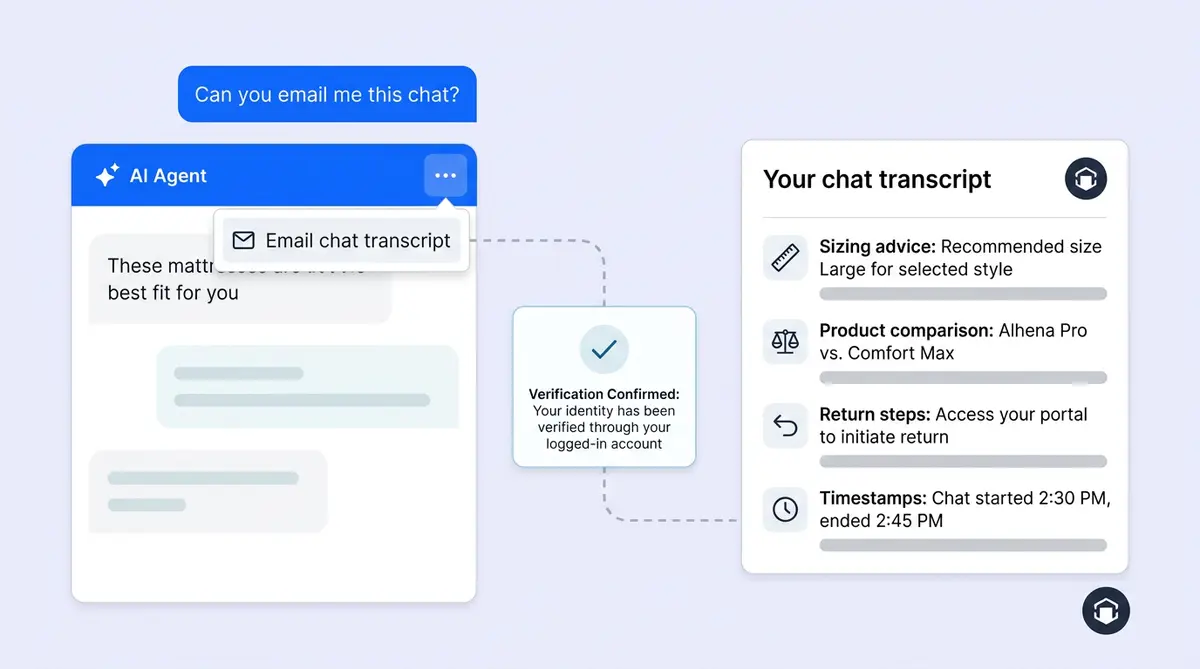
Send Transcript adds an Email chat transcript option to the Alhena chat widget menu. After a shopper starts a conversation, they can click this option, enter an email address, and receive a formatted email titled Your chat transcript within seconds.
The email includes the full chat transcript history from that chat session:
- Shopper messages
- AI assistant replies
- Human agent messages, if the conversation included a handoff
- Timestamps adjusted to the shopper's local timezone
- Attached images where supported
- Brand-specific sender name and optional transcript logo or header styling
There's no download link, no public URL, and no support-ticket mutation. Alhena simply emails a copy of the existing conversation to the address the shopper provides. The shopper owns that copy the same way they'd own any email in their inbox.
How Shoppers Trigger a Chat Transcript
There are two ways a shopper can request their chat transcript for customer service conversations.
The Menu Option
The shopper opens the Alhena chat widget, has a conversation, then clicks the three-dot menu icon. They click Email chat transcript, enter their email address, and see a short "Transcript sent" confirmation in the widget. Done.
The Natural Language Request
In agentic experiences, the shopper can also just ask. Something like "Can you email me this chat?" or "Send me a copy of this conversation." Alhena's dedicated SendTranscriptAgent picks up that request, asks for the email if it doesn't already have one, validates the address, sends the transcript, and confirms delivery, all inside the same conversation flow.
This is what separates Alhena's approach from a static live chat menu button. The transcript request becomes part of the conversation itself, handled by the same AI the shopper is already talking to. No context switch, no hunting through menus.
What Happens Behind the Scenes
When a shopper requests a transcript, the widget sends a request to Alhena containing four pieces of information: the conversation ID, the shopper's session fingerprint, the email address, and the shopper's timezone.
The backend then runs a session ownership check. It verifies that the current shopper session actually owns that conversation before sending anything. This matters because a chat transcript contains private conversation context: product questions, order details, sizing information, and sometimes discount codes. Alhena won't send a transcript just because someone knows a conversation ID.
Once validated, Alhena queues a background email task. That task pulls the conversation messages, formats them into an email-friendly layout, applies brand details (bot name, transcript logo, header styling), and sends the email through Alhena's email system.
Rate limiting prevents abuse. A shopper can't hammer the endpoint to send dozens of copies from the same conversation. The feature is designed for convenience, not bulk export.
Why Shoppers Want Their Chat Transcript (and Why It Helps You Sell)
AI support conversations feel temporary. A shopper gets great advice, but once they close the widget, that advice lives nowhere they can easily access it. Send Transcript changes that dynamic completely.
Product Recommendations They Can Revisit
A shopper asks the AI Shopping Assistant to compare two serums for dry skin. The AI walks through ingredients, texture differences, and price points. With Send Transcript, the shopper emails that comparison to themselves and reads it again before buying, maybe a day later, maybe while standing in a store comparing in-person options.
Brands like Tatcha have seen a 3x conversion rate from AI-assisted shopping. A transcript that follows the shopper beyond the chat session extends that conversion window.
Sizing and Usage Advice Worth Keeping
Sizing questions are one of the biggest drivers of ecommerce support tickets. When the AI gives detailed fit guidance ("For your measurements, we'd recommend the Medium in this cut, but the Large runs smaller in the oversized collection"), a transcript turns that into a reference document the shopper can pull up in a fitting room or share with a friend shopping for them.
Return and Exchange Instructions
Post-purchase support often involves multi-step instructions: print a label, pack the item, drop it at a specific carrier. If a shopper asks the Support Concierge about a return and then transcripts the conversation, they have every step in their inbox instead of trying to remember what the AI said.
Promises and Next Steps
Sometimes an AI conversation includes a commitment: "Your replacement will ship within 48 hours" or "I've applied a 15% discount to your account." A transcript gives the shopper a record of that promise. If something goes wrong, they can forward their chat transcripts to the support team instead of saying "the chatbot told me..." without proof.
This is where designing for trust gets practical. You're not just telling shoppers to trust the AI. You're giving them a receipt of the interaction.
How Send Transcript Helps Brands
The shopper-facing benefits are obvious. But Send Transcript also solves real operational problems for ecommerce teams.
Fewer Repeat Questions
When a shopper already has the transcript, they don't need to open a new chat to ask the same question again. That's one less conversation for your AI to handle and one less potential escalation for your human agents. Brands using Alhena's Support Concierge already see high deflection rates (Crocus hit 86%), and Send Transcript helps protect those numbers by reducing repeat contacts.
Better Context for Escalations
If a shopper does need to contact a human agent later, they can forward the transcript. The agent sees exactly what was discussed, what the AI recommended, and what commitments were made. No "Can you tell me what you already told the chatbot?" No guesswork. This ties into how Alhena's Agent Assist already passes conversation context to human agents, but Send Transcript puts a copy in the shopper's hands too.
Stronger Privacy Perception
Brands that enable Send Transcript are effectively telling shoppers, "This conversation is yours too. You can keep a copy." That's a small signal, but it matters. Research from CMSWire shows that 76% of managers say customers are more likely to trust companies that are transparent about AI interactions. Giving shoppers ownership of their conversation data fits that transparency playbook perfectly.
For brands already thinking about AI disclosure and transparency, Send Transcript is a tangible action that backs up the messaging.
Support Continuity Across Channels
Alhena supports conversations across web chat, email, Instagram DMs, WhatsApp, and voice. A transcript from any chat session creates a bridge. The shopper can reference the transcript when they call in, email back, or message on a different channel. Combined with Unified Memory, which keeps context across channels on Alhena's side, Send Transcript keeps context on the shopper's side.
Admin Control: Enabling and Configuring Send Transcript
Brands control Send Transcript from a single toggle in widget settings: Let customers request a full chat transcript.
When enabled, two things happen:
- The customer-facing chat widget shows the Email chat transcript option in the three-dot menu
- For brands using agentic capabilities, the dedicated SendTranscriptAgent activates automatically, so natural-language transcript requests ("email me this chat") work too
When disabled, both the menu option and the agentic handler turn off. There's no scenario where one is active without the other, which prevents inconsistent behavior where the menu says no but the AI says yes (or the reverse).
Brands can also customize the transcript email with their bot name and an optional transcript logo or header image. The email arrives from a branded sender, not a generic "noreply" address. This keeps the experience on-brand even after the shopper leaves the widget.
Setup takes seconds. There's no developer work, no API configuration or custom integrations, and no template coding. Toggle it on, optionally upload a logo, and the feature is live. This fits Alhena's broader approach to deployment: the platform goes live in under 48 hours, and individual features like Send Transcript follow the same pattern.
What Send Transcript Is Not
It's worth being clear about what this feature doesn't do, because the name could create assumptions.
It's not a replacement for support ticket history. Alhena still stores every conversation internally for support workflows, analytics, quality assurance, and agent training. Send Transcript gives shoppers their own chat transcripts. It doesn't remove or alter the internal record.
It's not a human handoff trigger. Sending a transcript doesn't escalate the conversation, create a new support case, or route the chat to a live agent. It's a convenience feature, not a routing feature.
It's not a summary or recap. Chat transcripts contain the actual conversation messages, not a rewritten summary. If the shopper asked five questions, all five questions and all five answers appear in the email. This is intentional: a summary might miss details the shopper actually cares about.
It's not a public share link. The transcript goes to the email address the shopper provides. There's no shareable URL, no public page, and no way for someone else to access it without access to that inbox.
Where Send Transcript Fits in the Bigger Picture
Ecommerce AI has spent the last two years focused on speed and deflection. Can the bot answer fast enough? Can it handle enough tickets? Those metrics matter, but they miss something: what happens after the conversation ends?
Most live chat tools treat conversations as disposable. The shopper gets an answer, the widget closes, and the interaction evaporates. Send Transcript challenges that assumption. It says the conversation has value beyond the moment it happens.
That mindset connects to several other Alhena features. Unified Memory remembers the shopper across sessions. Conversation Debugger traces every AI response back to its source. Flagged Conversations catches quality issues before they reach shoppers. Send Transcript adds the shopper's perspective to that chain: the conversation is accurate, traceable, and now portable.
For brands evaluating AI shopping assistants, this kind of feature signals maturity. It's not flashy. It won't show up in a demo reel. But it's the kind of thing shoppers notice when they need it and the kind of thing that turns a one-time chat into a reason to come back.
Ready to give your shoppers a better AI experience? Book a demo with Alhena AI or start for free with 25 conversations.
Frequently Asked Questions
What is the Send Transcript feature in Alhena AI?
Send Transcript lets shoppers email themselves a formatted copy of their AI chat conversation. It includes all messages, timestamps adjusted to the shopper's timezone, and brand-specific styling. The feature is available through the chat widget menu or by asking the AI directly in natural language.
How does a shopper request a chat transcript?
There are two ways. The shopper can tap the three-dot menu in the Alhena chat widget and select "Email chat transcript," then enter their email address. In agentic setups, the shopper can also ask naturally, like "Can you email me this chat?" and Alhena's SendTranscriptAgent handles the request inside the conversation flow.
Is the chat transcript sent as a public link?
No. Alhena emails the transcript directly to the address the shopper provides. There's no shareable URL, no public page, and no download link. The transcript is a private email containing the conversation history, accessible only through the shopper's inbox.
Does Send Transcript create a support ticket?
No. Send Transcript is a convenience feature, not a routing feature. It doesn't escalate the conversation, create a new support case, or trigger a human handoff. It simply emails a copy of the existing conversation to the shopper.
How do brands enable Send Transcript?
Brands toggle a single setting in widget configuration: "Let customers request full chat transcript." When enabled, the menu option appears in the chat widget and the agentic handler activates simultaneously. There's no developer work or API setup required.
Can brands customize the transcript email?
Yes. Brands can set a custom bot name, add a transcript logo or header image, and the email arrives from a branded sender. This keeps the transcript on-brand even after the shopper leaves the chat widget.
Does Send Transcript reduce repeat support conversations?
Yes. When shoppers have a copy of their chat, they're less likely to reopen a new conversation to ask the same question. This protects deflection rates and reduces the volume of repeat contacts that would otherwise reach AI or human agents.
How does Alhena prevent abuse of the transcript feature?
Alhena enforces session ownership verification and rate limiting. The backend checks that the requesting shopper's session actually owns the conversation before sending anything, and limits how many transcript emails can be sent from the same conversation.