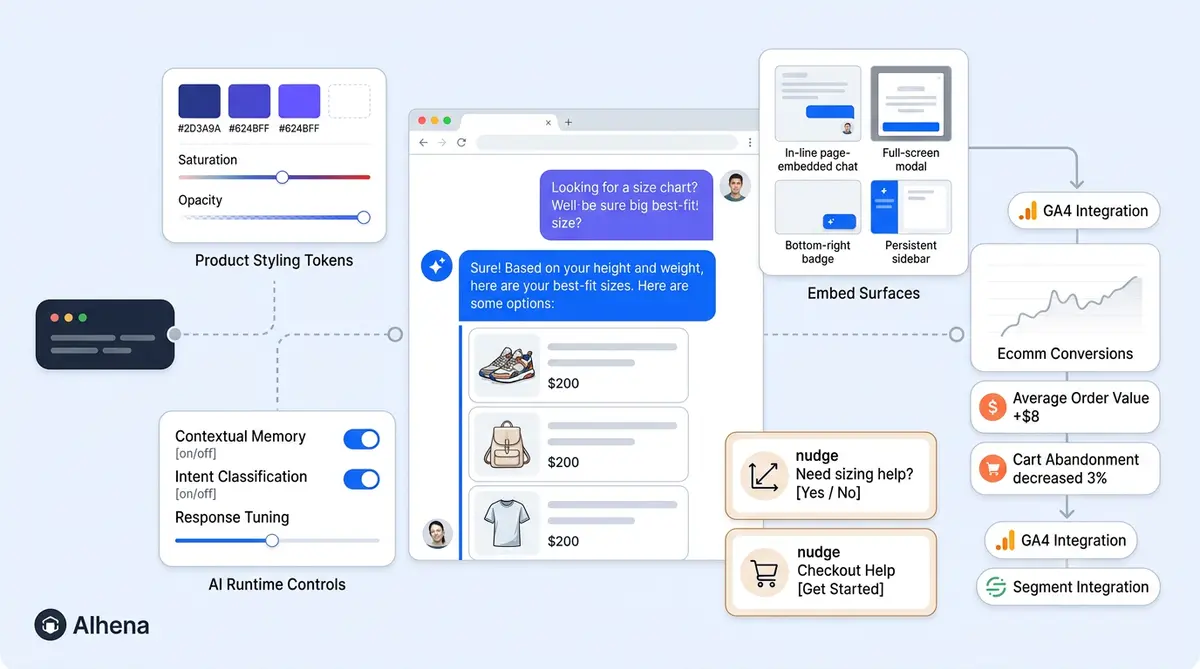
Embedding Alhena's chat widget takes two lines of code. What most teams don't realize is that those two lines open up over 40 appearance settings, a full-runtime JavaScript API, four distinct embed modes, and a behavioural event stream you can pipe straight into your analytics stack. Here's every lever, organized by what it controls.
The Two-Line Embed and What It Actually Does
The standard chat embed code looks like this:
<script>
  document.alhenaConfig = { company: "your-company-key" };
</script>
<script src="https://cdn.alhena.ai/widget.js"></script>
That script reads your config, calls Alhena's API to pull every styling and behavior setting from your dashboard, injects a mount point, and boots the widget. Everything after that is adjustable, either in the dashboard, in the config object, or through the runtime JS API.
Appearance: 40+ Knobs for Look and Feel
The dashboard's widget customisation page gives you fine-grained control over how the widget looks on your site. Every visual element is editable, from tagline to colours.
Alhena’s Send Transcript feature takes this further by letting shoppers email themselves a copy of any AI conversation.
Colours cover 13 separate tokens: widget background, header background and text, user message bubble and text, bot message bubble and text, send button, launcher background and text, suggested-questions background and text, nudge background, and CTA button colour. Every surface has its own token, so your widget can match your design system exactly.
Typography includes font family (any CSS font, including web fonts), message font size, and line height. Logos and avatars cover a brand logo and display name in the header, a bot avatar with its own display name on messages, and a separate email transcript logo for emailed conversation history.
Geometry controls widget width, border radius, launcher shape (circle or square), launcher icons and icon size, close button style (chevron, cross, or dash, with the option to disable it), and UI z-index for both the panel and launcher. That last one matters more than you'd think: sites with sticky headers or cookie banners often bury the widget under other elements. Separate desktop and mobile spacing settings let you position the launcher differently on each device, and a mobile launcher size setting helps with thumb-zone reach.
Behavior and Content Settings
Welcome Screen
The welcome screen is what shoppers see the moment they open the widget, before they type anything. It has four configurable parts.
The welcome screen title and subtitle set the headline and supporting text at the top of the panel. A beauty brand might use "Hi, welcome to Tatcha" as the title with "Ask me about routines, ingredients, shipping, or returns" as the subtitle. Below those sit a first welcome message and an optional second welcome message, both displayed as bot-style bubbles with a display name. These staged messages appear before the shopper types anything, so the assistant feels like it's already started the conversation. Check out our first-touch configuration guide for a deeper walkthrough of welcome screen, launcher, and nudge configuration.
Other content settings include input placeholder text (the greyed-out hint in the message field), separate launcher text for desktop and mobile, a tagline for the greeting panel, and a satisfaction prompt delay that controls when the CSAT survey appears after a conversation.
Auto-Close
Auto-close is enabled by default on every Alhena deployment. The inactivity timer is adjustable from 5 to 120 minutes, with a default of 30 minutes. When the timer runs out, the widget sends a closing message and marks the conversation as resolved.
Alhena uses two separate closing messages depending on whether the chat was escalated to a human agent. The pre-escalation message (AI-only chats) politely lets the visitor know the conversation is closing due to inactivity and invites them to return anytime. The post-escalation message (after human handoff) tells the visitor the chat is closing but reassures them the team will follow up via email. Both messages are fully editable, and both auto-translate to match the customer's detected language with no manual translation work required. Our Auto-Close Conversations guide covers the full breakdown of how auto-close syncs with helpdesks like Zendesk and Freshdesk.
Teams running human handoff through Alhena's Support Concierge get separate business-hours and after-hours form fields with dropdown selectors per path (requiring email plus order number during hours; adding phone after hours) and timezone-aware scheduling. There's also a toggle for "assigned to Jane" visibility and an anonymous agent mode that hides real names from the customer.
The Runtime JS API Most Integrators Miss
Alhena's widget API is a full programmatic surface that goes well beyond open and close.
Open, close, toggle: the API exposes open(), close(), and toggle() methods. The launcher is independently hideable too, which is useful for suppressing the bubble on checkout while keeping the chat available through your own button.
User context: the setUserMetadata() method passes attributes the AI uses for routing and prompt personalization. Pair that with getFingerprint() linking anonymous sessions to a logged-in user later.
Programmatic messaging: sendMessage("Where is my order?") triggers a conversation from any UI element. getMessages() and getTicketId() give read access to the current session.
Commerce hooks: sendCartEvent(cart) and sendCheckoutEvent(checkout) feeds real-time cart data to the AI. setConvertPriceHook(fn) Handles currency and locale formatting for Shopify and headless storefronts. For multi-brand portals, setCompanyKey("other-brand-key") switch the entire widget config on the fly.
Four Embed Modes, Not One
The floating launcher is the default, but three other embed modes exist, each designed for a different UI scenario.
- Floating launcher: The standard chat bubble. Works for general browsing across your site.
- Inline mode: Mount the chat into any container via a designated container div. Ideal for help centre pages and the best option for dedicated customer support hubs. It’s also the best way to surface chatbot answers where the chat interface should be a persistent, visible element rather than a hidden bubble.
- Product FAQs widget: Drop the Product FAQs container element on any PDP for a contextual Q&A module. It has its own independent theming system (container, card, selected state, answer, and input surfaces are all separately styleable).
- Conversational Search:
<div id="alhena-conversational-search"></div>renders a search box with starter questions.openSearch("laptop")programmatically opens it with a prefilled query.
Each mode has its own colour palette, starter questions, and placeholder text and can be A/B tested independently. To learn how to place these across Shopify, WooCommerce, and other composable storefronts, see the headless commerce guide.
Nudges: The Right Message on the Right Page
A nudge renders as a tooltip-style bubble that pops from the launcher to pull visitors into conversation. Alhena's nudge system offers two trigger types: TIMER (after N seconds) and SCROLL (after N pixels of scroll depth).
Targeting conditions match PAGE_URL or PAGE_TITLE with equals, not equals, contains, or not contains operators. A rule like PAGE_URL CONTAINS "/collections/" matches every collection page. PAGE_TITLE NOT_CONTAINS "checkout" suppresses nudges during purchase.
Content can be fixed text (with multiple rotating variations) or AI-generated, where you give the bot guidelines and it writes page-contextual nudge copy automatically. Display controls include tagline text, max nudges to rotate, animation interval, window position, button label, background shade, corner radius, and priority ranking. Cap frequency at one or two nudges per session to avoid fatigue.
Events: Everything Is Observable
The widget API's on(event, callback) method supports a rich event stream you can pipe into GA4, Segment, Mixpanel, your CRM, or Hotjar.
- Lifecycle:
widget:loaded,widget:opened,widget:closed - Conversation:
ticket:message_submitted,ticket:bot_response_finished,ticket:link_clicked,ticket:attachment_added,ticket:closed - Handoff:
ticket:agent_handoff_initiated,ticket:agent_handoff,ticket:email_submitted - Commerce:
product:added_to_cart,products:added_to_cart,product:page_opened,product:displayed - FAQ/search:
faqs:question_clicked,faqs:bot_response_finished - Experiments:
experiment:loaded
This turns the widget into a first-class data source, not a black box. Wire these events into GA4 to track which PDPs generate the most chat-initiated cart additions, which nudge variants drive the highest open rates, and where agent handoffs cluster by product category.
Privacy, Consent, and Localization
Privacy Consent Gate
Alhena supports a general privacy consent gate that, when enabled, blocks the message input field, suggested questions, and voice controls until the visitor clicks the consent button. The visitor sees a disclosure message explaining data usage and must accept before any chat interaction can begin. This creates an unambiguous record of consent under GDPR and similar privacy regulations.
Three elements are configurable: the consent message text (the disclosure itself), the button label (defaults to "Agree & Continue", but you can customize it to match your brand's legal language), and a simple enable/disable toggle. All consent text feeds into Alhena's localization system, so it auto-translates based on the visitor's browser locale, with the option for legal teams to override specific translations. For the full GDPR and consent architecture, see our GDPR-Ready AI Chat guide.
Attachments
The Let Customers Attach Files toggle in Website Settings controls whether the file upload icon appears in the chat. Once it's on, visitors upload one attachment per message, either paired with text or on its own. The upload flow shows a file preview before sending, then stores the file in secure storage with a unique URL tied to that conversation thread.
Size limits depend on file type: images (JPG, PNG) are capped at 5 MB; documents (PDF, Word, Excel, PowerPoint, CSV, and plain text) at 10 MB; and videos at 25 MB. Images render as inline thumbnails in the chat thread, while documents and videos show as clickable file previews with the filename and type visible.
Attachment consent is a separate toggle from the general privacy consent gate. It fires only when a visitor tries to upload their first file, so shoppers who never attach anything won't see an extra consent dialogue. Once accepted, consent persists for that visitor and bot profile. This layered approach satisfies GDPR's data-minimization principle: text-only chats don't collect consent for data categories that never apply.
Teams with strict data-residency requirements can route uploads to a custom S3 bucket, keeping files within their own cloud environment. On the analytics side, every upload fires a ticket:attachment_added event through the SDK's event stream, making attachment usage visible in GA4, Segment, or any other analytics tool. Our Attachments in Chat deep dive walks through the full setup.
Localization
Localization auto-detects the visitor's browser locale. Every visitor-facing string (welcome messages, launcher text, consent copy) is overridable per locale, with a fallback chain from the requested language to English. The UI language matches the AI's multilingual answering, so the entire chat experience stays in one consistent language.
Whitelabel mode removes Alhena branding entirely. A custom_js field lets you run your own code inside the widget on load for advanced integrations.
For Shopify and WooCommerce stores, the widget installs via a single app or plugin. For headless builds on Salesforce Commerce Cloud or custom frontends, the two-line embed plus the JS API gives you full control without waiting on a dev sprint. The widget design and conversion optimization guide covers how placement and trigger decisions connect to measurable revenue outcomes.
Ready to go beyond the default embed? Book a demo with Alhena AI to see these live chat customizations on your site, or start free with 25 conversations.

Frequently Asked Questions
How do I embed the Alhena chat widget on my website?
Add two lines of JavaScript to your site to embed the chatbot: a config object with your company key. It’s the fastest way to add customer support chat to any site and the widget script tag. The script pulls all styling and behavior settings from your Alhena dashboard automatically. No build step or framework dependency required.
What appearance settings can I customize in the Alhena widget?
Over 40 settings are available: 13 color tokens (backgrounds, text, bubbles, buttons), font family and size, brand logo and bot avatar, widget width, border radius, launcher shape, close button style, z-index, and separate desktop and mobile spacing. Everything is editable from the dashboard.
What is Alhena's widget JavaScript API?
It's a runtime JavaScript API that gives you programmatic control over the widget. Methods include open, close, and toggle for visibility, setUserMetadata for personalization, sendMessage to trigger conversations, cart and checkout event hooks for commerce data, company key switching for multi-brand setups, and getFingerprint for anonymous session linking.
What are the different embed modes available?
Four chatbot embed modes: floating launcher (the standard bubble), inline mode (mounted into any page container), Product FAQs widget (contextual Q&A on PDPs with independent theming), and Conversational Search (a search box with starter questions). Each has its own color palette and configuration.
How do nudges work in the Alhena widget?
Nudges are tooltip bubbles attached to the launcher. They fire on a timer (after N seconds) or scroll depth (after N pixels). Target them by URL path or page title using contains/not-contains rules. The nudge content itself is either hand-written with rotating variations, or auto-generated by the AI using guidelines you provide. Keep it to one per session to avoid annoying visitors.
Can I track chat widget events in Google Analytics or Segment?
Yes. The widget API's on(event, callback) method supports 20+ events across lifecycle, conversation, handoff, commerce, and FAQ categories. Pipe events like widget:opened, product:added_to_cart, and ticket:agent_handoff into GA4, Segment, Mixpanel, your CRM, or Hotjar. Brands use this data to measure chat-initiated revenue, handoff rates by category, and which nudge variants perform best.
Does the widget support multiple languages?
Yes. Browser language detection is automatic. Consent text, welcome messages, launcher labels, and closure messages are all overridable per locale, with English as the fallback. AI responses stay in sync with the UI language, so a French visitor sees French across every element.
How does auto-close work in the Alhena chat widget?
Inactive conversations close automatically after 30 minutes by default (adjustable between 5 and 120 minutes). Two different closure messages exist: one for AI-only chats and one for conversations handed off to a human agent. Both translate into the customer's language without manual work. When connected to Zendesk or Freshdesk, non-escalated chats create solved records while escalated chats leave the helpdesk ticket open.
What file types and size limits does the Alhena chat widget support?
Supported uploads include images (JPG, PNG, up to 5 MB), documents (PDF, Word, Excel, PowerPoint, CSV, plain text, up to 10 MB), and videos (up to 25 MB). Only one file per message. A separate attachment consent prompt appears on the first upload attempt, independent of general privacy consent. If compliance rules require it, uploads can route to your own S3 bucket.