Shoppers who engage with chat are 2.8x more likely to buy and spend 60% more per order, according to LiveChat's research. Yet most ecommerce brands leave their chat widget on factory settings: a blue bubble, a "How can I help?" greeting, zero behavioral triggers. Seventy-seven posts on this blog mention "widget" in passing. None make the widget's visual design and placement the actual topic. This one does. Below are seven chat widget and chatbot customization fixes that turn a passive icon into an e-commerce conversion and automation tool.
The 5% Problem: Why Your Widget Isn't Working
Passive live chat widgets reach roughly 5% of site traffic. Proactive, well-designed ones reach 45%, according to Alhena's own engagement data. That 5.5x gap isn't about the AI behind the widget. It's about the UX layer in front of it: how the web widget looks, where it appears, and when it triggers.
Forrester puts the ROI difference at 105% for proactive chat versus 15% for reactive-only setups. Baymard Institute's usability research goes further, calling three common chat implementation patterns "highly disruptive" to shoppers. The widget you installed with default settings is quietly bleeding e-commerce conversions.
Here are seven fixes—the best strategies for making your chat widget a real conversion tool—each tied to a measurable outcome.
Fix 1: Page-Specific Display Rules
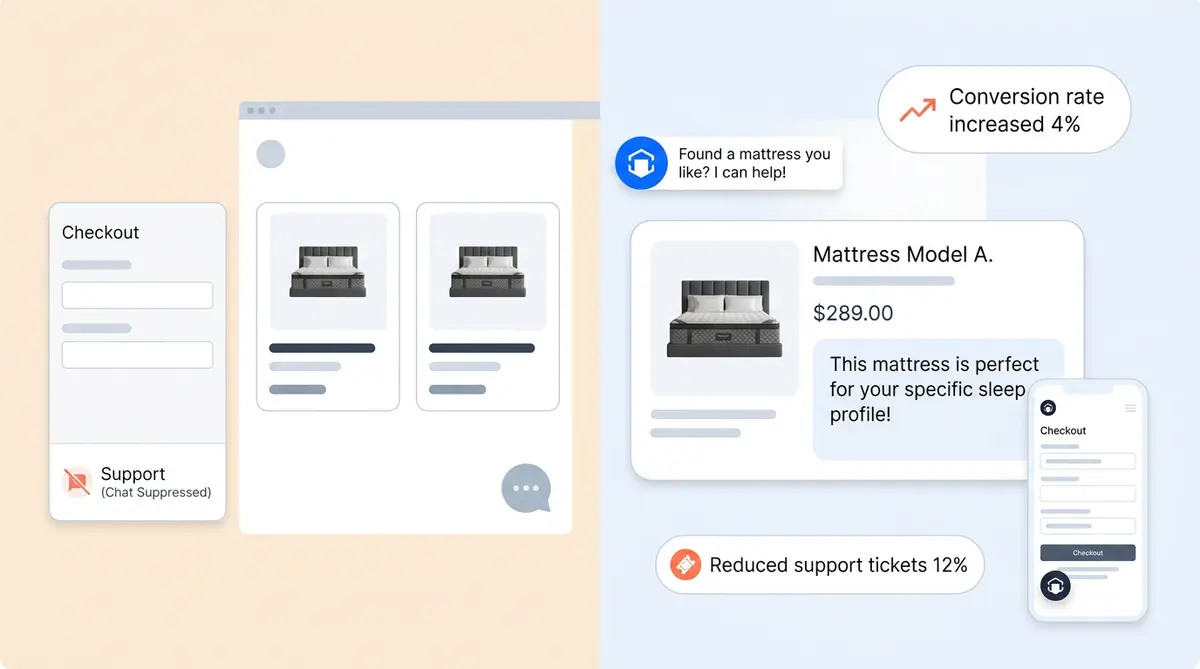
Your chat widget doesn't belong on every page. Baymard's testing found that live chat overlays on checkout pages and filtering interfaces distract shoppers mid-task. One SaaS company reduced checkout abandonment from 55% to 38% simply by suppressing chat on their pricing page and adding targeted help only where friction existed.
The fix: show proactive live chat greetings on collection pages where shoppers browse. Suppress the widget entirely at checkout to control distraction. Trigger differently on mobile versus desktop. Alhena's Shopping Assistant allows you to set URL-based display rules so the widget appears only where it helps, not where it interrupts.
Fix 2: Launcher Behavior and Icebreaker Text
The bubble in your bottom-right corner is doing more work than you think. Whether it pulses, sits quietly, or shows preview text directly affects open rates. A fashion brand using icebreaker prompts on their launcher saw engagement jump from 58% to 72%, with live chat chatbot-driven upsell sales rising 8% within 60 days through automation.
For the complete launcher and welcome screen configuration walkthrough, see ourfirst-touch system guide.
The principle: pulse the bubble when a shopper has been on a product page for 45+ seconds without acting. Keep it quiet on pages where they're already engaged (blog posts, checkout). Use personalized icebreaker text that matches the page context, like "Not sure which shade?" on a foundation PDP instead of the generic "How can I help you?"
Fix 3: Visual Brand Consistency
Users decide whether a design feels trustworthy within 50 milliseconds, according to research published in Smashing Magazine. A generic blue chat bubble on a minimalist black-and-white luxury site screams "third-party plugin". That erodes trust before the first message.
Match your widget's colours, fonts, and avatar to your site's design system. Consistent colour use increases brand recognition by up to 80%. Alhena's brand voice configuration lets you align the widget's visual identity and conversational tone with your brand guidelines, so the chat feels native. Strong branding in your widget builds trust rather than eroding it.
Fix 4: Three Embed Modes Most Teams Don't Know Exist
Most brands deploy one mode: the floating launcher in the bottom-right corner. That's fine for general browsing, but it's leaving two high-value surfaces untouched. Think of it like putting a salesperson at the front door and nowhere else in the store.
- Floating launcher: The standard bubble for sitewide browsing. It’s a good default for customer service, but not enough on its own.
- Inline mount: Embed the chat directly into your help center or FAQ page as a persistent element. Visitors on those pages already have customer support questions. Remove the extra click. It’s a simple change that pays off.
- Product FAQ widget: Drop a contextual Q&A block directly on product detail pages. It provides answers instantly to sizing, shipping, and compatibility questions right where the e-commerce buying decision happens.
Ecommerce brands using all three surfaces see 6%+ engagement rates compared to roughly 1% for a floating widget alone. Alhena's headless architecture guide covers how to place these embed modes across Shopify, WooCommerce, and other e-commerce composable storefronts.
Fix 5: Mobile UX Gets Its Own Config
73.6% of e-commerce chat interactions happen on mobile, per Ringly.io's 2026 data. Yet most widgets ship with identical configs for both screen sizes. The result: chat bubbles that block "Add to Cart" buttons, launchers too small for thumb zones, and overlay windows that cover the entire product image.
Mobile needs separate rules. Size the launcher for the thumb zone (bottom-right, large enough to tap without misfire). Use full-screen chat mode on mobile instead of a cramped overlay. Adjust the trigger timing: mobile shoppers scroll faster, so a scroll-depth trigger at 60% makes more sense than the 30% you'd use on desktop. Alhena's widget allows independent mobile configuration for sizing, spacing, and launcher positioning.
Fix 6: Nudges with URL Targeting
A nudge is a tooltip bubble that appears outside the chat window, triggered by a timer, scroll depth, exit intent, or page URL. It's the least intrusive way to start a conversation, and the data backs it up: one contextual nudge per session lifts conversions 15-25%, though four or more nudges per session actually increase bounce rates.
The power is in URL targeting. "Need help sizing?" appears only on product pages. "Having checkout issues?" fires only on /cart. "Looking for something specific?" shows on collection pages after 30 seconds of browsing. Alhena's AI nudge system generates nudge text from the page's product context, so the prompt feels personalized and specific rather than scripted. Cap automation at two nudges per session maximum.
Fix 7: The Event Goldmine Nobody Wires Up
Your chat widget fires events that most analytics stacks never see. widget:opened, product:added_to_cart, ticket:agent_handoff: these smart signals (available via API or native integrations) turn the widget from a black box into a first-class telemetry source.
Pipe these customer support events into GA4, Segment, Mixpanel, or your CRM and you can provide insights and answer customer service questions no one on your team is asking today: Which product pages drive the most visitor-initiated purchases? What's the handoff rate by product category? Do shoppers who open the widget on mobile convert at the same rate as desktop?
Alhena's built-in revenue attribution analytics track these signals natively, connecting personalized widget interactions to completed orders. Tatcha attributed 11.4% of total site revenue to AI-assisted chat sessions using this data. Victoria Beckham measured a 20% AOV increase. Without event tracking, those numbers are invisible. With it, you can A/B test every fix on this list and prove what's working.
Start With One Fix, Then Stack
You don't need to ship all seven changes at once. Start with the highest-leverage move for your store: if you're seeing checkout abandonment, try Fix 1 (suppress at checkout) and Fix 6 (cart-page nudge). If engagement is low across the board, Fix 2 (icebreaker text) and Fix 4 (embed modes) will move the needle fastest.
The common thread is that chat widget design isn't a set-it-and-forget-it decision. It's a conversion optimization surface, and it deserves the same attention you give your product pages, CTAs, and checkout flow. Visitors who interact with a well-placed, well-timed widget convert at 4x the rate of unassisted browsers. The widget is already on your site. These seven fixes make it actually work.
Ready to turn your chat widget into a revenue channel? Book a demo with Alhena AI or start free with 25 conversations.

Frequently Asked Questions
How does chat widget placement affect ecommerce conversion rates?
Placement has a direct impact. Baymard Institute found that chat overlays on checkout and filtering pages are "highly disruptive" and hurt completion rates. Suppressing the widget at checkout while activating it on collection and product pages matches chat availability to where shoppers actually need help, making proactive, page-specific placement the best approach for converting traffic. The best chatbot implementations match their display rules to the page type. It’s why optimized widgets reach 45% of visitors versus 5% for always-on defaults. Every visitor who sees a relevant prompt is more likely to engage.
What are chat widget icebreakers and how do they improve engagement?
Icebreakers are tappable chatbot prompt buttons displayed on the chat launcher before a shopper types anything. They cut the friction of composing a first message. A fashion retailer using icebreakers saw engagement rise from 58% to 72% and bot-driven upsell revenue increase 8% in 60 days. Page-specific icebreaker text (like "Not sure which shade?" on a cosmetics PDP) outperforms generic greetings.
Should I show the chat widget on checkout pages?
Generally, no. Baymard's usability testing calls checkout-page chat a distraction. One company that suppressed chat at checkout and added targeted FAQ support elsewhere reduced cart abandonment from 55% to 38%. If you must offer help at checkout, the simplest fix is a passive text link rather than a floating overlay.
What is the difference between a floating chat launcher and an inline widget?
A floating launcher is the standard chatbot bubble in the bottom corner that follows the shopper across pages. An inline widget is embedded directly into a page's content, like a help center or product detail page. Inline mounts remove the extra click to open the chat interface, and brands using multiple embed modes (floating, inline, and product FAQ) see 6%+ engagement rates compared to roughly 1% for floating alone.
How should I configure my chat widget differently for mobile?
Mobile accounts for 73.6% of chat interactions, so it needs its own rules. Size the launcher for thumb-zone reach, use full-screen chat mode instead of a cramped overlay, and adjust scroll-depth triggers (60% on mobile versus 30% on desktop) since mobile users scroll faster. Test that the launcher never blocks the Add to Cart button or navigation.
What are AI-powered nudges and how do they work?
Nudges are tooltip bubbles that appear near the chat launcher, triggered by timers, scroll depth, or specific page URLs. Alhena's nudge system generates contextual text from the page's product data, so a shopper on a sizing-heavy PDP might see "Need help finding your size?" One nudge per session lifts conversions 15-25%, but more than three nudges per session increases bounce rates.
How do I track chat widget events in Google Analytics or Segment?
Forward chatbot widget events like widget:opened, product:added_to_cart, and ticket:agent_handoff to GA4, Segment, or Mixpanel. This lets you measure chat-initiated revenue, handoff rates by category, and mobile versus desktop conversion differences. Alhena's built-in revenue attribution tracks these natively. Tatcha used it to attribute 11.4% of total site revenue to AI chat sessions.