A Smartsupp study of five billion website visits found that only about 15% of visitors who see a chat widget actually open it. The other 85% glance at the floating greeting button, decide it's not worth their time, and keep scrolling. That first-touch moment, the split second a shopper notices your AI chatbot widget and chooses whether to click, is the highest-impact first impression most ecommerce and digital commerce teams never think about. For customers browsing your store, that moment shapes their entire perception of your brand.
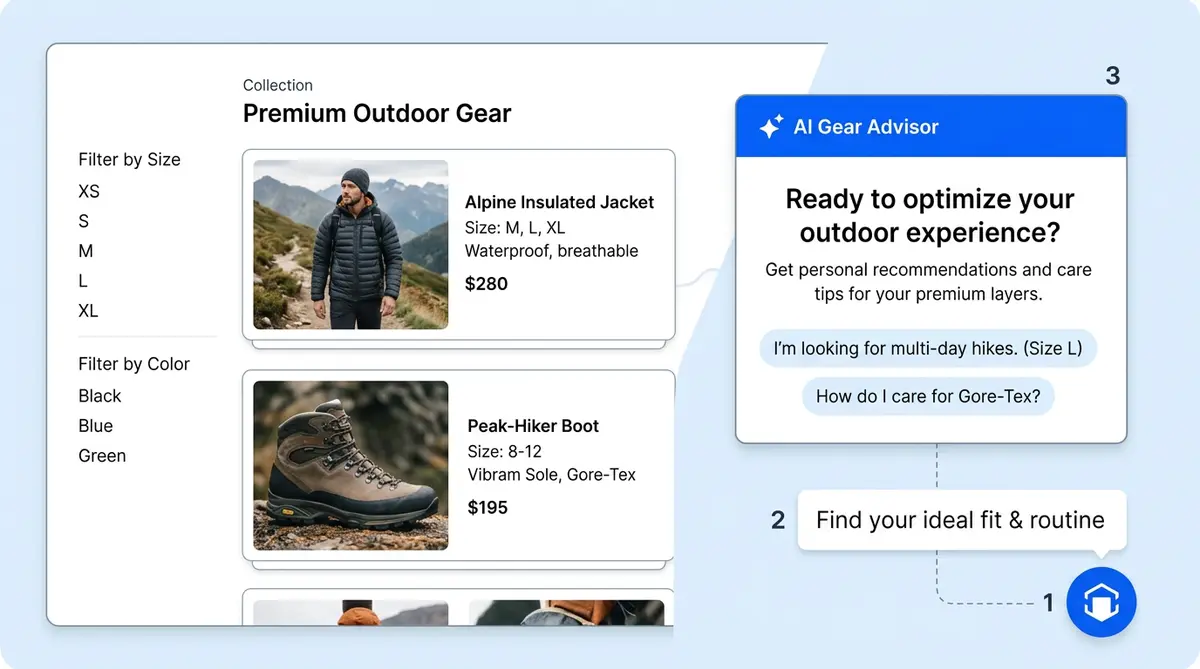
Alhena AI breaks that first-touch moment into three configurable layers: the launcher (the floating button), the welcome screen (the greeting screen after opening), and nudges (proactive chat prompts that appear before the shopper opens anything). The launcher earns attention from anyone looking for something. The nudge gives a reason to click. The welcome screen sets expectations and builds trust.
This post walks through every configuration option across all three layers, explains how targeting and triggers work, and shows how brands use Alhena's first-touch system to lift engagement and revenue.
Three Layers, One First-Touch System
Most AI chatbot platforms treat the chat button, the greeting, and proactive prompts as separate features built by separate teams. Alhena treats them as a single system because that's how shoppers experience them. A customer lands on your site, sees the launcher in the corner, maybe notices a nudge bubble, clicks, and lands on the welcome screen. If any layer feels off, generic, or irrelevant, the interaction never starts.
Here's how the three layers connect:
- Launcher (closed state): the persistent floating button. It controls visibility, brand recognition, and the physical entry point into chat.
- Welcome screen (opened state): the first in-widget experience before the shopper types. It greets the visitor, sets context, introduces the assistant's capabilities, and optionally collects privacy consent.
- Nudges (proactive state): small prompts that appear near the launcher before the visitor opens chat. They give users and shoppers a reason to engage by surfacing relevant help with real personalization at the right moment.
The visual language matters too. Alhena's nudges inherit colors, icons, and button styles from the launcher, so the proactive prompt and the chat entry point feel like one personalized experience, not a random pop-up with no human touch. When a shopper clicks a nudge, the widget opens with that nudge's context already loaded. No repetition, no "how can I help you?" after the shopper already told you what they need.
Launcher Configuration: The Button That Earns the Click
The launcher is the closed-state entry point for your AI shopping assistant. It sits on every page, visible but not intrusive. The concept is simple: getting it right means matching your brand (formal or casual), fitting your site layout, and staying accessible to users on both desktop and mobile.
Brand Identity Settings
You can upload your brand logo or use Alhena's default AI icon. Icon padding lets you control how much space surrounds the logo inside the button. Background color and text color are fully customizable, so the launcher matches your site palette instead of looking like a third-party plugin bolted onto the page.
Shape, Size, and Position
Alhena supports circle or square launcher shapes, with a configurable border radius for square buttons, so you can soften the corners. Desktop and mobile button sizes are set independently. Position options include bottom-left or bottom-right, with pixel-level spacing controls for both desktop and mobile edges. A configurable z-index ensures the launcher sits above your site's sticky headers, footers, or cookie banners without getting buried.
Launcher Text
Optional text appears next to the launcher icon, like "Hi, chat with an expert" or "Hi, need sizing help?" You configure desktop and mobile text separately. On mobile, you might shorten or hide the text entirely to keep the UI compact. That small greeting detail has an outsized effect: research on chat widget design shows that well-crafted, value-focused launcher text outperforms generic "Chat with us" copy because it tells shoppers what they'll get, not just that chat exists. Whether your tone is formal or relaxed, the text should match.
Unread Message Badge
If a shopper receives a reply while the widget is closed, the launcher displays an unread badge with a count and configurable text like "You've received a new message." This pulls customers back into conversations they started but didn't finish, recovering engagement that would otherwise be lost. A welcome back message like "You\u2019ve received a new message" draws returning users into the conversation again.
Welcome Screen: Setting Expectations Before a Word Is Typed
The welcome screen is the first thing shoppers see after clicking the launcher. It appears before any conversation starts, which makes it the perfect place to set the tone and frame what the virtual assistant can do and why the user should bother engaging.
Headline and Supporting Text
Admins configure a welcome screen title (the headline) and a welcome screen subtitle (supporting text below it). A skincare brand might use "Hi [name], welcome to Tatcha" as the title and "Ask me about routines, ingredients, shipping, or returns" as the subtitle. A furniture brand might go with "Find the right piece" and "I can help with dimensions, fabric options, and delivery times."
The subtitle greeting is where you tell shoppers what the assistant is good at. This matters because most visitors don't know what an AI chatbot can actually do. Spelling it out helps the bot answer questions accurately, gives users a clear picture, removes the guessing, and gives them a reason to type. A user look for something specific gets a nudge that matches their query instead of a generic pop-up.
Welcome Messages
Below the title area, one or two chatbot welcome messages appear as bot-style bubbles in the chat area. These look like the AI has already started talking, which lowers the psychological barrier for users to respond. These welcome messages support rich text, so you can bold key phrases or add emojis or include short, formatted lists.
For example, an apparel brand might show: "Hi! I can help with sizing, order status, or style comparisons. What are you looking for today? Looking for something specific?" That single message accomplishes three steps: it makes capabilities clear, signals a friendly, conversational tone, and invites users to respond with a question the bot can answer.
Input Placeholder and Privacy Consent
The input placeholder text (e.g., "Send a message..." or "Let me know what you need...") is configurable. It's a small touch, but it reinforces the conversational tone and feel. If your brand requires privacy consent before chat begins, Alhena supports an optional consent message and accept button. The visitor sees the consent overlay and must accept before the conversation starts, keeping your business compliant with data handling rules without adding friction to the experience.
Why the Welcome Screen Converts
A well-configured chatbot welcome message does more than say hello or hi. It pre-qualifies intent in a single step. When you tell shoppers, "Ask about routines, ingredients, or shipping," you're guiding them toward the questions your AI answers best. Brands like Tatcha have seen a 3x conversion rate and 38% average order value uplift from AI-assisted conversations, and those conversations start here, on the welcome screen.
Nudge Configuration: The Right Proactive Chat Prompt on the Right Page
Nudges are where Alhena's first-touch system gets smart. Instead of waiting for shoppers to notice the launcher and decide to click on their own, nudges proactively surface a reason to engage. A Forrester study found that proactive chat boosts conversion by up to 50% when done right, but timing and relevance are everything.
Admins and business users configure nudges under Settings, Integrations, AI Nudges in the Alhena dashboard. The setup is simple. Each nudge has a name, an enabled/disabled toggle, targeting conditions, a trigger, content, CTA button text, and a display priority.
Targeting: Matching Nudges to Pages
Every nudge uses conditions to decide where it appears. Conditions match either page URL or page title using four operators: contains, does not contain, is, or is not.
For example, a nudge with the condition "URL contains /collections/moisturizers" shows only on moisturizer collection pages. A condition like "page title does not contain checkout" suppresses a nudge during the purchase flow. Multiple values inside one condition act as alternatives (OR logic), while multiple conditions on a nudge must all match (AND logic).
This granularity lets you build a nudge strategy that maps to your site structure. Product pages get sizing help, cart pages get shipping questions, and collection pages get comparison assistance. The full guide to AI nudges that convert covers the strategy side in depth.
Priority Ordering
When multiple nudges match the same page, Alhena shows only the first matching enabled nudge based on the admin's priority order. Admins can drag and reorder nudges in the dashboard. A "Need help choosing between the Original and the Royal?" nudge for a specific mattress page should rank above a generic "Questions? I can help" fallback.
Triggers: Timer, Scroll, and SDK
A nudge doesn't fire on page load. It waits for a trigger:
- Timer: the nudge appears after a configured delay (5 seconds, 10 seconds, 15 seconds, etc.).
- Scroll: the nudge appears after the visitor scrolls a configured number of pixels, signaling engagement with the page.
- SDK control: developers can call
showNudge()orhideNudge()programmatically, overriding the configured trigger for custom logic.
Timer triggers work well for personalized high-intent pages like product detail or cart pages. Scroll triggers are better for long-form content pages, blog posts, or collection pages where scrolling signals interest. The SDK option opens up advanced use cases like triggering a nudge after a specific user action (adding to cart, viewing a size chart, hovering over the shipping policy).
Three Nudge Content Types
Alhena supports three types of nudge content, each suited to different scenarios:
Fixed nudges use admin-written text. You create the exact message shoppers see. Best for promotions, seasonal campaigns, or pages where you know the exact objection ("Free shipping on orders over $75, need help picking one more item?").
AI-generated nudges use admin guidelines plus page content to generate a short, contextual message. Getting started is straightforward. You provide the guardrails ("keep it friendly, mention our return policy, stay under 20 words") and Alhena crafts a personalized prompt based on what's on the page. This automation scales across hundreds of product pages without manual copywriting.
Product FAQ nudges are specific to product pages. They pull product-specific questions (up to four at a time) and rotate through them with clear, configurable animation timing. Questions might include "What's the difference between queen and king?" or "Is this safe for sensitive skin?" Clicking a Product FAQ nudge opens the chat and immediately answers that specific question, turning a browsing moment into a guided conversation. This is a proven engagement strategy that removes the "what should I ask?" barrier that ecommerce chatbots typically create.
Dismissal and Frequency Control
Alhena designs every nudge to be helpful, not annoying. Alhena enforces several restraints:
- Nudges don't show while the widget is already open.
- Alhena remembers dismissals for a configurable period, so the same visitor isn't interrupted twice.
- Opening the widget automatically suppresses any visible nudge.
- Active conversations prevent new nudges from appearing.
This is a critical difference from generic proactive customer service pop-ups. A poorly timed pop-up that covers the "Add to Cart" button destroys trust. Alhena's frequency controls keep nudges in the "helpful suggestion" zone, never crossing into "annoying interruption" territory.
Styling: Visual Consistency Across All Three Layers
The launcher, welcome screen, and nudges share a visual language. Nudges display an optional header with the bot icon and brand name. The nudge background color can be set directly or derived automatically from the launcher background. The CTA button on nudges uses the launcher's color scheme, with a configurable border radius.
This visual consistency matters for trust. When a proactive chat prompt looks like it belongs to the same system as the chat launcher, users recognize it as part of the site experience. When it looks like a random third-party pop-up, they dismiss it instantly. Brands investing in full widget customization see higher engagement precisely because every touchpoint feels intentional.
A Real Configuration Example
Here's how a beauty and skincare brand might configure Alhena's first-touch system:
Launcher: Brand logo icon, soft pink background (#F5E6E0) matching the site palette, circle shape, bottom-right position, desktop text "Hi [name], find your routine," mobile text hidden for a cleaner mobile experience.
Welcome screen: Title: "Welcome to [Brand]." Subtitle: "I can help with skincare routines, ingredient questions, order tracking, and returns." Welcome message bubble: "Tell me about your skin type and goals, and I'll recommend products that fit." Input placeholder: "Ask me anything..."
Nudge strategy (3 nudges, priority ordered):
- Product FAQ nudge (priority 1): targets pages where URL contains "/products/." Shows rotating product-specific questions like "Is this good for sensitive skin?" and "How do I use this with my current routine?" Timer trigger at 8 seconds.
- Cart nudge (priority 2): targets pages where URL contains "/cart." Fixed text: "Want to make sure these products work together? I can check." Timer trigger at 5 seconds.
- Fallback nudge (priority 3): targets all pages where the URL does not contain "/checkout." AI-generated with guideline: "Keep it short, friendly, mention skincare help." Scroll trigger at 400 pixels.
The priority ordering means a shopper on a product page sees the Product FAQ nudge (priority 1), not the fallback (priority 3). A user on the cart page sees the cart nudge (priority 2). Everyone else sees the AI-generated fallback after scrolling. The checkout page gets no nudge at all, because nobody wants a pop-up while entering payment details.
What Happens When the First Touch Is Right
Getting the first-touch layer right has a compounding effect on everything that follows. More shoppers open the widget. More conversations start with a clear intent. More of those conversations lead to product discovery, comparison, and purchase.
Brands using Alhena's AI Shopping Assistant with properly configured first-touch systems report measurable lifts. Tatcha achieved a 3x conversion rate and 11.4% of total site revenue from AI-assisted conversations. Victoria Beckham saw a 20% average order value increase. Puffy hit 63% automated inquiry resolution with 90% customer satisfaction.
These results don't come from the AI model alone. They come from the full experience: a launcher that earns attention, nudges that give shoppers a reason to engage, and a welcome screen that creates a personalized first interaction before the conversation starts. Alhena deploys in under 48 hours with no dev resources and zero custom automation, so your business can get started and test its first-touch system quickly. The definitive guide to AI shopping assistants covers the full product in detail.
The first 3 seconds of your ecommerce chatbot widget experience determine whether 85% of your visitors keep scrolling or start a conversation that leads to a sale. Alhena gives you full control over those seconds in every digital storefront. Whether a first-time visitor or a welcome back scenario, every greeting feels intentional.
Ready to configure your first-touch system? Book a demo with Alhena AI to see the launcher, welcome screen, and nudge configuration in action, or start for free with 25 conversations included.

Frequently Asked Questions
What is a chatbot welcome message and why does it matter for ecommerce?
A chatbot welcome message is the greeting a bot displays when a user opens the chat widget for the first time. It sets the tone for the entire interaction by telling shoppers what the AI chatbot can help with, like finding products, checking orders, or answering questions. A well crafted welcome message creates a strong first impression and leads to higher conversation rates. Brands that greet users with a clear, helpful message see up to 40% more engagement than those using a generic hi or hello.
What makes a good chatbot greeting message?
A good chatbot greeting does three things in under 30 words: it says hi, states what the bot can assist with, and gives the user a clear next step. For example, "Hi there! I can help with sizing, order tracking, or product questions. What can I help you with?" is better than a vague "Hello, how can I help?" The best greetings feel conversational, not robotic, and include a personalization touch when possible. Craft your greeting text to match your brand tone, whether that's formal, friendly, or playful, or formal.
Can the welcome message be personalized for returning visitors?
Yes. Alhena supports welcome back messages that greet returning users by name when visitor data is available (e.g., "Hi Sarah, welcome back!"). This kind of personalization makes the interaction feel human and builds trust. Returning visitors who see a personalized greeting are more likely to re-engage in a conversation than those who see the same generic message every time. You can craft different welcome messages for new visitors versus returning customers without writing any code.
How does Alhena's launcher differ from a standard chat button?
Most chat buttons are a simple icon with no context. Alhena's launcher is fully configurable: brand logo or custom bot icon, circle or square shape, independent desktop and mobile sizing, pixel-level positioning, adjustable z-index, and optional text like "Ask about sizing" or "Chat with an expert." It also shows an unread message badge to pull users back into paused conversations. These details help the ai chatbot feel like part of the site rather than a third-party add-on, which makes a meaningful difference in how many shoppers interact with it.
What are AI nudges and how do they work?
AI nudges are automated, conversational prompts that appear near the chat launcher before a user opens the widget. They turn passive browsing into an active interaction by surfacing relevant help at the right moment. Each nudge is targeted to specific pages using URL or title rules, and triggered by a timer delay or scroll depth. The bot can greet shoppers with prompts like "Need help choosing the right size?" or "Hey, want to compare these two products?" to start an assist before the user even asks.
Can I show different nudges on different pages?
Yes. Each nudge has targeting rules based on page URL or page title, with operators like contains, does not contain, is, or is not. This lets you automate different greetings for different use cases: a sizing prompt on product pages, a shipping question on the cart page, and a general "Hey, look for something specific? I can help" on collection pages. Priority ordering determines which message wins when multiple rules match the same page.
How does proactive chat affect ecommerce conversion rates?
Forrester research shows proactive chat lifts conversion by as much as 50% when timed and targeted well. Brands using Alhena's nudge and greeting system report 3x conversion rates (Tatcha) and 20% average order value increases (Victoria Beckham). The key is matching the right message to the right page at the right moment. A well-timed hi with a relevant assist offer drives more conversations than waiting for the user to ask. It also reduces the load on human customer service agents by answering common queries before they become tickets.
What is the difference between fixed, AI-generated, and Product FAQ nudges?
Fixed nudges display exact admin-written text, ideal for promotions or known objections. AI-generated nudges automate the craft of writing by using admin guidelines and page content to create a contextual greeting message. Product FAQ nudges pull product-specific questions like sizing or compatibility and let the user click to get an instant reply from the bot. Each type serves a different use case: fixed for control, AI-generated for scale across hundreds of pages, and Product FAQ for answering specific queries on product detail pages.
How do I prevent nudges from being annoying to users?
Alhena includes built-in rules to keep the tone helpful rather than pushy. Nudges don't appear while the chat widget is open, dismissals persist for a configurable period, and active conversations suppress new prompts. You also control trigger timing (e.g., show after 10 seconds or 400 pixels of scroll). The goal is a simple, helpful interaction, not an aggressive popup. If a user dismisses a greeting, the bot remembers and doesn't repeat it. These automation rules mean you can greet shoppers proactively without hurting the experience.
How long does it take to set up Alhena's welcome screen, launcher, and nudges?
Setup takes less than 48 hours and needs no developer resources. Getting started is simple: launcher appearance, welcome message text, and nudge configuration are all managed through the dashboard under Settings and Integrations. Most brands have their greeting, bot appearance, and automated nudge strategy live within a single work session. From there, you can example different message variations and refine based on interaction data and conversation analytics.