Alhena AI does not own your customer data. It doesn't build identity graphs, stitch devices together, or replace your CDP. What it does is something more focused: it takes the customer data you already have, uses it to personalize every AI conversation with ecommerce personalization, and pushes what it learns back to your systems of record.
This post walks through the full ecommerce personalization data flow, from the moment shoppers start their shopping journey on your page to the moment Alhena sends enriched attributes back to mParticle or Klaviyo. If you're evaluating how Alhena fits into your personalization stack, this is the technical picture of how personalization works across the shopping journey.
What Data Drives Ecommerce Personalization
At each point in the customer journey, Alhena needs three things for shopping journey personalization: who the shopper is, what you already know about their behavior, and their behavior right now in the customer journey.
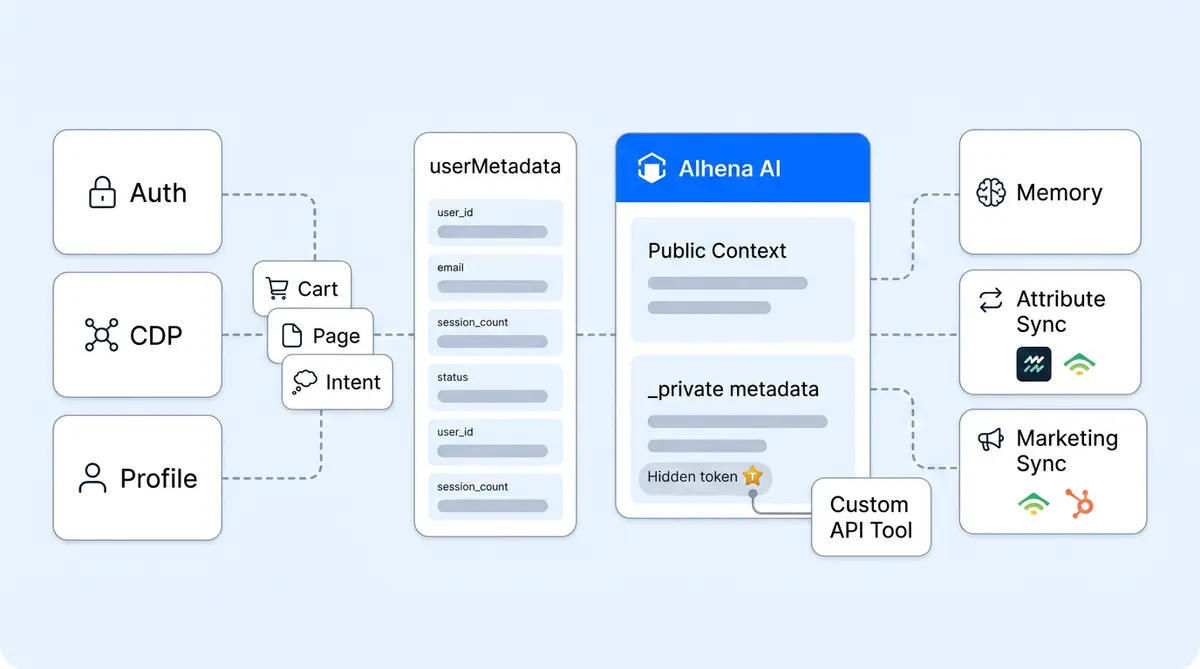
You provide all three through one surface: userMetadata, set at widget load or updated at runtime via setUserMetadata. Two visibility tiers control what the AI can see at each touchpoint:
- Public keys (no prefix): passed into the AI's prompt context. Use these for email, name, loyalty tier, segmentation tags, or current cart contents.
- Private keys (
_prefix): never sent to the language model. Reserved for bearer tokens, user IDs, and session credentials that Custom API Tools use for authenticated backend calls.
This split is the core ecommerce personalization and data privacy primitive for safe, scalable personalization across your ecommerce store. Sensitive credentials stay out of model context for safe personalization entirely, while the AI still gets the profile data it needs for ecommerce personalization, tailored recommendations for shoppers, and hyper-personalized shopping experiences.
How Personalization Starts: Identity and the Shopping Journey
Alhena identifies a shopper via whatever identifier you set in userMetadata on or after page load. It does not perform cross-device identity resolution or device-graph stitching. Your auth system or ecommerce CDP handles that upstream for your ecommerce store.
The recommended pattern:
- Anonymous visitors: Load the widget with minimal metadata (page URL, visitor type). The AI Shopping Assistant still delivers personalized recommendations based on browsing behavior, browsing history, and context.
- Returning and loyal customers on login: Call
setUserMetadatawith email, user ID, and any profile attributes and segmentation data you want the AI to reference. - On logout: Null those keys out to reset the session.
If you use mParticle as your CDP, pass the MPID and Alhena fetches configured user attributes from mParticle's Profile API, merging them into AI context for that conversation. This is the only native cross-system personalization step. Alhena relies on mParticle (or your auth layer) having already resolved who the user is.
Real-Time Customer Journey Personalization Signals: Cart, Page, and Conversions
Three real-time signals feed ecommerce personalization in every conversation through Alhena's Shopping Assistant:
- Cart state, cart abandonment prevention, purchase intent signals, and retargeting: For retailers, auto-synced on Shopify. Beyond Shopify, on WooCommerce, Magento, or custom platforms, fetch from your store API on widget load and push items, currency, subtotal, and checkout URL via
setUserMetadata. - Cart, recommendations, and purchase events: Emitted via the SDK's event API. These power Revenue Attribution for cross selling and upselling, tying each conversion back to the personalized conversation, enabling retargeting and showing real conversion rates and ecommerce conversion impact that influenced it.
- Page context: Pass the current URL, product SKU, or category. The AI uses it to deliver personalized product recommendations and tailored answers based on what shoppers are looking at.
Combined with profile attributes, these signals let Alhena help shoppers get answers that feel like a sales associate who knows shoppers' purchase history and shopping behavior and can see what's in your hand. Tatcha saw 3x improvement in conversion rates and 38% AOV uplift using this approach. Read the full case study.
Personalization in Action: Backend API Tools
When the AI needs to act on behalf of the shopper (look up an order, check a subscription, trigger an RMA), it calls a Custom API Tool configured in your ecommerce personalization dashboard. Tools authenticate using the private metadata you passed at session start.
The token never enters the model. The runtime substitutes it into the outbound HTTP call. This keeps auth out of prompt context while still letting the Support Concierge take personalized, authenticated actions like canceling orders or updating shipping addresses.
For a deeper look at configuring these tools, see our guide on agentic workflows without scripts.
Ecommerce Personalization Memory Across Touchpoints
Alhena's User Memory extracts factual statements from conversations (preferences, sizing, household details, recurring concerns) and stores them keyed to the shopper's identifier. On the next session, those facts are fetched and added to context automatically.
Admins can audit exactly which memories powered each response in the Answer Sources panel. This personalization layer is not a CDP and not a substitute for your profile store. It's a conversation-derived layer that complements whatever you sync from mParticle, Klaviyo, or HubSpot.
Closing the Ecommerce Personalization Loop: Pushing Data Back
Personalization isn't one-directional. Alhena extracts configured attributes from finished conversations and writes them back to your marketing systems:
- mParticle: Fires a
lead_generatedevent with extracted attributes via the Events API. - Klaviyo and HubSpot: Analogous lead capture flows push personalized recommendations and conversation-derived data into your email and CRM workflows.
You define the attributes (name, description, examples) in your integration settings. The lead-generation agent uses those instructions to extract values from each chat. Your broader ecommerce personalization and recommendations stack gets richer with every conversation.
What Personalization Boundaries You Still Own
Alhena's ecommerce personalization approach is explicit about its boundaries:
- Identity resolution: Your auth system or CDP is the source of truth. Alhena trusts the identifier you pass.
- Consent and privacy: You control whether to load the widget and which attributes to pass based on the user's consent state. Alhena does not ship a consent banner or DSAR workflow.
- Cross-device stitching: Done upstream (e.g., mParticle MPID) and surfaced to Alhena via that identifier.
This separation means Alhena deploys in under 48 hours, improving your customer experience and customer retention without touching your privacy architecture. It plugs into the stack you already have, personalizes every AI conversation with data you already collect for ecommerce personalization and real-time personalization across your store, and sends ecommerce personalization data back so every customer interaction, helping engage customers at each touchpoint in your stack gets smarter too.
Ready to see how your existing customer data can power personalized AI conversations? Book a demo with Alhena AI or start for free with 25 conversations.

Frequently Asked Questions
Does Alhena AI replace my CDP?
No. Alhena is the ecommerce personalization and conversational personalization layer that consumes data from your CDP and pushes enrichment back. It doesn't unify profiles, build identity graphs, or de-duplicate customer records. Your CDP remains the system of record.
What customer data can I pass to Alhena?
Any key-value pair via the SDK's userMetadata. Public keys (email, loyalty tier, cart contents, shopper preferences) enter the AI's prompt context. Private keys (prefixed with underscore) stay hidden from the model and are used only by Custom API Tools for authenticated backend calls.
Does Alhena handle cross-device identity resolution?
No. Alhena's personalization trusts whatever identifier you pass via the SDK. Cross-device stitching happens upstream in your auth system or CDP (e.g., mParticle MPID). Alhena uses the resolved identity, it doesn't create it.
How does cart data sync with Alhena?
On Shopify, cart state syncs automatically. On WooCommerce, Magento, or custom platforms, you fetch cart data from your store API at widget load and push it via setUserMetadata. Cart and purchase events power Alhena's Revenue Attribution.
What is User Memory and how is it different from a profile store?
User Memory extracts facts from conversations (shopping preferences, sizing, browsing behavior, household details) and recalls them on return visits. It's a conversation-derived layer, not a CDP replacement. It complements the profile data you sync from mParticle, Klaviyo, or HubSpot.
How long does it take to set up Alhena's personalization features?
Most ecommerce brands deploy Alhena personalization in under 48 hours. Passing metadata via the SDK requires minimal frontend work. CDP integrations like mParticle connect through the dashboard without dev resources.