Most e-commerce chatbots still run on scripted, repetitive if/else trees. They work fine for "What are your hours?" but fall apart when a shopper says, "I want to return order #1234 but also swap the blue one for a medium in black." That query touches returns, inventory, sizing, and order modification in a single message. A scripted bot dead-ends or hands off to a human.
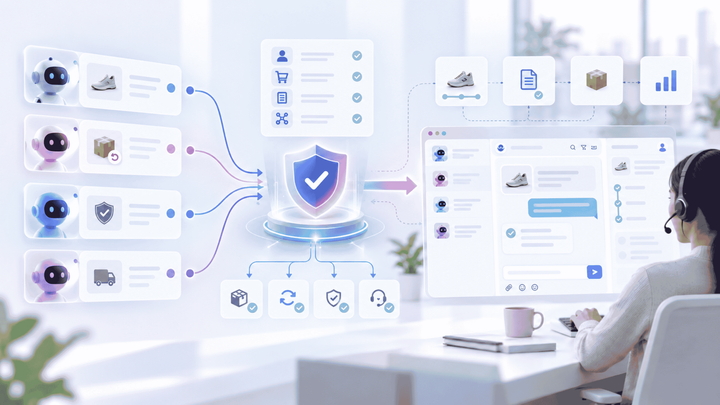
Agentic commerce workflows handle this differently. Instead of mapping every path in advance, you describe what each AI agent is responsible for, give it tools to execute actions, and write rules that shape its behaviour. An intelligent planner powered by large language models and machine learning models reads the customer context in their message and routes it to the right agent autonomously. No flowchart. No code. This is what AI systems for e-commerce look like in practice. This post walks through how that works in Alhena for Shopify stores, with an example you can replicate.
Flow Canvases vs. Declarative Agent Configuration
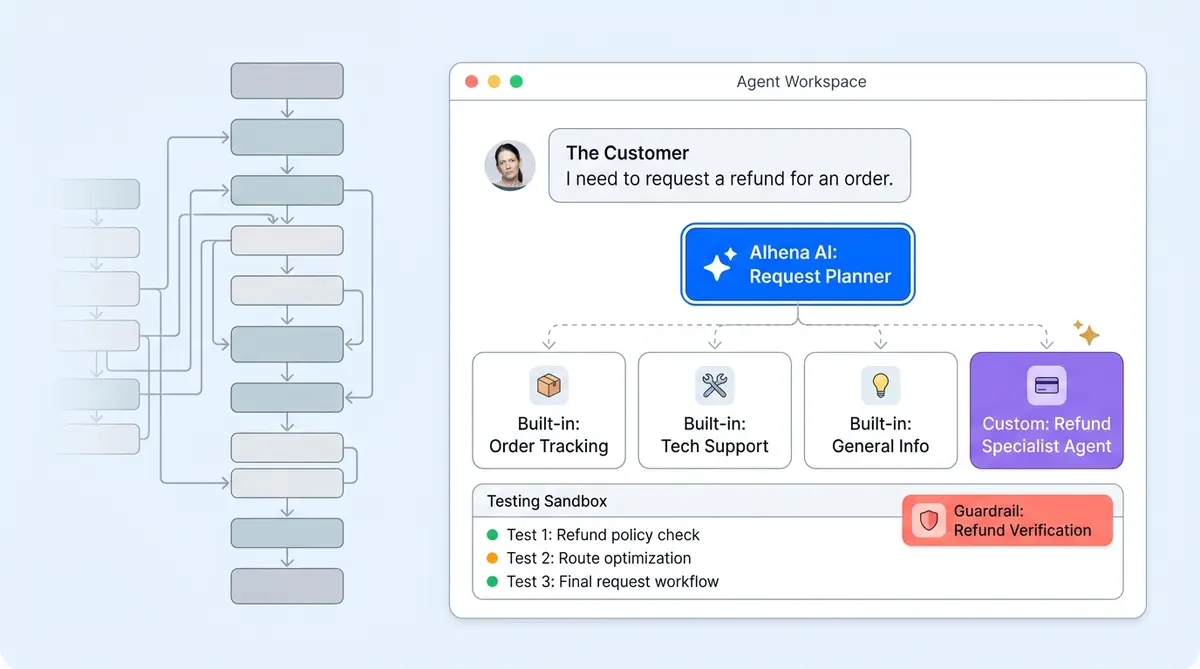
There are two design patterns for building agentic workflows for e-commerce. The first is visual: some ecommerce platforms use visual workflow builders that let you drag and drop decision nodes on a canvas. You draw the path a conversation follows. The second is declarative: you describe each agent's purpose in plain language, assign capabilities, and set guidelines. A planner backed by large language models matches customer intent to agent descriptions and routes automatically.
Alhena uses the declarative model. You don't draw a flowchart. You compose behaviours by writing agent descriptions and rules, not generative AI prompt engineering. The trade-off is real: visual canvases give you explicit, predictable paths; declarative agentic commerce design patterns give you flexible coverage that generalizes to queries you didn't anticipate. For e-commerce support, where customers interact and phrase the same request in dozens of ways across chat, email, and other channels like Instagram DMs, that flexibility tends to matter more.
What an Agentic Shopify Configuration Looks Like in Alhena
When you connect your Shopify store to Alhena's AI Shopping Assistant, three built-in agents activate automatically:
- Product Expert Agent handles product specs, comparisons, and alternatives when items are out of stock.
- Order Management Agent retrieves order status and tracking details and answers questions about shipping, returns, and exchanges.
- Outfit Builder Agent assembles coordinated looks from your catalog (requires enablement from the Alhena team).
These agents cover the most common Shopify queries out of the box. For store-specific scenarios that vary across businesses and e-commerce brands, you create custom agents in the dashboard. Each custom agent gets a name, a description, and optional capabilities for tool use. The description is the key: the planner reads each prompt and makes routing decisions autonomously. This decision-making process determines when to route conversations to that agent. A "pre-order status agent" described as "handles questions about upcoming product launches, pre-order timelines, and estimated ship dates" will catch those queries without you mapping every possible phrasing.
In agentic commerce, tools extend what agents can do. The native Shopify integration (with more platform integrations available) gives agents access to your product catalog, orders, and customer data. For systems Alhena doesn't natively connect to, API Tools (Pro plan (see pricing)) lets you wire up any HTTP endpoint via their API: your 3PL API's tracking API, a loyalty platform, or a billing service or payment services. MCP Servers (API-based) (also Pro; check pricing for details) expose multiple tools through a single standardized connection. For simpler lookups, Sheet Search works on all pricing plans and lets agents query Google Sheets for things like SKU-level return policies or regional shipping rules.
The shift from retrieval-based chatbots to agentic commerce is the difference between an agent that finds information and one that takes action on your customer's behalf.
Conditional Logic for VIP Customers, Without a Flowchart
In a visual builder, treating VIP customers differently means creating a "check customer tier" node, branching on the result, and duplicating downstream logic for each segment. In Alhena, you write a Guideline.
Guidelines are natural language rules with a trigger, an action, and a scope:
- Trigger: "Metadata field 'subscription_tier' equals 'premium'"
- Action: "Offer free return shipping and expedited processing. Apologize for any inconvenience."
- Agent: Order Management Agent
- Channel: All channels
Your Shopify storefront passes customer data (tags, lifetime value tier, and subscription status) to Alhena via the Website SDK's custom data feature. When the metadata matches the trigger, the guideline fires and shapes agent behavior and how it responds. No branching nodes. No duplicated flows.
This pattern scales cleanly. Different behavior for wholesale vs. retail? Add a guideline. A/B testing a new greeting for a segment? Use metadata ab_variant_group as the trigger. Each guideline stays focused on a single scenario, so they're easy to audit and update without touching other rules. Brands that avoid common mistakes that brands make with AI agents keep guidelines narrow rather than trying to cover too much in one rule.
Testing Before It Reaches a Customer
Alhena's Playground lets you test agent routing and responses in a sandbox. Interact with the playground by typing a customer query, see which agent the AI systems planner picks, and check whether the response matches expectations.
Three things to test before going live with any new agent or guideline:
- Routing accuracy. Feed the Playground five to ten variations of the same request. If the planner doesn't consistently pick the right agent, sharpen the agent's description.
- Metadata-driven behavior. Pass different
userMetadatavalues (VIP vs. standard, subscriber vs. guest) and confirm the correct guidelines fire. - Ambiguous queries. Ask questions that could match multiple agents. Watch which one the planner selects to detect routing issues. Overlap tells you where descriptions need tightening.
The iteration loop is fast: tweak a description or guideline, retest, and deploy. This iterative process of continuous improvement keeps your agentic workflows evolving over multiple iterations. No flowchart rewiring. For a structured approach to ongoing improvement, the AI coaching playbook for ecommerce teams covers how to analyze feedback and refine agent performance week over week.
When You Still Need Hard Rules
Not everything should be left to agent reasoning. Payment authorization, payments processing, refund execution, identity verification, and refund approvals are cases where you want a deterministic gate for autonomous execution, not a judgment call. Alhena handles this through API tool preconditions and guideline guardrails. A guideline like "Never process a refund without a verified order ID and matching email address" creates a hard stop within the agentic flow.
The result is a hybrid: flexible, intent-based routing for the 90% of queries that benefit from it, and strict rules for the 10% that need rigid control.
Getting Started
Ecommerce brands like Tatcha (3x conversion rate, 82% chat deflection through automation) and Puffy (63% automated resolution, 90% CSAT) already run agentic commerce workflows in production with Alhena. The Shopify integration deploys in under 48 hours, and productivity gains start from day one of deployment with no dev resources.
Ai agents interpret each prompt, select the right tool use pattern, and handle execution autonomously. Language models powering these design patterns automate queries they have never seen.
Ready to move past scripted bots? Book a demo with Alhena AI or start your free trial with 25 conversations.

Frequently Asked Questions
What are agentic workflows in ecommerce?
Agentic workflows use AI agents that reason about customer intent, route queries to specialized agents, and complete tasks like checking order status or processing returns. Unlike scripted bots that follow fixed if/else trees, agentic ai agents can interact with multiple systems, execute tasks, and automate workflows they were not explicitly programmed for. These autonomous agents refine their capabilities through evolving prompt interpretation and continuous improvement.
How does Alhena configure agentic workflows without code?
Alhena uses a declarative model. You create agents by writing a name and description, assign tools (API Tools, MCP Servers, or Sheet Search), and set guidelines with natural language triggers. A planner reads agent descriptions to route queries automatically. No scripting or flowchart building required. This approach uses language models to automate prompt routing across agents, with no automation scripts needed.
What built-in agents does Alhena activate for Shopify?
Connecting Shopify activates three agents: the Product Expert Agent for product specs and recommendations, the Order Management Agent for order status and returns, and the Outfit Builder Agent for styling and complete looks (requires enablement from the Alhena team).
How do metadata-driven guidelines handle VIP customers?
Your Shopify storefront passes customer data like subscription tier or lifetime value to Alhena via the Website SDK. You write a guideline with a metadata trigger such as subscription_tier equals premium, and the agent can execute behavior changes accordingly. No separate flowchart branch needed.
How do you test agentic workflows before going live?
The Playground in the Alhena dashboard lets you type customer queries and see which agent the ai systems planner picks. Test routing accuracy with query variations, verify metadata-driven guidelines with different user profiles, and check prompt execution against expected tool use outcomes.
How is Alhena different from visual workflow builders like visual workflow builders?
Some platforms use a visual canvas where you drag and drop decision nodes. Alhena uses declarative configuration: you describe agent purpose in plain language and the planner routes automatically. The declarative approach with language models generalizes better to unanticipated queries, while visual canvases give more control over fixed paths.