A February 2026 Gartner survey found that 91% of customer service leaders face pressure to roll out AI this year. The same report noted that 84% are already adding new capabilities to evolving agent profiles. The message is clear for leaders: AI is rewriting the support job description.
When AI resolves 80% of routine queries, the remaining 20% become the entire job. Your customer service workforce shifts from ticket closers to AI operators. This post lays out a practical model for the five capabilities that matter most.
The New Daily Mix for AI-Augmented Agents
After intelligent AI systems take over the repetitive ticket queue, the agent's day looks completely different.
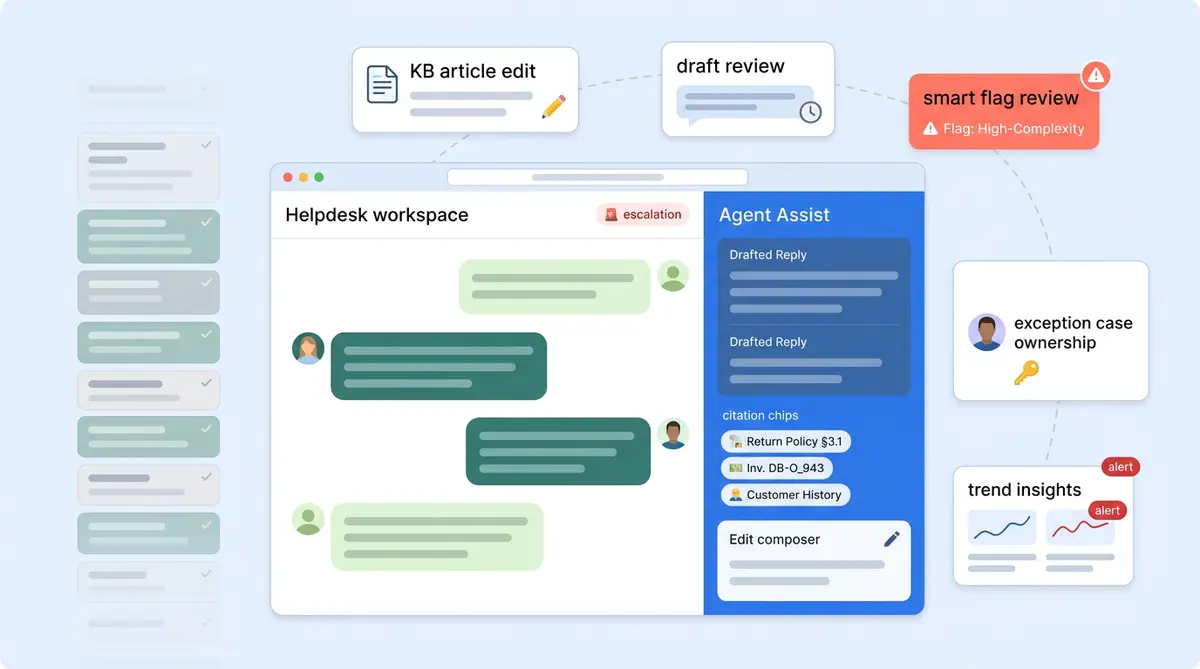
A typical shift now includes reviewing escalated conversations the AI couldn't resolve, hands-on editing AI-drafted replies for better accuracy before they go out, auditing flagged AI outputs, and updating the knowledge base when content gaps surface. With Alhena AI's Agent Assist, agents use tools inside their existing helpdesk (Zendesk, Freshdesk, Zoho Desk, or Zoho SalesIQ) with a sidebar that drafts replies, lets them adjust tone, length, and suggestions, and shows source citations from the intelligent knowledge base. These tools ground every suggestion in verified data.
The shift requires better tools and judgment, not just speed.
Five Capabilities That Define the AI-Augmented Agent
These aren't abstract ideas. Each one maps to something your agents will do every day once AI handles the routine volume for service agents.
1. Knowledge Base Stewardship
Every escalation is a signal. When a customer question reaches a live agent in your support systems, it often means the AI couldn't find a grounded answer in the knowledge base. The best agents treat each escalation as an opportunity to spot a KB hole, write the missing article, or update the outdated policy. Over time, this shrinks the escalation rate and makes the AI smarter, which helps your workforce stay ahead of evolving customer needs. For a deeper look at this feedback loop, see our guide on how support teams train and improve AI agents week over week.
2. Draft-Editing Judgment
AI-drafted replies are a starting point, not a final answer. Agents need judgment to know when a live draft is ready to send, when the tone needs softening for a frustrated customer, and when to scrap the suggestion entirely. Alhena's Agent Assist learns each agent's writing style over time, but the agent still owns the final call. This hands-on capability is less about writing speed and more about editorial instinct.
3. Flag Adjudication
Not every AI response deserves the same level of trust. Alhena's Smart Flagging automatically identifies the small percentage of AI outputs that need review: low-confidence answers, signs of customer frustration, sensitive topics including refunds, and fallback replies. Agents interpret why a response was flagged and decide whether to approve, edit, or override. This is the quality assurance layer that keeps AI trustworthy at scale.
4. Exception Ownership
The 20% of conversations that reach a human are the hardest ones: complex returns, warranty disputes, VIP clients, or edge cases where customers need creative solutions. These essential interaction types require empathy and the authority and tools to make decisions. The handoff from AI to human needs to be clean, with full conversation context passed along so the agent doesn't ask the customer to repeat themselves.
5. Voice-of-Customer Synthesis
AI analytics show conversation volumes, resolution rates, trending topics, and what customers ask most. Personalized customer interactions stand out. The Alhena dashboard surfaces all of this. But turning data into action still takes a person. Agents who can spot patterns (a spike in complaints about a new product, for example, a recurring policy confusion, or a seasonal shift in question types) become strategic assets. Using analytics tools, they generate insights that connect frontline signals to decisions that product, marketing, and ops teams need to make.
Redefining the Role, Not Eliminating It
Teams rolling out AI are redefining roles. Common archetypes across e-commerce brands:
- Customer Resolution Specialist handles the complex exceptions AI escalates, with full authority to deliver resolution.
- Knowledge Operations Lead owns the KB, writes new content based on escalation patterns, and measures coverage holes.
- AI QA Reviewer monitors flagged responses, tunes AI behavior, and maintains quality and management standards.
Brands like Manawa cut agent workload by 43% while dropping response times from 40 minutes to 1 minute. That freed-up capacity meant higher-value work, not fewer people. Crocus hit an 86% deflection rate with 84% CSAT, which only works when the human agents handling the remaining 14% are skilled enough to maintain that satisfaction score. And as we've explored in our post on whether AI should replace support agents, the answer is consistently no: it should elevate them.
Measuring What Matters in the New Role
Traditional customer service KPIs don't capture agent value here. Track these instead:
- KB contribution rate: How many knowledge base updates does each agent submit monthly?
- Agent Assist adoption: Are agents using AI-drafted replies, or ignoring them? These metrics matter. Low adoption signals a training or trust problem or a trust problem.
- Post-escalation CSAT: Customer satisfaction on the conversations AI couldn't handle. This is the truest measure of human agent quality.
- Escalation reason distribution: Are the same issues causing repeated escalations? Agents should be closing those loops.
- Flag review accuracy: When agents override a flagged AI response, are they making the right call?
Alhena's Agent Assist analytics track adoption rates, AI vs. agent conversation splits, and resolution rates out of the box. For deeper per-agent metrics like KB contributions and flag review accuracy, pair these with your helpdesk system's native reporting. The combination gives you a complete picture. For the cost side of this equation, our outsourcing vs. AI cost framework breaks down the math.
Getting Started: A Five-Step Rollout
- Communicate the "why" before the tool. Share the change management plan and available resources before you flip on AI. Fear of replacement kills workforce adoption.
- Pilot with one team or channel. Start with one live channel like email or chat, not everything at once. Traffic splitting lets you test AI safely alongside human agents.
- Set a conservative automation target. Start at 50% AI resolution and increase as the KB matures. Stay conservative early.
- Run weekly KB-gap reviews. Every Monday, look at recent escalations and ask: which of these could the AI have handled with better documentation? Leaders who run reviews?
- Redefine career ladders before quotas. Show agents the path from "ticket closer" to "AI operator" with real titles, real pay bands, and real growth opportunity across the organization.
Ready to give your support team the AI-powered tools that make upskilling practical? Book a demo with Alhena AI or start for free with 25 conversations.

Frequently Asked Questions
What does an AI-augmented support agent do differently?
Instead of handling repetitive tickets like order status or password resets, AI-augmented agents focus on escalated conversations, editing AI-drafted replies, reviewing flagged AI responses, and maintaining the knowledge base. The routine 80% is handled by AI, leaving agents with the complex 20% that requires human judgment.
What skills do support agents need to work alongside AI?
Five core skills matter most: knowledge base stewardship (finding and fixing content gaps), draft-editing judgment (refining AI-suggested replies), flag adjudication (reviewing AI responses flagged for low confidence or sensitivity), exception ownership (resolving complex cases AI can't handle), and voice-of-customer synthesis (turning analytics into actionable insights).
Does Alhena AI provide agent training modules or templates?
Alhena AI doesn't ship training courses or downloadable templates. What it provides is the daily tooling that builds these skills through practice: Agent Assist drafts replies with source citations, Smart Flagging surfaces AI responses that need human review, and the analytics dashboard shows AI vs. human performance splits.
How does Agent Assist help with the upskilling process?
Agent Assist works as a sidebar inside Zendesk, Freshdesk, Zoho Desk, or Zoho SalesIQ. It drafts replies grounded in the knowledge base, lets agents adjust tone and length, and shows source citations for every suggestion. Over time, it learns each agent's writing style, making drafts more accurate and reducing edit time.
What KPIs should I track for AI-augmented agents?
Move beyond tickets-per-hour. Track KB contribution rate (updates per agent per week), Agent Assist adoption rate, post-escalation CSAT, evidence-based escalation reason distribution, and flag review accuracy. Alhena's dashboard covers adoption rates and resolution splits natively. Pair it with your helpdesk reporting for per-agent depth.
How long does it take to upskill a support team for AI-augmented work?
Most teams see meaningful adoption within 2 to 4 weeks of deploying AI alongside human agents. Start with a pilot on one channel, set a conservative 50% automation target, and run weekly knowledge base gap reviews. The skills develop through daily use of tools like Agent Assist and Smart Flagging, not through classroom training.