The Confidence Gap: Why Informal AI Tests Fail
Every ecommerce CX leader considering AI deployment faces the same internal objection from stakeholders: "Prove it works before we scale it." The problem is that most brands test AI informally. They deploy it broadly, check CSAT after a month, and call it a pilot. That approach produces unreliable data because there's no control group, no statistical significance, and no way to isolate AI impact from seasonal, promotional, ad-driven, or campaign-driven fluctuations.
A properly designed traffic split test, a form of controlled experimentation, disciplined experimentation, and structured testing methodology, solves this. Experimentation done right removes opinion from the decision. Structured split testing experimentation also protects you from acting on anecdotal feedback. It helps CX leaders produce clean, defensible data and helps the business to build the internal business case for full AI deployment and align results with broader business goals. This guide walks you through exactly how to set up, run, analyze, and optimize a controlled AI vs human agent testing experiment using your existing helpdesk integration. Think of it as a creative approach to ai-driven testing that can help your team that replaces guesswork with structured experiments.
Three Split Testing Approaches: How Split Testing Methods for AI A/B Testing in Ecommerce
Before you start routing conversations, you need to choose a splitting method. Each has trade-offs around data quality, ease of setup, and bias risk. Running tests with the right experimentation method determines whether your experiments produce actionable data or noise. While multivariate testing frameworks control for many variables, the best experimentation frameworks control for the key variables that informal tests ignore.
Method 1: Random Assignment (Gold Standard)
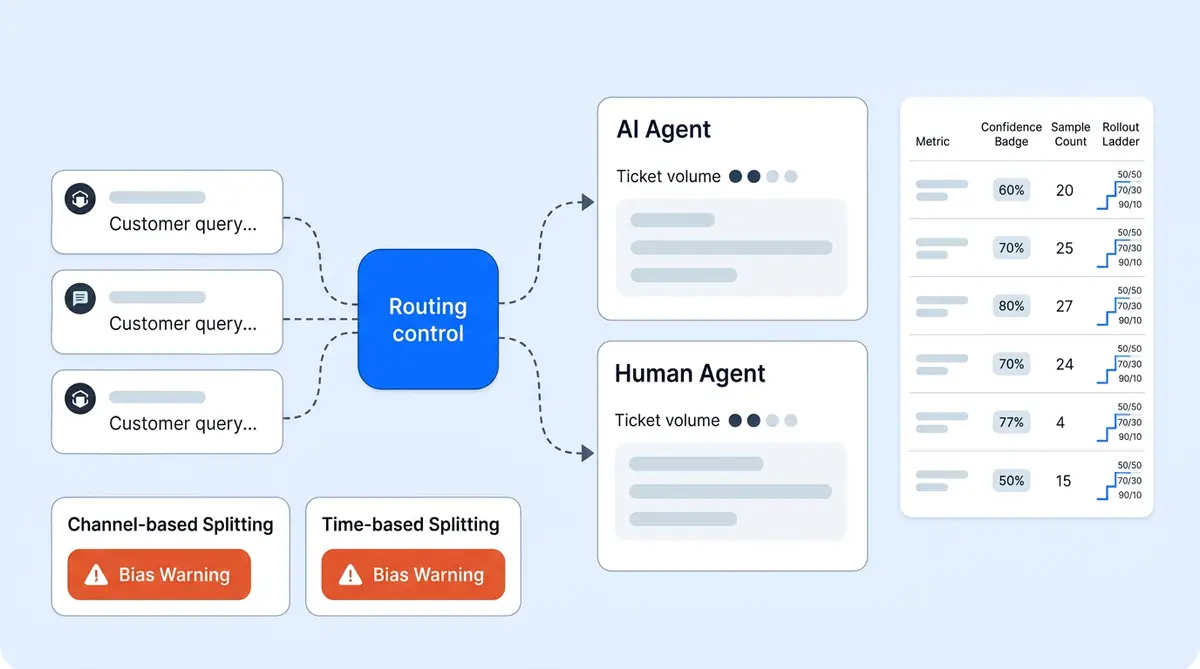
Route a defined percentage of incoming conversations randomly so each one has an equal probability of being handled by AI or a human agent. A 50/50 split produces the fastest results and the largest sample size per group. A bigger sample size reduces the margin of error. Calculate sample size requirements before you start in your results. A 70/30 AI/human split works if you want to minimize disruption to your existing team while still collecting enough AI data.
Random assignment is the cleanest comparison because it eliminates selection bias. Both groups receive identical ticket types, customer segments, and complexity levels. Customers in each group should represent the same mix of new and returning shoppers. This is the method you should use if your volume supports it. Unlike multivariate testing or full-factorial multivariate testing, which tests multiple variables at once, an A/B split testing approach isolates one variable: AI versus human handling.
Method 2: Channel-Based Split
Assign AI to one channel (webpage live chat on your store webpage or product page) and keep humans on another (email) during the test period. This is simpler to configure but introduces channel bias. Web chat and email shoppers behave differently: chat users expect faster responses. They tend to ask simpler questions than those who click through email subject lines or marketing campaign links, and convert at different rates. Your test results will reflect channel differences, not just AI performance.
Method 3: Time-Based Split
Alternate between AI and human handling by time blocks. AI handles mornings, humans handle afternoons, rotating weekly. This is the easiest to manage but the most vulnerable to bias. Morning visitors and afternoon visitors have different behavior and intent patterns. Shopper behavior varies by time of day. Customer behavior patterns shift between weekdays and weekends too, cart sizes, and urgency levels. Time-of-day behavior differences contaminate your results.
Recommendation: Use Method 1 (Random Assignment) whenever possible. The other two methods work as fallbacks if your helpdesk doesn't support percentage-based routing, but they require more careful interpretation of results.
How to Configure Random Traffic Splitting in Your Helpdesk
Within your helpdesk platform, configure routing rules that assign a set percentage of incoming tickets to the AI agent and the remainder to the human queue. Alhena AI's Support Concierge integrates with Zendesk, Freshdesk, Gorgias, and Kustomer with configurable routing rules that support percentage-based split testing, A/B split testing, and traffic splitting without custom development.
Three rules make the split clean:
- Tag at assignment. Every conversation gets tagged as "ai-test" or "human-test" the moment it's routed. This tag follows the ticket through its lifecycle so your analysis can split results by group without ambiguity.
- Match ticket types across groups. Do not route only simple tickets to AI and complex ones to humans. Both groups must receive the same distribution of order status inquiries, product questions, returns, complaints, and everything else. If your routing rules filter by ticket type before splitting, you're biasing the test.
- Lock the split percentage. Don't adjust the ratio mid-test. If you start at 50/50, stay at 50/50 until the test concludes.
Volume and Duration: How Long to Run the Test
Most ecommerce brands need a minimum of 500 conversations per group (AI and human) to detect a meaningful difference in resolution rate or CSAT with 95% confidence. At typical ecommerce support volumes, this means running the test for 2 to 4 weeks minimum.
Stopping the test early because early results look good (or bad) is one of the most common mistakes. Small sample sizes produce noisy data. A 5-point CSAT variation in week one might vanish by week three as the sample grows. Natural variation in customer sentiment makes small samples unreliable. Set a clear target for each metric before the test starts. Your target benchmarks and target KPIs should come from existing human agent performance. Commit to the full test duration. Reaching statistical significance requires patience. Without statistical significance, your results are just noise. Only draw conclusions from statistically significant differences between groups. Report only statistically significant findings to stakeholders. A statistically significant result means the difference you observe is real, not random, and don't analyze final results until you hit your target sample size.
If your brand handles fewer than 250 support conversations per week, extend the test to 6 weeks or increase the AI allocation to 70% to reach the 500-conversation threshold faster.
Seven Metrics to Compare: AI vs Human Agent Testing Scorecard
Measure these seven metrics identically for the AI group and the human group. No exceptions, no different definitions between groups. Every metric must reflect the actual customer experience.
- Resolution rate: Percentage of conversations fully resolved without needing follow-up or reopening within 48 hours.
- First response time: How quickly the first reply reaches the customer after they send their initial message. Real-time response matters: customers expect answers in seconds on chat, not minutes.
- Full resolution time: Total elapsed time from the customer's first message to confirmed resolution.
- CSAT score: Collected through identical post-conversation surveys for both groups. Use the same survey format, the same scale, and the same timing for delivery. Real-time survey delivery works best. Alhena AI collects CSAT natively within the conversation for both AI and human-handled interactions, removing the variable of different survey tools.
- Escalation rate: Percentage of conversations that required transfer to a different handler (AI escalating to human, or human escalating to a specialist).
- Cost per resolution: Fully loaded cost including platform pricing and fees for AI conversations and agent salary plus overhead for human conversations.
- Revenue impact: For brands using an AI shopping assistant, compare conversion rate, average order value, and checkout completion for sessions where the shopper interacted with AI versus a human agent. Personalized product recommendations from AI can lift AOV during these sessions. Track cart additions, cart value, cart abandonment, checkout starts, checkout completions, and cart abandonment rates separately. Alhena's revenue attribution analytics track this automatically.
Four Pitfalls That Invalidate AI A/B Testing Results
Even a well-designed test can produce misleading data if you don't control for these common problems.
Routing bias. If your AI handles 80% order-status queries while humans handle 80% complaints, you're not comparing AI to humans. You're comparing easy tickets to hard tickets. Have your CX teams verify ticket-type distribution is balanced across both groups weekly. Set up real-time monitoring dashboards and schedule weekly updates so the team catches imbalances early.
Hawthorne effect. Do not tell human agents they're being compared to AI during the test. When agents know they're being measured against a machine, they change their behavior: faster responses, more careful language, higher effort. That inflates human performance, skews the comparison, and misrepresents what customers would actually experience post-deployment.
Measurement inconsistency. Use the same CSAT survey, the same resolution criteria, the same measurement elements, and the same escalation definitions for both groups. Any variation in your testing tool, measurement tools, or testing tool configuration creates variation in results that has nothing to do with AI performance. If AI conversations use an in-chat survey and human conversations use a follow-up email survey, response rates will differ, and so will scores.
Cherry-picking timeframes. Commit to the full test period and analyze complete data. Don't select the best week for AI or the worst week for humans to build your narrative. If a sale, paid ad campaign, social ad burst, retargeting ad, or targeted promotion happened mid-test, note it as a variable but include all data in your analysis. Rigorous analysis of the complete dataset prevents false conclusions.
Analyzing Results: Four Scenarios and What to Do Next
When the test concludes, your data will likely fall into one of four scenarios. The results determine your next move. They also determine which conversation categories are ready for AI and which still need human handling. Each one leads to a different scaling decision.
Scenario 1: AI matches or exceeds humans across all metrics. Deploy AI broadly and automate the majority of incoming volume. Transition human agents to specialist roles handling escalated conversations only. This is the outcome brands like Tatcha (3x conversion rate, 82% chat deflection) and Puffy (63% automated inquiry resolution, 90% CSAT in fully automated conversations) have documented.
Scenario 2: AI matches humans on resolution and speed, but CSAT is 3 to 5 points lower. Apply customer segmentation and ticket segmentation to investigate which conversation types drive the CSAT gap. Tune AI guidelines for those specific scenarios and retest the gap area rather than rejecting AI entirely.
Scenario 3: AI underperforms on specific ticket categories but excels on others. Deploy AI on the categories where it performs well (order status, shipping, product questions, sizing) and keep humans on categories where AI underperforms (complex complaints, emotionally sensitive issues, multi-system problems). This hybrid approach captures most of the efficiency and cost gains while protecting CX quality and user experience across all channels. The user experience must stay consistent whether AI or a human handles the conversation.
Scenario 4: AI significantly underperforms across the board. Diagnose the root cause before abandoning the test. Form a hypothesis about what went wrong. Test that hypothesis directly. A clear hypothesis leads to better test design. Run a focused rerun targeting the specific failure category. Refine your AI knowledge base, refine response templates, then refine your routing rules based on what the data shows. Common causes include incomplete knowledge base content, misconfigured generative AI conversation guidelines, or testing against a metric where AI wasn't designed to compete. Review your AI quality framework and address gaps and optimize your knowledge base, optimize response tone, optimize escalation triggers, and optimize resolution workflows before retesting.
Scaling Gradually: From Test to Full Deployment
Once the test produces a clear result, scale gradually rather than flipping a switch. Move from 50/50 to 70/30 AI/human and monitor the same seven metrics for two weeks. Then move to 85/15 or 90/10, where humans handle only escalated conversations and the rest are fully automated. The automated portion should cover order tracking, FAQs, and simple returns. Running tests at each scaling step produces additional data confirming the test results hold at higher AI volume. Over time, the data from these experiments and previous experiments also informs predictive testing models that help businesses decide which visitor segments and campaigns benefit most from AI-first handling.
Alhena AI's configurable routing rules make this scaling straightforward. Adjust the percentage in your helpdesk integration settings, and the system dynamically rebalances traffic. The same KPIs you tracked during the test continue reporting at each scale level, so you catch any degradation before it affects the full customer base. These real-time insights give your team confidence at every step.
Why Alhena AI Is Built for Controlled Testing
Most AI platforms treat testing as an afterthought, leaving CX teams, marketers, and operations leads to build their own tracking spreadsheets. Marketers running marketing campaigns alongside support tests, or launching a marketing campaign, influencer marketing campaign, or holiday marketing campaign in the middle of your test period end up with conflicting data. Alhena is built for it from day one. It works as a complete testing tool for AI deployment, similar to how tools like Optimizely let you run webpage experiments for conversion optimization. The platform integrates with your existing helpdesk through native connectors that support percentage-based traffic splitting without custom development. Every AI-handled conversation is tagged and tracked in real-time through built-in analytics and integrations covering resolution rate, response time, CSAT, analytics dashboards, real-time analytics, and revenue attribution.
Alhena's Conversation Debugger lets CX teams inspect specific AI responses during the test to understand why certain conversations went well or poorly. This turns test results into actionable improvement rather than a pass/fail judgment. Explore the feature in a live walkthrough when you book a demo. The insights from each test cycle feed directly into AI improvement. And because Alhena deploys in under 48 hours, the test can start within days of deciding to run it. You can be running tests within a week, and running tests at scale, continuously running tests with new variables, within a month.
The brands with the strongest AI business cases aren't the ones with the best intuition about AI. They're the ones who ran a rigorous test, produced clean data, and let the numbers make the argument. A properly designed split testing experiment takes 2 to 4 weeks and produces the evidence that turns internal skeptics into AI advocates.
Ready to run your own AI vs human agent test? Businesses of all sizes can get started quickly. Book a demo with Alhena AI to see how traffic splitting works with your helpdesk, or start free with 25 conversations to test the platform firsthand.

Frequently Asked Questions
How do I set up AI A/B testing in ecommerce without custom development?
Alhena AI connects to your existing helpdesk (Zendesk, Freshdesk, Gorgias, or Kustomer) and supports percentage-based routing rules out of the box. You configure the traffic split percentage in the integration settings, tag each conversation at assignment for real-time tracking, and the system handles random assignment automatically. Setup takes under 48 hours with no engineering work required.
What sample size do I need for a statistically valid AI vs human agent test?
You need a minimum of 500 conversations per group (AI and human) to detect meaningful differences in resolution rate or CSAT at 95% confidence. For most ecommerce brands, that means running the test for 2 to 4 weeks. Lower-volume brands should extend to 6 weeks or increase AI allocation to 70% to reach the threshold faster.
Can I measure revenue impact during an AI vs human agent test?
Yes. Alhena AI includes built-in revenue attribution that tracks conversion rate and average order value for every AI-handled shopping conversation. During the test, you compare these revenue metrics between the AI group and the human group to quantify the sales impact of AI, not just the support efficiency.
How does the Conversation Debugger help analyze AI test results?
Alhena AI's Conversation Debugger lets CX teams open any AI-handled conversation from the test and inspect the AI's reasoning, knowledge sources, and response decisions step by step. Instead of just seeing aggregate pass/fail metrics, teams can identify exactly which conversation types the AI handled well and where it needs guideline tuning.
What is the safest way to scale AI after a successful traffic split test?
Scale in increments rather than switching all traffic at once. Move from your test split (50/50) to 70/30 AI/human and monitor the same seven metrics for two weeks. Then increase to 85/15 or 90/10. Alhena AI's configurable routing rules let you adjust the percentage in your helpdesk settings without reconfiguring the integration, and built-in analytics continue tracking performance at each scale level.