The Dashboard Isn't Enough
Conversational AI deployments grew 64 percent year-over-year through 2025, according to Elsner Technologies research. Mid-sized ecommerce brands now generate five to twenty million chat messages a year. All that conversation data sits inside the AI platform, visible through dashboards and summary reports and performance data, but locked away from the tools your team actually uses to make decisions.
Dashboards show you what happened. They don’t reveal the pain points underneath. They don't let you cross-reference support patterns with warehouse data, build custom customer satisfaction models in Looker, or hand compliance a tamper-evident audit trail of customer feedback. For that, you need the raw data.
Alhena's Data Export solves this by automatically delivering detailed, message-level customer service conversation data to your team on a weekly or monthly schedule. No customer service API requests, no support ticket exports to configure, no manual downloads. This post walks through exactly what the feature exports, how it works, and why it matters for teams that treat customer service analytics as a strategic customer support input rather than an afterthought.
What Alhena Data Export Actually Delivers
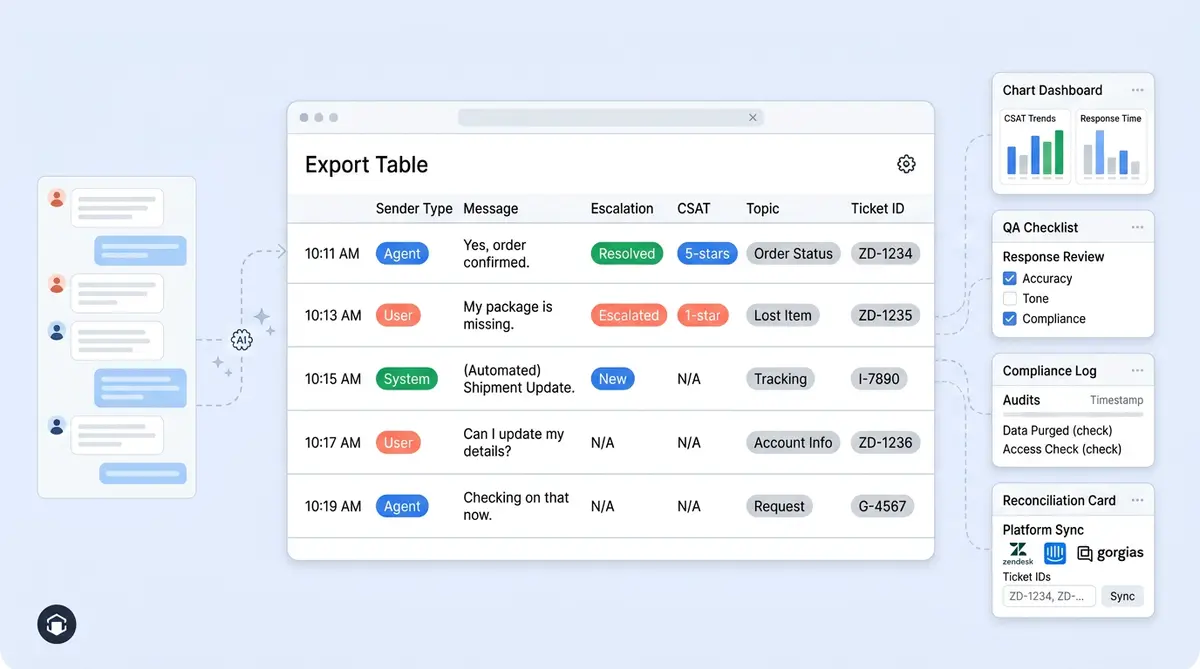
Most AI platforms give you conversation summaries or aggregated metrics when you hit "export." Alhena takes a different approach. Every export contains message-level rows, meaning each line in the CSV represents a single message within a conversation, not a rolled-up summary.
Here's what each row includes:
- Conversation ID and Message ID for joining data across systems
- Full message text from the customer, the AI, or a human agent
- Sender type (user, bot, or human agent) so you can filter by who said what
- Timestamp and locale/language for time-series and multilingual analysis
- Conversation source and source category (web chat, email, social media channels like Instagram, WhatsApp)
- External ticket ID and type when connected to a helpdesk like Zendesk, Freshdesk, or Gorgias
- Referrer URL path and page title showing where the customer started the conversation
- Sender IP and geo fields (city, country, state, timezone)
- Thumbs up/down counts and satisfaction rating with review text
- Topic tags from Alhena's analytics engine
- FAQ-initiated flag indicating whether the message came from an FAQ prompt
- Human response flag showing whether the conversation needed agent involvement
That level of insight means you can reconstruct entire customer experience journeys, not just count tickets. You can see which page triggered a question, whether the AI answered it or escalated, what the customer rated the experience in post-interaction surveys, and what topic Alhena tagged it under, and what the overall customer sentiment was.
How Scheduled Data Export Works
Alhena built Data Export as a set-it-and-forget-it system. There's no API to configure, no webhook to maintain, and no cron job to babysit. The entire setup takes about two minutes.
Setup in Four Steps
- Alhena enables the feature for your Enterprise account.
- An org admin opens Settings, then Scheduled data export in the Alhena dashboard.
- The admin toggles on automated conversation export.
- The admin picks a frequency: weekly or monthly.
That's the entire configuration. Once active, Alhena's backend scheduler checks for due exports, collects your conversation messages for the relevant period, enriches each row with topic tags and satisfaction data, compresses everything into a ZIP file containing a CSV, and emails it directly to your company admins.
How the System Handles Scale
High-volume brands don't need to worry about export size. Alhena processes records in batches, so even accounts with hundreds of thousands of monthly messages get clean, complete exports without overloading memory or timing out. Weekly exports cover the previous seven days. Monthly exports cover the previous calendar month.
The result is a predictable, automated data pipeline that arrives in your inbox without anyone writing a single line of code.
Six Ways Teams Use Exported Conversation Data
The value of Data Export isn't the CSV itself. It's what your customer service team does with the data once it lands in your analytics stack. Here are several example customer service use cases we see across Alhena's enterprise customers.
1. Custom BI Dashboards in Looker, Tableau, or Power BI
Alhena's built-in conversation analytics dashboard handles the most common customer service reporting needs. But teams running any analytics tool like Looker, Tableau, Google Sheets, or Power BI want to blend customer service data with customer service order data, marketing attribution, CRM records, and warehouse metrics. Data Export gives them the raw insight to build those cross-functional service analytics dashboards without depending on an API integration.
2. Satisfaction Deep Dives and Sentiment Analysis
Each exported row includes the CSAT rating and the customer's review text. That means you can go beyond average customer satisfaction results, drill past aggregate metrics like net promoter score, and pinpoint which service analytics topics, pages, or channels produce the lowest ratings. Brands like Puffy maintain 90% CSAT while automating 63% of inquiries. Data Export lets you see exactly which customer service conversations drive and signal that number up or down.
3. AI Answer Auditing and QA
Every message includes the sender type (bot vs. human agent) and the full response text. Customer service QA teams can filter for bot-only conversations, sample customer service responses by topic and behavior, and flag answers that need correction based on review data. This kind of audit loop feeds directly back into Alhena's Agent Assist and human feedback systems, closing the gap between AI customer service performance and the customer experience your brand promises.
4. Escalation and Handoff Analysis
The "human response needed" flag in each export marks conversations where the AI couldn't resolve the issue alone. By filtering on this flag, you can identify and measure patterns: which customer service topics escalate most, which pages generate the hardest customer service questions, and whether FRT, first response rates, escalations, and response time are affecting efficiency week over week. Crocus achieved an 86% deflection rate, and Data Export is how teams track FCR and drive progress toward those benchmarks.
5. Compliance and Audit Trails
Enterprise teams in regulated categories (health, beauty, finance) need a defensible customer service record of what their AI customer service agent told customers. Data Export provides timestamped, message-level records with sender identification, making it straightforward to produce audit trails for internal reviews or regulatory inquiries. Organizations analyzing chatbot data have improved first-contact resolution by 41%, according to industry research, partly because audit data helps them catch and fix bad answers faster.
6. Helpdesk Reconciliation
When Alhena connects to Zendesk, Intercom, or Gorgias, each exported row includes the external ticket ID and type. That means you can join Alhena conversation data with helpdesk data in your warehouse, giving you a single view of every customer service engagement and interaction regardless of which system handled it.
Why Message-Level Granularity Matters
Most competitors export conversation-level summaries: one row per ticket, with metadata like status, duration, and maybe a topic tag. Alhena exports at the message level, which changes what's possible.
With message-level data, you can:
- Trace the full back-and-forth of a conversation, including every AI response and customer reply
- Measure response quality per message, not just per conversation
- Spot the exact moment a conversation went off track or triggered an escalation
- Build NLP models on top of real conversation text for advanced intent classification or sentiment scoring
- Compare AI and human agent responses to the same types of questions side by side
Conversation-level exports tell you that a ticket was resolved. Message-level exports tell you how it was resolved, what the customer actually said, and whether the AI's answer was accurate. For teams that care about quality, customer sentiment, and resolution (not just volume), that distinction is everything.
Data Export and the Broader Alhena Analytics Stack
Data Export doesn't replace Alhena's in-platform analytics. It extends them. Think of it as the data portability feature that connects your service analytics insights to the rest of your business intelligence infrastructure.
Inside the Alhena dashboard, you already get topic tagging and conversation analytics that surface customer service patterns in real time across all stages. You get customer service revenue attribution that ties AI conversations to actual purchases. And you get satisfaction survey tracking that shows customer service performance and satisfaction by platform and subject.
Data Export takes all of that underlying data and makes it portable. Load it into BigQuery for long-term customer analytics and trend analysis. Pipe it into cloud data warehouses alongside your Shopify order data. Drop it into Google Sheets for example, a quick leadership performance review. It’s CSV format, which means any analytics software on the planet can ingest it.
This approach reflects a broader principle in how Alhena handles ecommerce customer data: your customer service data belongs to you. It’s there for convenience in the dashboard. The export is there for control. Brands running on Shopify, Salesforce Commerce Cloud, or WooCommerce can combine Alhena conversation data with platform-specific order and product data to build a complete service analytics picture of customer engagement across the full customer journey from first question to final purchase, helping you connect customer support performance to CLV.
Who Should Use Data Export
Data Export is an Enterprise feature, which means it's built for teams with mature analytics features and, advanced analytics practices and high customer service conversation volumes typical of enterprise contact center operations. If you’re on any of the following teams, this feature was designed for you:
- You run a BI tool (Looker, Tableau, Power BI, Metabase) and want support data alongside CRM, sales, and marketing data
- You have a data warehouse (Snowflake, BigQuery, Redshift) and want conversation data flowing into it regularly
- Your compliance or legal team needs periodic access to AI conversation records and survey responses
- Your CX team runs QA reviews and needs to sample and score AI responses at scale
- Your product team wants to mine support conversations for feature requests, bug reports, product issues or usability concerns
Smaller teams that only need dashboard-level insights can get everything they need from Alhena's built-in analytics. Data Export adds value when your customer support operation wants service analytics ownership, to own the data, blend it with CRM data and other sources, or hand it to a customer support team that works outside the Alhena dashboard.
Getting Started with Alhena Data Export
If you're already an Alhena Enterprise customer, ask your account manager to enable Scheduled data export. Once it's on, any org admin can configure it in under two minutes from the dashboard settings.
If you're not yet on Alhena, Data Export is one of many reasons enterprise ecommerce teams choose the platform. Between Unified Memory for cross-channel personalization, AI Support Concierge for ticket automation, and now Data Export for full data portability, Alhena gives you both the AI performance and the data access that most competitors lock behind custom API work.
Ready to turn your AI support conversations into BI-ready data? Book a demo with Alhena AI to see Data Export in action, or start free with 25 free conversations to test the platform.

Frequently Asked Questions
What is Alhena Data Export?
Alhena Data Export is an Enterprise feature that automatically delivers scheduled CSV exports of your AI conversation data. Each export captures all customer interactions at the message level, including full text, sender type, satisfaction ratings, topic tags, and helpdesk ticket IDs. The data arrives as a compressed ZIP emailed to org admins weekly or monthly, giving CX teams the raw insight they need to analyze customer experience across support platforms.
What data fields are included in an Alhena conversation export?
Each row represents a single message and includes over 20 fields: conversation ID, message ID, full message text, sender type (customer, bot, or human agent), timestamp, locale, conversation source and system, external ticket ID, referrer URL, geo data, satisfaction score, customer feedback text, topic tags, and flags for FAQ-initiated and human-response-needed messages. These fields give you the data to track response time, track buyer touchpoints, and analyze agent performance alongside customer sentiment.
How do I set up scheduled data export in Alhena?
Once Alhena enables the feature for your Enterprise account, go to Settings, then Scheduled data export in the dashboard. Toggle on automated conversation export and choose weekly or monthly frequency. The whole setup takes under two minutes with no engineering work. While the Alhena dashboard shows real-time customer service analytics, scheduled exports let you optimize your approach with deeper offline analysis for smarter decisions.
Can I load Alhena export data into Snowflake, BigQuery, or Looker?
Yes. Alhena exports standard CSV files that every major analytics tool and BI software can ingest. Teams load exports into Snowflake, BigQuery, Looker, Tableau, Power BI, and Google Sheets for reporting that goes well beyond the dashboard. Common use cases include building descriptive analytics dashboards to measure KPIs like FCR, running predictive analytics models on purchase patterns, and tracking performance patterns by channel or topic.
How does Alhena Data Export handle high-volume accounts?
Alhena processes export records in batches, so brands generating hundreds of thousands of customer interactions per month get complete exports without memory issues or timeouts. Whether you run a small CX team or a full contact center, the system collects, enriches, compresses, and emails the data automatically. Each interaction is captured at the message level, including outcomes and escalation events, so no customer service detail gets lost.
Does Alhena Data Export include CSAT and customer satisfaction data?
Yes. Each exported row includes thumbs up/down counts, the satisfaction rating, and customer feedback text. CX teams use this to analyze customer satisfaction at the conversation level rather than relying on aggregate survey results. When you combine this with metrics like net promoter score or customer effort score from your broader measurement stack, you get a complete picture of customer sentiment and customer experience across all touchpoints.
How is Alhena Data Export different from dashboard analytics?
The Alhena dashboard provides real-time visual analytics: topic patterns, revenue attribution, satisfaction tracking, and customer experience summaries. Data Export gives you the raw, message-level data behind those insights so you can ask new questions. For example, you can calculate FCR rates by topic, spot churn signals in conversation patterns, analyze how customer satisfaction shifts over time, or correlate chat data with customer retention, customer loyalty, and CLV data in your warehouse.
Is Alhena Data Export available on all plans?
Data Export is an Enterprise feature designed for teams whose customer needs go beyond dashboard reporting. If your biggest pain point is getting customer service data into your existing analytics stack, or you need conversation records for compliance and QA, this feature addresses it directly. Contact your Alhena account manager or book a demo at alhena.ai/schedule-demo to discuss your support strategy and see whether Data Export fits your workflow.
What customer experience KPIs can I track with exported data?
Alhena's export data supports a wide range of customer experience measurements. You can measure first response time (FRT) and overall response time by conversation, calculate first contact resolution (FCR) rates by subject or source, and gauge customer satisfaction from satisfaction ratings and review text. Teams also use exported data to track indicators tied to customer retention and loyalty, including repeat-contact rates, escalation frequency, and churn patterns. The message-level granularity lets you build KPIs that no standard dashboard can provide.
Can Data Export help me analyze customer sentiment and feedback trends?
Absolutely. Each exported row includes the customer's actual message text, satisfaction rating, and review comments, which gives you the raw material to analyze customer sentiment at scale. You can identify feedback patterns by category, source, or type of customer, and spot shifts in behavior over time. Teams that combine Alhena export data with input from other sources like social media surveys or post-purchase forms get a unified view of sentiment across all buyer interactions. That depth of insight is hard to get from any single analytics dashboard.