Every AI copilot can generate a reply. The hard part is generating a reply that sounds like you.
Most agent-assist tools and AI-powered copilots produce drafts in a single, company-approved tone. That works fine on paper. In practice, your support team isn't one voice. Your five-year veteran writes differently than your seasonal hire who started last Tuesday. A one-size-fits-all draft forces both of them to rewrite from scratch, which defeats the point of AI-assisted drafting entirely.
Alhena AI's Agent Assist takes a different approach. Instead of generating generic drafts that every agent has to reshape, it observes how each agent communicates and calibrates future drafts to match. Here's how that style-matching mechanism works under the hood.
The Edit-Observe-Calibrate Loop
When an agent opens a new ticket, the sidebar triggers the Suggested Reply Generator, an async Celery job that fetches the full conversation from the helpdesk API (Zendesk's Conversations API, Freshdesk's Tickets API, or whichever platform you use), normalizes every message into a clean {sender_type, text} format, and forwards it to the AI server. Before spending a model call, a gatekeeper checks: is the last message actually from the customer? Is a draft already being generated? Is there a fresh draft cached? A two-minute freshness window and a Redis lock prevent duplicate generations if an agent clicks the button twice.
The AI server runs semantic retrieval against your knowledge base, assembles a prompt with the conversation plus retrieved docs and model instructions, and generates the draft. That draft streams back over WebSocket to the sidebar so the agent sees tokens arriving in real time. Generated drafts are cached by bot profile, ticket ID, and ticket type, so reopening a ticket doesn't waste another model call.
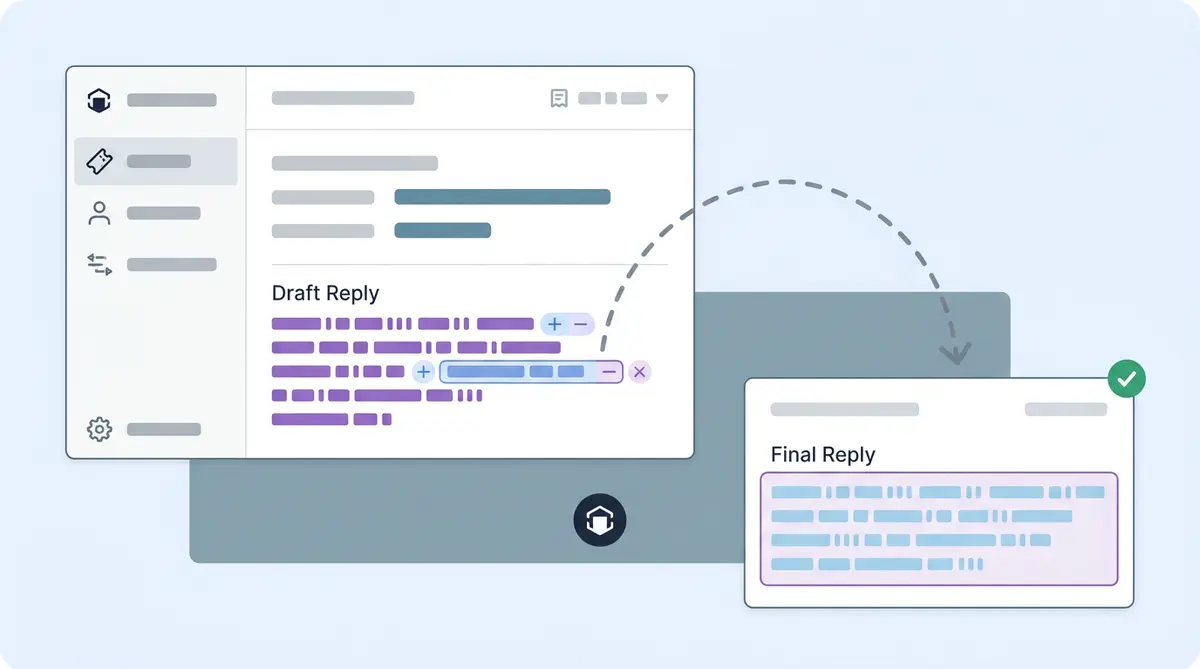
Here's where style matching kicks in. The agent reviews the draft and makes changes before clicking "Insert." Maybe they soften "We cannot process this request" to "Let me look into that for you." Maybe they strip out a bullet list, for example, and rewrite it as a conversational paragraph. Maybe they add an emoji or drop the exclamation marks.
Each of those edits is a signal. The system captures the delta between what it drafted and what the agent actually sent. Over dozens of interactions, a pattern forms: this agent prefers shorter sentences, informal greetings, contractions, and first-person language. That agent prefers structured responses and formal closings, and no emojis.
The system uses those patterns to calibrate the next draft. As the 3x Faster post explains, a formal agent gets formal, tone-consistent drafts while a conversational agent gets replies that match their natural tone. The AI gives high priority to human feedback, and adaptation happens in near real time. An agent who corrects a draft at 10:15 a.m. sees the adjustment reflected in draft suggestions by 10:30.
Company Tone vs. Agent Style: Two Layers, Not One
This is the part most CX ops leads miss when evaluating copilot tools. Brand voice and agent style aren't the same thing.
Brand voice is the company-level personality. It's configured once in Alhena's tuning settings through three layers: Identity (the role your AI plays), Tone (formality, warmth, vocabulary register), and Situational Guidelines (context-specific rules for complaints, returns, or escalations). These settings ensure a luxury skincare company never sounds like a discount electronics retailer, no matter which agent is handling the ticket.
Agent style sits on top of brand voice. Think of company tone as the guardrails and agent style as the driving behavior within those rails. Two agents at the same company can both stay on-brand while writing in noticeably different styles. One opens with "Hey Sarah, thanks for reaching out!" while the other writes "Hi Sarah, thank you for contacting us." Both are on-brand for a mid-formality DTC company. Neither should be forced into the other's pattern.
Alhena reinforces this split architecturally with dual bot profiles. You can configure separate AI personas for customer-facing chat and agent-assist, mapped by workspace tag. The tone and guardrails you want for a customer chat ("be polite, never quote internal pricing") are different from what you want for agent-assist ("be direct, surface everything you know, including internal notes"). The agent-assist persona's system prompt is explicit: "You are NOT talking directly to a customer. You are helping a Human Agent." That single instruction reframes the entire model behavior, producing drafts for the agent to review rather than direct customer replies.
Most competing copilots (Zendesk AI, Intercom Fin, Gorgias Automate) operate at the company-tone layer only. They produce a single draft style, and every agent adapts it manually. Alhena runs both layers simultaneously: company tone constrains what the AI can say, and agent style controls how it says it for each individual.
Why This Matters for Mixed-Experience Teams
Ecommerce support teams aren't static. You have tenured agents who've handled 50,000 tickets and seasonal hires onboarding for Black Friday. The gap between them is real, and generic AI drafts make it wider.
A veteran agent has developed shortcuts, preferred phrases, and a rhythm and set of workflows that customers respond to. When an AI draft doesn't match that rhythm, the veteran rewrites 80% of it. The time savings disappear. Some veterans stop using the copilot entirely because editing bad drafts feels slower than writing from scratch.
A brand-new agent has the opposite problem. They don't have a style yet. They're copying phrases from the knowledge base and following training scripts and examples from onboarding. A generic AI draft gives them one more template to parrot without building real fluency.
Style matching solves both sides. For the veteran, The copilot quickly picks up their patterns and produces draft suggestions that need minimal edits, maybe a word swap or a detail check. The veteran keeps their voice and gets the speed benefit. Alhena's data shows a 56% reduction in average response time when agents use drafts that actually match how they write.
For the new hire, the system starts with the company tone baseline and adapts as the agent develops their own style over the first 30 days. Early drafts lean on the company's established tone. As the new agent makes edits that reflect emerging preferences (shorter greetings, more conversational closings, specific phrases they favor), the AI shifts to meet them. If you're evaluating copilot capabilities, this matters. The new hire gets coaching toward brand-appropriate communication while still developing an individual voice.
How the Learning Compounds Without Explicit Training
There's no "train your AI" step. No prompt engineering. No style configuration form where an agent picks "formal" or "casual" from a dropdown.
The feedback loop is implicit. Each sent reply is a training signal. The agent doesn't need to do anything extra. They just work their queue, edit drafts as they see fit, and the system detects the patterns accumulating. If the first draft isn't right, the agent can also iterate through the chat box: "shorten this," "add a link to our shipping policy," "make it more casual." Those streaming follow-ups run through the Human Agent Assistant Processor, which labels conversation turns as Customer, Bot, and Human Agent so the model understands the three-way context. Each iteration refines the style profile further.
This compounding effect is what separates style matching from a one-time calibration. In week one, the AI might nail the agent's greeting style but miss their preferred sign-off. By week three, it has the sign-off. By week six, it's picking up subtler patterns: how the agent handles frustrated customers differently from happy ones, how they shorten replies on simple order-status questions but write longer, more empathetic responses for damaged-item complaints.
The result is that AI-powered drafts get closer to send-ready with every passing week. Agents edit less. Response times drop. And because the learning is per-agent, scaling your team doesn't reset the system. Your veteran's style model stays intact when a new hire joins. The new hire builds their own model from day one.
For ecommerce brands running lean support teams through high-volume periods, that compounding accuracy is the difference between an AI copilot that agents tolerate and one they actually rely on. Brands using Alhena's Agent Assist have seen 2x faster resolution rates and agents reaching near-veteran performance levels from their first shift.
What This Means for Your Copilot Evaluation
If you're comparing AI copilot tools for your support team, ask this question: does the AI adapt to each agent, or does every agent adapt to the AI?
Most tools answer honestly that it's the latter. They'll generate solid drafts in your brand's voice, and your agents will spend time reshaping every one. Alhena's Agent Assist flips that dynamic. Each draft requires the agent to click "Insert," and they can edit before sending. Source citations on every draft let the agent verify the knowledge-base doc the answer came from. The AI does the adapting, and your agents do what they were hired to do: help customers.
Ready to see how style-matched drafts work for your team? Book a demo with Alhena AI or start for free with 25 conversations.

Frequently Asked Questions
How does Agent Assist learn an individual agent's writing style?
Agent Assist captures the difference between its AI-drafted reply and the version the agent actually sends. Over dozens of interactions, it builds a per-agent style profile covering sentence length, formality, greeting preferences, and tone. Learning happens in near real time, with adjustments visible within minutes of an edit.
What is the difference between brand voice and agent style in Alhena?
Company tone is the organization-level personality configured once for all agents. It controls identity, tone, and situational guidelines. Agent style is the individual layer that sits on top of brand voice, adapting how each agent expresses that brand personality. Two agents can both be on-brand while writing in noticeably different ways.
Does Agent Assist work differently for new hires vs experienced agents?
Yes. For new hires, Agent Assist starts with the company tone baseline and adapts as the agent develops their own style over the first 30 days. For experienced agents, the system quickly learns their established patterns and produces drafts that need minimal edits. Alhena reports a 56% reduction in average response time when drafts match the agent's writing style.
Do agents need to explicitly train the AI on their style?
No. The feedback loop is entirely implicit. Agents just work their ticket queue and edit drafts as they normally would. Every sent reply becomes a training signal. There's no style configuration form, no dropdown, and no prompt engineering required.
How long does it take for Agent Assist to match an agent's style?
Basic patterns like greeting style and formality level are captured within the first week. By week three, the system picks up sign-off preferences. By week six, it handles subtler patterns like how an agent adjusts tone for frustrated versus happy customers. Accuracy compounds with every interaction.
Which helpdesk platforms support Agent Assist style matching?
Agent Assist works as a sidebar copilot inside Zendesk, Gorgias, Freshdesk, Intercom, Kustomer, and other supported helpdesks. The style matching feature works across all integrated platforms because it learns from the agent's edits, not from the helpdesk itself.
How does Alhena Agent Assist compare to Zendesk AI or Intercom Fin for style adaptation?
Most competing copilots like Zendesk AI and Intercom Fin generate drafts in a single brand voice. Every agent then manually reshapes those drafts. Alhena runs two layers simultaneously: brand voice for company-level consistency, plus per-agent style matching that adapts drafts to each individual's communication patterns.