Why Exchanges Still Feel Broken for Online Shoppers
Exchanges should be the simplest form of return. The customer doesn't want their money back. They want the same product in a different size, color, or variant. Yet for most ecommerce brands, processing an exchange still requires a support ticket, adding to the customer service tickets backlog. Returns automation has transformed refunds, but exchange automation lags behind. Most returns automation solutions stop at label generation and refund processing, a customer service agent, and anywhere from 24 hours to several days, and the volume of these requests spikes during peak seasons of back-and-forth with customer service.
That delay has real consequences. According to the National Retail Federation's 2025 Retail Returns Landscape, consumers returned nearly $850 billion in merchandise in 2025, with 15.8% of all sales ending up back at the warehouse. But here's the part most ecommerce brands miss: a significant share of those returns could have been exchanges instead of refunds, keeping revenue inside the business. Retailers lose billions annually to preventable refunds.
Loop Returns' 2026 retention report found that 73.6% of merchants now offer exchanges as a return option, and over half pair exchange offers with bonus credit as a return option, and customers who exchange have a measurably higher lifetime value than those who get refunds. The market opportunity is clear. The execution is where things break down.
This is the problem Alhena AI's exchange management solution was built to solve. Instead of answering exchange policy questions and handing off the actual work to a human, the AI verifies eligibility, collects the customer's intent, confirms the action, and creates the exchange directly in Shopify or Loop Returns. All inside a single chat conversation.
What Exchange Management Actually Means Inside Alhena
Exchange management lives inside Alhena's Return Management Agent, found in AI Settings > Agents > Return Management. It isn't a standalone product or a separate agent. It's a core capability with advanced safety controls, one of four tools the Return Management Agent uses to handle the full spectrum of ecommerce returns.
The key features of the Return Management Agent are four tools:
- Check Return Eligibility: verifies whether an item qualifies for return or exchange based on the merchant's policy, time window, and product rules
- Create Return: initiates a refund-based return through the connected backend
- Return Status: looks up the current state of an existing return or exchange
- Create Exchange: initiates an exchange, swapping the original item for a different variant or product
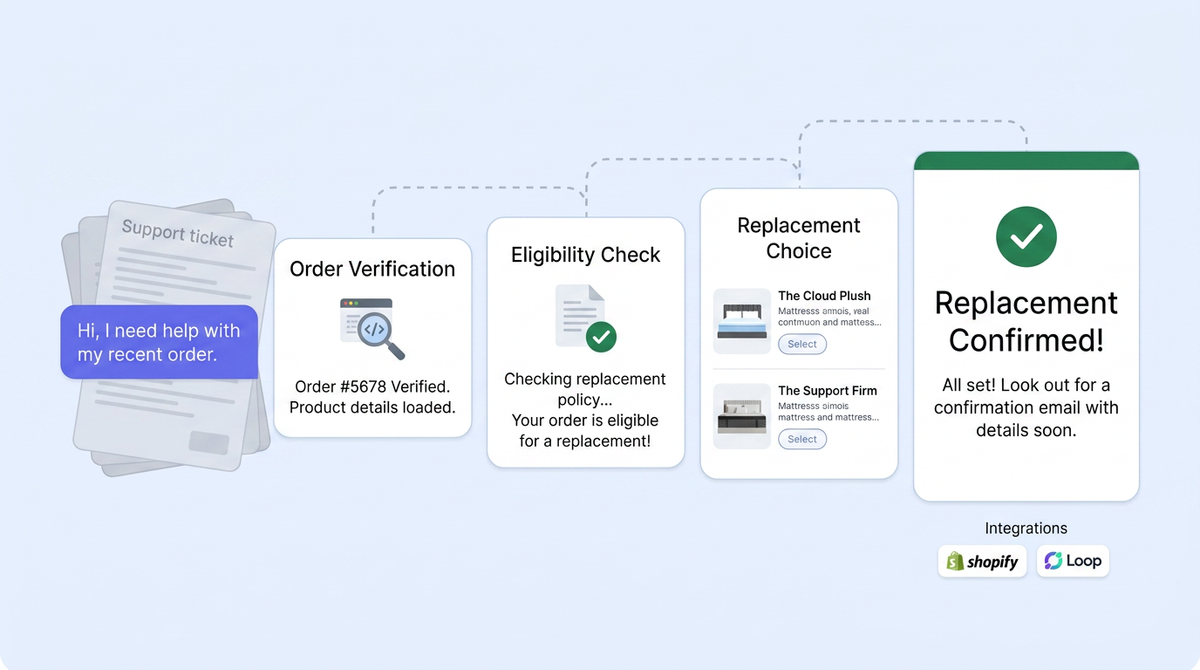
The "Create Exchange" tool is the focus here. When a customer says "I need this in a medium instead of a large," the Return Management Agent doesn't just explain the exchange policy. It walks the customer through every step, from order lookup to variant selection to confirmation, then executes the exchange in the merchant's commerce platform.
This is what separates Alhena's AI Support Concierge from chatbots that only deflect tickets. The agent doesn't hand off to a human when the conversation moves from "understanding the question" to "doing the thing." It handles both. That's a different approach to customer service.
How the AI-Guided Exchange Flow Works
From the customer's perspective, exchanging a product through Alhena feels like a single, natural conversation. Behind the scenes, the Return Management Agent follows a structured sequence that keeps the experience fast and accurate.
Step 1: The Customer Initiates the Exchange
The conversation starts when a customer says something like "I want to exchange my order for a different size" or "This color doesn't match what I expected, can I swap it?" Alhena's planner recognizes the intent and routes the request to the Return Management Agent automatically.
Step 2: Order Verification
The agent asks for the order number and the email address associated with the purchase (if not already known from prior context). This step is a security checkpoint, similar to the confirm-log-escalate guardrail framework that governs all of Alhena's action-taking agents. The agent won't proceed without matching order details, which prevents unauthorized access to someone else's order.
Step 3: Eligibility Check
The agent calls the Check Return Eligibility tool, which queries the connected platform (Shopify or Loop) for the specific order. The backend returns a list of items that are eligible for return or exchange, along with the internal IDs needed to take action. If an item falls outside the return window or is marked as final sale, the agent tells the customer immediately rather than letting them fill out a form that will be rejected later.
Step 4: Collecting Exchange Details
The agent asks the customer which item they'd like to exchange and what replacement they want. For a size swap, that might mean selecting "Medium" instead of "Large." For a color change, the agent presents available variants. The customer also provides a reason for the exchange: wrong size, defective item, changed their mind, or something else.
Step 5: Confirmation Before Action
Before creating anything, the agent summarizes the full exchange: the item being returned, the replacement variant, and the reason. It asks for explicit confirmation. This isn't optional. The agent is designed to never execute a write action without the customer saying "yes, go ahead."
Step 6: Exchange Creation
After confirmation, the agent fetches fresh eligibility IDs from the backend (not cached data from earlier in the conversation) and calls the Create Exchange tool. The exchange is created in the merchant's commerce system, and the customer receives a return or exchange ID plus instructions on next steps, like shipping the original item back for delivery of the replacement.
The entire flow typically takes under two minutes. Compare that to the industry average: return processing times average 5 to 7 business days when handled manually.
Under the Hood: Shopify vs. Loop Returns
Alhena supports exchange creation through two providers today: Shopify (via the Admin GraphQL API) and Loop Returns (via Loop's Returns API). The customer expectations is identical regardless of which backend the merchant uses, but the underlying mechanics differ.
On the Shopify Side
For Shopify merchants, Alhena creates the exchange using Shopify's native return creation flow. The API call includes the original order ID, the return line items (what's coming back), the exchange line items (what's going out), the replacement variant IDs, the reason and any notes, and a flag for customer notification. It's a single API mutation that handles the full exchange in one request.
Shopify's "Create Exchange" tool requires specific write permissions: write_returns, write_order_edits, and write_draft_orders. These permissions go beyond standard read access, which is why the tool is disabled by default and must be explicitly enabled by the merchant.
On the Loop Returns Side
Loop Returns uses a multi-step draft return sequence. Alhena handles all five steps behind the scenes:
- Initialize a draft return
- Add the returning item to the draft
- Set the return reason
- Add the exchange item (the replacement product)
- Submit the draft return
Even though Loop requires five separate API calls, the customer sees none of this complexity. They answer questions, confirm their choices, and get an exchange ID. The multi-call orchestration is handled entirely by Alhena's Return Management Agent.
When a merchant connects Loop, only the Return Status tool is auto-enabled. Eligibility checking, return creation, and exchange creation all stay opt-in, giving the merchant full control over which actions the AI can take. For a deeper look at how Alhena connects with Loop on Shopify, see our Shopify + Loop Returns integration guide.
Safety First: How Alhena Protects Against Exchange Errors
Creating an exchange is a write action. It changes order data, triggers fulfillment workflows, and affects inventory. That's why Alhena treats exchange creation with more caution than read-only actions like checking a return status.
Here's the safety model:
- Explicit enablement required. The Create Exchange tool is disabled by default. A merchant must actively turn it on in the dashboard before the AI can use it.
- Platform permissions checked. For Shopify, the required write permissions must be granted. Without them, the tool won't execute even if it's enabled in Alhena's settings.
- Customer identity verified. The agent requires order number and email before proceeding, and for Loop, it cross-checks the email against the order record to prevent data leakage.
- Fresh data on every action. The agent pulls fresh eligibility IDs right before calling Create Exchange rather than reusing data from earlier in the conversation. This prevents stale-data errors if the order state changed mid-chat.
- Explicit confirmation required. The agent summarizes the planned exchange and waits for a clear "yes" before executing. No silent actions.
- Credentials are never exposed. API keys and tokens are stored internally and masked in all dashboard-facing responses.
- Complex cases escalate to humans. If the exchange involves a disputed order, a flagged customer, or a scenario outside the agent's configured rules, it escalates to a human agent through Alhena's Agent Assist handoff.
This layered approach means the AI can handle routine exchanges autonomously while keeping a human in the loop for anything unusual. It's the same philosophy behind Alhena's AI Shopping Assistant: automate the predictable, escalate the exceptions. For more on how Alhena grounds every financial decision in verified data, learn more in our deep dive on refund accuracy.
Why Exchange Management Matters More Than You Think
Most brands treat exchanges as a subset of returns. Operationally, that's true. But from a revenue perspective, exchanges are fundamentally different from refunds.
A refund means lost revenue. The customer gets their money back, the product goes into reverse logistics, and the brand absorbs the cost. An exchange keeps the revenue in the business. The customer gets a product they actually want, the brand retains the sale, protecting sales revenue, and the relationship stays intact.
The numbers back this up. Returns management software can deliver a 50% increase in revenue retention by routing customers toward exchanges instead of refunds. And customers who exchange have a measurably higher lifetime value than those who get refunds, according to Loop Returns' 2026 retention benchmarks.
But here's the catch: exchanges only work as a revenue retention strategy if they're easy. Every extra step, every day of waiting, every "please email our support team" pushes the customer toward requesting a refund instead. The faster and simpler the exchange process, the more likely customers are to choose it.
That's where AI changes the equation. When a customer can complete an exchange in under two minutes through a chat conversation (on your website, through Instagram DMs or WhatsApp, or even by voice), the friction drops to near zero. The result: more customers choose exchanges over refunds, and more revenue stays in your business.
Brands using Alhena AI have already seen this play out. Tatcha achieved a 3x conversion rate and 38% average order value uplift with Alhena's AI agents. Puffy reached 63% automated inquiry resolution with 90% customer satisfaction. And Crocus hit an 86% deflection rate while maintaining 84% CSAT, proving that automation doesn't come at the cost of customer experience.
Setting Up Exchange Management in Alhena
Getting exchange management live takes less than you'd expect. Here's how it works:
- Connect your commerce platform. Link Shopify or Loop Returns in Alhena's integrations settings. For Shopify, ensure you've granted the required write permissions (
write_returns,write_order_edits,write_draft_orders). - Enable the exchange tool. Go to AI Settings > Agents > Return Management and toggle on "Create Exchange." Remember, it's disabled by default for safety.
- Configure your exchange policy. Train the Return Management Agent on your exchange rules: time windows, eligible product categories, whether exchanges are free or carry a fee, and any restrictions on final-sale items.
- Test the flow. Run a test exchange through the chat widget to verify the end-to-end process, from eligibility check through exchange creation.
- Go live. Once you're satisfied, the agent handles exchange requests automatically across every channel through native integrations: web chat, email, Instagram, WhatsApp, and voice.
The whole setup takes minutes, not weeks. Alhena deploys in under 48 hours with no developer resources required, and exchange management and return automation is simply one more capability within that deployment. If you're already using Alhena for ecommerce support, enabling exchanges is a configuration change, not a new return automation implementation.
For a broader look at how AI handles the full returns lifecycle (not just exchanges), see our guide on how AI automates returns and refunds in ecommerce. And if you want to see the revenue impact before committing, Alhena's ROI calculator and pricing page can estimate how much revenue you'd retain by converting refund requests into exchanges.
Exchanges as a Competitive Advantage
The ecommerce brands that win on customer experience aren't just the ones with the best products or the fastest shipping. They're the ones that make the annoying parts painless. Returns and exchanges sit squarely in the territory that shoppers dread most in "annoying parts" territory for most shoppers.
When you can turn an exchange from a multi-day support ticket into a two-minute chat conversation, you're not just saving on customer service costs. You're building the kind of post-purchase experience that drives repeat purchases and word-of-mouth referrals.
Alhena's exchange management capability does exactly that. It takes the most revenue-positive outcome in the returns process (keeping the sale through an exchange) and makes it the path of least resistance for the customer. No forms. No waiting. No ticket queues. Just a conversation that ends with a confirmation ID and a replacement on the way.
Ready to turn your exchanges into a one-chat experience? Book a demo with Alhena AI or start for free with 25 conversations.

What is exchange management in Alhena AI?
Exchange management is a capability inside Alhena's Return Management Agent that lets the AI guide customers through product exchanges in a single conversation. The agent verifies order details, checks eligibility, collects the replacement preference, and creates the exchange directly in Shopify or Loop Returns without human intervention.
How does Alhena AI create exchanges in Shopify?
Alhena uses Shopify's Admin GraphQL API to create exchanges through a single API mutation. The call includes the original order ID, return line items, exchange line items, replacement variant IDs, reason, and customer notification flag. The store must grant write_returns, write_order_edits, and write_draft_orders permissions.
Does Alhena work with Loop Returns for exchanges?
Yes. Alhena connects to Loop Returns via Loop's Returns API and handles a five-step draft return sequence behind the scenes: initialize draft, add returning item, set reason, add exchange item, and submit. The customer experiences it as one conversation. Only the Return Status tool auto-enables when you connect Loop. Exchange creation is opt-in.
Is exchange creation enabled by default in Alhena?
No. The Create Exchange tool is disabled by default because it's a write action that modifies order data. Merchants must explicitly enable it in AI Settings, Agents, Return Management. For Shopify, the required write permissions must also be granted before the tool can execute.
How long does an AI-guided exchange take compared to manual processing?
An exchange through Alhena AI typically completes in under two minutes. By comparison, manually processed returns and exchanges average 5 to 7 business days according to industry data. The AI handles eligibility checks, variant selection, and exchange creation in a single chat session.
Can Alhena's exchange management convert refunds into exchanges?
Yes. When a customer initiates what looks like a refund request, Alhena's Return Management Agent can check exchange eligibility and offer a swap as an alternative. Returns management software can deliver a 50% increase in revenue retention by routing customers toward exchanges instead of refunds.
What safety guardrails does Alhena use for exchange creation?
Alhena uses seven layers of protection: the tool must be explicitly enabled, platform write permissions must be granted, customer identity is verified via order number and email, fresh eligibility IDs are pulled before every action, explicit customer confirmation is required, credentials are never exposed, and complex cases escalate to human agents automatically.
How do I set up exchange management in Alhena?
Connect your Shopify store or Loop Returns account, enable the Create Exchange tool in Return Management settings, configure your exchange policy rules, and test a sample exchange through the chat widget. The setup takes minutes and requires no developer resources. Alhena deploys in under 48 hours.