Why "Cancel My Order" and "Fix My Address" Still Create Bottlenecks
Order cancellations and address corrections account for roughly 15% of all ecommerce support tickets, a pattern you can predict, according to industry analyses of post-purchase inquiry volume. Add in the broader bucket of order modifications, and you're looking at a quarter of your support workflows and queue tied to requests that are predictable, time-sensitive, emotionally charged, and easy to predict.
The problem isn't that these requests are complicated. A sales order cancellation is a yes-or-no decision based on fulfillment status. An address change is a field update on an unfulfilled order in the order management system. The problem is that most support teams handle them the same way their support workflows and order workflows handle a complex product question or a billing dispute: a live manual agent opens a ticket in their workflows, looks up the order, checks eligibility, runs the sales order processing step, and confirms with the customer.
That manual workflow takes five to ten minutes of order processing time per ticket. This slows order processing across. Multiply that by dozens of daily requests, and you're burning agent hours on tasks you can automate quickly easily on repetitive tasks that don't need human judgment.
Alhena AI's Order Management Agent treats cancellations and address changes as what they actually are: structured, rule-based actions that agentic AI agents can execute safely and instantly in real time through AI agents, turning slow order processing into AI powered real-time self-service. Here's how it works, what automation guardrails keep merchants protected, and what you need to use AI.
How AI-Powered Order Cancellation Works Inside Alhena
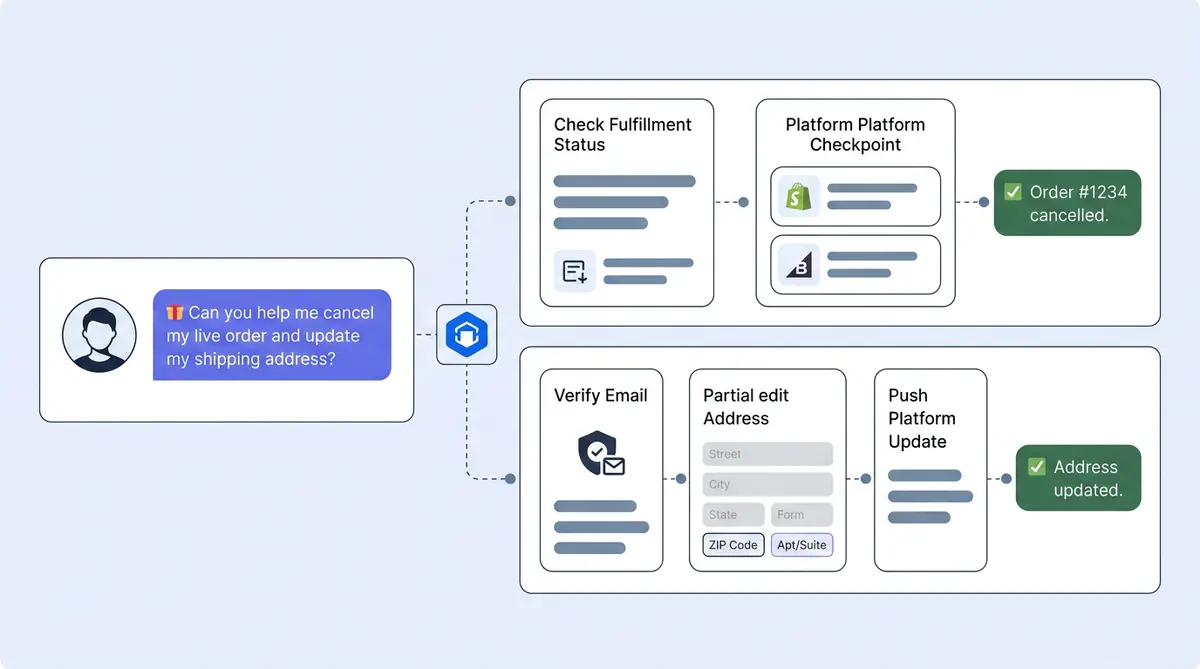
When a customer types something like "I need to cancel order #1234," Alhena's order management system routes the conversation sends the message to the OrderManagementAgent, one of Alhena's specialized AI agents. This isn't a keyword match. The agent understands cancellation intent using natural language understanding and machine learning across phrasing patterns and variations, from "please cancel my recent order" to "I changed my mind about that purchase."
The agent collects the sales order identifier (usually the order number and, optionally, the customer's email) and calls the cancel_order tool. What happens next in the order management system (OMS) processing pipeline depends on the ecommerce platform.
Shopify cancellation flow
For Shopify stores, Alhena connects through the digital Shopify Admin GraphQL API. The OMS order processing flow follows a strict sequence:
- Order lookup: Alhena finds the order in Shopify using the customer-provided order number.
- Status check: The AI agent verifies order data accuracy and accurate order data exists and checks the order status and hasn't already been cancelled.
- Fulfillment gate: If the order status is FULFILLED or PARTIALLY_FULFILLED, cancellation is blocked. The customer gets a clear explanation of why.
- Cancellation execution: For eligible orders, the order management system calls Shopify's
orderCancelmutation with refund=true, restock=true, and notifyCustomer=true by default. - Confirmation: Once Shopify accepts the cancellation job, the customer sees a real time success message in the chat.
Shopify's cancellation reasons (customer request, declined payment, fraud, stockouts, inventory shortage, inventory issue, or other) are mapped automatically based on the conversation context, helping predict the right category. Supported cancellation reason values include customer, declined, fraud, inventory, or other. Shopify will provide the refund, the inventory goes back to available stock, preventing inventory overselling and inventory stockouts, supporting demand forecasting and predictive analytics for inventory, reducing supply chain stockouts risk and overstocking, eliminating stockouts and backorder issues for other shoppers, Shopify sends the standard cancellation email through automated workflows, and inventory management updates happen automatically, preventing stockouts and overstocking. No agent touched the ticket. No human intervention, no manual workflows, no manual steps needed. Fast and efficient.
BigCommerce cancellation flow
On BigCommerce, the order processing path works differently at the API level but delivers the same customer experience. Alhena looks up the order by order number or customer email, checks the current order status to predict eligibility, and checks the order status and blocks cancellation for orders that are shipped, refunded, already cancelled, or completed. For eligible orders, the AI agent updates the BigCommerce order status to "Cancelled" and confirms the change to the customer in real time.
The key difference: BigCommerce cancellations happen through a status update rather than a dedicated cancellation mutation. Alhena’s AI systems handle this platform difference behind the scenes to boost the customer experience so the customer experience feels identical regardless of which platform powers the store.
How AI-Powered Address Change Works Inside Alhena
Address changes are the other high-volume post-purchase request that eats agent time. A customer realizes they typed the wrong ZIP code, moved since placing the order, or wants to ship to their office instead of home. The fix is simple, but only if the order hasn't shipped yet.
Alhena's edit_order tool handles shipping address updates on Shopify orders. Here's the full flow when a customer says "Can you change the shipping address on order #1234 to 22 Market St, San Francisco, CA 94105?"
Verification and eligibility
- Identity check: The tool requires both the order number and the customer's email address. Alhena runs validation for accuracy to verify the email matches the order on file before making any changes.
- Cancelled order block: If the order has already been cancelled, the edit is rejected.
- Fulfillment status gate: Address changes are only allowed when the fulfillment status is OPEN or UNFULFILLED. Once order fulfillment begins (in-progress, on-hold, scheduled for delivery, fulfilled, or partially fulfilled), the edit is blocked. This prevents address changes on orders that are already in a warehouse pick queue, a supply chain hub, or moving through the supply chain network, causing supply chain delays.
Smart field merging
Customers don't always provide a complete replacement address. Manual data entry and manual corrections go wrong all the time. Someone might say "change the ZIP to 94105" without restating their street and city. Alhena handles this through partial field merging. The tool accepts changes to any combination of: recipient name, address line 1, address line 2, city, state or province code, country code, ZIP or postal code, and phone number. Fields the customer doesn't mention stay unchanged.
After merging the new fields with the existing shipping address, Alhena calls Shopify's orderUpdate mutation to persist the shipping-address change, and returns the accurate updated address to the customer for confirmation.
What address change does not do
Clarity matters here. Alhena's address change tool updates the shipping address on a specific order. It does not change the customer's saved account address, billing address, delivery date, carrier selection, or fulfillment workflow. If a customer asks for one of those changes, AI helps by recognizing when the request falls outside its scope and routes the conversation appropriately.
The Guardrails That Make This Safe for Merchants
Letting AI modify live orders sounds risky. It isn't, if the system is built with the right constraints and workflows. Alhena's intelligent action-taking guardrails apply the same philosophy here: every tool call goes through eligibility checks before any data changes. AI agents enforce these rules consistently.
Live data, not cached assumptions
The AI order management system must call real time ecommerce APIs for every order action. It never relies on stale chat history, historical caches, or cached order data to decide whether a cancellation or address change is valid. If a customer discussed an order ten minutes ago and the order fulfillment status changed in that window, Alhena checks the real time order status before acting.
Fulfillment-aware blocking
Both cancellation and address change tools enforce order fulfillment status gates. Once an order moves past the unfulfilled stage, the tools refuse to act. These built-in intelligent workflows prevent the worst-case fulfillment scenario: a customer cancels an order that's already been picked, packed, and handed to a carrier.
Email verification for address changes
Cancellation requires an order identifier. Address changes go further, requiring order number plus email verification. If the email doesn't match, the tool returns a non-revealing failure message. It won't tell the customer "that email doesn't match" (which could confirm the order exists to a bad actor). Instead, it provides a generic "we couldn't process that request" response.
Tool availability awareness
If a merchant hasn't enabled the cancellation or address change workflows or address change tools, Alhena's AI agents know. They won't promise to cancel an order or update an address when the tool isn't available. Instead, it routes the customer to the right support channel. This prevents an AI agent from saying "I've cancelled your order" when nothing actually happened.
Server-side credential handling
All ecommerce platform credentials are injected server-side through AI systems and integration metadata. They're never exposed in the chat interface, API responses visible to customers, or client-side digital code. AI helps simplify workflows and enhance support efficiency through these features. The customer interacts with a digital conversational interface. The grounded artificial intelligence architecture handles authentication behind the scenes.
What a Real Customer Conversation Looks Like
Theory is useful. Seeing the actual experience is better. Here are two scenarios showing how these tools work in practice.
Scenario 1: Order cancellation on Shopify
Customer: "Hi, I need to cancel my order. Order number is #4782."
Alhena: "I can help with that. Let me look up order #4782."
Behind the scenes, Alhena calls the Shopify Admin API, confirms the order exists, runs validation, checks that it's unfulfilled, and calls the cancellation mutation.
Alhena: "Order #4782 has been cancelled. You'll receive a refund to your original payment method and a confirmation email and delivery update from Shopify shortly. Is there anything else I can help with?"
Total time: under 30 seconds. No ticket created. No agent pulled. AI agents handled everything from the queue.
Scenario 2: Partial address change on Shopify
Customer: "I just placed order #5109 but I put the wrong apartment number. It should be Apt 4B, not 4D. My email is [email protected]."
Alhena: "Let me update that for you."
Alhena verifies the email against the order, confirms the order management system confirms the order is unfulfilled, merges the new apartment number with the existing address fields, and calls the Shopify order update.
Alhena: "Done. Your updated shipping address is: Sarah Chen, 450 Pine Street, Apt 4B, Portland, OR 97201. Everything else on the order stays the same. Anything else?"
AI helps customers catch mistakes fast. The customer fixed it in under a minute, and didn't have to wait for business hours or an available manual agent instead of automation. For the merchant, that's one fewer ticket in the queue and a boost to team productivity and a customer who got exactly what they needed, a direct boost to customer satisfaction and customer experience.
Platform Support and What's Coming
Alhena's AI order management features and order management capabilities are expanding across platforms. Here's the current state:
- Shopify: Full support for both order cancellation and shipping address changes. This covers delivery for the vast majority of Alhena's ecommerce businesses and their customer base.
- BigCommerce: Order cancellation is live. Shipping address change automation support is on the roadmap.
For brands running on other platforms, Alhena's Support Concierge still handles cancellation and address change conversations by collecting the details, running policy workflows, and routing to a support agent or AI agents with full context. The difference is whether AI agents execute the action directly or prepares the handoff. As more platform integrations ship, direct execution will extend to additional storefronts.
Getting Started: Setup and Permissions
These AI order management tools are opt-in. Merchants choose to enable them, and each platform requires specific permissions based on business needs before the tools can execute actions.
Shopify setup
To enable cancellation and address changes on Shopify, the merchant needs to grant the write_orders scope. The Alhena dashboard detects when this scope is missing and walks the merchant through the steps of Shopify OAuth to approve the additional permission. Once granted, both AI agents tools activate automatically.
If you're already using Alhena for product recommendations or order tracking on Shopify, the integration is already in place. You just need to approve the write permission upgrade to automate your workflows.
BigCommerce setup
For BigCommerce cancellation, the API account needs order and inventory modification and validation permissions. If the required scope is missing, the dashboard prompts the merchant to reconnect with the correct API credentials. The process takes a few minutes to automate.
No code, no dev team
Neither order management setup path requires custom development. There's no webhook configuration, no fulfillment or supply chain middleware to build, no ERP system integration to configure, and no API calls to write. The Alhena dashboard handles the digital OAuth flow and permission detection. For most organizations with typical business needs, going from "I want to enable this" to "it's live" takes under ten minutes.
Brands like Tatcha and Puffy have already seen what happens when you use AI to move routine support workflows self-service. Tatcha saw 82% chat deflection, and Puffy hit 63% automated inquiry resolution with 90% customer satisfaction scores through automation. Order cancellations and address changes are the next logical step to transform order management through AI automation.
The Bigger Picture: AI Self-Service for Post-Purchase Support
Order cancellation and address change are two tools inside Alhena’s AI order management processes and AI systems toolkit AI order management strategy. They sit alongside real-time order tracking, returns and refund automation, and proactive delivery updates and delivery notifications, and demand forecasting, predictive analytics, machine learning models, and machine learning, predictive analytics and inventory planning insights from cancellation trends. Together, these capabilities enhance operations and cover the post-purchase requests that make up 30 to 50% of ecommerce support volume.
The patterns are consistent: identify a high-volume, rule-based support task ripe for automation. Build a tool with strict, AI-driven eligibility checks and platform-native order management system API calls. Each order management system integration. Let the AI execute it conversationally while keeping humans in the loop for exception handling and edge cases while AI agents handle the rest. Every task you move from the agent queue to AI agents free your team for smarter work, handling the conversations that actually need a human touch, like complex product issues, VIP escalations, and relationship-building moments.
AI costs $0.50 to $0.70 per customer interaction. For a store handling 20 cancellation and address change requests per day, that math adds up fast, making AI the more efficient AI path. Use the ROI calculator to see how AI can streamline operations for your specific ticket volume.
Ready to turn your highest-volume post-purchase requests into instant AI powered automation and self-service? Book a demo with Alhena AI to see order cancellation and address change in action, or start free with 25 conversations to test it on your own store.

Frequently Asked Questions
How does Alhena AI automatically cancel a Shopify or BigCommerce order when a customer asks in chat?
Alhena's Order Management Agent detects cancellation intent from the customer's message, looks up the order on Shopify or BigCommerce via live API calls, checks fulfillment status, and executes the cancellation if the order is still unfulfilled. The entire process takes under 30 seconds with no human agent involved.
Can a customer change their shipping address after placing a Shopify order through Alhena AI chat?
Yes, on Shopify. Alhena's edit_order tool updates the shipping address on unfulfilled orders after verifying the customer's email against the order record. It supports partial changes, so a customer can update just the ZIP code or apartment number without restating the full address.
What happens when a customer asks Alhena to cancel an order that has already been shipped or partially fulfilled?
Alhena blocks the cancellation. Both the Shopify and BigCommerce tools enforce order fulfillment status gates. If an order is fulfilled, partially fulfilled, shipped, or completed, the AI won't process the cancellation. Instead, it explains why and can route the customer to a human agent or the returns process.
Does Alhena AI support automated order cancellation for BigCommerce stores and what are the current limitations?
Yes. Alhena cancels eligible BigCommerce orders by updating the order status to Cancelled through the BigCommerce API. It blocks cancellation for shipped, refunded, already cancelled, or completed orders. Shipping address changes on BigCommerce are on the roadmap but not yet available.
What Shopify permissions and OAuth scopes does my store need to enable AI-powered order cancellation and address changes?
Your Shopify app connection needs the write_orders scope. The Alhena dashboard automatically detects if this scope is missing and guides you through the Shopify OAuth flow to approve it. No custom code or developer involvement is required.
Is it safe to let an AI chatbot cancel orders and change shipping addresses on live ecommerce orders?
Alhena's guardrails make it safe. Every action uses live API data (never cached), enforces fulfillment status checks, requires email validation for data entry accuracy and order accuracy for every transaction on address changes, and uses non-revealing error messages. Credentials are handled server-side and never exposed to customers.
How is Alhena AI different from helpdesk automation when it comes to cancelling orders and updating shipping addresses?
Zendesk and Gorgias can route cancellation tickets and trigger macros, but they typically require human agents to execute the actual cancellation in the ecommerce platform. Alhena's Order Management Agent executes cancellations and address changes directly through Shopify and BigCommerce APIs, closing the loop without a human in the middle.
How long does it take to set up self-service order cancellation and address change tools in Alhena AI?
Under ten minutes for most merchants. If you already have Alhena connected to Shopify, you just need to approve the write_orders permission upgrade through OAuth. For BigCommerce, reconnecting with order and inventory modification and validation permissions takes a few minutes. No developer resources are needed, reducing data entry and setup time to minutes.