Your Zendesk deflection dashboard says 35%. Your VP of Support cites it in every QBR. But that number only counts tickets that entered Zendesk and were resolved without a human. It completely ignores every question your AI answered on a product page, in a proactive chat, or during checkout, where no ticket was ever created. According to industry benchmarks, ecommerce support costs $2.70 to $5.60 per ticket. Multiply that by the hundreds of daily questions your AI prevents from becoming tickets, and you're looking at the single highest impact customer support cost lever that Zendesk has no way to measure. This post breaks down the three rings of ticket deflection, explains why the most valuable ring is invisible to your helpdesk, and shows how to finally measure it.
For a look at how this applies to after-hours calls, see how after-hours voice callbacks turn dead-end calls into Monday morning resolutions.
What Zendesk Actually Measures (And Where It Stops)
Zendesk tracks ticket deflection through three metrics. Each one has a blind spot large enough to hide your biggest cost savings.
The first is the self-service score, a deflection ratio of help center sessions to ticket-creating users. If 4,000 people visit your help center and 1,000 submit tickets, your deflection ratio is 4:1. The problem: this only counts activity inside Zendesk Guide. A shopper who asks your chat widget "Does this run large?" on a product page and never visits the help center doesn't exist in this metric.
The second is confirmed deflections, which count tickets avoided because a suggested article on the help center request form resolved the question. This is the narrowest possible funnel. It only fires when someone is actively filling out a ticket form, sees an article suggestion, and clicks away.
The third is assumed deflections, which count anyone who visits the help center and does not submit a ticket. Zendesk's own documentation acknowledges the flaw: there's no way to tell whether that visitor found their answer or simply gave up. As of April 2025, Zendesk further narrowed this dataset to only events originating from the help center, excluding Agent Workspace and other channels entirely.
All three metrics share one structural limitation: they only see what happens inside Zendesk's ecosystem. The shopper who got their question answered on your product page, during checkout, or in an Instagram DM? Zendesk's deflection dashboard reads zero. That's the gap this post is about. Your deflection score looks fine, but it's grading an incomplete test.
The Three Rings of Ticket Deflection
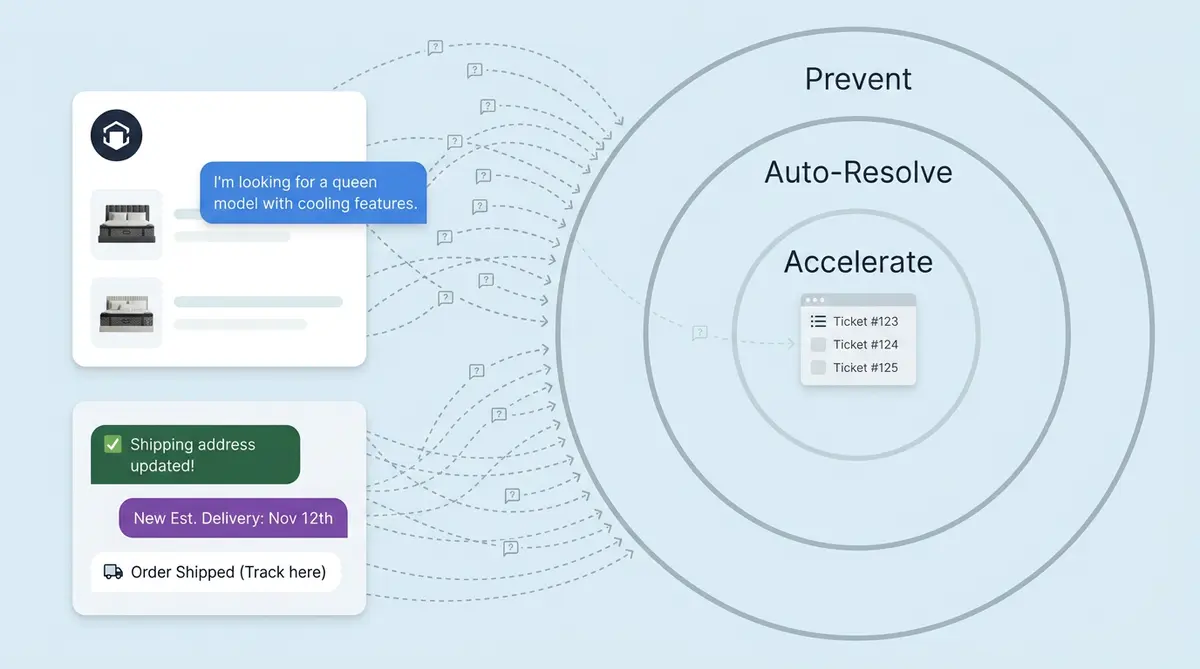
Most support teams think of deflection as a single number: tickets resolved without a human. That framing misses two-thirds of the picture. Ticket deflection actually operates in three concentric rings, and the one with the highest ROI is the one your helpdesk can't see.
- Ring 1: Prevent. Stop the ticket from ever being created. This happens on product pages, in proactive chat, through conversational search. No new ticket ID is generated. Zendesk sees nothing.
- Ring 2: Auto-Resolve. A ticket lands in Zendesk, but AI picks it up, answers it from verified knowledge, and closes it. This is what most teams call "deflection." Zendesk can measure it.
- Ring 3: Accelerate. The ticket needs a human, but smart routing and AI-drafted replies cut handle time in half. This doesn't reduce the number of tickets, but it reduces cost per ticket.
Here's what makes this framework useful: Ring 1 often prevents more tickets than Ring 2 resolves. Yet Ring 1 is invisible in every deflection rate report your VP of Support pulls from Zendesk Explore.
Ring 1: Prevent (The Invisible Lever)
Picture a shopper on your product page for a $180 moisturizer. She's reading ingredients, scrolling reviews, and she has one question: "Will this work with tretinoin?" She's 30 seconds from opening a new browser tab and emailing customer support. If that email lands in Zendesk, it becomes a ticket. An agent spends six minutes on it. At $2.70 to $5.60 per ticket, it's a small cost individually. Multiply it by 200 similar questions per day and it's a headcount problem. Unanswered questions also drive churn.
Ring 1 intercepts that moment. Not after the ticket is created, but before the thought "I should email customer support" fully forms.
Product page nudges
An AI shopping assistant embedded on the product page detects hesitation signals like scroll depth, time on page, and cursor hovering near the size guide. It surfaces a contextual prompt: "Have a question about ingredients or skin compatibility?" The shopper types her tretinoin question, gets an instant response grounded in your product data, and adds to cart. Without that nudge, she bounces. Lower bounce rate, fewer tickets. No ticket. No help center page views. No Zendesk event of any kind. Your bounce rate drops, and your ticket queue stays quiet.
Icebreakers that lower activation energy
Most chatbot widgets sit in the corner with a generic "How can I help?" That's a cold start problem. Icebreakers are pre-loaded, page-specific conversation starters: "What skin type is this for?" or "How does this compare to the travel size?" They turn a blank text field into a menu of common questions, which drops the effort required to self-serve from "compose a message" to "tap a button." The result: more shoppers engage with AI instead of defaulting to email.
Suggested follow-ups that keep the conversation going
When a shopper asks about shipping time, a good AI doesn't just answer and stop. It follows up: "Want me to check if expedited shipping is available for your zip code?" or "Here's our return policy in case that's helpful." The benefits are clear: each follow-up is a potential ticket that never gets created. Without them, the shopper gets a partial answer, still has a lingering question, and opens a ticket 20 minutes later. Proactive follow-ups keep the conversation inside the AI flow instead of letting it leak into your ticket queue.
Conversational search that replaces "contact us"
Your help center has a search bar. It returns a list of articles. The shopper has to click, scan, and troubleshoot whether the article answers their specific question. Conversational search skips that entire loop. The shopper types "Can I use my loyalty points on sale items?" and gets direct information, not a link to a 1,200-word FAQ page. The difference matters: self-service resolves issues at $0.50 to $2.37 per resolution compared to $5 or more for agent-handled tickets.
WISMO interception on the order status page
"Where is my order?" accounts for 20% to 40% of ecommerce support tickets during normal periods and up to 80% during peak seasons. An AI chatbot on your order status page that proactively displays tracking updates and delivery updates, estimated delivery dates, and delay explanations can absorb the majority of these inquiries before they become tickets. Alhena's Order Management Agent pulls real time tracking data and answers WISMO questions in the same conversation where a shopper checks their order, not in a separate Zendesk ticket created 10 minutes later.
Why Ring 1 is invisible to Zendesk
None of these interactions generate a Zendesk ticket ID. There's no "deflected ticket" to count because the ticket never existed. Zendesk's proactive messaging feature tracks three things: sent, opened, and replied to. There's no native metric for tickets prevented, cost avoided, or resolution rate from proactive messages. Your Zendesk dashboard can't track or measure this. It could read 0% while Ring 1 is quietly preventing 300 tickets a day.
Ring 2: Auto-Resolve (Tickets That Land and Vanish)
Ring 1 can't catch everything. Some customers skip self-service entirely and go straight to email when they need to troubleshoot an issue. Others navigate to the ticket form. When a ticket does land in Zendesk, Ring 2 takes over.
The mechanics: Alhena connects to Zendesk via webhook. When a new ticket arrives, the AI reads it, matches the question against your grounded knowledge base (product catalog, shipping policies, return rules), composes an answer, and posts it as a public reply. If the answer resolves the issue, the ticket auto-closes. If the customer replies with a follow-up, Zendesk reopens the ticket, and the loop continues.
The critical behavior here is auto-close, not just auto-reply. Plenty of chatbot tools draft responses for agents to review. That saves handle time but doesn't move the ticket volume chart. Auto-close means the ticket goes from "new" to "solved" without a human touching it. That's what actually reduces your total number of tickets and the staffing math behind it.
Alhena's Support Concierge handles this loop with hallucination-free responses grounded in verified data. It doesn't guess at your return window or make up a shipping estimate. Every answer traces back to a source document, closing knowledge gaps, which is why brands like Crocus see 86% deflection rates with 84% CSAT. The answers are accurate enough that customers have good experiences and accept them without pushing for a human.
For teams already running Zendesk, the setup process connects in days, not quarters. Alhena ingests your existing Zendesk knowledge base to fill knowledge gaps, past ticket resolutions and answers, and product catalog without requiring manual data prep.
Ring 3: Accelerate (When Humans Step In Faster)
Some tickets need a person. A high impact refund dispute, a damaged product with photos to review, a VIP customer who explicitly asks for a manager. Ring 3 doesn't try to deflect these. It makes the human resolution faster and smarter.
When Alhena's Agent Assist detects an escalation trigger (low AI confidence, refund above a threshold, explicit human request), it routes the ticket to the right queue with full context attached. The receiving agent sees the complete conversation history, the customer's order details, and a suggested draft reply with cited sources.
Smart classification means the ticket skips the general queue and lands directly with an agent who handles that category. No triage step. No "let me transfer you." The agent reads the AI-drafted response, adjusts if needed, and sends. Handle time drops significantly.
Ring 3 doesn't reduce the number of tickets, which is why it often gets overlooked in deflection conversations. But when your VP of Support reports a "40% reduction in support costs," half of that savings usually comes from shorter handle times on escalated tickets. Manawa saw this play out directly: response time dropped from 40 minutes to 1 minute, with 80% of inquiries automated and 43% lower overall workload.
How to Measure Pre-Ticket Deflection (Since Zendesk Can't)
If Ring 1 is invisible in Zendesk, how do you measure and prove its value to your CFO?
You need a measurement layer that sits outside your helpdesk. Alhena's widget analytics track every conversation that happens in the AI assistant, whether or not a Zendesk ticket is involved. This gives you three insights Zendesk doesn't provide:
- Conversations resolved without a ticket. The AI answered the question, the shopper had a positive experience (confirmed by CSAT rating or by conversion event), and no new ticket was created. This is the core Ring 1 metric.
- Ticket prevention rate. Compare your predicted ticket volume (based on order volume, seasonality, and historical patterns) against actual tickets received. The gap, after controlling for other variables, the financial impact, is your prevention estimate.
- Revenue from support conversations. When the AI answers a pre-purchase question and the shopper converts, that's an insight into attributable revenue. Tatcha found that 11.4% of total site revenue flowed through AI conversations, with a 3x conversion rate and 38% AOV uplift. That's not a support metric. That's a sales metric hiding inside your customer support channel.
For teams that want rigorous proof, ServiceXRG's deflection formula offers a four-stage framework: Self-Help Events x Success Rate x Intent Rate x No Further Action Rate. The key variable is "Intent Rate," the percentage of self-service users and help center users who would have created a ticket otherwise. Most Zendesk dashboards skip this step entirely, which is why their deflection numbers are either inflated (counting abandoners as deflections) or invisible (missing pre-ticket interactions altogether).
Zendesk's Answer Bot resolves roughly 6% of tickets on average, with well-configured instances reaching 8% to 12%. That's Ring 2 only, measured narrowly. When you add Ring 1 prevention and Ring 3 acceleration, the total cost impact is often 3x to 5x what Zendesk's dashboard reports.
The Real Deflection Number Your Board Needs
Gartner predicts that by 2029, agentic AI will autonomously resolve 80% of common customer service issues, leading to a 30% reduction in operational costs. But that projection assumes you're measuring the full picture, not just the views Zendesk can see.
Your real deflection score isn't tickets resolved by AI divided by total number of tickets. It's (tickets prevented + tickets auto-resolved + handle time saved on escalated tickets) divided by total potential support demand. That denominator includes every shopper who would have contacted you but didn't because Ring 1 caught them first.
Most ecommerce brands running Zendesk today report deflection rates of 30% to 50% and call it good. When you add Ring 1 measurement, the real number is often 60% to 80%. The difference is the budget justification for your next AI investment, the headcount you don't need to hire for Q4 peak season, and a strategy to reduce churn, and the proof that customer service isn't just a cost center.
Containment rate and deflection rate are useful starting points, but they only tell the Ring 2 story. The brands pulling ahead are the ones measuring all three rings, and using Ring 1 data to reframe support as a revenue driver, not a line item to minimize.
This distinction is central to the broader debate between native helpdesk AI vs commerce-native AI.
Ready to measure the tickets you're already preventing? Book a demo with Alhena AI to see all three rings in action, or start free with 25 conversations and measure Ring 1 for yourself. Want to model the financial impact first? Try the ROI Calculator.

Frequently Asked Questions
What is pre-ticket deflection and how is it different from standard deflection?
Pre-ticket deflection prevents support tickets from being created in the first place by answering questions on product pages, in proactive chat, and during checkout. Standard deflection measures tickets that entered your helpdesk but were resolved by AI instead of a human. Pre-ticket deflection happens outside your helpdesk, so tools like Zendesk have no way to track it.
Why can't Zendesk measure pre-ticket deflection?
Zendesk's deflection metrics only track activity inside its own ecosystem: help center visits, ticket form interactions, and AI agent conversations within Zendesk. Questions answered by an AI widget on your product page or order status page never generate a Zendesk ticket ID, so they don't appear in any Zendesk Explore dashboard, Explore report, or deflection metric.
How do I calculate the ROI of tickets that were never created?
Compare your predicted ticket volume (based on order count, seasonality, and historical ticket-to-order ratios) against actual tickets received. The gap is your prevention estimate. You can also track conversations resolved without a ticket in your AI widget analytics and multiply by your average cost per ticket ($2.70 to $5.60 for ecommerce). Alhena's dashboard provides this metric natively.
What percentage of ecommerce tickets can be prevented before they reach Zendesk?
WISMO queries alone account for 20% to 40% of ecommerce support tickets during normal periods and up to 80% during peak seasons. When you add pre-purchase questions about sizing, ingredients, and compatibility, Ring 1 prevention can absorb 30% to 50% of total potential support demand before any ticket is created.
Does Alhena AI replace Zendesk or work alongside it?
Alhena works alongside Zendesk, not as a replacement. It connects via webhook to auto-resolve tickets inside Zendesk (Ring 2) and provides Agent Assist for escalated tickets (Ring 3). It also deploys on your storefront and social channels to prevent tickets before they reach Zendesk (Ring 1). The integration takes under 48 hours with no dev resources required.
How does Alhena's auto-close work inside Zendesk?
When a ticket arrives in Zendesk, Alhena reads it via webhook, matches the question against your grounded knowledge base, posts a public reply, and closes the ticket if the answer resolves the issue. If the customer replies, Zendesk reopens the ticket and Alhena responds again. This auto-close behavior is what moves ticket volume charts, not just drafting replies for agents to review.
What is a good deflection rate for ecommerce brands using Zendesk?
Most Zendesk teams report 30% to 50% deflection using standard metrics, which only count Ring 2 (auto-resolutions). Best-in-class ecommerce brands using AI across all three rings see effective deflection rates of 60% to 80%. Crocus achieved 86% deflection with 84% CSAT using Alhena's grounded AI responses.
How do product page nudges and icebreakers reduce support tickets?
Product page nudges detect shopper hesitation (scroll depth, time on page) and surface contextual prompts like "Have a question about sizing?" Icebreakers are pre-loaded, page-specific conversation starters that lower the effort to self-serve from composing a message to tapping a button. Both keep shoppers in the AI flow on the product page instead of defaulting to email or the ticket form.
Can I measure Ring 1 deflection if I'm already using Zendesk Answer Bot?
Zendesk Answer Bot resolves about 6% of tickets on average and only operates within Zendesk's ecosystem. It cannot measure or perform Ring 1 prevention because it doesn't deploy on product pages or checkout flows. You need a separate AI layer like Alhena that operates outside Zendesk and provides its own analytics for conversations resolved without a ticket.