What Is a Zendesk AI Chatbot?
A Zendesk AI chatbot is an automated conversational agent built into the Zendesk support workflow. It uses NLP and generative AI to handle customer queries, automate repetitive tickets, and route conversations to human agents when needed. Zendesk retired its legacy Answer Bot in 2024 and replaced it with AI Agents, a bot powered by knowledge base articles from your Zendesk help center.
Considering other options alongside Zendesk? See our comparison of the 10 best AI chatbots for ecommerce to evaluate alternatives by pricing and ecommerce features.
For ecommerce brands, the native Zendesk AI chatbot covers basic support automation: answering frequently asked questions, deflecting support tickets, and reducing wait times across channels. But it wasn't built to drive sales, recommend products, or recover abandoned carts. That's where Alhena AI for Zendesk changes the conversation.
Why Ecommerce Brands Need Alhena AI in Zendesk
Zendesk's native AI handles ticket deflection well, but ecommerce customer needs go beyond support. Shoppers want product recommendations, real-time inventory answers, and checkout help. Zendesk's bot can't connect to your product catalog, populate a cart, or track revenue from AI interactions.
Alhena AI integrates directly with Zendesk and fills these gaps. It adds AI powered product intelligence, omnichannel sales capabilities, and built-in revenue attribution to your existing Zendesk setup. You keep Zendesk as your ticketing system and customer service platform while Alhena AI agents handle shopping queries, automate order management, and convert conversations into revenue.
For a step-by-step look at the deployment process, see how Alhena AI goes live in under 48 hours.
Brands using Alhena AI on Zendesk have seen measurable results. Tatcha achieved a 3x conversion rate with 38% higher average order value. Puffy reached 63% automated inquiry resolution with 90% customer satisfaction. These results come from AI that understands your product catalog, not just your help center articles.
How to Set Up Alhena AI Chatbot in Zendesk
Setting up Alhena AI in your Zendesk workspace takes under 48 hours with no developer resources required. Here's the step-by-step setup process.
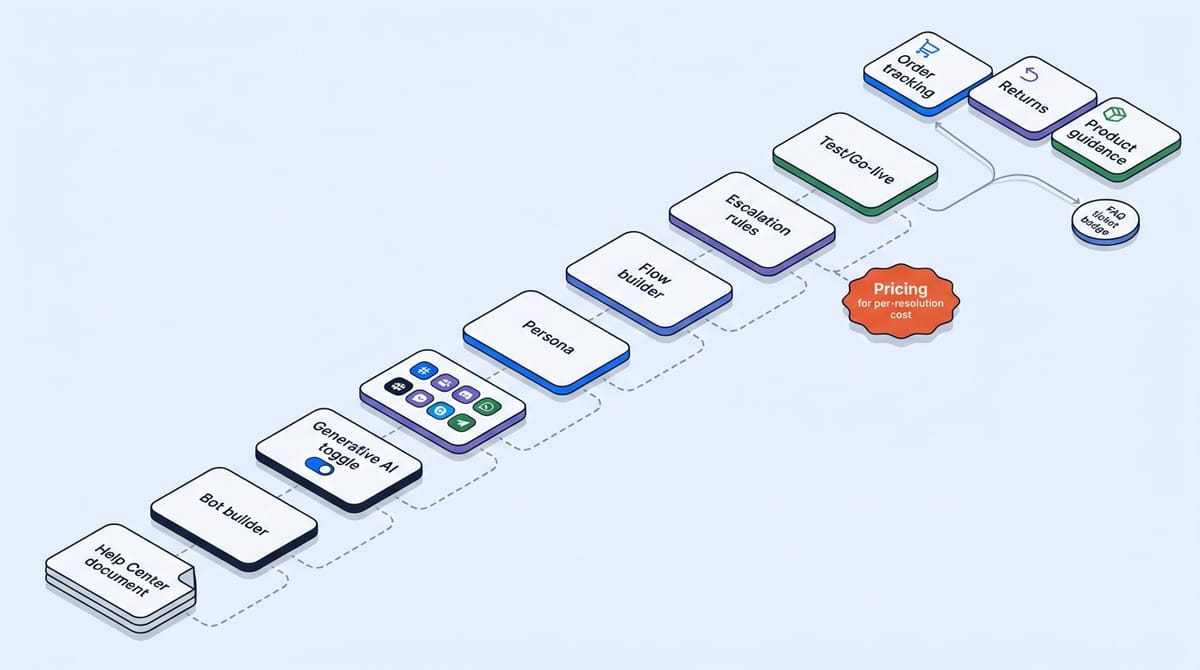
Step 1: Connect Your Zendesk Account
Start by linking your Zendesk instance to Alhena AI through the Zendesk integration. Alhena syncs your ticket data, customer history, and Zendesk help center content automatically. The integration uses Zendesk's APIs, so your existing workflow stays intact.
Step 2: Connect Your Ecommerce Platform
Link your Shopify, WooCommerce, or Salesforce Commerce Cloud store. Alhena AI ingests your full product catalog, inventory levels, pricing, and order data in real time. This is what gives the chatbot actual product intelligence instead of just FAQ answers.
Step 3: Configure Your AI Agents
Alhena AI runs two specialized agents inside your Zendesk widget. The Support Concierge handles post-purchase queries like order tracking, returns, and exchanges. The Product Expert guides shoppers through product discovery, comparisons, and personalized recommendations based on their customer needs.
Step 4: Set Your Brand Voice and Messaging
Define your bot's tone, the languages you support (Alhena handles multiple languages), and customization rules for your brand. The AI adapts its conversation style to match your customer service experience, whether that's casual or formal.
Step 5: Configure Smart Routing and Escalation
Set rules for when the AI chatbot should escalate to human agents in Zendesk. Common triggers include complex billing questions, VIP customers, or negative sentiment. Alhena's Agent Assist also gives your support team AI-generated summaries and suggested replies for faster resolution.
Step 6: Go Live Across Channels
Deploy your Alhena AI chatbot across web chat, email, Instagram DMs, WhatsApp, and voice. This omnichannel setup means shoppers get the same AI powered experience whether they message you on your website widget or through social commerce channels. Use AI to automate conversations, deflect repetitive support tickets, and connect every interaction to your product catalog.
What Alhena AI Does That Zendesk's Native Bot Cannot
Zendesk's built-in AI pulls answers from your knowledge base. Alhena AI goes further by grounding every response in verified product data, which eliminates hallucinated answers about pricing, availability, or product details.
Key capabilities that set Alhena AI apart in your Zendesk setup:
- Product catalog intelligence: The AI recommends products, compares items, and answers specific questions about sizing, ingredients, and compatibility.
- Agentic checkout: Alhena AI populates carts and pre-fills checkout automatically, turning support conversations into completed purchases.
- Revenue attribution: Track exactly how much revenue your AI chatbot generates, something Zendesk's native bot doesn't offer.
- Hallucination-free responses: Every answer is grounded in your actual product data, not generated from general knowledge.
- Seamless Zendesk integration: Alhena works inside your existing Zendesk support workflow. Your agents see the full conversation history, and tickets route through your normal Zendesk automation rules.
Not sure Zendesk AI is right? See alternatives.
Getting Started with Alhena AI on Zendesk
If you're already on Zendesk and want to add AI powered sales and support capabilities beyond what the native bot provides, Alhena AI is the best AI solution built for ecommerce. The integration deploys in under 48 hours with no developer resources.
Use the ROI calculator to see how much revenue Alhena AI can generate for your store, or book a demo to see the Zendesk integration in action. You can also start free with 25 conversations to test Alhena AI in your Zendesk workspace today.

Alhena AI
Frequently Asked Questions
How does Alhena AI integrate with Zendesk for ecommerce stores?
Alhena AI connects to your Zendesk workspace through a native integration that syncs ticket data, customer history, and help center content. It also connects to your ecommerce platform (Shopify, WooCommerce, Salesforce Commerce Cloud) to pull real-time product catalog data, so the AI chatbot can answer shopping queries and automate support tickets in one unified workflow.
Can Alhena AI replace Zendesk's native AI Agents for product recommendations?
Yes. Zendesk's native AI Agents pull answers from your knowledge base but can't access your product catalog. Alhena AI adds product intelligence on top of Zendesk, enabling personalized product recommendations, real-time inventory answers, and AI powered comparisons that drive purchases instead of just deflecting support tickets.
What ROI can ecommerce brands expect from adding Alhena AI to Zendesk?
Ecommerce brands using Alhena AI on Zendesk see measurable revenue impact. Tatcha achieved a 3x conversion rate and 38% AOV uplift. Puffy reached 63% automated resolution with 90% CSAT. Alhena AI includes built-in revenue attribution so you can track exactly how much your AI chatbot contributes to sales.
How long does it take to deploy Alhena AI as a Zendesk chatbot?
Alhena AI deploys inside your Zendesk workspace in under 48 hours with no developer resources or coding required. The setup process includes connecting your Zendesk account, linking your ecommerce platform, configuring AI agents, and going live across channels like web chat, email, WhatsApp, and Instagram DMs.
Does Alhena AI support omnichannel customer service through Zendesk?
Alhena AI extends your Zendesk setup to omnichannel coverage including web widget, email, Instagram DMs, WhatsApp, and voice. Every channel gets the same AI powered experience with full product catalog access, so shoppers can start a conversation on social commerce and complete a purchase through your website.
How does Alhena AI prevent hallucinated answers in Zendesk conversations?
Alhena AI grounds every response in verified product data from your ecommerce platform, not general knowledge. This means the chatbot gives accurate answers about pricing, availability, sizing, and specifications. Zendesk's native AI has a documented 9% hallucination rate, while Alhena AI eliminates hallucinated responses entirely.
What vertical AI agents does Alhena AI offer inside Zendesk?
Alhena AI runs two specialized vertical AI agents in your Zendesk workspace: a Support Concierge that automates post-purchase queries (order tracking, returns, exchanges) and a Product Expert that handles pre-sale shopping guidance with personalized recommendations. Both agents use NLP to understand customer intent and connect to your product catalog.
Can Alhena AI automate checkout and cart recovery inside Zendesk?
Yes. Alhena AI includes agentic checkout capabilities that populate carts and pre-fill checkout automatically during Zendesk conversations. This turns support interactions into completed purchases, something Zendesk's native bot cannot do. Brands using this feature see direct revenue attribution from AI chatbot conversations.
How does Alhena AI handle multilingual support in Zendesk?
Alhena AI supports multiple languages natively within your Zendesk integration. The AI chatbot detects customer language automatically and responds in kind, maintaining product accuracy and brand voice across all languages without requiring separate knowledge base articles for each language.
Is Alhena AI the best AI chatbot for Zendesk-based ecommerce brands?
For ecommerce brands on Zendesk, Alhena AI is purpose-built to add what the native bot lacks: product catalog intelligence, agentic checkout, revenue attribution, and omnichannel sales automation. It deploys in under 48 hours, integrates with your existing Zendesk workflow, and is the best AI solution for turning customer service conversations into measurable revenue.