Most AI chatbots claim they "drive revenue". Ask how they prove it, and the answer is usually some flavour of "we track sessions." That's not revenue attribution. That's guessing.
Alhena AI built something different: a first-party event attribution model and pipeline that connects a specific AI conversation touchpoint to a specific cart event to a specific completed order. No UTM hacks, no session proxies, no manual tagging effort, no "the shopper was on the site, so the chatbot probably helped." Every single attributed dollar traces back to a real touchpoint, a real answer, and a real purchase.
This post explains exactly how Alhena's revenue attribution system works, from the visitor fingerprint that starts the chain to the BigQuery reporting table that powers the Revenue Impact dashboard, giving your sales and marketing teams real numbers.
The Problem With "AI-Generated Revenue" Claims
Traditional e-commerce attribution relies on cookies, UTM parameters, and JavaScript pixels. Those tools were built for marketing channels: paid ads, email channels, organic search channels, and other marketing channels. They work when a shopper clicks a link, lands on a page, and buys.
Conversational AI doesn't fit that model. Someone asks your AI shopping assistant about moisturizers, gets a product recommendation, adds it to the cart, then checks out 90 minutes later. Where does the attribution go? Google Analytics credits the last campaign click. Your ad platform claims the conversion. The marketing campaign that ran last week claims it too. The chatbot gets nothing. No marketing metric captures what the AI actually did.
Some vendors work around this by counting "sessions where the chatbot appeared". If a shopper opened the chat widget and later bought something, the chatbot takes credit. That's not a revenue attribution model. It's correlation dressed up as causation. Someone could open the widget, immediately close it, and the vendor still claims the sale, giving equal weight to a two-second glance and a ten-minute guided session.
Alhena’s model takes a stricter approach. The system requires proof at every step: the shopper asked a question, Alhena found a real answer grounded in product data, the shopper acted on it, and that action happened within a defined time window from the last touchpoint. Only then does the revenue get attributed. If you want the full picture of how to measure Shopify AI chatbot ROI, that post covers the business side; this one covers the engineering.
How Revenue Attribution Works in Alhena
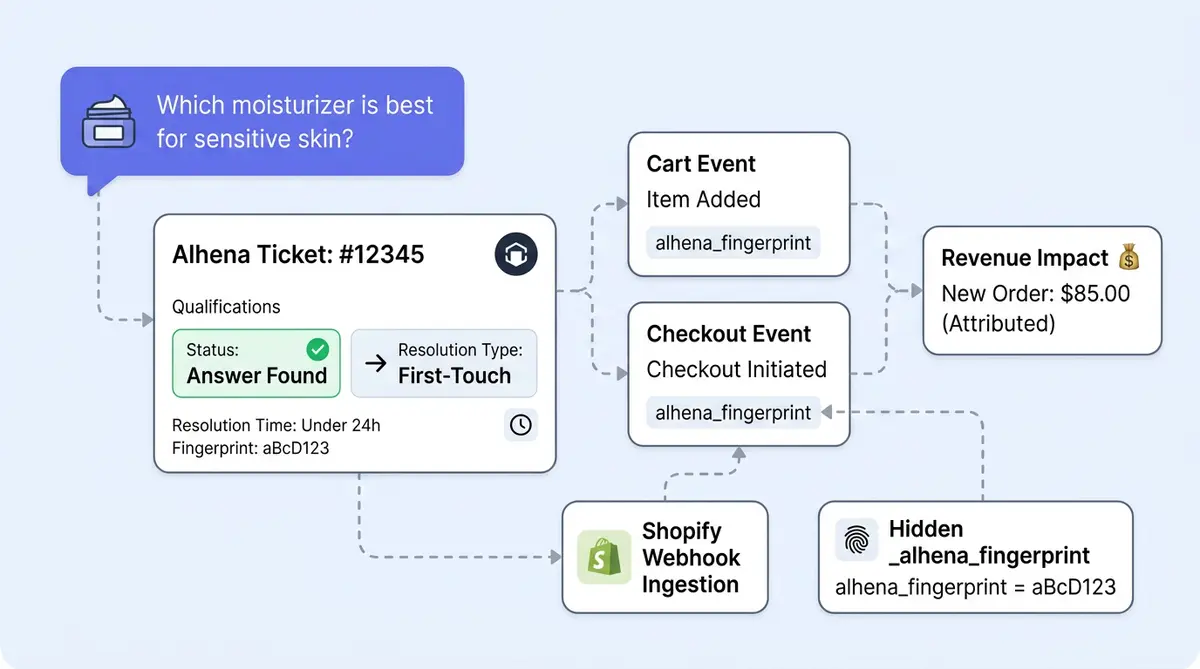
Alhena's revenue attribution connects three data objects: the visitor fingerprint, the conversation ticket, and the commerce event. Here's how they link together.
Visitor Fingerprints
When a shopper interacts with the Alhena widget (chat, Product FAQs, or a proactive nudge), the system assigns a visitor fingerprint. This fingerprint is a unique identifier tied to that browser session. It persists across page navigations within the same session, so a customer who chats on a product page and then adds to cart on another page still carries the same fingerprint.
The fingerprint is the connective tissue of the entire attribution system. It links what the shopper asked for to what they bought.
Conversation Tickets
Every Alhena interaction creates a ticket. A ticket captures the full exchange: the shopper's questions, Alhena's responses, which products the AI leads with, whether the AI found an answer (the has_answer_found flag), and the message source (chat widget, FAQ, or nudge). The ticket is tagged with the same visitor fingerprint.
Commerce Events
Alhena tracks two distinct types of commerce events:
- CartEvent: product added to cart, quantity increased, quantity decreased, item removed. These measures increase purchase intent and contribute to cart GMV.
- CheckoutEvent: a completed purchase with order value, currency, order ID, and line items. These measure actual attributed revenue.
Each commerce event carries the visitor fingerprint. The attribution engine matches the fingerprint on the commerce event to the fingerprint on the conversation ticket. If the match passes the attribution rules, the revenue is associated with that specific conversation.
Five Rules That Determine If Revenue Gets Attributed
Not every commerce event after an Alhena conversation counts as attributed revenue. The system applies five strict rules, each carrying real weight, before connecting a purchase touchpoint to a conversation. This is what separates Alhena's revenue attribution model from session-based guessing.
1. The 24-Hour Attribution Window
Revenue is attributed only if the commerce event happened within 24 hours of the most recent qualifying Alhena touchpoint. If a shopper chatted on Monday and bought on Wednesday, that purchase doesn't get attributed. The window keeps the connection tight and the conversion numbers honest.
2. The Answer-Found Requirement
The conversation ticket must contain at least one AI response where has_answer_found=True. Alhena must have actually delivered a grounded, helpful answer from your product catalog or store data. If the shopper asked a question and the AI couldn't answer (or escalated to a human agent), that ticket doesn't qualify for revenue attribution. The rule prevents inflated numbers from failed conversations.
3. First-Touch Priority Across Surfaces
Your visitors might interact with Alhena through multiple surfaces: the chat widget, Product FAQs, and a proactive nudge. If the same fingerprint appears across multiple Alhena touchpoints and customer touchpoints, revenue is attributed to whichever interaction happened first. Credit goes to the surface that initially engaged and led the customer.
4. Source Classification and Nudge Detection
Alhena classifies the interaction source automatically. If the first chat message metadata contains a nudge_id, the source is labeled NUDGE_CLICK, meaning the shopper engaged because of a proactive nudge. Without a nudge ID, the source is CHAT_WIDGET. FAQ sessions are labeled FAQ. The classification lets you see which surface drives the most revenue in your analytics dashboard. For the full breakdown of what each metric means, see our guide to conversational analytics and the revenue signals hiding in your chat data.
5. No Interaction, No Attribution
The system may still record a cart or checkout event for a customer who never interacted with Alhena. Those events are stored (they're useful for baseline comparisons), but they're marked as not Alhena-influenced and never attached to a conversation. If there's no matching ticket, there's no attribution. Period.
Shopify Revenue Attribution: The Automatic Path
For Shopify businesses, revenue attribution is mostly automatic. You don't need to write code or add tracking scripts. Here's the technical flow.
The Webhook Pipeline
When you connect your Shopify store to Alhena, the system registers a Shopify orders/paid webhook. Every time a customer completes a purchase, Shopify fires this webhook to Alhena's servers. The processing flow looks like this:
- Shopify sends the
orders/paidwebhook with the full order payload (line items, totals, customer info). - Alhena verifies the Shopify HMAC signature to confirm the webhook is authentic and hasn't been tampered with.
- Alhena deduplicates using the Shopify webhook ID. Shopify sometimes sends the same webhook twice; Alhena catches and discards the duplicate.
- Alhena resolves the store to the correct company profile and AI configuration in its system.
- Alhena extracts the visitor fingerprint from the order data (more on this below).
- Alhena applies the five attribution rules to find a matching conversation ticket.
- If matched, Alhena creates a
CheckoutEventwith sourceSHOPIFYand saves each line item as aCheckoutLineItemrow. - The conversation index refreshes so the dashboard immediately shows the purchase linked to the lead conversation, that specific chat.
How the Fingerprint Gets Into Shopify Orders
This is the clever part. When a shopper adds a product to cart through Alhena's chat or through Alhena's agentic checkout flow, the widget injects a hidden _alhena_fingerprint property into the Shopify line item. Shopify preserves line-item properties through checkout, so when the orders/paid webhook arrives, the fingerprint is right there in the order data.
There's also a fallback path. Alhena's script records the Shopify cart token alongside the visitor fingerprint. When the paid-order webhook arrives, Alhena first tries to match the cart token to a stored fingerprint. If that fails, it reads _alhena_fingerprint directly from the line-item properties. Two paths, one goal: connect the order to a single conversation.
Cart Activity Tracking on Shopify
Checkout attribution is only half the picture. The Alhena script also monitors cart activity in real time. It watches Shopify's cart API calls, intercepting add, remove, and quantity-change events. Each action becomes a CartEvent row with the visitor fingerprint, giving you a complete view of purchase intent before the shopper ever reaches checkout. Brands that value customer engagement at this level.
Revenue Attribution on WooCommerce, Magento, and Custom Platforms
For WooCommerce, Magento, Salesforce Commerce Cloud, BigCommerce, or any custom commerce system used by e-commerce companies, businesses send events through Alhena's SDK or HTTP API.
Client-Side SDK
The JavaScript SDK provides two types of tracking methods:
trackAlhenaEvent('sendCartEvent', {...})for cart actions (add, remove, quantity change)trackAlhenaEvent('sendCheckoutEvent', {...})for completed purchases
The SDK automatically includes the visitor fingerprint from the Alhena widget session, so the merchant doesn't need to pass it manually.
Server-Side API
For server-side tracking (useful when the purchase completes outside the browser, like phone orders or post-purchase flows), Alhena exposes two endpoints:
POST /analytics/cart_eventsPOST /analytics/checkout_events
Server-side calls require the company_key, user_fingerprint, and optionally user_faq_fingerprint, along with the product or order details. Checkout events accept order_id and line_items for product-level attribution.
The attribution rules work identically regardless of the source. Whether the event comes from a Shopify webhook, a WooCommerce SDK call, or a custom API integration, the same five-rule attribution model determines if the revenue gets linked to a conversation.
Cart GMV vs Checkout Revenue: Measuring Intent and Outcome
Alhena separates two distinct metrics that most platforms collapse into one. Understanding the difference matters for accurate revenue attribution reporting.
Cart GMV (Purchase Intent)
CartEvent data feeds the cart GMV metric. The math is directional:
ITEM_ADDEDandQUANTITY_INCREASEDevents add valueITEM_REMOVEDandQUANTITY_DECREASEDevents subtract value
There's a built-in safeguard: removal and decrease events are rejected if there's no prior add or increase event for that product and fingerprint combination. This prevents fake negative GMV from orphaned removal events.
Cart GMV tells you how much purchase intent Alhena is creating, even if the shopper doesn't complete checkout.
Checkout Revenue (Completed Sales)
CheckoutEvent data feeds the attributed revenue metric. Each event stores the checkout amount with currency, and the system applies several deduplication layers:
- Order ID deduplication: the same order can't be attributed twice
- Idempotency IDs: if a client retries a failed API call, the duplicate event is caught and discarded
- Line-item storage: each checkout event saves individual line items, enabling product-level revenue drilldown
Why track both? Because the gap between cart GMV and checkout revenue tells a story. If Alhena is driving strong add-to-cart numbers but checkout revenue is low, the problem isn't the AI. It's your checkout flow. That insight alone can be a big deal, worth more than the attribution data itself. Our data shows that AI-assisted shoppers complete checkout at nearly 2x the rate of unassisted visitors, and revenue attribution is how you verify that claim for your own store.
From Raw Events to the Revenue Impact Dashboard
The data you see in Alhena's Revenue Impact dashboard travels through several layers before it reaches you.
The Data Pipeline
Raw commerce events live in application-server tables: analytics_cartevent, analytics_checkoutevent, and analytics_checkoutlineitem. These tables capture every event in real time as it arrives from Shopify webhooks, SDK calls, or API integrations.
Those raw tables are replicated into BigQuery and modeled into a purpose-built revenue-impact-analysis reporting table. This table normalizes the data with fields like source category, message source, cart type (CART_EVENT or CHECKOUT), cart value in the original currency, a currency multiplier, and the converted USD value.
What the Dashboard Actually Calculates
When you open Analytics and navigate to Revenue Impact in the Alhena dashboard, here's what each metric actually computes:
- AI-Assisted Checkout Revenue: sum of
usd_cart_valuewherecart_type='CHECKOUT'for the selected time period - Total Cart GMV: sum of
usd_cart_valuewherecart_type='CART_EVENT' - Average Order Value: total checkout revenue divided by the count of unique checkout orders
- Products in Cart: sum of net cart quantity across all attributed cart events
- Daily Averages: averages computed across active days (days with at least one event) in the selected period
- Change Percentages: comparison against the previous equivalent time window (if you're viewing the last 30 days, the change compares against the 30 days before that)
You can filter by AI profile, date range, and source. If checkout data exists, the dashboard can show checkout revenue tabs. If your store hasn't connected checkout tracking yet, it can still show cart GMV, so you get value from day one.
Per-Conversation Revenue View
Revenue attribution in Alhena doesn't just live in aggregate dashboards. Your support team can open any conversation and see the commerce events attached to that specific ticket. The conversation revenue view fetches cart and checkout events for the ticket, enriches product IDs with images and links, and renders them chronologically.
The practical value: a customer success teams and managers can open a chat and see, "This conversation about moisturizers led to three products being added to cart and a $127 order." That's the level of visibility that turns support teams into revenue-aware teams.
What Revenue Attribution Tells You (That Deflection Metrics Can't)
Ticket deflection and CSAT scores are useful operational metrics. But they can't answer the questions that matter most to your business, and they can’t measure the effectiveness of AI as a sales channel:
- Which AI conversations actually influenced purchases?
- Did Product FAQs or proactive nudges drive more revenue?
- Are shoppers adding products to cart but abandoning before checkout?
- Which AI profile or channel creates the most commerce impact across your channels?
- Did a prompt change, model update, or configuration tweak improve revenue?
- Which product recommendations actually convert into sales?
Businesses using Alhena's revenue attribution have seen concrete results. Tatcha measured a 3x conversion and 38% average order value uplift, with 11.4% of total site revenue traced back to AI-assisted conversations. Victoria Beckham tracked a 20% AOV increase. These aren't vanity metrics. They're numbers that came directly from the revenue attribution pipeline, matching conversations to completed orders.
Revenue attribution is especially powerful for testing AI strategies and A/B testing configurations. Change a prompt, swap a model, adjust your product recommendation strategies, then compare the revenue numbers before and after. The attribution data tells you if the change drove more conversions, not just chat more. For a deeper look at how brands like Tatcha achieved these numbers, see our luxury skincare AI case study.
Attribution vs Causation: What Revenue Attribution Doesn't Claim
Revenue attribution says, "This purchase happened after a qualifying Alhena conversation within the attribution rules." It doesn’t say, "This purchase wouldn’t have happened without Alhena." That's an important distinction.
For stronger causal claims, Alhena offers a separate revenue experiments layer (holdout tests and A/B splits). Attribution tells you what happened. Experiments tell you what would have happened without the AI. Together, they give you both the tracking and the proof.
A few other things to keep in mind:
- The 24-hour window means longer purchase cycles may be under-attributed, which can undervalue the AI’s true contribution. A shopper who researches on Monday and buys on Thursday won't show as AI-influenced.
- Cross-device journeys are hard to track unless the business preserves the same fingerprint or session linkage across devices and channels.
- Custom platforms need to set up checkout attribution tracking correctly for full attribution. The SDK handles cart events automatically, but checkout requires merchant-side integration.
- Dashboard reporting depends on data replication freshness from the application database to BigQuery, so there can be a short delay before new events appear in the Revenue Impact view.
Alhena is transparent about these boundaries because honest attribution is a better deal for everyone than inflated numbers could ever be.
A Complete Example: From Question to Attributed Revenue
Here's the full journey, end to end.
A shopper lands on a skincare brand's site and opens the Alhena chat widget. Alhena assigns a visitor fingerprint FP-8a3c and creates a conversation ticket TK-2291.
The shopper asks, "Which moisturizer is best for dry skin?" Alhena's Product Expert Agent searches the brand's catalog, finds three matching products, and presents them with images, prices, and reviews. The AI's response is marked has_answer_found=True.
The shopper clicked "Add to Cart" on the recommended moisturizer. A CartEvent is recorded: fingerprint FP-8a3c, product ID, quantity 1, value $48. The event is linked to ticket TK-2291.
Forty-five minutes later, the shopper completes checkout on Shopify. Shopify fires the orders/paid webhook. Alhena verifies the HMAC, deduplicates the webhook, extracts the fingerprint FP-8a3c from the line-item properties, and finds the ticket TK-2291 (last message was 45 minutes ago, well within the 24-hour window), confirms the ticket had a valid answer, and creates a CheckoutEvent with source SHOPIFY, order value $48, and the full line items. When you value customer conversations enough to track them at this level.
The Revenue Impact dashboard updates. The brand's CX team opens the conversation and sees, "This chat about moisturizers led to a $48 order." That's revenue attribution, from fingerprint to checkout, with every step verified.
Get Started With Revenue Attribution
If you're on Shopify, revenue attribution starts working the moment you connect your store to Alhena. No code, no configuration, no integration effort. For WooCommerce, Magento, and custom platforms, the SDK integration takes minimal effort.
Ready to see which conversations drive revenue and ROI? Book a demo with Alhena AI today or start for free with 25 conversations and see exactly how AI conversations drive sales in your store.

Frequently Asked Questions
What is revenue attribution in ecommerce?
Revenue attribution is the process of assigning credit to specific touchpoints in the customer journey that influenced a sale. In ecommerce, traditional marketing attribution models (like linear, first-click, or multi touch attribution) distribute credit across ad campaigns and marketing channels. Alhena takes a different approach: it attributes revenue directly to AI conversations using first-party conversion data, not marketing channel proxies used in B2B or traditional retail. The result is a clear line from a single source of influence (the chat) to a completed purchase, which gives marketers and marketing teams a metric they can trust when measuring how AI drives sales.
How does Alhena track revenue from AI conversations?
Alhena assigns a visitor fingerprint when a buyer interacts with the AI widget. That fingerprint follows the customer journey from chat through add-to-cart through checkout. When a conversion happens, Alhena matches the fingerprint to the conversation ticket, verifies the AI provided a grounded answer within the 24-hour attribution window, and creates a CheckoutEvent with the full conversion data. This lets you attribute each sale to the exact conversation that influenced it, along with product-level line items, order value, and channel source.
Does Alhena revenue attribution work automatically on Shopify?
Yes. When you connect Shopify to Alhena, the system installs an orders/paid webhook that fires on every completed purchase. The Alhena widget injects a hidden fingerprint into Shopify line-item properties, so the attribution model can match orders to conversations without any custom code. Cart activity tracking is also automatic. This means you can measure how AI drives sales from day one, without impacting your campaign setup, ad budget, or CRM workflow.
How does Alhena revenue attribution work on WooCommerce or custom platforms?
For WooCommerce, Magento, Salesforce Commerce Cloud, or custom platforms, businesses send cart and checkout events through Alhena's JavaScript SDK or server-side HTTP API. The SDK automatically includes the visitor fingerprint, so the attribution model assigns credit to the right conversation. The same five rules apply regardless of platform or marketing channel. Whether the prospect converted after a chat, a Product FAQ visit, or a proactive nudge, the system attributes revenue from a single source of truth.
What is the difference between cart GMV and checkout revenue in Alhena?
Cart GMV measures purchase intent: the total value of products added to cart during the customer journey after an AI interaction. Checkout revenue measures actual completed sales. Tracking both gives you a conversion funnel view. High cart GMV with low checkout revenue signals a drop-off between add-to-cart and payment, meaning the problem is your checkout flow, not the AI. This metric helps marketers and marketing teams understand where buyers stall in the funnel and make smarter budget decisions about where to invest.
What is Alhena's attribution window for revenue?
Alhena uses a 24-hour attribution window, which means revenue is attributed only if the sale happened within 24 hours of the last qualifying AI interaction. Unlike multi touch attribution models that distribute credit across a long sales cycle, Alhena keeps the connection tight: one conversation, one window, one attribution decision. This approach avoids over-crediting and gives you an honest metric. For products with a longer sales cycle, Alhena's holdout experiments can measure the broader influence the AI had on the purchase journey.
Can Alhena show revenue for a specific conversation?
Yes. Alhena attaches cart and checkout events to individual conversation tickets. Your support, sales, or marketing team can open any conversation in the dashboard and see the exact products added to cart and orders placed, complete with product images, values, and timestamps. This per-conversation revenue view makes it easy to calculate ROI, identify which product recommendations actually convert, and show leadership the direct impact AI has on generating revenue and how conversations generate revenue and drive sales. It also syncs with your CRM for a complete picture of the customer journey.
How is Alhena's revenue attribution different from Google Analytics attribution?
Google Analytics attributes conversions to marketing channels like ad campaigns, organic search, email, and social. Its attribution models assign credit based on website visits and clicks across the marketing funnel. Alhena's attribution is purpose-built for conversational AI. Instead of crediting a campaign or ad platform, it connects individual AI conversations to individual orders using visitor fingerprints and event-level tracking. Google Analytics tells you which marketing strategy brought the prospect to your site. Alhena tells you which AI conversation turned that prospect into a buyer and exactly how much revenue it generated.