Google Lens processes over 20 billion visual searches every month. One in five of those searches carries shopping intent. That's four billion camera-driven product queries per month, and most e-commerce stores can't participate because they weren't built for visual discovery. This post breaks down how visual search works, where it fits in your discovery stack, and how to pair it with conversational AI to turn a photo into a sale.
Why Camera-First Discovery Is Winning
Text search assumes shoppers know what they want. Visual search assumes they've seen what they want. That difference matters more every year as consumers learn to search with their cameras.
A ViSenze study found that 62% of Gen Z and Millennial consumers want visual search capabilities more than any other new technology. ASOS reports that users of its Style Match camera feature view 48% more products and place orders worth 9% more than non-users. Amazon's visual searches grew 70% year-over-year. Pinterest Lens handles 600 million+ visual queries per month with 140% annual growth.
Gartner estimates visual search can increase revenue by 30% for brands that adopt it. Yet only about 8% of ecommerce brands have implemented on-site visual search. The gap between consumer demand and retailer readiness is wide open. As the Ecommerce Discovery Gap pillar explores, shoppers leave when they can't find products through the mode that feels natural to them. Visual search is increasingly that mode.
How Visual Search Actually Works
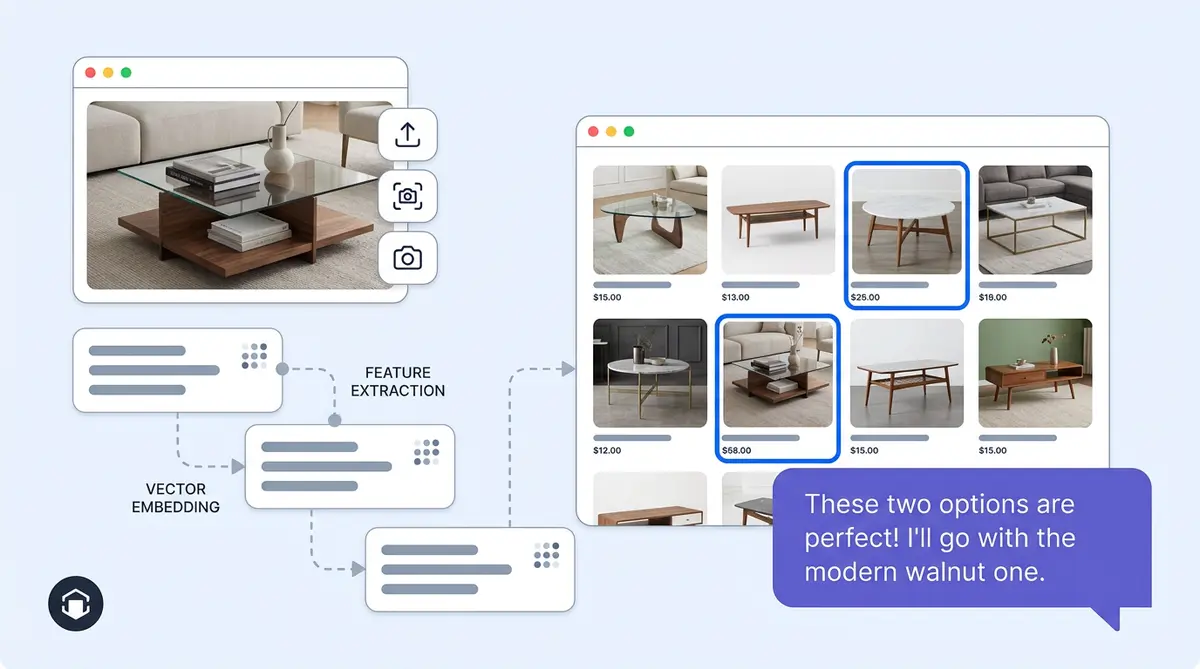
A visual search ecommerce pipeline has four stages. First, a computer vision model (CNN or vision transformer like CLIP) processes the uploaded image through image recognition and extracts features: color, pattern, shape, texture, silhouette. Second, those features become a dense vector embedding that represents the image in mathematical space. Third, the system runs a nearest-neighbor search against your pre-indexed product catalog in a vector database. Fourth, results return visually similar products, ranked and filtered by metadata like price, size, or availability.
The computer vision breakthrough is multimodal embedding models like CLIP, which map images and text into the same vector space. The same system can match a photo to a product, a description to a product, or both at once ("this dress but in navy").
Three Visual Search Paths Shoppers Take
Shoppers use visual search in three distinct ways, and each one signals different intent:
- Upload a saved photo. They found something on social media, saved it, and want to buy it. High purchase intent, low brand loyalty.
- Screenshot a competitor's product. They like the style but want options. Price-sensitive, comparison-ready.
- Point their camera at something in real life. A friend's jacket, a lamp in a hotel lobby, a pair of shoes on the subway. Discovery-mode, inspired by the physical world.
Each path produces a different shopper mindset, and each one outperforms a traditional image search query. Brands that recognize these patterns can tailor results, showing exact matches for uploads, similar-but-differentiated options for screenshots, and broad style collections for camera captures.
Google Lens vs. Pinterest Lens vs. On-Site Visual Search
Google Lens reaches 20 billion searches across 45 billion indexed product listings. Pinterest Lens captures high-intent shoppers since 80% of Pinners start shopping with a visual search. Both are powerful, but neither gives you control.
Google Lens can surface your competitor right next to your product. Pinterest routes traffic through its own ecosystem first. On-site visual search keeps the shopper in your experience, and you own the behavioral data: which products get visually searched, what styles trend, where zero-result gaps appear.
The play isn't choosing one channel. It's making sure your catalog is optimized for all three: clean product images, attribute-rich alt text, structured Product schema markup, and a Google Merchant Center feed. The searchandising principles apply here too.
Combining Visual Search with AI Chat
Visual search alone returns a grid of visually similar products to customers. That's useful, but it doesn't handle nuance. "I want something like this but cheaper." "Show me this silhouette in petite sizes." "I love the pattern, not the color."
This is where visual search meets conversational AI, and where the experience gets genuinely powerful. A shopper uploads a photo of a mid-century coffee table, then tells the chat assistant they need something under $400 that fits a 36-inch space. The AI processes the image embedding and the text constraints in one query, returning results no filter bar could replicate.
Alhena AI's Shopping Assistant is built for this kind of multimodal discovery. Because it's grounded in your actual product catalog, every recommendation ties to real inventory, real pricing, and real availability. No hallucinated products, no dead-end recommendations. For fashion and home furnishing brands where visual attributes drive purchase decisions, camera input plus conversational refinement closes the gap between inspiration and checkout.
Visual search is just one piece of the puzzle. Learn how AR and visual AI are solving the broader ecommerce return crisis.
Brands like Tatcha already see 3x conversion rates from AI-assisted discovery. When shoppers can show what they want and describe what they need, they don't bounce to a competitor.
Measuring Visual Search Performance
Track these metrics to know whether your visual search investment is working:
- Visual search conversion rate vs. text search conversion rate. ASOS saw a 9% AOV lift from visual search users.
- Products viewed per visual search session. Higher engagement signals better result relevance.
- Zero-result rate. On-site search averages 10-20% zero results. Visual search should bring that down, and when it can't find an exact match, a visual fallback ("You might also like") based on extracted attributes keeps the shopper engaged.
- Search exit rate. If customers leave immediately after a visual image search, your catalog coverage or image recognition quality needs work.
For a broader view of how AI-driven commerce revenue performance varies by category, the AI Commerce Performance by Vertical benchmarks show where visual discovery has the most impact.
The Camera Is the New Search Bar
Visual search isn't a future feature. Four billion shopping queries per month already happen through a camera lens. The brands that treat visual discovery as a core channel, not a nice-to-have, will capture the shoppers who can't describe what they want but know it when they see it.
The strongest play combines visual search with AI chat: let shoppers show you what they like, then refine through conversation. Ready to build that experience? Book a demo with Alhena AI or start for free with 25 conversations.

Frequently Asked Questions
What is visual search in ecommerce?
Visual search lets shoppers use an image, screenshot, or camera photo to find products instead of typing keywords. AI models extract features like color, pattern, and shape from the image and match them against a product catalog using vector similarity. Retailers who add visual search see conversion rate lifts of up to 38%, according to The Good.
How does AI visual search differ from traditional image search?
Traditional image search matches pixels and metadata to return images as results. AI visual search uses neural networks to understand what's in the image, extracting attributes like silhouette, texture, and style, then returns purchasable products ranked by visual similarity. It's the difference between finding the same photo and finding the same product.
Does Google Lens work for ecommerce product discovery?
Yes. Google Lens processes over 20 billion visual searches per month, with 20% carrying shopping intent. It pulls from a Shopping Graph of 45 billion product listings. To appear in Lens results, your products need clean images, structured Product schema markup, and an active Google Merchant Center feed.
Can visual search work with AI chatbots for ecommerce?
Yes, and this is where visual search gets most powerful. A shopper can upload a photo and then refine through conversation: 'show me this but in blue' or 'similar style under $200.' Alhena AI's Shopping Assistant handles this multimodal discovery by processing image embeddings and text constraints in one query, grounded in your real product catalog.
What metrics should I track for visual search performance?
Track visual search conversion rate compared to text search, products viewed per visual search session, zero-result rate, and search exit rate. ASOS found that visual search users viewed 48% more products and had 9% higher average order values than non-users.
How do I prepare my product catalog for visual search?
Start with high-resolution, multi-angle product photos on clean backgrounds. Write attribute-rich alt text that describes color, material, pattern, and style. Add Product schema markup with structured data. Upload your feed to Google Merchant Center for Lens visibility. These steps also improve your searchandising and SEO performance.
Why do ecommerce brands need on-site visual search if Google Lens exists?
Google Lens can surface competitors alongside your products, and you don't own the behavioral data from those searches. On-site visual search keeps shoppers in your experience, shortens the path to purchase, and gives you direct insight into which products and styles drive visual queries. Only 8% of ecommerce brands offer it, so it's a real competitive edge.