Every Support Queue Has a Ghost-Chat Problem
Open your support dashboard right now. Count the conversations listed as "active" or "in progress". Now ask yourself: how many of those are actually active?
If you're running a live chat widget on your ecommerce store, the answer is probably fewer than you think. Shoppers open chats, get their question answered (or get distracted), and walk away without closing the window. The conversation sits there, marked as open, cluttering your queue and skewing every metric tied to it.
This is the ghost-chat problem. And it's not a minor annoyance. When your support team can't distinguish between genuinely active conversations and abandoned ones, response times look worse than they are, agent workloads appear higher than reality, and CSAT surveys fire into empty rooms. Freshdesk reports that chat abandonment rates in e-commerce hover between 20% and 40% as of 2026, depending on the vertical. That's a lot of phantom conversations sitting in your queue.
Alhena AI solves this with a feature called Auto-Close Conversations. It's a built-in conversation hygiene layer that automatically wraps up inactive website chats, keeps your support queue accurate, and gives your customers a clear signal that the session has ended. Here's exactly how it works.
What Auto-Close Conversations Actually Does
Auto close is an operational control inside Alhena's AI Shopping Assistant and Support Concierge. It monitors every website chat conversation for inactivity and handles automatic closure of the ones that have gone silent.
The mechanics are straightforward:
- A background job runs roughly every minute, checking all companies with auto-close enabled.
- For each website conversation, Alhena checks the timestamp of the last message.
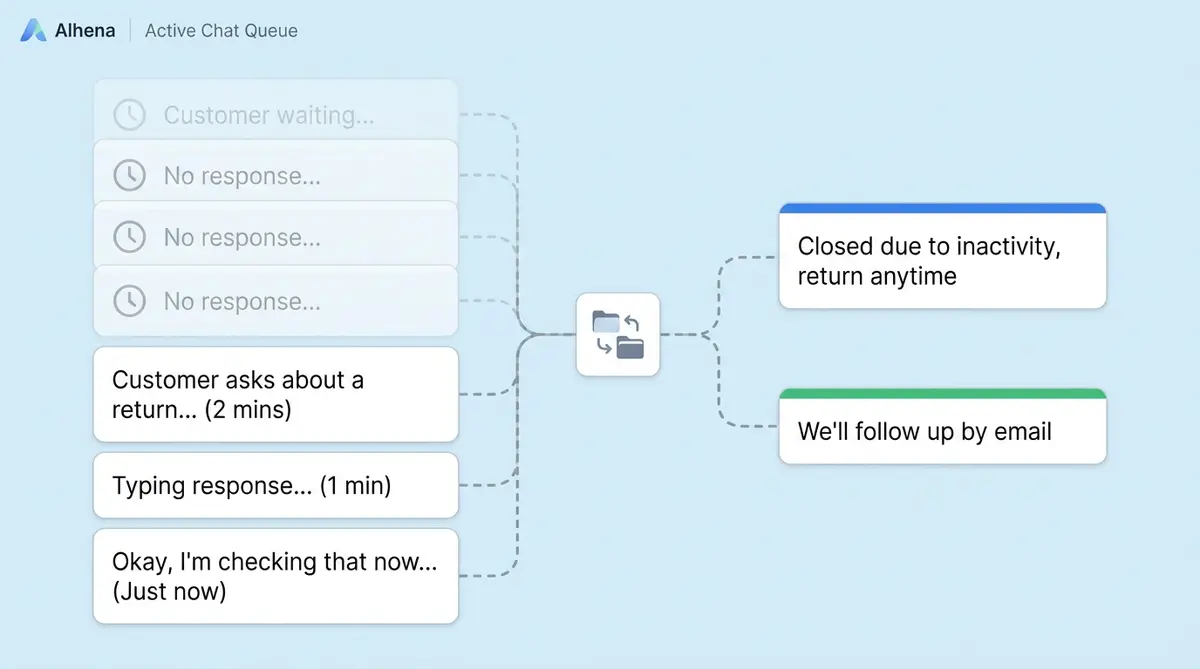
- If the conversation has been idle longer than the configured threshold, Alhena sends a closing message and marks the conversation as CLOSED.
- The conversation moves out of active views and into the closed archive.
- Alhena flags it internally as auto-closed, which prevents unnecessary follow-up behaviors like feedback prompts firing on an empty chat.
The default inactivity window is 30 minutes. Admins can adjust this anywhere from 5 minutes to 120 minutes, depending on the brand's support style. A high-volume electronics store might close chats after 10 minutes. A luxury skincare brand might wait a full hour. The feature applies to website chat conversations only and excludes operational surfaces like Agent Assist and Conversational Search.
Enabled by default, zero setup required
Auto-Close ships turned on for every Alhena deployment. Since Alhena deploys in under 48 hours with no dev resources needed, auto-close is working from day one. Brands that want to fine-tune timing or messaging can do so in Website Settings, but the default configuration handles most scenarios well.
Two Closing Messages, Two Operational States
Not every abandoned conversation is the same. A shopper who asked about shoe sizing and then walked away is in a different state than a shopper who requested human help and shared their email. Alhena treats these differently.
Before escalation: the AI-handled chat
When a visitor chats with Alhena's AI, gets their answer (or simply leaves), and the conversation goes idle, Alhena sends a message like:
"It seems this conversation has been inactive for a while, so I'll go ahead and close it. If you need further assistance, feel free to reach out again anytime!"
This is the most common scenario. The visitor's question was either resolved by the AI or the visitor lost interest. Closing the chat is clean and final.
After escalation: the human handoff case
When a visitor asks for human help and provides contact information (typically an email), the conversation enters a different state. If the widget chat then goes idle while waiting for an agent, Alhena sends a different message:
"This conversation will now close due to inactivity. We've received your query and will follow up with you via email shortly."
This distinction matters. Closing a post-escalation chat doesn't mean ignoring the customer. It means the live widget session is over, while the follow-up continues asynchronously through email or the connected helpdesk workflow. The customer knows their issue isn't dropped. To learn more about how Alhena handles these handoffs, see our guide on human escalation done right.
Both messages are fully customizable
Admins can rewrite either closing message to match their brand voice. A playful DTC brand might say, "Looks like you've stepped away!" We'll be here when you're back." A B2B brand might keep it formal. Alhena also auto-translates closing messages to match the customer's detected language, so international shoppers see the message in their own language without the brand needing to maintain translation files.
How Auto-Close Syncs with Your Helpdesk
If you're running Alhena alongside a helpdesk like Zendesk, Freshdesk, HubSpot, Salesforce, or Zoho Desk, auto-close doesn't just clean up Alhena's queue. It can sync the closed state into your external system too.
The behavior depends on the conversation type:
- Non-escalated, AI-resolved chats: Alhena can close or create closed records in the connected helpdesk. For teams using Zendesk, this means the ticket goes straight to "solved" without an agent touching it. For Freshdesk and Freshchat, the conversation closes in both systems simultaneously.
- Escalated chats with contact info: Alhena is careful here. It won't prematurely close a helpdesk ticket that still needs human follow-up. The widget session closes, but the helpdesk ticket stays open for the agent to handle.
This two-track approach is what separates Alhena from simpler timeout features you'll find in tools like Intercom or LivePerson. Intercom's auto-close, for example, waits 3 days by default and doesn't differentiate between escalated and non-escalated states. It's a blunt instrument. Alhena's version is escalation-aware from the ground up.
Brands like Crocus have seen 86% deflection rates with Alhena's AI handling the bulk of conversations end-to-end. When the vast majority of chats resolve at the AI layer, auto-close becomes the cleanup mechanism that keeps the remaining queue spotless for human agents. Read the full Crocus case study for context on how this plays out at scale.
What Auto-Close Is Not
Positioning matters here. Auto-Close Conversations is an inactivity-based feature, not an AI-confidence-based one. It doesn't decide that the customer's problem was solved. It decides that the conversation has been idle long enough to close the active chat session.
That's a meaningful difference. Some AI platforms conflate "auto-close" with "auto-resolve", which leads to inflated resolution metrics. If the AI closes a chat after 5 minutes of silence, did it actually resolve the issue? Maybe. Maybe the customer just gave up. Alhena keeps these concepts separate:
- Auto-Resolve is when Alhena's AI answers the customer's question and the customer confirms satisfaction (or the conversation naturally concludes). This is a resolution-quality metric.
- Auto-Close is when the conversation has been inactive and Alhena closes the session for operational hygiene. This is a queue-management action.
By keeping them distinct, your reporting stays honest. Your containment rate reflects genuine AI resolutions, not silent timeouts padded into the number. For more on how Alhena draws these lines, learn about the 7 ticket types Alhena won't auto-resolve.
The Operational Impact: Cleaner Queues, Better Data
Auto-close sounds like a small feature. It's not. The downstream effects compound across your entire support operation.
Accurate workload visibility
When abandoned conversations linger as "open", your team's active conversation count is inflated. Managers allocate staff based on queue depth. If 30% of your "active" chats are actually abandoned, you're overstaffing or misallocating resources. Auto-close gives you a real-time view of actual workload.
Cleaner CSAT data
Alhena flags auto-closed conversations internally. That means CSAT and feedback prompts don't fire on idle closures. Your satisfaction scores reflect real customer interactions, not survey responses from people who left 40 minutes ago and forgot the chat was open. Brands using Alhena, like Puffy, maintain 90% CSAT scores partly because feedback collection targets the right conversations.
Faster perceived response times
Stale sessions sitting in the queue inflate average handle time and response time metrics. Once auto-close clears them, your dashboards reflect the speed your team actually operates at. Manawa dropped response times from 40 minutes to 1 minute with Alhena's AI handling front-line conversations. Auto-close ensures that the metric stays clean by removing the noise of stale sessions.
Better conversation lifecycle data
Every conversation in Alhena has a clear lifecycle: opened, active, resolved, or closed. Auto-close ensures there's no limbo state. When you pull reports on conversation duration, resolution rates, or escalation percentages, the data is grounded in conversations that actually had a clear ending. Alhena's built-in revenue attribution analytics depend on this clean data to connect chat interactions to purchases accurately.
Admin Controls: Setting It Up in 60 Seconds
Configuration lives in Website Settings inside your Alhena dashboard. There are four controls, all available in your dashboard:
- Enable/disable auto-close with a single toggle. (It ships enabled by default.)
- Inactivity timer with a slider or input field. Choose any value between 5 and 120 minutes. The default is 30 minutes.
- Pre-escalation closing message for conversations the AI handled. Customize the text your shoppers see when the chat closes after idle time.
- Post-escalation closing message for conversations where the customer requested human help. This message reassures the customer that follow-up is coming through another channel.
That's it. No API calls, no developer involvement, no YAML files. The steps take under a minute. The same simplicity applies to every widget customization Alhena offers. Change a setting, save, and it takes effect within the next scheduled check (roughly one minute).
For brands running Alhena across multiple websites or storefronts, each site can have its own auto-close configuration. A high-touch concierge site might use a 60-minute window, while a high-volume outlet store uses 10 minutes. The flexibility is per-deployment, not global.
When to Adjust the Default 30-Minute Window
The 30-minute default works well for most ecommerce brands, but there are good reasons to change it.
Shorten to 5-15 minutes if you're a high-volume store where chat sessions are short and transactional. Fast fashion, grocery delivery, and electronics accessories fall into this category. Shoppers ask quick questions ("Is this in stock?" or "When will my order ship?"), get an answer, and move on. A 5-minute idle window clears the queue fast.
Extend to 45-120 minutes if you sell high-consideration products where shoppers browse, leave, and come back to the same chat. Luxury goods, furniture, and travel bookings fit here. Home furnishing brands often see customers go quiet for 20-30 minutes while they measure a room or check with a partner. Closing the chat too early forces them to restart the conversation, losing context.
Keep the 30-minute default for beauty, skincare, apparel, and general retail. These verticals balance quick product questions with occasional longer browsing sessions. Tatcha, for example, uses Alhena to drive 3x conversion rates and 38% AOV uplift across their beauty catalog. The standard window keeps chats open long enough for the AI to guide product discovery without leaving abandoned sessions lingering.
How This Fits Alhena's Broader Architecture
Auto-Close isn't a standalone feature. It's one piece of a larger system designed to give every conversation a clear lifecycle.
Alhena's Unified Memory ensures that closing a conversation doesn't erase context. If the same shopper returns later, Alhena remembers their previous questions, preferences, and browsing history. Auto-close ends the active session; it doesn't wipe the relationship.
The ticket gating system works alongside auto-close to ensure the AI doesn't prematurely resolve complex issues. Auto-close handles the operational side (idle sessions), while ticket gating handles the quality side (should this be resolved by AI or escalated?).
And Alhena's omnichannel presence means the conversation can continue on another surface. A shopper whose widget chat was auto-closed can pick up the conversation via email, Instagram DM, or WhatsApp. The context carries over through Unified Memory, so they don't start from scratch.
This is the difference between a point feature and a system. Auto-close is a small gear, but it meshes with conversation memory, escalation logic, helpdesk sync, and omnichannel continuity to keep the entire machine running smoothly.
Ready to see how Auto-Close Conversations fits into your support stack? Book a demo with Alhena AI or start for free with 25 conversations to test it on your own store.

Frequently Asked Questions
What is Alhena's Auto-Close Conversations feature?
Auto-Close Conversations is Alhena's built-in conversation hygiene layer. It monitors website chat sessions for inactivity and automatically closes them after a configurable idle period (default 30 minutes, adjustable from 5 to 120 minutes). It sends a closing message to the customer, marks the conversation as closed, and syncs the status to connected helpdesk systems.
Does auto-close count as a resolution in Alhena's reporting?
No. Alhena separates auto-close (inactivity-based) from auto-resolve (AI-confidence-based). An auto-closed conversation reflects queue cleanup, not a confirmed resolution. This keeps your containment rate, deflection rate, and CSAT scores honest and free from inflated timeout-based numbers.
Can I customize the closing message customers see?
Yes. Alhena provides two customizable closing messages: one for conversations the AI handled (pre-escalation) and one for conversations where the customer requested human help (post-escalation). Both messages auto-translate to match the customer's detected language.
How does auto-close work with Zendesk, Freshdesk, or other helpdesks?
For non-escalated chats, Alhena can sync the closed state into connected helpdesks like Zendesk, Freshdesk, HubSpot, Salesforce, and Zoho Desk, creating a solved or closed record automatically. For escalated conversations with contact info, Alhena closes the widget session but keeps the helpdesk ticket open so agents can follow up.
Does auto-close trigger CSAT surveys on abandoned chats?
No. Alhena flags auto-closed conversations internally and suppresses feedback prompts on idle closures. CSAT surveys only fire on conversations where genuine customer interaction occurred, keeping your satisfaction data accurate.
What happens if a customer returns after their chat was auto-closed?
Alhena's Unified Memory preserves the full conversation context. When the same shopper starts a new chat, Alhena remembers their previous questions, preferences, and browsing history. The auto-close ends the active session, not the customer relationship.
How long should I set the inactivity timer for my store?
High-volume, transactional stores (fast fashion, electronics accessories) do well with 5 to 15 minutes. High-consideration categories like luxury goods, furniture, and travel benefit from 45 to 120 minutes. The 30-minute default works well for beauty, skincare, and general retail.
Is auto-close enabled by default in Alhena?
Yes. Auto-close ships enabled with a 30-minute inactivity window for every new Alhena deployment. You can adjust the timer, customize closing messages, or disable the feature entirely in Website Settings with no developer involvement required.