What the Suggested Questions Agent Does
Every AI shopping assistant answers questions. But the best ones do more than answer. They anticipate the next question. The hard part is what happens after the answer. Most customers stare at a blinking cursor and either type something vague or close the widget entirely. Alhena's Suggested Questions Agent solves that gap.
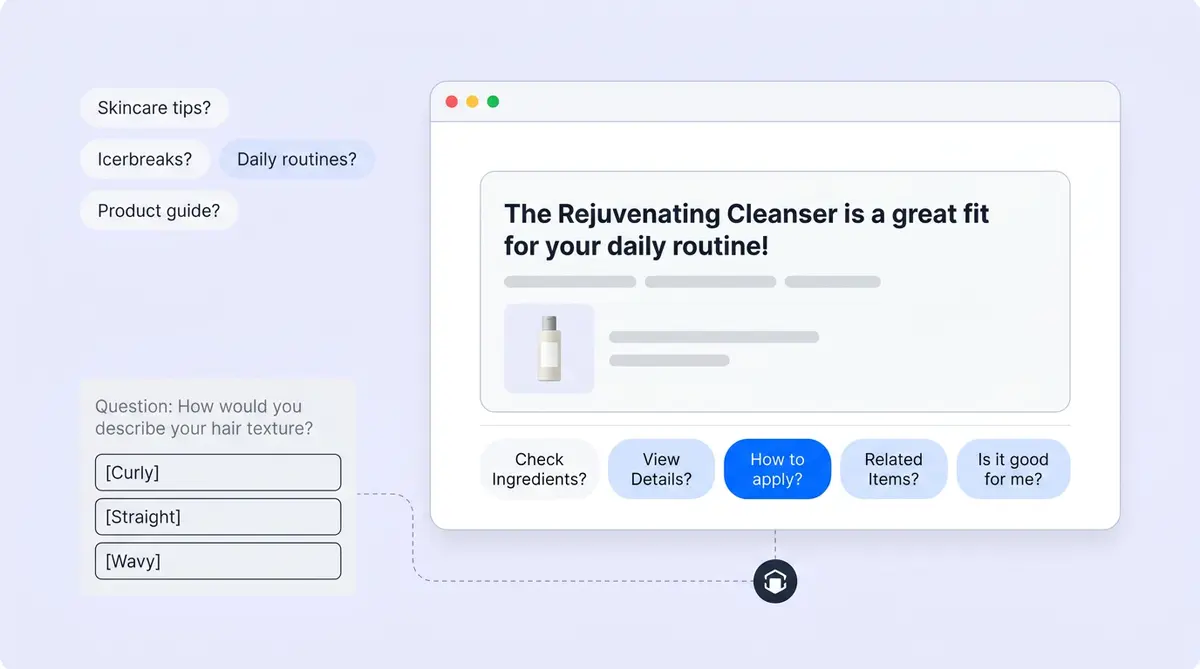
After Alhena's main AI responds to a shopper, a separate companion agent runs in the background. Using machine learning, it reviews the full conversation, the answer that was just given, and the knowledge used to generate that answer. Then it produces a small set of real-time follow-up questions, typically five, that appear as tappable chips below the response.
These aren't random prompts. Each one reflects what the customer is most likely to ask or do next based on behavioral signals, buying intent, and where they are in the conversation. A customer browsing serums might see "Best for dry skin?" or "What does niacinamide do?" A customer comparing two jackets might see "How do these compare?" or "Show me more options."
When a customer taps a chip, it's sent as their next message, and the conversation continues as if they typed it themselves. No friction for users, no blank-input paralysis, no dead ends. For e-commerce brands, this is the difference between a one-message session and a full product exploration.
How Shoppers Experience Suggested Questions
From the shopper's perspective, the experience feels natural. They ask a question in the chat widget. Alhena answers. Below the answer, a row of smart, tappable buttons appears. Each one is a complete question they can send with a single tap.
The flow looks like this:
- A customer asks something in the chat widget, like "Do you have anything for sensitive skin?"
- Alhena's Product Expert Agent answers with relevant products, ingredients, and personalized product recommendations.
- The Suggested Questions Agent runs separately and generates follow-ups: "Which one is fragrance-free?", "Best for redness?", "How do I layer these?"
- The chips appear below the answer in real time. This real-time delivery means customers never wait for suggestions.
- The shopper taps one, and the conversation keeps moving.
If the customer reloads the page or reconnects, the widget fetches the latest saved suggestions in real-time again. Nothing is lost.
This matters because most customers don't know what to ask next. They're browsing, comparing, or trying to understand a product category they're unfamiliar with. The suggested questions turn every response into a guided next step, moving them from online shopping curiosity to confidence to purchase, building loyalty along the way.
Why one-tap matters more than you think
A peer-reviewed study found that chatbots with follow-up suggestions increased user queries by 20% and kept users in the conversation and extended engagement by 114 seconds per session. That's not a minor UX improvement. It's the difference between a customer who asks one question and leaves and a customer who explores three products and adds something to their cart.
Brands like Tatcha have seen 3x conversion rates with Alhena's AI shopping assistant, and multi-turn conversations are a key driver. Shopping assistants that generate contextual follow-ups see stronger engagement across every vertical. The agent can generate contextual chips that keep those conversations going.
How Suggested Questions Differ from Icebreakers and Quiz Options
Alhena offers three types of in-chat prompts, and they serve very different purposes. Confusing them leads to a cluttered experience. Here's how they break down.
Icebreakers: conversation starters
Icebreakers are static prompts that appear before or at the start of a conversation. They're pre-configured by the brand and don't change based on context. Think of them as "Hey, here are some things you can ask me" when the widget first opens. Examples: "What's your return policy?" or "Help me find a moisturizer."
If icebreakers are configured, they take priority in the widget. Suggested questions only appear when there are no icebreakers to show, which is after the first exchange when the conversation is already underway.
Quiz options: structured choices
Quiz options appear when Alhena's AI needs the shopper to pick from a set of structured choices to narrow down a recommendation. "What's your skin type: oily, dry, combination, or sensitive?" is a quiz option. The shopper must select one for the conversation to proceed.
Suggested questions are different. They're optional. The shopper can ignore them, type something else, or close the chat. They're follow-up paths, not required selections.
The key distinction
Icebreakers are static and pre-conversation. Quiz options are required and mid-conversation. Suggested questions are dynamic, optional, and post-answer. Each one serves a different moment in the buyer journey, and Alhena’s shopping assistants keep them separate so the experience never feels repetitive or forced.
When the Suggested Questions Agent Stays Silent
Not every moment calls for follow-up suggestions. One of the smartest things about Alhena's Suggested Questions Agent knows when to stay quiet, making conversations smarter.
The agent automatically skips generating suggestions during:
- Order status flows: When a shopper is tracking a package or checking an order, they don't need product discovery prompts.
- Human handoff flows: If the conversation has been escalated to a live agent, AI-generated suggestions would be confusing.
- Personal information collection: When Alhena is gathering details like an email address or shipping info, follow-up chips would interrupt the flow.
- Specific order or account questions: Questions tied to a particular order ID or account don't benefit from generic follow-ups.
- Unrelated knowledge contexts: If the knowledge used to answer doesn't connect to useful follow-ups, the agent stays silent rather than guessing.
- Quiz-option flows: When the AI is already presenting structured choices, adding more options would create visual clutter.
This restraint builds trust. Customers don't see irrelevant or distracting suggestions at the wrong moment. The AI support concierge handles sensitive interactions cleanly, and the Suggested Questions Agent respects those boundaries.
Quality rules that prevent bad suggestions
Beyond knowing when to stay silent, the agent follows strict quality rules for the suggestions it does generate:
- Every suggestion must be answerable from the available knowledge. No speculative questions that would lead to a dead end.
- It avoids suggesting questions about information already visible, like asking "What's the price?" when the price is in the answer above.
- Product names are kept short and natural. "Tell me more about the Advanced Ceramide Repair Treatment Night Cream" would never appear as a chip.
- Language stays conversational. Conversational tone matters because stiff phrasing breaks immersion. "Best for oily skin?" reads better than "Could you recommend products suitable for oily skin types?"
- Suggestions don't repeat topics already covered in the conversation.
The result is a set of follow-ups that feel like they came from a thoughtful friend helping you shop, not from a bot trying to fill space.
Customization and Styling
Brands can enable or disable the Suggested Questions Agent from AI Settings > Agents inside the Alhena dashboard. No custom tools or developer resources are needed.
The agent's behavior can be shaped through Alhena guidelines, which let brands influence the tone, focus areas, and types of follow-ups the agent generates. A skincare brand might guide the agent toward ingredient education. A furniture brand might steer it toward room-sizing and compatibility questions.
Visual styling
The suggested question chips inherit the look and feel of your chat widget. From the widget settings, brands can customize:
- Background color of the chips
- Text color for readability
- Custom icon displayed alongside suggestions
- Border radius for rounded or sharp chip edges
- Font size and line height, inherited from the widget's message styling
This means suggested questions match your brand's visual identity without any CSS overrides or frontend work. If your widget uses your brand colors and typography, the chips follow suit automatically.
Where the Suggested Questions Agent Fits in the Alhena Stack
Alhena uses a multi-agent architecture where specialized agents handle different parts of the customer experience. The Product Expert Agent handles product questions. The Order Management Agent handles post-purchase queries. The Agent Assist helps human support teams and customer service teams work faster.
The Suggested Questions Agent sits outside this main routing flow. It doesn't answer shoppers directly. It doesn't participate in the planner that decides which agent handles a query. Instead, it's a companion layer that runs after any agent responds, regardless of which agent handled the question.
Think of it as the "what should I ask next?" layer. The main agents handle the "what's the answer?" part. The Suggested Questions Agent handles the "Where should I go from here?" part.
This separation is intentional. Because the agent runs independently, it doesn't slow down the main response. The customer sees the answer first, and the suggested questions appear moments later. There's no latency penalty for adding guided follow-ups to every interaction.
Works across every channel
The Suggested Questions Agent works wherever Alhena's AI-powered shopping assistant operates. That includes web chat widgets, and the same intelligence extends to conversations across all supported ecommerce platforms and channels. It works with platforms like Shopify, WooCommerce, Magento, and Salesforce Commerce Cloud. On Shopify stores, the integration is especially simple. The Shopify integration connects your product catalog automatically. Customers get personalized, guided follow-ups whether they're on your website, chatting through Instagram, or reaching out on WhatsApp. This omnichannel coverage.
Real Scenarios: What Suggested Questions Look Like in Action
The best way to understand this feature is to see it in context. Here are three scenarios across different ecommerce verticals. These real-world ecommerce scenarios show how the agent adapts to each store.
Skincare brand
A shopper asks, "What's good for dark spots?" Alhena's Product Expert Agent responds with a vitamin C serum recommendation, explaining the key ingredients, product insights, and how they work. These insights help customers make informed decisions. The Suggested Questions Agent then generates:
- "Best for sensitive skin?"
- "How long until I see results?"
- "Can I use this with retinol?"
- "Show me the full routine"
- "What size should I start with?"
Each question moves the customer deeper into the product education funnel. The "full routine" suggestion could lead to multiple product recommendations, increasing average order value through intelligent merchandising. Visual merchandising comes alive when follow-up chips guide customers toward complementary items. Guided product recommendations feel natural because they're grounded in what the customer already asked about. Brands in the beauty and skincare vertical see this pattern drive significant customer engagement.
Fashion retailer
A shopper asks, "Do you have linen blazers?" Alhena responds with three options. The follow-up chips might read:
- "How do these fit?"
- "Available in navy?"
- "What pants go with this?"
- "Compare the two"
- "What's the fabric care?"
The "What pants go with this?" prompt turns a single-item browse into a styled outfit, exactly the kind of AOV increase that makes AI shopping assistants pay for themselves. The agent can use contextual follow-ups to make cross-selling feel natural. Fashion and apparel brands benefit from cross-selling that builds customer loyalty and prompts that feel helpful rather than pushy.
Home furnishing store
A shopper asks, "Will this sofa fit in a 12x14 room?" Alhena answers with dimensions and layout guidance. Suggested questions appear:
- "What about the sectional version?"
- "Does it come in other colors?"
- "How long is delivery?"
- "Show me matching coffee tables."
- "What's the return policy?"
The progression from fit check to color options to complementary furniture to logistics mirrors how a skilled in-store sales associate would guide a customer through every stage. That's the core promise of the AI-powered online sales associate: replicating the in-store experience as a virtual shopping assistant. The virtual experience feels personal. Every interaction adapts to the customer’s context in e-commerce.
Getting Started
Setting up the Suggested Questions Agent takes less than five minutes. Here's what's involved:
- Log into your Alhena dashboard.
- Go to AI Settings > Agents.
- Enable the Suggested Questions Agent.
- Optionally, add guidelines to shape the types of follow-ups the agent generates (e.g., "Focus on ingredient education" or "Prioritize cross-sell suggestions").
- Customize the chip styling in your chat widget settings to match your brand style and visual style.
No developer resources, no complex integration work, no custom code. Online stores of any size can turn it on in minutes. E-commerce teams get value from the first e-commerce conversation. The agent starts generating personalized follow-ups on the next conversation. Alhena deploys in under 48 hours with zero-friction deployment. The deployment process requires no technical team, and this agent is built into the platform from day one, with no separate integration required.
For a deeper look at the engineering decisions behind this feature, read our technical deep dive on how AI suggested questions boost ecommerce conversion.
Ready to see how the Suggested Questions Agent works with your product catalog? Book a demo with Alhena AI or start for free with 25 conversations.
Frequently Asked Questions
What is the Suggested Questions Agent in Alhena AI?
The Suggested Questions Agent is a companion AI layer that generates personalized, contextual follow-up questions after every AI response. It analyzes the conversation, the latest answer, and the knowledge used, then produces tappable chips that shoppers can tap to continue the conversation without typing.
How do suggested questions differ from icebreakers?
Icebreakers are static, pre-configured prompts shown at the start of a conversation. Suggested questions are generated dynamically after each AI response based on the shopper's actual intent and conversation context. Icebreakers take priority when configured; suggested questions appear once the conversation is underway.
Does the Suggested Questions Agent slow down AI responses?
No. The agent runs separately in the background after the main AI response is delivered. Shoppers see the answer first, and the follow-up chips appear moments later. There is no latency penalty to the primary response.
Can I customize what types of follow-up questions appear?
Yes. You can shape the agent's behavior through Alhena guidelines in your dashboard. For example, a beauty brand might guide it toward ingredient education, while a furniture brand might prioritize sizing and compatibility questions. Visual styling (colors, border radius, icons) is also fully customizable.
When does the Suggested Questions Agent stay silent?
The agent automatically skips suggestions during order status flows, human handoff, personal information collection, specific account queries, quiz-option flows, and when the knowledge context does not support useful follow-ups. This prevents irrelevant or distracting prompts.
Do suggested questions work on mobile devices?
Yes. The chips are designed as tappable buttons that work on any screen size, making the experience feel native on every device. They inherit the chat widget's responsive styling, so they display correctly on mobile, tablet, and desktop without extra configuration.
How do suggested questions increase conversion rates?
By removing blank-input friction, they keep shoppers engaged longer. Research shows follow-up suggestions increase queries by 20% and extend sessions by 114 seconds. Multi-turn conversations drive higher conversion because shoppers explore more products and move closer to a purchase decision.
How do I enable the Suggested Questions Agent?
Go to AI Settings, then Agents in your Alhena dashboard and toggle the agent on. No developer resources or API setup is needed. The agent starts generating follow-ups on the next conversation automatically.